1. Bubuka
This user manual provides comprehensive instructions for the UNIWA E1801 Senior Mobile Phone. Designed with large buttons and a clear display, this phone is ideal for users seeking simplicity and essential communication features. Please read this manual carefully before using your device to ensure proper operation and longevity.
2. Eusi Paket
Saatos muka bungkusan, mangga pariksa yén sadaya item di handap ieu kalebet:
- 1 x UNIWA E1801 Mobile Phone
- 1 x BL-5C 800 mAh Battery
- 1 x carjer
- 1 x Manual Pamaké (dokumén ieu)
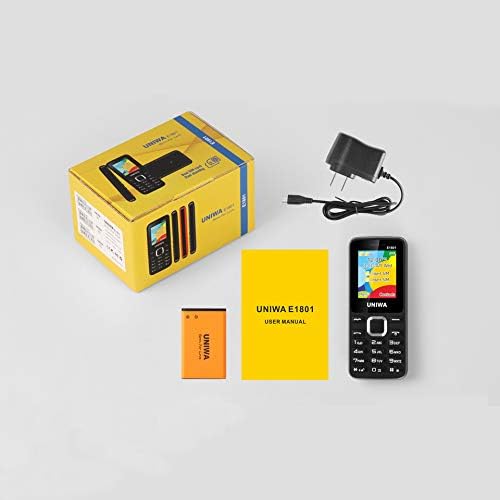
Image: Contents of the UNIWA E1801 package, including the phone, battery, charger, and user manual.
3. Alat Leuwihview
The UNIWA E1801 features a user-friendly design with large, easy-to-press buttons and a non-slip frame for comfortable handling. It includes an ergonomic keypad with plating navigation keys for intuitive operation.
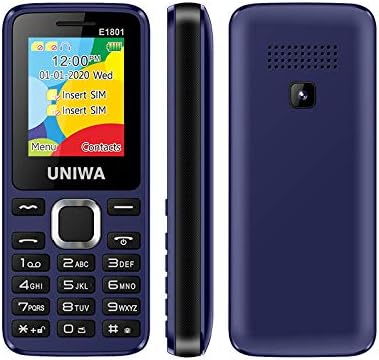
Gambar: Hareup, sisi, jeung tukang views of the UNIWA E1801 phone, highlighting its compact design.

Image: Detail showing the non-slip frame of the UNIWA E1801, designed for secure grip.

Image: Close-up of the ergonomic keypad and plating navigation keys on the UNIWA E1801.
4. Setélan
4.1. Pamasangan batré
- Leupaskeun panutup tukang telepon ku gently prying eta muka tina kiyeu.
- Align the gold contacts of the BL-5C 800 mAh battery with the contacts in the battery compartment.
- Pencét batréna lalaunan ka handap dugi ka ngaklik kana tempatna.
- Ganti panutup tukang, pastikeun eta snaps aman.
4.2. Pamasangan Kartu SIM
The UNIWA E1801 supports Dual SIM cards, allowing for two active phone numbers simultaneously.
- With the back cover removed and battery out (if necessary), locate the SIM card slots.
- Insert your SIM card(s) into the designated slot(s) with the gold contacts facing down and the cut corner aligned correctly.
- Dorong lemah lembut kartu SIM nepi ka pinuh diuk.
- Pasang deui batré sareng panutup tukang.

Image: The dual SIM card slots of the UNIWA E1801, illustrating how SIM cards are inserted.
4.3. Ngecas Alat
Sateuacan dianggo anu munggaran, eusian heula batré telepon sacara pinuh.
- Connect the charger cable to the charging port on the phone.
- Colokkeun carjer kana stop kontak standar.
- Indikator batré dina layar bakal nembongkeun status ngecas.
- Sanggeus dicas pinuh, pegatkeun sambungan carjer.
5. Parentah Operasi
5.1. Daya Hurung / Pareum
- Pikeun Ngahurungkeun: Pencét jeung tahan tombol Daya/Tungtung Telepon nepi ka layar hurung.
- Pikeun mareuman: Press and hold the Power/End Call button until the power-off options appear, then confirm.
5.2. Nelepon
- From the idle screen, enter the phone number using the keypad.
- Pencét tombol Telepon (biasana héjo) pikeun ngamimitian nelepon.
- To end a call, press the End Call button (usually red).
5.3. Ngirim Pesen
- Arahkeun ka menu 'Pesen' tina layar utama.
- Select 'Write Message' or 'New SMS'.
- Lebetkeun pesen anjeun nganggo keypad.
- Asupkeun nomer panarima atawa pilih ti kontak.
- Kirim pesen.
5.4. Kontak
Buku telepon tiasa nyimpen dugi ka 300 kontak.
- Nambahkeun Kontak: Go to 'Contacts' > 'Add New Contact', then enter the name and number.
- Milarian Kontak: From the 'Contacts' menu, use the navigation keys to scroll or search by name.
5.5. Radio FM
The UNIWA E1801 features a wireless FM radio, allowing you to listen to your favorite stations without needing headphones as an antenna.
- Buka aplikasi 'Radio FM' tina ménu utama.
- Use the navigation keys to scan for available stations or manually tune to a frequency.
- Adjust the volume using the side keys (if available) or navigation keys.

Image: The UNIWA E1801 showcasing its wireless FM radio feature.
5.6. Multimedia (MP3/MP4)
The phone supports MP3 audio and MP4 video playback.
- Ensure you have a TF card (up to 16GB) inserted with your media files.
- Navigate to the 'Multimedia' or 'File Manager' menu.
- Select 'MP3 Player' or 'Video Player' to browse and play your files.

Image: Illustration of the 2030 Box Speaker on the UNIWA E1801, indicating its audio capabilities.
5.7. Kaméra
The phone is equipped with a 0.08 MP rear camera.
- Tina ménu utama, pilih 'Kaméra'.
- Pigura shot anjeun ngagunakeun layar salaku a viewanu mendakan
- Press the designated button (usually the center navigation key) to take a photo.
5.8. Senter
The built-in flashlight can be useful in low-light conditions.
- Refer to your phone's specific shortcut key or menu option to activate/deactivate the flashlight. This is often a long press on a specific number key or a dedicated button.

Image: The UNIWA E1801 demonstrating its integrated flashlight function.
5.9. Fungsi séjén
The UNIWA E1801 includes several utility functions:
- Kaulinan: Simple pre-installed games.
- Kalénder: To keep track of dates and events.
- Jam alarem: Setel sababaraha alarm.
- Kalkulator: Fungsi aritmatika dasar.
- Jam Dunya: View waktos dina zona waktos anu béda.
- E-buku: Basic text file pamaca.
- WAP: Basic internet browsing (requires GPRS data plan).
- Perekam: Voice recording function.
6. Pangropéa
- beberesih: Anggo lawon anu lemes sareng garing pikeun ngabersihkeun permukaan telepon. Hindarkeun pembersih cair atanapi bahan anu kasar.
- Perawatan batré: To prolong battery life, avoid extreme temperatures. Do not leave the phone charging for excessively long periods after it is full.
- Panyimpenan: Upami nyimpen telepon kanggo waktos anu lami, pastikeun batréna dicas sabagian (sakitar 50%) teras simpen di tempat anu tiis sareng garing.
7. Cara ngungkulan
| Masalah | Mungkin Cukang lantaranana / Solusi |
|---|---|
| Telepon teu hurung. | Battery is depleted. Charge the phone for at least 30 minutes. Ensure battery is correctly installed. |
| Teu tiasa nelepon atanapi nampi telepon. | No network signal. Move to an area with better reception. SIM card not properly inserted. Reinsert SIM card. |
| Batré gancang boros. | Background applications running. Close unused applications. Battery may be old and require replacement. |
| Teu tiasa ngadangu nu nelepon / Nu nelepon teu tiasa ngadangu kuring. | Volume too low. Adjust call volume. Microphone/speaker blocked. Ensure no obstructions. |
Lamun masalah persists sanggeus nyobian solusi ieu, mangga ngahubungan rojongan customer.
8. Spésifikasi
| Fitur | Rincian |
|---|---|
| Nomer modél | ECON E1801 |
| Diménsi | 108 x 45 x 14 mm |
| Beurat | 68 g |
| CPU | SC6531E |
| Network band | 2G: GSM850/900/1800/1900 MHz, GPRS |
| Kartu SIM | Dual-SIM, Dual-Standby |
| Kapasitas Buku Telepon | 300 angka |
| Nada dering | 64 chords, supports MP3, Midi ringtones |
| Speaker | 2030 Panyatur |
| Radio FM | Radio FM nirkabel |
| layar | 1.77 inch QQVGA Display, 160 x 128 pixels |
| Kaméra | 0.08 MP Rear Camera, 640 x 480 pixels |
| Multimédia | MP3, MP4 |
| Mémori | Supports TF cards up to 16 GB max |
| Bluetooth | V2.1 |
| Vibrator | Sumuhun |
| Waktu Ngobrol | Nepi ka 240 menit |
| Waktu sayaga | Nepi ka 200 jam |
| Basa | English, Russian, Hebrew, Arabic, French, Spanish, Polish, German, Italian, Portuguese, Chinese |
9. Garansi jeung Rojongan
For warranty information and technical support, please refer to the warranty card included with your product or contact the retailer where you purchased the UNIWA E1801. You may also visit the official UNIWA website for further assistance and updated support information.


