1. Bubuka
Welcome to the user manual for your Behringer RHYTHM DESIGNER RD-6 Analog Drum Machine. This device is designed to provide authentic analog drum sounds with modern connectivity and sequencing capabilities. The RD-6 features true analog circuitry, 8 distinct drum voices, a 16-step sequencer, and a built-in distortion effect. Please read this manual thoroughly to ensure proper setup, operation, and maintenance, allowing you to fully explore its creative potential.
2. Parentah Kasalametan penting
- Baca parentah ieu.
- Tetep parentah ieu.
- Heed sagala warnings.
- Turutan sagala parentah.
- Entong nganggo alat ieu caket cai.
- Beresih ngan ku lawon garing.
- Ulah meungpeuk sagala bukaan ventilasi. Install luyu jeung parentah produsén urang.
- Entong dipasang di deukeut sumber panas sapertos radiator, register panas, kompor, atanapi aparat sanésna (kalebet ampLiifiers) anu ngahasilkeun panas.
- Ulah eleh tujuan kaamanan colokan polarized atawa grounding-tipe. A colokan polarized boga dua wilah jeung hiji leuwih lega ti lianna. A colokan tipe grounding boga dua wilah sarta prong grounding katilu. Agul lega atawa prong katilu disadiakeun pikeun kaamanan Anjeun. Upami colokan anu disayogikeun henteu pas kana stop kontak anjeun, konsultasi ka tukang listrik pikeun ngagentos stopkontak anu tos lami.
- Nangtayungan kabel listrik tina leumpang atawa diciwit utamana dina colokan, wadah merenah, jeung titik dimana aranjeunna kaluar tina aparat.
- Ngan anggo kantétan/aksésori anu ditunjuk ku produsén.
- Anggo ngan sareng karanjang, stand, tripod, bracket, atanapi méja anu ditunjuk ku produsén, atanapi dijual sareng alatna. Nalika karanjang dipaké, ati-ati nalika ngagerakkeun kombinasi karanjang/aparatur pikeun nyegah tatu tina tip-over.
- Cabut colokan alat ieu nalika badai kilat atanapi nalika henteu dianggo kanggo waktos anu lami.
- Rujuk sadayana jasa ka tanaga jasa anu mumpuni. Diperlukeun ngalayanan nalika aparatur ruksak ku cara naon waé, sapertos kabel catu daya atanapi colokan rusak, cairan tumpah atanapi barang murag kana aparatur, aparatur parantos kakeunaan hujan atanapi lembab, henteu beroperasi normal. , atawa geus turun.
3. Naon dina Box
- Behringer RHYTHM DESIGNER RD-6 Analog Drum Machine
- Adaptor kakuatan
- Kabel USB
- Gancang Mimitian Guide
4. Controls and Connectors Overview
The Behringer RD-6 features an intuitive layout for easy access to all its functions, designed for both performance and studio integration.
4.1 Kadali Panel hareup

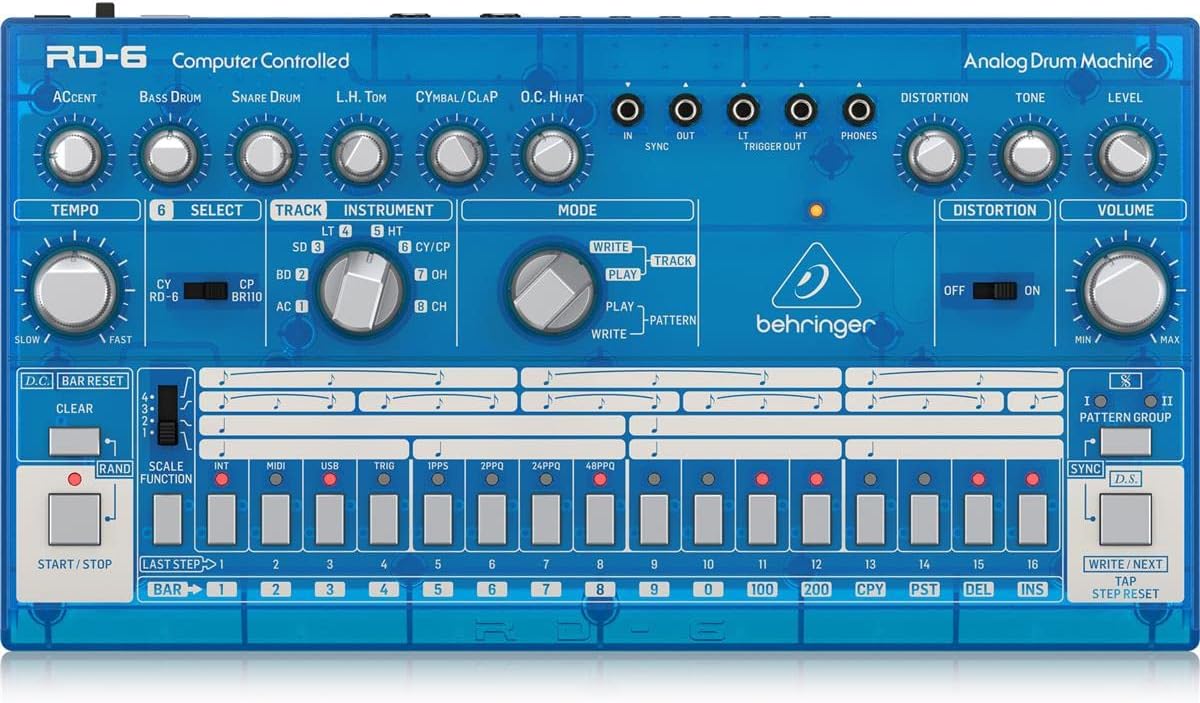
Gambar: luhur-handap view of the Behringer RD-6 front panel, showing various knobs, buttons, and the 16-step sequencer.
- WAKTU: Adjusts the playback speed of patterns.
- AKSEN: Controls the intensity of accented steps.
- BASS DRUM, SNARE DRUM, L.H. TOM, CYMBAL/CLAP, O.C. HI HAT: Individual controls for tone, decay, and level of each drum voice.
- PANYIMPANGAN: Activates the built-in distortion effect.
- TONE/LEVEL (Distortion): Adjusts the character and intensity of the distortion.
- JILID: Master kaluaran volume kontrol.
- PILIH: Used to select various functions or parameters.
- TRACK/INSTRUMENT: Selects the current track or instrument for editing.
- MODE (NULIS/MAÉN/POLA): Switches between pattern writing, playback, and pattern selection modes.
- 16 STEP BUTTONS: Used to program steps in a pattern or select patterns.
- Mimitian / STOP: Initiates or halts pattern playback.
- JELAS: Erases patterns or steps.
- SCALE FUNCTION: Adjusts the timing scale for patterns.
- singkronisasi: Selects the synchronization source (Internal, MIDI, USB, Clock).
- NULIS/SALAJENGNA: Saves patterns or advances to the next step/pattern.
- TAP/STEP RESET: Used for tap tempo or resetting the step sequencer.
4.2 Panyambung Panel pungkur
Gambar: Tukangeun view of the Behringer RD-6, highlighting the various audio outputs, MIDI ports, USB port, and power input.
- VOICE OUT (OH/CH, CP, CY, LT/HT, SD, BD): Individual 3.5 mm TS outputs for each drum voice, allowing for external processing.
- Campur: 6.35 mm TS output for the main stereo mix.
- Mimitian / STOP: 3.5 mm TS input for external start/stop control.
- MIDI LEBET/KALUAR/TEPI: 5-pin DIN connectors for MIDI communication with other devices.
- USB: USB-B port for MIDI over USB and firmware updates.
- POWER DC INPUT: Sambungan pikeun adaptor kakuatan 9V DC anu kalebet.
5. Setup Awal
5.1 Sambungan Daya
Sambungkeun adaptor daya 9V DC anu kalebet kana POWER DC INPUT on the rear panel. Plug the adapter into a suitable power outlet. Ensure the POWER switch is in the OFF position before connecting the power supply.
5.2 Sambungan Audio
For a combined stereo mix, connect the CAMPURAN (6.35 mm TS) to your mixer or audio interface. For individual drum sound processing and recording, use the dedicated VOICE OUT jacks (3.5 mm TS) for each drum voice (OH/CH, CP, CY, LT/HT, SD, BD).
5.3 USB/MIDI Connection
Nyambungkeun USB port to your computer for MIDI control and firmware updates. Use the MIDI IN/OUT/THRU ports for connecting to other MIDI devices such as synthesizers, sequencers, or MIDI interfaces.
6. Operasi dasar
6.1 Powering on / Pareum
Balikkeun POWER switch on the rear panel to the ON position. The unit will power up and be ready for use. To power off, flip the switch back to OFF.
6.2 Creating a Pattern
- Select a pattern bank (I or II) using the PATTERN GROUP kancing.
- Pencét éta NULIS button to enter pattern write mode. The NULIS LED bakal nyaangan.
- Select an instrument (e.g., Bass Drum, Snare Drum) using the INSTRUMEN kenop pamilih.
- Ngagunakeun éta 16 step buttons to program your rhythm. Pressing a button will activate or deactivate a step for the selected instrument. Illuminated buttons indicate active steps.
- Adjust parameters like AKSEN, TEMPO, and individual drum sound controls (e.g., Tone, Decay) as desired to shape your sound.
- Pencét ulin to hear your pattern.
- Pencét NULIS again to exit write mode and save the pattern.
6.3 Real-time Recording
Nalika di ulin modeu, pencét tombol NULIS button to enable real-time recording. The NULIS LED will flash. Play the drum sounds using the step buttons or an external MIDI controller. The notes will be recorded into the current pattern. Press NULIS again to stop real-time recording.
6.4 Using Distortion
Ngalibetkeun PANYIMPANGAN switch to activate the built-in distortion effect. Adjust the NADA jeung TINGKAT knobs to shape the distortion character and intensity to add grit and aggression to your drum sounds.
7. MIDI and USB Connectivity
7.1 Kontrol MIDI
The RD-6 supports MIDI In, Out, and Thru via its 5-pin DIN connectors. Connect to other MIDI devices to synchronize tempo, trigger sounds, or control parameters. The MIDI THRU port allows you to daisy-chain multiple MIDI devices. Refer to the full MIDI implementation chart in the comprehensive manual for detailed CC messages and settings.
7.2 USB Audio/MIDI
The USB port provides class-compliant MIDI connectivity to your computer. This allows the RD-6 to be used as a MIDI controller or to receive MIDI data from your Digital Audio Workstation (DAW) for seamless integration into your production environment.
8. Pangropéa
8.1 beberesih
Keep the unit clean using a soft, dry cloth. Avoid abrasive cleaners, solvents, or waxes, as these can damage the finish and internal components.
8.2 Panyimpenan
Protect the RD-6 from dust, moisture, and extreme temperatures. When not in use for extended periods, store it in a cool, dry place, preferably in its original packaging or a protective case.
8.3 Palayanan
Do not attempt to service the unit yourself. Refer all servicing to qualified service personnel to prevent electric shock or damage to the device.
9. Cara ngungkulan
9.1 Taya Kaluaran Sora
- Check that the power adapter is securely connected and the unit is powered ON.
- Verify all audio cables are correctly connected to the CAMPURAN atawa individu VOICE OUT ports and to your audio system.
- Pastikeun masterna VOLUME knob and individual instrument level knobs are turned up.
- Confirm that a pattern is playing and that the selected instrument has active steps.
9.2 MIDI Not Responding
- Verify MIDI cables are correctly connected to the MIDI asup / kaluar ports of the RD-6 and your external device.
- Check that the MIDI channel settings on both the RD-6 and your external device match.
- Ensure the RD-6 is in the correct sync mode (e.g., MIDI Sync, USB Sync) if synchronizing with an external clock.
9.3 Paripolah Anu Teu Disangka-sangka
If the unit exhibits unexpected behavior, try powering it off and on again. If the issue persists, a factory reset may resolve it. Refer to the comprehensive manual for instructions on how to perform a factory reset.
10. Spésifikasi Téknis
| Fitur | Rincian |
|---|---|
| Ngaran modél | RD-6 |
| merek | Behringer |
| Item Beurat | 1.98 pon (900 gram) |
| Dimensi produk | 17.2 x 8.95 x 3.8 inci |
| Bahan Awak | Coal Fiber |
| Bahan | Beusi sténless |
| Warna | Biru |
| Tipe Panyambung | USB |
| Voltage | 230 volt |
| Nomer Modél Item | 000-EE204-00010 |
| UPC | 644216639205 |
| Produsén | Suku Musik AS |
10.1 Fitur konci
- True analog circuitry for authentic sound reproduction.
- 8 original drum sounds, including Bass Drum, Snare Drum, Low Tom, High Tom, Cymbal, Clap, Open Hi-Hat, and Closed Hi-Hat.
- 16-step sequencer with 256 patterns for complex rhythm creation.
- Built-in distortion effect with Tone and Level controls.
- USB/MIDI connectivity for seamless integration with modern DAWs and external MIDI devices.
- 7 independent analog outputs for flexible mixing and individual drum sound processing.
- Multiple sync options: USB, MIDI, Clock, and Internal.
11. Garansi jeung Rojongan
Kanggo inpormasi garansi anu lengkep, pendaptaran produk, sareng dukungan téknis, mangga buka situs resmi Behringer. website or contact your local distributor. It is recommended to keep your proof of purchase for any warranty claims.