1. Produk Langkungview
The Homcloud AS-DM2 is an intelligent 2-channel Wi-Fi dimmer module designed for in-wall installation. It allows for remote control of lighting via a smartphone application, as well as integration with smart home voice assistants like Amazon Alexa and Google Home. This module provides convenient dimming capabilities for compatible light sources.
Fitur konci:
- 2-channel Wi-Fi smart dimmer module for in-wall installation.
- Remote control via dedicated smartphone application.
- Compatibility with Amazon Alexa and Google Home for voice control.
- Supports both physical switch control and app control.

Image 1.1: The Homcloud Smart Wi-Fi 2-Channel Dimmer Module, showcasing desain kompak na.
2. Émbaran Kasalametan
Please read all safety warnings and instructions carefully before installation and operation. Failure to follow these instructions may result in electric shock, fire, or serious injury.
- Pamasangan profésional disarankeun: Electrical installation should be performed by a qualified electrician.
- Pareuman sateuacan dipasang: Salawasna pegatkeun sambungan listrik di circuit breaker saméméh masang atawa ngalayanan alat.
- Voltage kasaluyuan: Pastikeun volume modultage rating (220-240V~ 50Hz) matches your electrical system.
- Wates beban: Do not exceed the maximum load capacity of 2x100W. Overloading can cause damage or fire.
- Pamakéan jero rohangan wungkul: alat ieu dirancang pikeun pamakéan indoor di lokasi garing.
- Jauhkeun tina cai: Ulah ngalaan alat ka cai atawa beueus.
3. Eusi Paket
Pastikeun yén sadaya komponén aya dina bungkusan:
- 1 x Homcloud Smart Wi-Fi 2-Channel Dimmer Module (AS-DM2)
- 1 x Manual Pamaké (dokumén ieu)
4. Spésifikasi
| Spésifikasi | Nilai |
|---|---|
| merek | Homcloud |
| Modél | AS-DM2 |
| Tipe Pamasangan | Tembok Gunung |
| Alat nu cocog | Amazon Alexa, Google Home, iOS, Android |
| Ukuran Paket (L x W x H) | 29.4 x 5.9 x 2.7 cm |
| Komponén Kaasup | Saklar Wi-Fi |
| Rujukan Produk | AS-DM2 |
| Bahan | palastik |
| Modeu Operasi | ON-OFF (Dimming functionality via app/smart home) |
| Tipe Kontak | Tombol Virtual |
| Terminal | sekrup |
| Jinis Sirkuit | 2-jalan |
| Tipe Aktuator | Pencét Tombol |
| International Protection Rating (IP Code) | IP00 |
| Beban Max | 2 x100w |
| Voltage | 220-240V~ 50Hz |

Image 4.1: Product label showing model, voltage, and maximum load specifications.
5. Setup jeung Instalasi
penting: Pastikeun yén kakuatan dipegatkeun dina pemutus sirkuit sateuacan ngamimitian pamasangan.
5.1 Diagram Wiring
Refer to the following diagram for correct wiring. The module supports 2-way switching configurations.
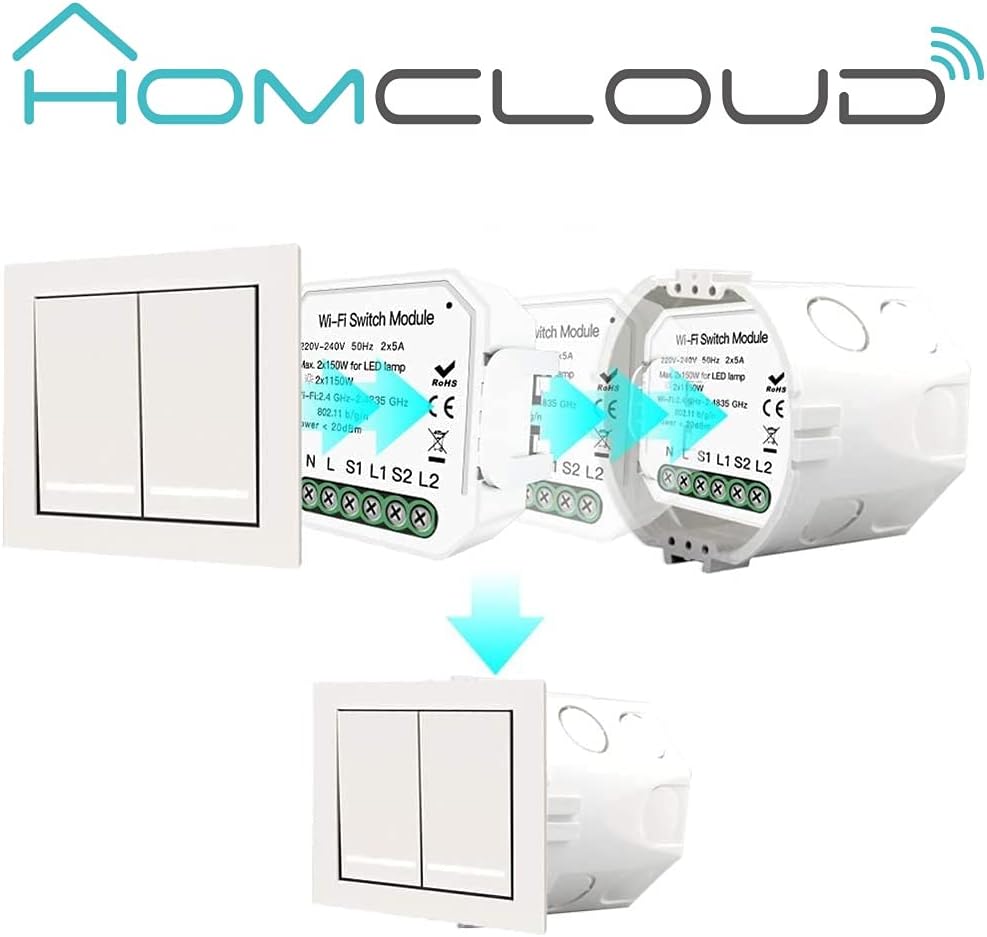
Image 5.1: Wiring diagram for a 2-gang, 2-way setup. Connect Neutral (N), Live (L), and switch inputs (S1, S2) to the module. L1 and L2 are outputs to the lights.
5.2 Instalasi fisik
- Pegatkeun Daya: Turn off the main power supply to the circuit at your home's circuit breaker.
- Nyiapkeun Wiring: Identify the Live (L), Neutral (N), and switch wires (S1, S2, L1, L2) in your wall box.
- Sambungkeun kawat: Connect the wires to the corresponding terminals on the Homcloud dimmer module as shown in the wiring diagram (Image 5.1). Ensure all connections are secure.
- Selapkeun Modul: Carefully place the dimmer module into the wall box behind your existing switch. Ensure it fits without obstruction.


Image 5.2: The dimmer module is designed to be installed discreetly behind a standard wall switch, fitting into the existing wall box.
5.3 Pamasangan Aplikasi sareng Papasangan
- Unduh App: Download the Homcloud Smart Home Solutions app from the App Store (iOS) or Google Play Store (Android). You can use the QR codes provided below or visit smartapp.tuya.com/homcloudsmart.
- Ngadaptar/Log: Buka aplikasi teras daptarkeun akun énggal atanapi lebet nganggo akun anu tos aya.
- Tambahkeun Alat: Power on the circuit at the breaker. The module should enter pairing mode (often indicated by a blinking light). In the app, tap 'Add Device' or the '+' icon.
- Pilih Jenis Alat: Choose 'Lighting' or 'Dimmer' from the device list.
- Nyambung ka Wi-Fi: Follow the in-app instructions to connect the module to your 2.4GHz Wi-Fi network. Ensure your phone is also connected to the same Wi-Fi network.
- Papasangan lengkep: Once connected, you can rename the device and assign it to a room.

Image 5.3: QR codes for downloading the Homcloud Smart Home Solutions app from Apple App Store and Google Play Store.
6. Parentah Operasi
6.1 App Control
Once paired, you can control the dimmer module directly from the Homcloud app:
- Hurung/Pareuman: Tap the power icon to turn the connected lights on or off.
- Dimming: Use the slider or specific percentage controls within the app interface to adjust the brightness level.
- Jadwal: Set schedules or timers for automatic on/off or dimming routines.
- Nyiptakeun Adegan: Create custom scenes to control multiple devices simultaneously.

Image 6.1: Screenshot of the Homcloud app interface, demonstrating remote control capabilities for the dimmer module.
6.2 Physical Switch Control
The module retains functionality with your existing physical wall switch. A short press typically toggles the light on/off, while a long press may initiate dimming (depending on switch type and configuration).
6.3 Integrasi Smart Home (Alexa/Google Home)
To enable voice control, link your Homcloud account to Amazon Alexa or Google Home:
- Buka Aplikasi Imah Pinter: Buka aplikasi Amazon Alexa atanapi Google Home.
- Aktipkeun Kamampuh/Aksi: Milarian pikeun and enable the 'Homcloud' skill (for Alexa) or 'Homcloud' action (for Google Home).
- Tautan Akun: Log in with your Homcloud app credentials when prompted.
- Panggihan Alat: Sakali disambungkeun, tanyakeun ka asistén sora anjeun pikeun mendakan alat énggal (contona, "Alexa, mendakan alat kuring" atanapi "Hei Google, singkronkeun alat kuring").
- Paréntah sora: Anjeun ayeuna tiasa nganggo paréntah sora sapertos:
- "Alexa, turn on [Light Name]"
- "Hey Google, dim [Light Name] to 50%"
- "Alexa, turn off [Light Name]"

Image 6.2: The Homcloud system supports multiple users controlling a single device, or a single user controlling multiple devices, enhancing smart home flexibility.
7. Pangropéa
The Homcloud dimmer module requires minimal maintenance.
- beberesih: If necessary, gently wipe the surface of the wall switch (not the module itself) with a soft, dry cloth. Do not use harsh chemicals or abrasive cleaners.
- Pembaruan firmware: Periodically check the Homcloud app for available firmware updates for your device. Updates can improve performance and add new features.
8. Cara ngungkulan
If you encounter issues with your Homcloud dimmer module, try the following troubleshooting steps:
| Masalah | Mungkin Cukang lantaranana | Solusi |
|---|---|---|
| Alat teu nyambung ka Wi-Fi | Incorrect Wi-Fi password; Module too far from router; 5GHz Wi-Fi network; Module not in pairing mode. | Ensure correct 2.4GHz Wi-Fi password. Move module closer to router. Confirm module is blinking for pairing. Reset module if necessary (refer to app for reset procedure). |
| Lights not dimming or flickering | Incompatible bulb type; Overload; Wiring issue. | Ensure bulbs are dimmable LED or incandescent. Check total wattage does not exceed 2x100W. Verify wiring connections are secure. |
| Physical switch not working | Incorrect wiring of S1/S2 terminals; Loose connection. | Double-check wiring according to Image 5.1. Ensure switch wires are securely connected to S1/S2. |
| Module loses connection frequently | Weak Wi-Fi signal; Network interference; Cloud connection issues. | Improve Wi-Fi signal strength (e.g., Wi-Fi extender). Reduce interference from other devices. Restart module and router. |
| Only one channel works | Wiring error for L2; Faulty channel. | Verify the L2 output wiring to the light. If wiring is correct, the module may be faulty. |
| Delay in light turning on/off | Normal operation for some smart dimmers; Network latency. | A slight delay (e.g., 1-2 seconds) can be normal for Wi-Fi controlled dimmers. Ensure stable Wi-Fi connection. |
| Interference with S1/S2 inputs (multiple buttons) | Sensitive inputs picking up induced currents. | Consider adding small capacitors (e.g., 1.5 microFarad 400V) between S1/S2 inputs and Neutral to filter interference, especially in complex multi-button setups. Consult a qualified electrician. |
9. Garansi jeung Rojongan
9.1 Émbaran jaminan
Homcloud products are designed for reliability and performance. For specific warranty terms and conditions, please refer to the warranty card included with your product or visit the official Homcloud websitus. Simpen resi pameseran anjeun salaku bukti pameseran pikeun klaim garansi.
9.2 Rojongan Palanggan
For technical assistance, troubleshooting, or product inquiries, please visit the official Homcloud websitus atanapi ngahubungi dukungan palangganna:
- Websitus: www.homcloud.com
- Dukungan Aplikasi: Use the 'Feedback' or 'Help' section within the Homcloud app.


