
1. Bubuka
The Amcrest AMCPFA134-B Waterproof Junction Box is designed to provide a secure and weather-resistant enclosure for the wiring and connections of compatible Amcrest Bullet Cameras. This junction box helps protect cables from environmental elements and tampering, ensuring a clean and professional installation.
2. Fitur Produk
- Kasaluyuan: Fits most Amcrest Bullet Cameras with a 1.3-inch / 3.5-inch diameter.
- Manajemén Kabel: Designed for hiding wires and connectors, offering rear and bottom access for cable routing.
- Desain waterproof: Provides a waterproof enclosure to protect internal connections.
- Konstruksi awét: Made from Aluminum and SECC for long-lasting performance.
3. Eusi Paket
Pariksa yén sadaya komponén aya sateuacan dipasang:
- Amcrest AMCPFA134-B Waterproof Junction Box
- Pemasangan Screws sareng Colokan Tembok
- Gasket karét
4. Setup jeung Instalasi
Follow these steps to properly install your Amcrest AMCPFA134-B Waterproof Junction Box with a compatible bullet camera.
- Persiapan: Ensure the mounting surface is clean and capable of supporting the weight of the junction box and camera.
- Nyirian Liang Bor: Place the junction box on the desired mounting location. Use a pencil or marker to mark the positions for the mounting screws.
- Pangeboran: Drill pilot holes at the marked locations. If mounting on masonry or concrete, insert the provided wall plugs into the drilled holes.
- Routing kabel: Route the camera's cables through the designated cable entry points on the junction box (rear or bottom access).
- Mounting the Junction Box: Secure the junction box to the mounting surface using the provided screws. Ensure it is firmly attached.
- Nyambungkeun kaméra: Connect the camera's cables inside the junction box. Ensure all connections are secure and properly insulated.
- Ngalampirkeun kaméra: Mount the compatible Amcrest bullet camera onto the junction box. The junction box has pre-drilled holes designed to align with various Amcrest bullet camera bases. Secure the camera using its mounting screws.
- Sealing: Ensure the rubber gasket is properly seated between the junction box and the camera base to maintain a waterproof seal.
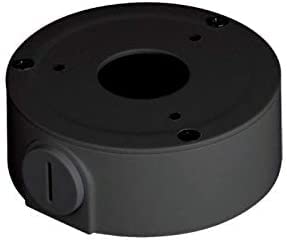
Image of the Amcrest AMCPFA134-B Waterproof Junction Box, designed for secure camera mounting and cable management.
5. Parentah Operasi
The AMCPFA134-B is a passive accessory designed to house and protect camera wiring. Once installed, it requires no direct operation. Its function is to provide a secure and waterproof environment for your camera's connections.
6. Pangropéa
To ensure the longevity and effectiveness of your junction box:
- Inspeksi périodik: Annually inspect the junction box for any signs of wear, damage, or loose connections.
- beberesih: Gently wipe the exterior of the junction box with a damp lawon pikeun miceun kokotor atawa lebu. Hindarkeun ngagunakeun bahan kimia anu kasar.
- Integritas segel: Check the rubber gasket for cracks or deterioration, especially in harsh weather conditions, to ensure the waterproof seal remains intact.
7. Cara ngungkulan
If you experience issues with your camera system after installing the junction box, consider the following:
- Teu Aya Daya/Sinyal: Carefully open the junction box and verify that all cable connections are secure and correctly wired. Ensure no wires are pinched or damaged.
- Intrusi cai: If moisture is found inside the box, check the rubber gasket for proper seating and any damage. Ensure all screws are tightened evenly to create a complete seal.
- Pasang Leupas: If the junction box feels loose, re-tighten the mounting screws. If the wall plugs are compromised, consider using new ones or relocating the box slightly.
8. Spésifikasi
| Atribut | Rincian |
|---|---|
| Nomer modél | AMCPFA134-B |
| merek | Amcrest |
| Bahan | Aluminum & SECC |
| Warna | Hideung |
| Tipe rengse | Matte |
| Tipe Pamasangan | Screw-In |
| Item Beurat | 0.29 kg |
| UPC | 854088008256 |
| GTIN | 854088008256 |
9. Garansi jeung Rojongan
Garansi: This product comes with a 1-Year Warranty provided by Amcrest.
Rojongan: Kanggo bantosan téknis, ngungkulan masalah, atanapi klaim garansi, mangga buka dukungan resmi Amcrest. website or contact their customer service directly. Refer to the Amcrest websitus pikeun inpormasi kontak sareng sumber dukungan anu paling énggal.