1. Bubuka
This manual provides essential information for the proper installation, configuration, and operation of your GIGABYTE B550 AORUS ELITE AX motherboard. This motherboard is designed to support 3rd Gen AMD Ryzen Processors and offers advanced features for high-performance computing.

Gambar 1.1: Leuwihview of the GIGABYTE B550 AORUS ELITE AX Motherboard. This image displays the full motherboard with its various components, including the CPU socket, RAM slots, PCIe slots, and heatsinks.
Key features include a True 12+2 Phases Digital VRM Solution, advanced thermal design with enlarged surface heatsinks, an Ultra Durable PCIe 4.0 x16 Slot, dual ultra-fast NVMe PCIe 4.0/3.0 x4 M.2 slots with dual thermal guards, and integrated Intel WiFi 6 802.11ax with Bluetooth 5.
2. Setup jeung Instalasi
Before beginning installation, ensure your system is powered off and unplugged from the wall outlet. Always handle the motherboard by its edges to avoid static discharge.
2.1. Idéntifikasi komponén
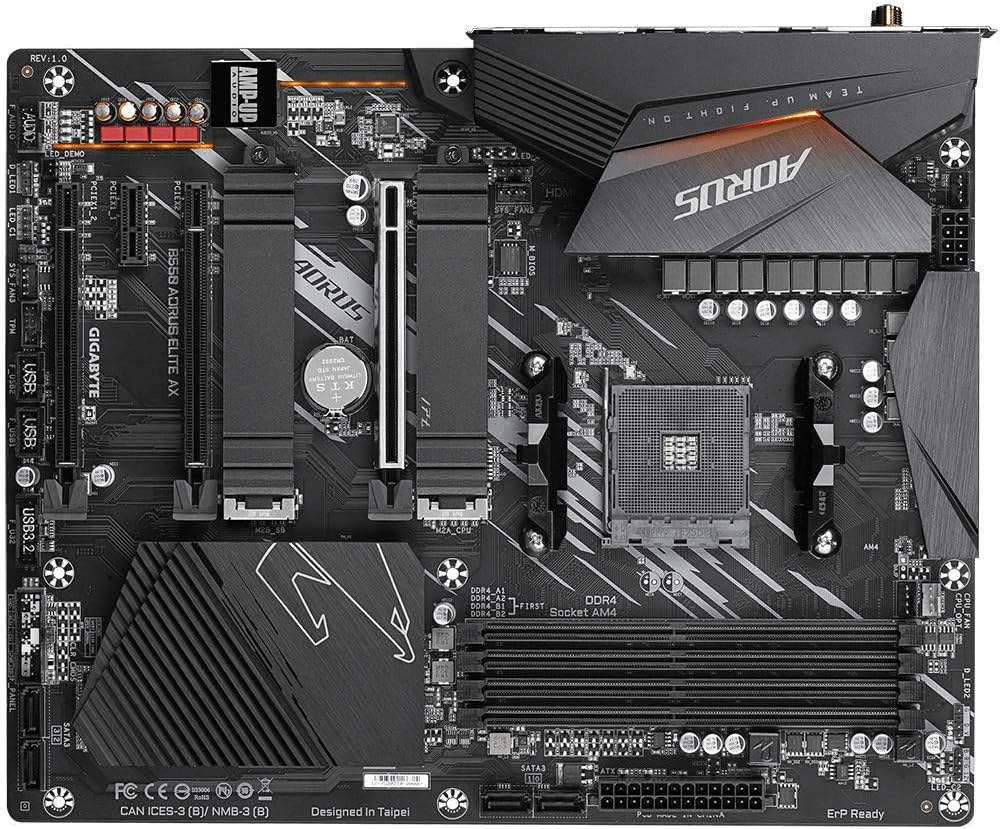
Gambar 2.1: Luhur-handap view of the GIGABYTE B550 AORUS ELITE AX Motherboard. This image highlights the layout of the CPU socket, four DDR4 DIMM slots, multiple PCIe slots, and two M.2 slots with their thermal guards.
2.2. Pamasangan CPU
- Locate the AM4 CPU socket. Lift the load lever to open the socket.
- Sajajarkeun tanda segitiga dina CPU kalayan ati-ati sareng tanda dina soket. Lebetkeun CPU kana soket kalayan ati-ati tanpa dipaksa.
- Lower the load lever back into place to secure the CPU.
2.3. Pamasangan RAM
This motherboard supports Dual Channel ECC/Non-ECC Unbuffered DDR4 memory across 4 DIMM slots.
- Buka klip dina kadua tungtung slot DIMM.
- Align the notch on the DDR4 memory module with the key on the DIMM slot.
- Pencét pageuh dina kadua tungtung modul mémori dugi ka jepitan dipasang dina tempatna.
2.4. M.2 Instalasi SSD
The motherboard features dual ultra-fast NVMe PCIe 4.0/3.0 x4 M.2 slots with dual thermal guards.
- Unscrew and remove the M.2 thermal guard from the desired slot.
- Selapkeun M.2 SSD kana slot dina hiji sudut.
- Gently nyorong SSD ka handap tur ngamankeun eta ku screw disadiakeun.
- Pasang deui pelindung termal M.2 pikeun mastikeun pendinginan anu optimal.
2.5. Pamasangan Kartu PCIe
Install graphics cards or other expansion cards into the PCIe slots. The top slot is an Ultra Durable PCIe 4.0 x16 slot.
- Align the PCIe card with the chosen slot.
- Press down firmly until the card is fully seated and the retention clip engages.
2.6. Sambungan Kakuatan
Sambungkeun 24-pin ATX konektor kakuatan utama jeung 8-pin konektor kakuatan CPU ti catu daya anjeun ka motherboard nu.
2.7. Panyambung Panel hareup
Connect the power button, reset button, HDD LED, and USB/audio headers from your PC case to the corresponding pins on the motherboard. Refer to the motherboard diagram for exact pin locations.
2.8. Panel I/O pungkur

Image 2.2: Rear I/O Panel of the GIGABYTE B550 AORUS ELITE AX Motherboard. This image shows the various ports available, including USB 3.2 Gen 1, USB 3.2 Gen 2, DisplayPort, HDMI, 2.5GbE LAN, Wi-Fi antenna connectors, and audio jacks. The pre-installed I/O shield is visible.
The motherboard features a pre-installed I/O shield for easy and quick installation. Connect your peripherals such as monitor, keyboard, mouse, and network cable to the appropriate ports on the rear I/O panel.
3. Parentah Operasi
3.1. Boot munggaran
After assembling all components and connecting power, press the power button on your PC case. The system should power on and display the GIGABYTE splash screen.
3.2. Ngaksés BIOS/UEFI
Pikeun ngasupkeun utilitas setelan BIOS/UEFI, pencét tombol DEL key repeatedly during the initial boot process when the GIGABYTE logo appears. The BIOS allows you to configure system settings, boot order, and enable features like XMP for memory profiles.
3.3. Pamasangan supir
After installing your operating system, install the necessary drivers for the motherboard's components. These include chipset drivers, LAN drivers, Wi-Fi/Bluetooth drivers, and audio drivers. Drivers can typically be found on the GIGABYTE official websitus pikeun model motherboard husus Anjeun.
4. Pangropéa
4.1. Beberesih Sistem
Rutin ngabersihan interior komputer anjeun pikeun nyegah akumulasi lebu, anu tiasa nyababkeun panas teuing sareng ngirangan kinerja. Anggo hawa anu dikomprés pikeun ngaleungitkeun lebu tina kipas, heatsink, sareng komponén sanésna. Pastikeun sistem dipareuman sareng dicabut colokan sateuacan beberesih.
4.2. BIOS Apdet
GIGABYTE provides BIOS updates to improve system stability, add support for new hardware, and fix bugs. The B550 AORUS ELITE AX supports Q-Flash Plus, allowing you to update the BIOS without installing the CPU, memory, or graphics card. Refer to the GIGABYTE website for detailed instructions on using Q-Flash Plus and for the latest BIOS versions.
5. Cara ngungkulan
Bagian ieu ngabahas masalah umum anu anjeun tingali.
5.1. Taya Daya / Henteu Boot
- Pastikeun sadaya kabel kakuatan (24-pin ATX, 8-pin CPU) disambungkeun aman ka motherboard jeung catu daya.
- Pastikeun saklar catu daya aya dina posisi 'ON'.
- Pariksa yén konektor tombol daya panel hareup parantos dipasang kalayan leres kana motherboard.
- Uji nganggo catu daya anu béda upami tiasa.
5.2. Taya Kaluaran Témbongkeun
- Ensure your monitor is connected to the graphics card (if installed) or the motherboard's HDMI/DisplayPort (if using an APU with integrated graphics).
- Pasang deui kartu grafik sareng modul mémori.
- Coba booting ngan ukur nganggo hiji RAM anu dipasang.
5.3. Bluetooth / Wi-Fi Connectivity Issues
- Ensure the external Wi-Fi antenna is securely connected to the rear I/O panel.
- Update your Wi-Fi and Bluetooth drivers to the latest version from the GIGABYTE websitus.
- If Bluetooth devices disconnect after sleep mode, try disabling USB selective suspend settings in Windows Power Options or updating the BIOS to the latest version, as this has resolved similar issues in some cases.
5.4. Ngareset BIOS
If you encounter issues after changing BIOS settings, you may need to reset the BIOS to default settings. This motherboard does not feature a dedicated BIOS reset button. To clear CMOS (BIOS settings), power off your system, unplug it, and remove the small circular battery (CMOS battery) from the motherboard for a few minutes. Reinsert the battery and power on the system.
6. Spésifikasi
Below are the key technical specifications for the GIGABYTE B550 AORUS ELITE AX Motherboard:
| Fitur | Spésifikasi |
|---|---|
| merek | GIGABYTE |
| Ngaran modél | B550 AORUS ELITE AX |
| CPU Socket | Socket AM4 |
| Prosesor cocog | AMD 3rd Generasi Ryzen |
| Tipe Chipset | AMD B550 |
| Téhnologi Mémori RAM | DDR4 |
| Laju mémori | 2133 MHz (Base), up to 4733MHz (OC) |
| Kapasitas Panyimpenan Mémori | 128 GB (Max) |
| Tipe Wireless | 802.11ax (Intel WiFi 6) |
| LAN | 2.5 Gigabit Ethernet |
| PCIe liang | 1x PCIe 4.0 x16, 2x PCIe 3.0 x16 (x4 mode), 1x PCIe 3.0 x1 |
| M.2 liang | 2x NVMe PCIe 4.0/3.0 x4 with Thermal Guards |
| USB 2.0 palabuhan | 2 (Belakang) |
| USB 3.2 Gen 1 Palabuhan | 4 (Belakang) |
| USB 3.2 Gen 2 Palabuhan | 2 (Rear, Type-A) |
| Kaluaran Video | HDMI, DisplayPort |
| Audio | Kodék Realtek ALC1200, AMP-UP Audio |
| Faktor Bentuk | ATX |
| Item Beurat | 4.07 pon |
| Dimensi produk | 13.18 x 10.62 x 3.14 inci |
7. Émbaran jaminan
GIGABYTE products are covered by a limited warranty. The specific terms and duration of the warranty may vary by region and product type. Please retain your proof of purchase for warranty claims. For detailed warranty information, including coverage, limitations, and the claims process, please visit the official GIGABYTE websitus atanapi ngahubungan pangecér lokal Anjeun.
8. Rojongan Téknis
If you encounter issues that cannot be resolved using this manual or require further assistance, please contact GIGABYTE technical support. You can find support resources, FAQs, driver downloads, and contact information on the official GIGABYTE websitus:
When contacting support, please have your motherboard model (B550 AORUS ELITE AX) and a detailed description of your issue ready.


