Bubuka
This manual provides comprehensive instructions for the SHARP EL501TBGR Scientific Calculator. Designed for high school students, this calculator features a 1-line display capable of showing up to 10 digits and includes 146 mathematical, statistical, and trigonometric functions. Please read this manual thoroughly to understand the calculator's functions and ensure proper use.
Disetél
Pamasangan batré
The SHARP EL501TBGR calculator is powered by a conventional battery (1 LR44 battery, included). To install or replace the battery:
- Pastikeun kalkulator dipareuman.
- Teangan tempat panutup kompartemen batré dina tonggong kalkulator.
- Taliti nyabut panutup.
- Insert the LR44 battery, ensuring the correct polarity (+/-) as indicated inside the compartment.
- Ganti panutup kompartemen batré aman.
Daya Awal Hurung
Pencét éta ON/C button to turn on the calculator. The display should show "0" or a similar initial state. If the display does not appear, recheck the battery installation.
Parentah Operasi
The SHARP EL501TBGR features a clear 1-line, 10-digit display. It offers 146 functions covering various mathematical, statistical, and trigonometric calculations.
Operasi Aritmatika Dasar
Perform standard calculations using the number keys and operation keys (+, -, ×, ÷). Pencét = pikeun mintonkeun hasilna.
- tambihan: Tulis nomer kahiji, pencét +, asupkeun nomer kadua, pencét =.
- Pangurangan: Tulis nomer kahiji, pencét -, asupkeun nomer kadua, pencét =.
- Multiplikasi: Tulis nomer kahiji, pencét ×, asupkeun nomer kadua, pencét =.
- Divisi: Tulis nomer kahiji, pencét ÷, asupkeun nomer kadua, pencét =.
Accessing Secondary Functions
Many keys have secondary functions printed above them. To access these, press the 2nd F key (second function key) first, then the desired function key.
Pikeun example, to calculate the inverse sine (sin-1), pencét 2nd F, tuluy dosa.
Key Layout Overview
Refer to the image below for a visual representation of the calculator's key layout and display.

Gambar 1: Hareupeun view of the SHARP EL501TBGR Scientific Calculator, showing the display and all keys. This image illustrates the arrangement of numerical, operational, and function keys, including the 2nd F key for secondary functions.
Specific Functions (Examples)
- Fungsi trigonometri: dosa, cos, samak and their inverses (arc hyp, dosa-1, cos-1, samak-1 accessed via 2nd F).
- Fungsi logaritmik: log (common logarithm) and ln (logaritma alam).
- Fungsi Daya sareng Akar: x2, √ (square root), xy (kakuatan).
- Fungsi mémori: STO (store), RCL (recall), M+ (memory plus).
- Fungsi Statistik: Access statistical modes via STAT key. Refer to the calculator's on-screen indicators for specific statistical operations.
- Angle Units: Switch between Degrees (DEG), Radians (DRG), and Gradians (DRG with 2nd F) using the DRG konci.
For a complete list and detailed usage of all 146 functions, please refer to the comprehensive function guide typically provided with the product packaging or available on the manufacturer's websitus.
Pangropéa
beberesih
Pikeun ngabersihkeun kalkulator, anggo lawon anu lemes sareng garing. Pikeun kokotor anu bandel, radaampen the cloth with water or a mild, non-abrasive cleaner. Avoid using strong solvents, alcohol, or abrasive materials, as these can damage the plastic casing sareng tampilan.
Ngagantian batré
When the display becomes dim or the calculator functions erratically, it may be time to replace the LR44 battery. Follow the battery installation steps outlined in the "Setup" section. Dispose of old batteries according to local regulations.
Panyimpenan
Store the calculator in a cool, dry place away from direct sunlight, extreme temperatures, and high humidity. If storing for an extended period, it is recommended to remove the battery to prevent leakage.
Pamérésan masalah
- Kalkulator teu hurung:
- Pariksa naha batréna leres dipasang sareng polaritasna anu leres.
- Replace the battery with a new LR44 battery.
- Tampilan taram atanapi kosong:
- Batré bisa jadi lemah. Ganti batréna.
- Ensure the calculator is not exposed to extreme cold, which can affect LCD performance.
- Hasil itungan anu salah:
- Verify that the correct mode (e.g., DEG/RAD/GRAD) is selected for trigonometric calculations.
- Ensure all previous calculations are cleared by pressing ON/C or CE.
- If the issue persists, try resetting the calculator by pressing the RESET button (usually a small recessed button requiring a thin object like a paperclip). Note that resetting may clear memory and settings.
- Konci teu ngaréspon:
- Bersihkeun di sabudeureun konci anu teu ngaréspon pikeun miceun kokotor naon waé.
- If the calculator has been dropped or subjected to impact, internal damage may have occurred.
If troubleshooting steps do not resolve the issue, please contact SHARP customer support for further assistance.
spésifikasi
| Modél | EL501TBGR |
| merek | SEUUT |
| Tipe tampilan | 1-line LCD, 10 digits |
| Jumlah Fungsi | 146 (Mathematical, Statistical, Trigonometric) |
| Sumber Daya | Battery Powered (1 x LR44, included) |
| Jenis Bahan | palastik |
| Dimensi produk | 12.7 x 7.25 x 1.3 cm |
| Beurat | 140 g |
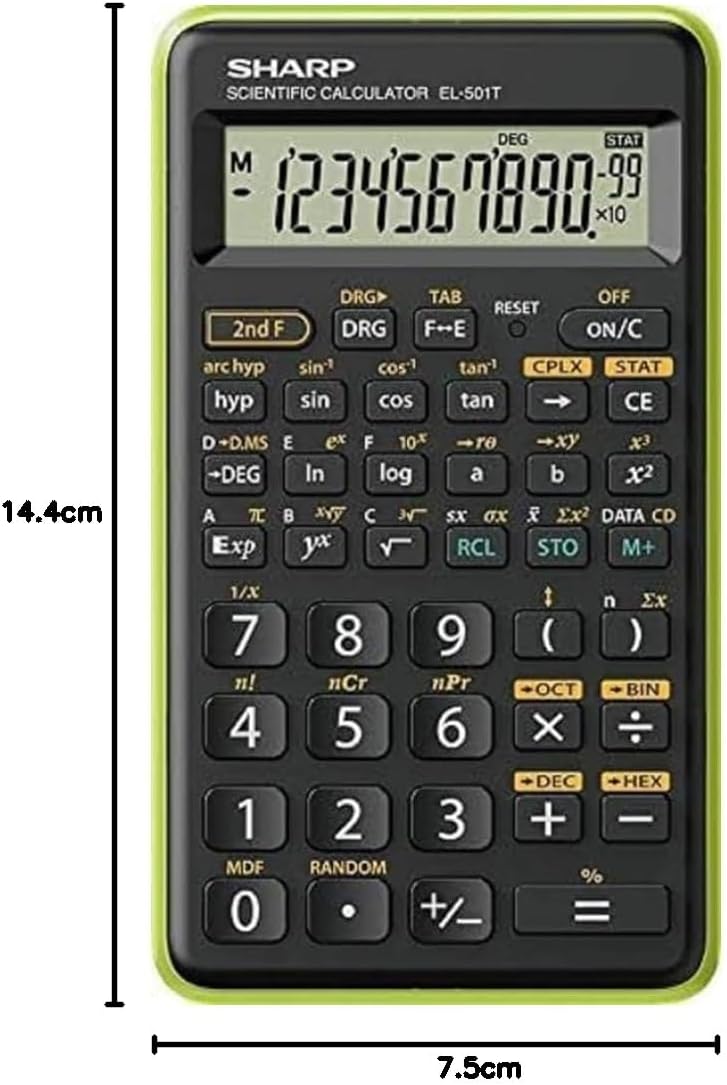
Gambar 2: Samping view of the SHARP EL501TBGR Scientific Calculator, illustrating its physical dimensions: approximately 14.4 cm in height and 7.5 cm in width.
Garansi sareng Rojongan
For warranty information, please refer to the documentation included with your purchase or visit the official SHARP website. For technical support, product inquiries, or service, please contact SHARP customer service directly. Contact details can typically be found on the SHARP official websitus atanapi dina bungkusan produk.


