Produk Leuwihview
Experience powerful volume and heavy bass sound with 16cm twin woofers and independent 4-channel high-power amplifiers. This all-in-one system features CD, Wide FM tuner, USB, and Bluetooth connectivity. Enjoy lighting effects for events and parties, with 4 types of light effects and 7-color illumination around the front speakers, including an option to turn lights off. Equipped with mixable microphone and guitar input terminals, and a built-in battery for approximately 14 hours of playback in environments without AC power (may vary depending on usage conditions). Includes a convenient shoulder strap for easy portability. Features a dimmer function to adjust display brightness, 10-second skip for CD/USB playback, and an auto-standby (power-saving) function that automatically turns off the unit after 15 minutes of inactivity. Also includes an eco-mode to reduce battery consumption during long periods of non-use.

Gambar 1: Hareupeun view of the JVC RV-NB250BT system, showcasinku desain anu kuat sareng kisi-kisi spikerna.
1. Setélan
1.1 Ngabongkar sareng Asesoris
Carefully remove all components from the packaging. Ensure all accessories, including the power cord and shoulder strap, are present. Retain the packaging for future transport or storage.

Figure 2: JVC RV-NB250BT with included shoulder strap and power cord.
1.2 Sambungan Daya
Connect the provided power cord to the AC IN terminal on the rear of the unit and then to a standard wall outlet. The unit can also operate on its internal rechargeable battery for portable use.

Figure 3: Rear panel connections, including the AC power input and FM antenna terminal.
1.3 FM Anteneu Sambungan
For optimal FM radio reception, connect the included FM antenna to the FM ANT terminal on the rear of the unit. Extend the antenna fully and adjust its position for the best signal.
1.4 Daya Awal Hurung
Press the Power button on the unit to turn it on. The display will illuminate. If using for the first time, ensure the internal battery is charged by connecting to AC power.
2. Parentah Operasi
2.1 Playback CD
- Pencét éta CD tombol pikeun milih modeu CD.
- Buka panutup kompartemen CD.
- Teundeun CD kalawan sisi labél nyanghareup ka luhur.
- Tutup panutup kompartemen CD.
- Putereun bakal dimimitian sacara otomatis. Anggo Play / Reureuh, Luncat ka hareup, jeung Skip mundur tombol pikeun ngadalikeun playback.
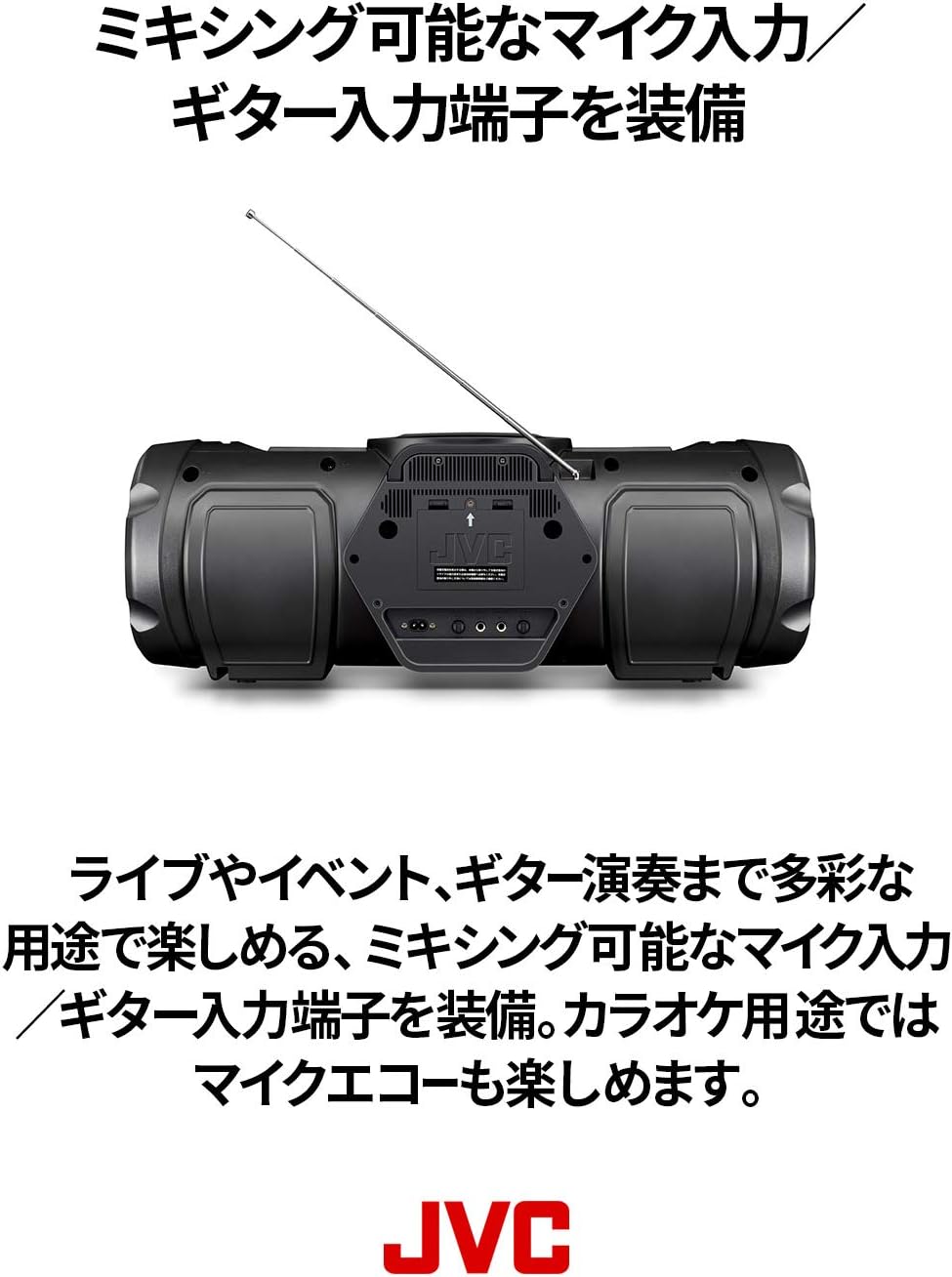
Figure 4: Top-loading CD compartment for easy disc insertion.
2.2 Playback USB
- Selapkeun USB flash drive kana port USB di hareup unit.
- Pencét éta USB tombol pikeun milih modeu USB.
- Unit ieu bakal otomatis ngadeteksi sareng muterkeun audio anu cocog files (e.g., MP3, WMA).
- Ngagunakeun éta Play / Reureuh, Luncat ka hareup, jeung Skip mundur tombol pikeun ngadalikeun playback.
2.3 Streaming Audio Bluetooth
- Pencét éta Bluetooth tombol pikeun milih modeu Bluetooth. Indikator Bluetooth bakal kedip-kedip.
- Enable Bluetooth on your smart device and search for "RV-NB250BT".
- Select "RV-NB250BT" from the list of available devices to pair. Once paired, the indicator will stop flashing and remain lit.
- Play audio from your smart device. The sound will be streamed to the RV-NB250BT.
2.4 Radio FM
- Pencét éta FM button to select FM tuner mode.
- Ngagunakeun éta Ngepaskeun or Ngepaskeun Turun tombol pikeun nyetel sacara manual ka stasiun, atawa pencét jeung tahan pikeun otomatis nyeken stasiun salajengna sadia.
2.5 Input Mikropon sareng Gitar
The unit features dedicated input terminals for a microphone and a guitar, allowing for mixing. Connect your microphone or guitar to the respective input jacks. Adjust the input volume using the dedicated controls. Microphone echo effects are also available for karaoke use.

Figure 5: Close-up of the front panel, highlighting the microphone and guitar input terminals.
2.6 Pangaruh cahaya
The RV-NB250BT includes four types of lighting effects with seven color options around the front speakers. Press the Pangaruh Cahaya button to cycle through the modes or turn the lights off. These effects synchronize with the music for an enhanced audio-visual experience.

Figure 6: The RV-NB250BT displaying its dynamic lighting effects.
2.7 Fungsi Dimmer
Adjust the brightness of the display using the dimmer function. Refer to the detailed instructions in the full manual for specific button presses to activate and adjust this feature.
2.8 Auto Standby and Eco Mode
The unit features an auto-standby function that automatically turns off the power after 15 minutes of inactivity to conserve energy. An eco-mode is also available to reduce internal battery consumption when the unit is not in use for extended periods.
3. Pangropéa
3.1 Ngabersihan Unit
Wipe the exterior of the unit with a soft, dry cloth. For stubborn dirt, slightly dampen the cloth with water and then wipe dry. Do not use abrasive cleaners, solvents, or alcohol, as these can damage the finish.
3.2 Perawatan Lénsa CD
To ensure optimal CD playback, occasionally clean the CD lens using a commercially available CD lens cleaner. Avoid touching the lens directly.
3.3 Perawatan Batré
For the built-in rechargeable lithium-ion battery, avoid fully discharging it frequently. If storing the unit for an extended period, charge the battery to approximately 50% and store in a cool, dry place. Recharge every 3-6 months to maintain battery health.
4. Cara ngungkulan
| Masalah | Mungkin Cukang lantaranana | Solusi |
|---|---|---|
| Taya kakuatan | Power cord not connected securely; internal battery discharged. | Ensure power cord is firmly plugged into the unit and wall outlet. Charge the internal battery if operating wirelessly. |
| Taya sora | Volume teuing leutik; sumber anu dipilih salah; fungsi bisu aktip. | Increase volume. Select the correct input source (CD, USB, Bluetooth, FM). Check if the unit is muted. |
| Nyapasangkeun Bluetooth gagal | Device too far; Bluetooth not enabled on source device; unit already paired with another device. | Ensure devices are within range. Enable Bluetooth on your smart device. Disconnect from other Bluetooth devices. Try re-pairing. |
| Masalah playback CD/USB | Disc/USB drive dirty or damaged; incompatible file formatna. | Clean the CD or try a different disc/USB drive. Ensure audio files are in a compatible format (e.g., MP3, WMA). |
| Clock resets when power is off | This model may reset the clock when completely powered off (not in standby). | This is a characteristic of the unit. Keep the unit in standby mode or reset the clock upon powering on if precise timekeeping is required. |
5. Spésifikasi
- Jumlah modél: RV-NB250BT
- merek: JVC
- Sumber Daya: AC Power Cord Type
- Batré: 8 Lithium-ion batteries (included), built-in rechargeable
- Konfigurasi Speaker: 4 speakers (2x 16cm woofers, 2x 10cm full-range speakers)
- Total Daya Kaluaran: 60W (implied from description)
- Konektipitas: Bluetooth, USB, CD, Wide FM Tuner, Microphone Input, Guitar Input
- Ukuran produk (L x W x H): 69.6 x 26.5 x 26.1 cm
- Pita frékuénsi Bluetooth: Pita 2.4GHz (2.4000GHz-2.4835GHz)
- Fitur: Lighting effects (4 types, 7 colors), Dimmer function, 10-second skip (CD/USB), Auto-standby, Eco-mode, Shoulder strap included.
6. Video produk
No official product videos from the seller are available for this specific model at this time.
7. Émbaran jaminan
This product is covered by a manufacturer's warranty. Please refer to the warranty card included in the product packaging for detailed terms and conditions, including the warranty period and coverage. Keep your proof of purchase for warranty claims.
8. Rojongan Palanggan
For technical assistance, product inquiries, or service requests, please contact JVC customer support. Visit the official JVC websitus kanggo inpormasi kontak, FAQ, sareng sumber daya tambahan.
JVC resmi Websitus: www.jvc.com


