1. Bubuka
This manual provides essential information for the installation, operation, and maintenance of your ASUS Prime A520M-K motherboard. The ASUS Prime A520M-K is a Micro-ATX motherboard designed for AMD AM4 socket processors, supporting 3rd Gen AMD Ryzen processors. It features DDR4 memory support, PCIe expansion, and multiple display outputs for a reliable computing experience.
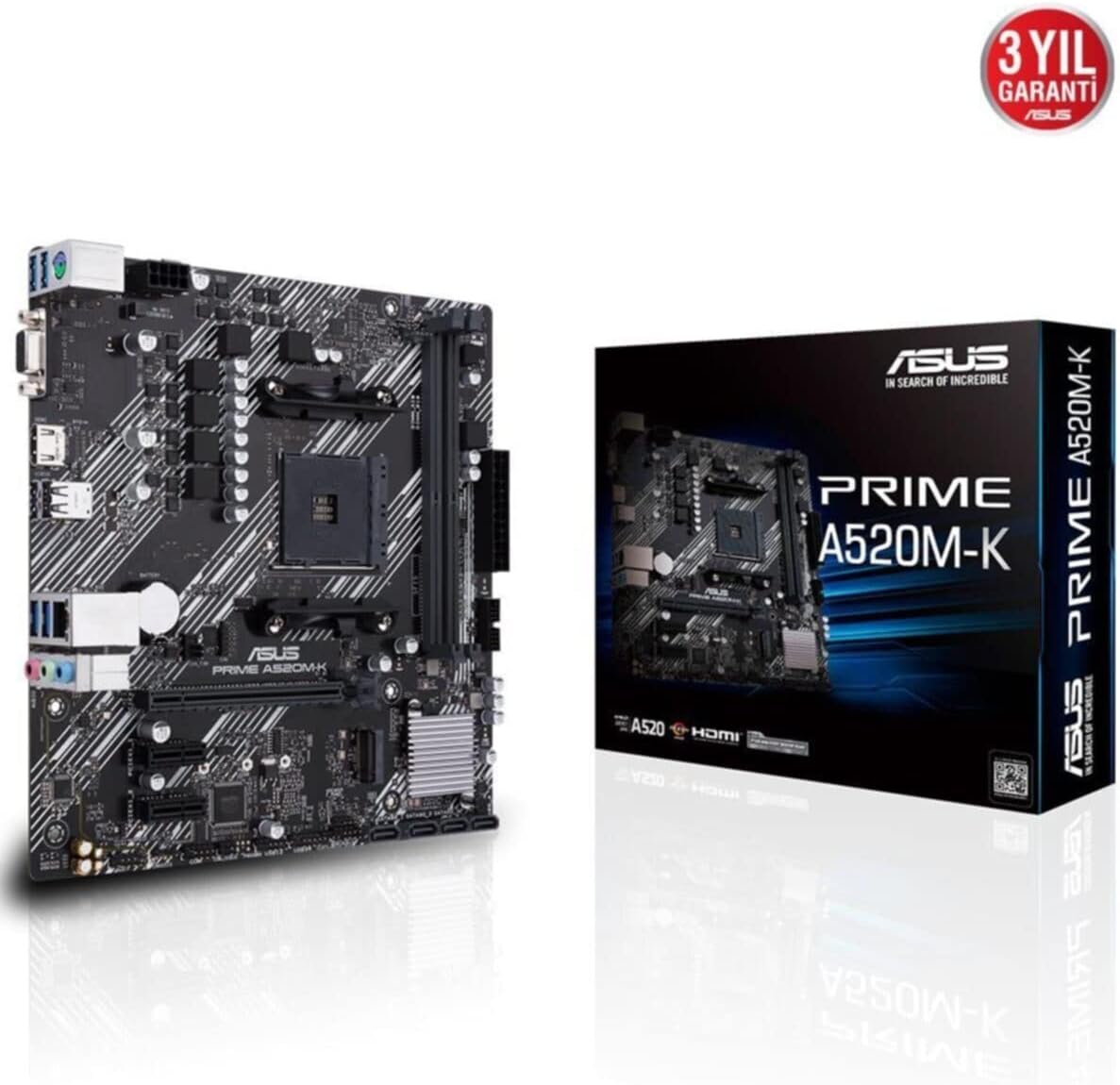
Figure 1: ASUS Prime A520M-K Motherboard and Retail Box.
2. Setup jeung Instalasi
Careful installation is crucial for optimal performance. Ensure your system components are compatible with the ASUS Prime A520M-K motherboard.
2.1. Pamasangan prosésor
The motherboard features an AMD AM4 socket. Align your AMD AM4 processor with the socket, ensuring the triangular markers on the CPU and socket match. Gently place the CPU into the socket without applying force, then secure it with the retention lever.
2.2. Pamasangan Mémori
The ASUS Prime A520M-K supports up to 64GB of DDR4 RAM across two DIMM slots. Insert DDR4 memory modules into the slots, ensuring they are properly seated until the clips on both ends lock into place.
2.3. Kartu Ékspansi
Utilize the PCIe expansion slots for graphics cards or other expansion cards. Align the card with the slot and press firmly until it is fully seated. Secure the card with a screw to the chassis.
2.4. Storage Devices
Connect SATA storage devices (HDDs/SSDs) to the available SATA 6Gb/s ports using SATA data cables. Ensure power cables from your power supply are also connected to these devices.
2.5. Sambungan Kakuatan
Sambungkeun konektor daya utama ATX 24-pin sareng konektor daya ATX 12V 8-pin tina catu daya anjeun ka port anu saluyu dina motherboard.
2.6. Panyambung Panel hareup
Connect your chassis's front panel cables (power button, reset button, USB ports, audio jacks, LED indicators) to the designated headers on the motherboard. Refer to the motherboard diagram for precise locations.
2.7. Panel I/O pungkur
The rear I/O panel includes various ports for peripherals:
- D-SUB (VGA) Port: For connecting to older monitors.
- Port HDMI: For connecting to modern displays.
- Port USB 2.0: Pikeun nyambungkeun periferal sapertos kibor sareng beurit.
- Port LAN: Pikeun konektipitas jaringan.
- Jacks audio: Pikeun spiker, headphone, sareng mikropon.

Figure 2: Rear I/O panel with D-SUB, HDMI, USB, LAN, and audio ports.
Video 1: Produk Leuwihview of the ASUS Prime A520M-K Motherboard, demonstrating key features and connectivity options for easy installation.
3. Parentah Operasi
Sakali sadaya komponén dipasang sareng disambungkeun, anjeun tiasa ngaktipkeun sistem anjeun.
3.1. Boot munggaran
Upon the first boot, the system may enter the BIOS/UEFI setup utility. This allows you to configure system settings, boot order, and monitor hardware status. Press the designated key (usually Del or F2) during startup to access the BIOS.
3.2. Pamasangan Sistem Operasi
Install your preferred operating system (e.g., Windows) from a bootable USB drive or DVD. Follow the on-screen instructions provided by the operating system installer.
3.3. Pamasangan supir
After installing the operating system, install the necessary drivers for the motherboard's chipset, audio, LAN, and any other integrated components. These drivers are typically provided on a support DVD or can be downloaded from the ASUS official websitus.
4. Pangropéa
Pangropéa rutin ngabantosan mastikeun umur panjang sareng operasi stabil tina motherboard anjeun.
- Ngaleungitkeun lebu: Périodik ngabersihan lebu tina motherboard sareng komponenana nganggo hawa anu dikomprés. Pastikeun sistem dipareuman sareng dicabut colokan sateuacan beberesih.
- Pembaruan BIOS/UEFI: Keep your BIOS/UEFI firmware updated to benefit from performance improvements, bug fixes, and support for new hardware. Download updates only from the official ASUS websitus.
- Manajemén Kabel: Pastikeun sadaya kabel dijalurkeun sareng diamankeun kalayan rapih pikeun nyegah halangan aliran hawa sareng pegatna sacara teu kahaja.
- Batré CMOS: The motherboard uses a small lithium-ion battery (CR2032) to retain BIOS settings and system time. If your system consistently loses time or BIOS settings, this battery may need replacement.
5. Cara ngungkulan
Upami anjeun mendakan masalah, tingal léngkah-léngkah ngungkulan umum ieu:
- Henteu aya kakuatan: Check all power connections, including the 24-pin and 8-pin connectors to the motherboard, and ensure the power supply is switched on.
- Henteu aya tampilan: Verify that your monitor is connected to the correct display output (D-SUB or HDMI) on the motherboard or dedicated graphics card. Reseat the graphics card and RAM modules.
- Instabilitas Sistem / Kacilakaan: This can be caused by incompatible RAM, overheating, or outdated drivers. Check RAM compatibility, ensure proper cooling, and update all drivers.
- Kasalahan Kode Pos: If your motherboard has diagnostic LEDs or a POST code display, consult the ASUS website or full manual for the meaning of specific codes.
- Reset BIOS: To reset BIOS settings to default, locate the CLRTC (Clear CMOS) jumper on the motherboard and follow the instructions in the full manual, or remove the CMOS battery for a few minutes.
6. Spésifikasi
Detailed technical specifications for the ASUS Prime A520M-K motherboard:
| Fitur | Spésifikasi |
|---|---|
| merek | ASUS |
| Runtuyan | PRIME A520M-K |
| Nomer modél | 90MB1500-M0EAY0 |
| CPU Socket | Socket AM4 |
| Prosesor cocog | AMD AM4 Socket 3rd Gen AMD Ryzen |
| Tipe Chipset | AMD A520 |
| Téhnologi Mémori RAM | DDR4 SDRAM |
| Slot mémori | 2 x DIMM |
| Max Mémori Dirojong | 64GB |
| Mémori Jam Speed | 2133 MHz (Dasar) |
| Jumlah USB 2.0 palabuhan | 2 (I/O Tukangeun) |
| Kaluaran Video | D-SUB, HDMI |
| Faktor Bentuk | Mikro ATX |
| Ukuran produk (L x W x H) | 8.9 x 8.7 x 0.79 inci |
| Item Beurat | 1.19 pon |
| Warna | Hideung |
| Platform | Windows |
| Tanggal Kahiji Sadia | 18 Agustus 2020 |
7. Garansi jeung Rojongan
The ASUS Prime A520M-K motherboard typically comes with a manufacturer's warranty. Please refer to the warranty card included with your product or visit the official ASUS support website for detailed warranty terms and conditions. For technical assistance, driver downloads, and further support, please visit the Rojongan ASUS websitus.

Figure 3: ASUS Prime A520M-K Motherboard, indicating a 3-year warranty.


