1. Bubuka
The LoraTap SC504W WiFi Smart Built-in Switch Module is designed to transform your traditional roller shutter, curtain, blind, or awning switches into smart control centers. This module allows you to control your devices not only manually but also conveniently via a mobile application or voice commands using popular smart home assistants like Amazon Alexa and Google Assistant.
Its compact design (4.8 x 4.7 x 2.2 cm) allows it to fit into standard flush-mounted boxes, preserving the functionality of your existing manual switch. The module supports remote control, time scheduling, group control, and family sharing, offering enhanced convenience and security for your home.
2. Émbaran Kasalametan
WARNING: Electrical installation should only be performed by a qualified electrician or a person with sufficient knowledge and training in electrical systems. Always disconnect power at the circuit breaker before performing any electrical work.
- Ensure the power supply is completely off before installation or maintenance.
- A neutral wire (N) is required for the operation of this module. Verify its presence in your wall box before proceeding.
- Ulah ngaleuwihan kapasitas beban maksimum 300 Watts.
- Alat ieu dirarancang pikeun pamakéan jero rohangan wungkul.
3. Eusi Paket
Mangga parios pakét kanggo barang-barang ieu:
- LoraTap WiFi Smart Built-in Switch Module (SC504W)
- Manual pamaké
4. Spésifikasi
| Parameter | Nilai |
|---|---|
| Nomer modél | SC504W |
| Masukan Voltage | 100-250VAC, 50/60Hz |
| Kaluaran Voltage | 100-250VAC, 50/60Hz |
| Beban maksimum | 300W |
| Konéktipitas Wireless | Wi-Fi 2.4 GHz (IEEE 802.11 b/g/n) |
| Ukuran (L x W x H) | 4.8 x 4.7 x 2.2 cm |
| Beurat | 250 g |

Figure 1: LoraTap SC504W module showing its compact dimensions (48mm x 47mm x 22mm).
5. Instalasi jeung Setup
5.1 Diagram Wiring
Follow the wiring diagram carefully. A neutral wire (N) is essential for the module's operation. Ensure all connections are secure.
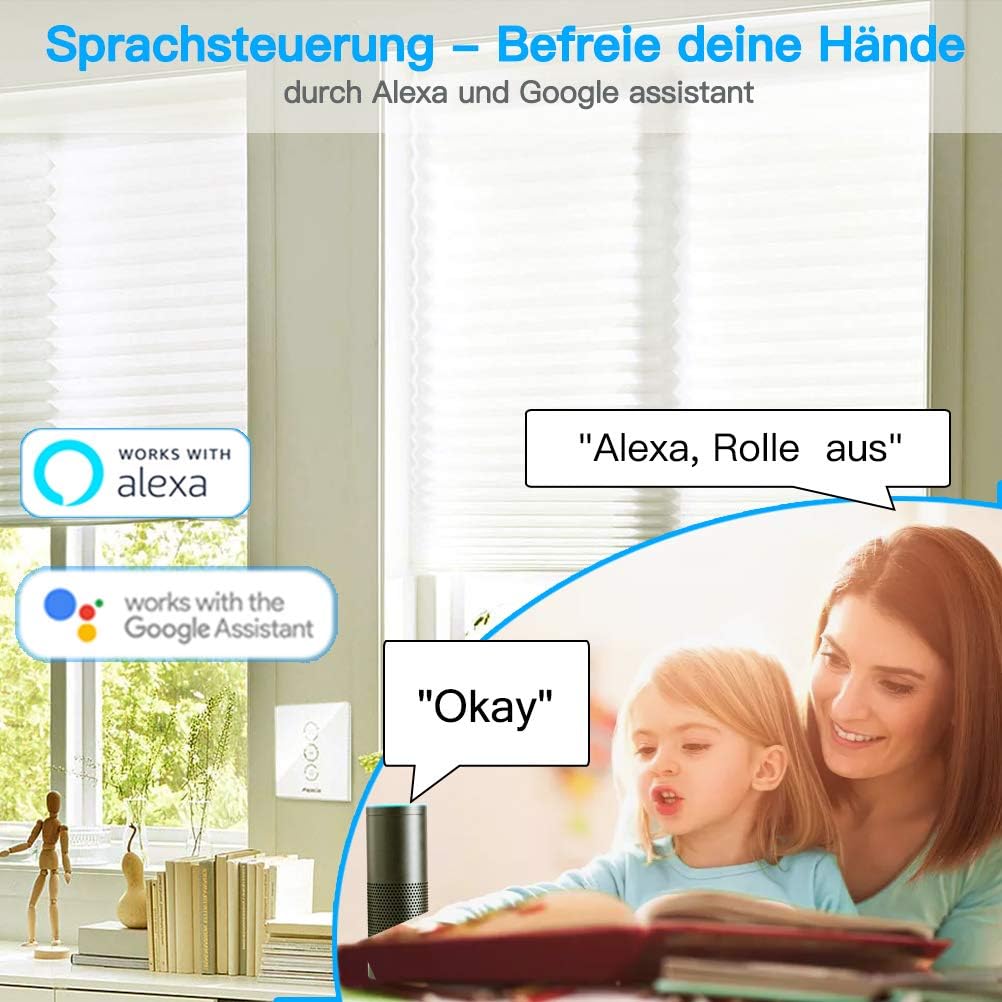
Figure 2: Detailed wiring diagram for connecting the LoraTap SC504W module to an electric roller shutter motor and a traditional wall switch. Note the required neutral wire (N) connection.
- Input L: Live wire (100-250VAC).
- Input N: Kawat nétral.
- Output N: Neutral wire to motor.
- Output L1: Live wire for one direction of motor (e.g., Up).
- Output L2: Live wire for the other direction of motor (e.g., Down).
- S1, S2: Connections for the manual wall switch.
- PE: Earth wire (if applicable to your motor/system).
5.2 Instalasi fisik
- Pegatkeun Daya: Turn off the main power supply to the circuit at your home's circuit breaker.
- Hapus saklar anu aya: Carefully remove your existing roller shutter wall switch from its flush-mounted box.
- Kawat Modul: Connect the wires to the LoraTap module according to the wiring diagram (Figure 2). Ensure all connections are tight and secure. It is recommended to use flexible wiring for easier installation in tight spaces.
- Place Module: Carefully place the wired module into the flush-mounted wall box. Due to its size, ensure there is sufficient space.
- Pasang deui Saklar: Reinstall your original wall switch over the module.
- Mulangkeun Daya: Hurungkeun deui catu daya utama dina pemutus sirkuit.
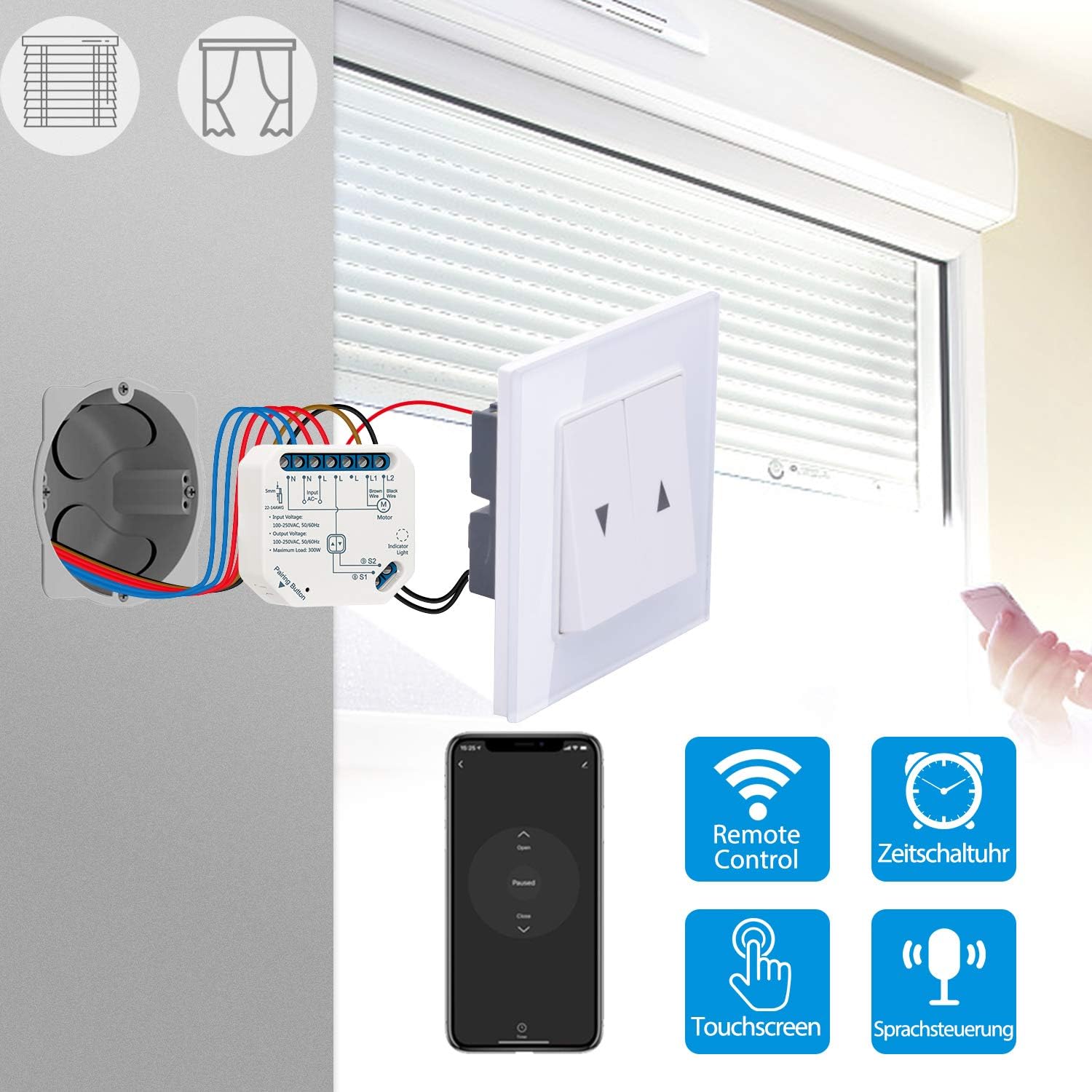
Figure 3: The LoraTap SC504W module discreetly installed within a standard wall box, behind the existing roller shutter switch.

Figure 4: An illustrative overview of the LoraTap SC504W module's connection to the motor and wall switch, demonstrating its integration into the existing setup.
5.3 Ngundeur Aplikasi sareng Masangkeun
- Unduh App: Unduh aplikasi "Smart Life" ti App Store (iOS) atanapi Google Play Store (Android).
- Ngadaptar/Log: Buka aplikasi sareng ngadaptarkeun akun énggal atanapi lebet upami anjeun parantos gaduh.
- Lebetkeun Mode Papasangan: Press and hold the "Pairing Button" on the LoraTap module for approximately 5 seconds until the indicator light starts blinking rapidly. This indicates it's in pairing mode.
- Tambahkeun Alat: In the Smart Life app, tap the "+" icon in the top right corner to add a new device. Select "Curtain Switch" or "Shutter Switch" from the device list.
- Nyambung ka Wi-Fi: Follow the on-screen instructions to connect the module to your 2.4 GHz Wi-Fi network. Ensure your phone is also connected to the same 2.4 GHz network during pairing.
- Papasangan lengkep: Once successfully paired, the indicator light on the module will stop blinking and remain solid. You can now rename your device in the app for easy identification.
6. Parentah Operasi
6.1 Kontrol Manual
The LoraTap module retains the functionality of your existing wall switch. You can continue to operate your roller shutters, curtains, or blinds manually by pressing the physical UP/DOWN buttons on your wall switch.
6.2 App Control (Smart Life App)
Once the module is paired with the Smart Life app, you can control your devices remotely from anywhere with an internet connection.
- Open the Smart Life app and select your LoraTap module.
- Use the virtual UP/DOWN buttons to open or close your roller shutters.
- You can also set the motor's running time (1 to 120 seconds) within the app to precisely control the opening/closing extent.
6.3 Timer and Schedule Function
Automate your roller shutters by setting schedules for opening and closing.
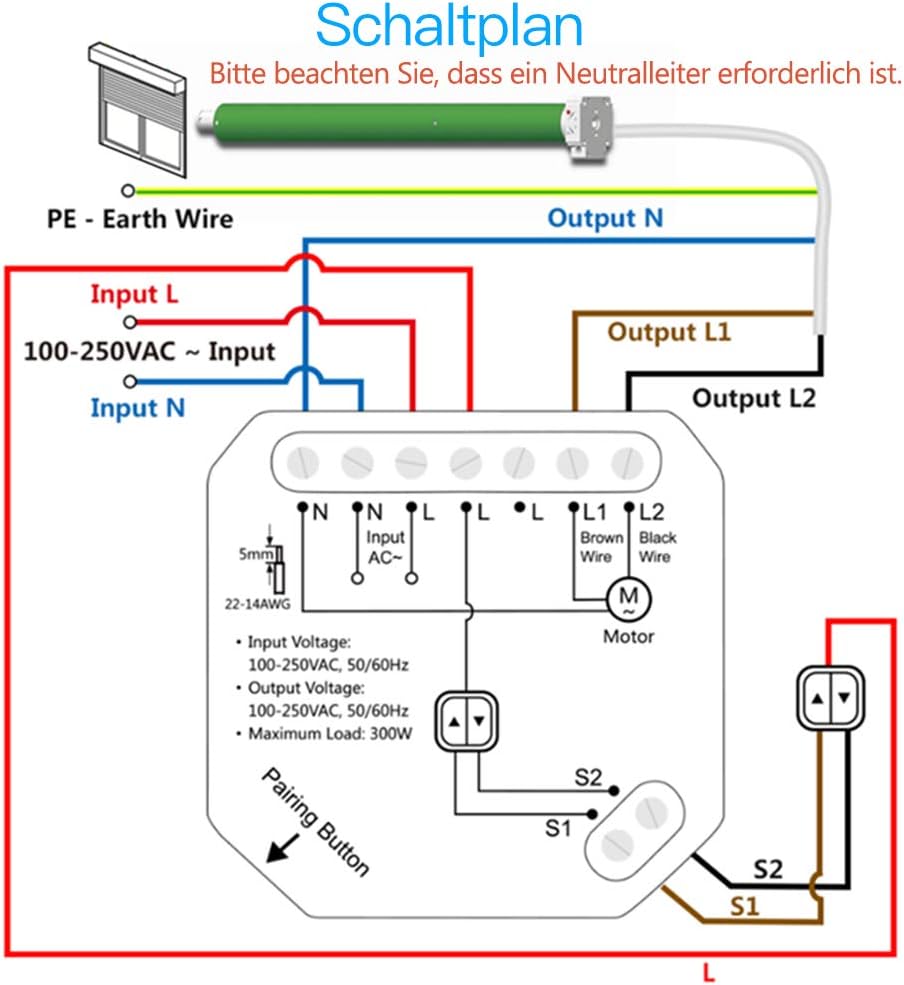
Figure 5: The Smart Life app's timer function allows you to set specific times for your roller shutters to open or close automatically, such as 8:00 AM for opening and 10:00 PM for closing.
- In the Smart Life app, navigate to your device settings.
- Select "Schedule" or "Timer" to create new automation rules.
- Set desired times for opening and closing, and select the days of the week for the schedule to repeat.
6.4 Kontrol Sora (Alexa & Asisten Google)
Integrate your LoraTap module with Amazon Alexa or Google Assistant for convenient voice control.

Figure 6: Voice control integration with Amazon Alexa and Google Assistant, allowing hands-free operation of your roller shutters using simple commands like "Alexa, close the blinds" or "Okay Google, open the curtains."
- Tautan Akun Smart Life: In your Alexa or Google Home app, search for the "Smart Life" skill/service and link your Smart Life account.
- Panggihan Alat: Saatos disambungkeun, tanyakeun ka asistén sora anjeun pikeun "Manggihan alat" atanapi sacara manual ngamimitian milarian alat dina aplikasi.
- Paréntah sora: You can now use commands such as:
- "Alexa, open [Device Name]"
- "Alexa, close [Device Name]"
- "Hey Google, open [Device Name]"
- "Hey Google, close [Device Name]"
6.5 Group Control and Family Sharing
Manage multiple modules together and share control with family members.

Figure 7: The Smart Life app offers features for family sharing, allowing multiple users to control the smart modules, and group control, enabling simultaneous operation of several roller shutters.
- Kontrol Grup: In the Smart Life app, you can create groups of devices to control multiple roller shutters simultaneously with a single command.
- Babagi kulawarga: Share access to your devices with other family members through the app, allowing them to control the roller shutters from their own devices.
7. Pangropéa
The LoraTap SC504W module requires minimal maintenance. Follow these guidelines to ensure optimal performance:
- Keep the module and surrounding area dry and free from dust.
- Do not expose the module to extreme temperatures or humidity.
- Clean the exterior of the wall switch with a soft, dry cloth. Do not use harsh chemicals or abrasive cleaners.
- Regularly check for any loose wiring connections, especially if you experience intermittent control issues.
8. Cara ngungkulan
| Masalah | Mungkin Cukang lantaranana | Solusi |
|---|---|---|
| Module not responding / No power. | Incorrect wiring; Power off; Loose connection. |
|
| Module not pairing with app. | Not in pairing mode; Incorrect Wi-Fi band; Weak Wi-Fi signal. |
|
| Roller shutter motor not moving. | Motor wiring issue; Module fault; Motor overload. |
|
| Module does not fit in wall box. | Insufficient space in standard flush-mounted box. |
|
9. Garansi jeung Rojongan
LoraTap products are manufactured to high quality standards. While specific warranty details are not provided in this manual, please refer to your purchase documentation or the seller's policy for warranty information.
For technical support, troubleshooting assistance, or any inquiries regarding your LoraTap SC504W module, please contact the seller or LoraTap customer support through the platform where you purchased the product. You can also visit the official LoraTap brand store on Amazon for more information and contact options.


