Bubuka
Thank you for choosing the SENTRY HPXKX50 RGB Gaming Mouse. This high-performance wired gaming mouse is designed to enhance your gaming and computing experience with its precise optical sensor, customizable RGB lighting, and ergonomic design. This manual provides detailed instructions on setting up, operating, maintaining, and troubleshooting your new mouse.
Eusi pakét
- SENTRY HPXKX50 RGB Gaming Mouse
- Manual pangguna (dokumén ieu)

Image: The retail packaging for the SENTRY HPXKX50 RGB Gaming Mouse, showing the mouse inside the box with its features highlighted.
Disetél
Follow these simple steps to set up your SENTRY HPXKX50 RGB Gaming Mouse:
- Buka bungkus Beurit: Carefully remove the mouse and its USB cable from the packaging.
- Nyambung ka Alat Anjeun: Locate an available USB port on your computer (PC, Laptop, Mac) or compatible gaming console (PS4/PS5). Insert the USB connector of the mouse into the USB port.
- Pamasangan supir: The SENTRY HPXKX50 is a plug-and-play device. Your operating system (Windows, macOS) will automatically detect and install the necessary drivers. No additional software installation is required for basic functionality.
- Pariksa sambungan: Once connected, the mouse's RGB lighting will illuminate, indicating a successful connection. You can now move the mouse to test cursor movement.

Gambar: A close-up view of the USB connector of the SENTRY HPXKX50 RGB Gaming Mouse, which is used for connecting to a computer.

Image: Icons illustrating the compatibility of the SENTRY HPXKX50 RGB Gaming Mouse with various devices, including laptops, desktop computers, HDTVs, PS4/PS5 consoles, and Mac computers.
Ngoperasikeun
The SENTRY HPXKX50 RGB Gaming Mouse offers intuitive operation with its standard buttons and advanced features.
Fungsi Dasar
- Klik Kénca: Tombol aksi primér.
- Klik katuhu: Tombol aksi sekundér, biasana pikeun menu kontéks.
- Gulung kabayang: Ngagulung eusi kaluhur atanapi kahandap. Ogé bisa dipencet pikeun fungsi-klik tengah.
- Tombol DPI: Located behind the scroll wheel, this button allows you to cycle through different DPI (Dots Per Inch) sensitivity settings.
Lampu RGB
The mouse features dynamic RGB lighting that illuminates the edges and scroll wheel. The lighting effects are pre-programmed and will cycle automatically, adding an aesthetic appeal to your setup.
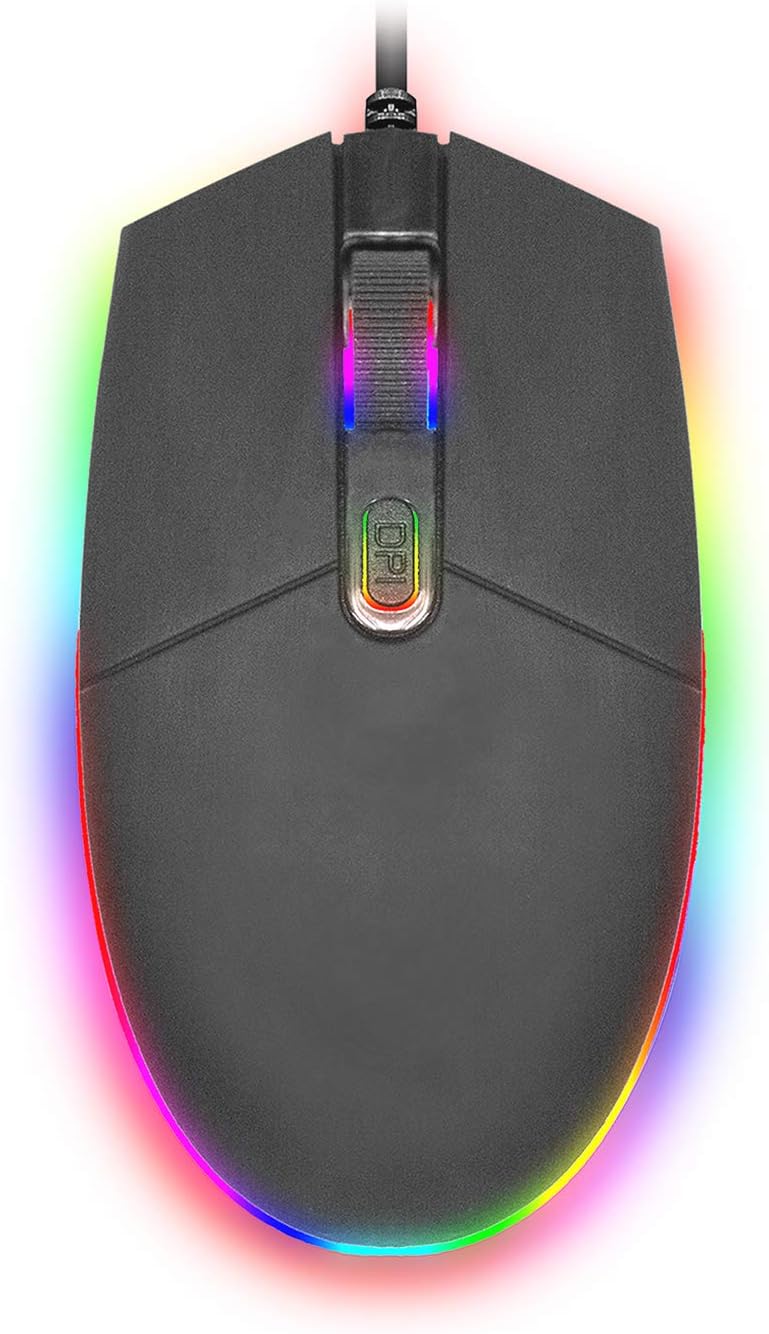
Gambar: A luhur-handap view of the SENTRY HPXKX50 RGB Gaming Mouse, showcasing its vibrant, multi-color RGB lighting along the base and around the scroll wheel.

Gambar: A sisi profile view of the SENTRY HPXKX50 RGB Gaming Mouse, highlighting the illuminated RGB strip along its bottom edge in a dark environment.
Sensitipitas DPI
The HPXKX50 mouse is equipped with a high-precision optical sensor, offering up to 7200 DPI. This allows for highly sensitive and accurate cursor movements, ideal for fast-paced gaming or precise graphic design work. Press the DPI button to switch between sensitivity levels. The mouse is designed for smooth tracking and ultra-high sensitivity.

Image: The SENTRY HPXKX50 RGB Gaming Mouse with an overlay indicating its 7200 DPI high-precision optical sensor, emphasizing its accuracy for gaming.
Pangropéa
To ensure the longevity and optimal performance of your SENTRY HPXKX50 RGB Gaming Mouse, follow these maintenance guidelines:
- beberesih: Paké lawon lemes, garing, lint-haratis pikeun ngusap beungeut beurit. Keur kokotor bandel, rada dampen lawon jeung cai. Hindarkeun ngagunakeun bahan kimia kasar, pangleyur, atanapi pembersih abrasive.
- Perawatan sénsor: Keep the optical sensor on the bottom of the mouse clean and free from dust or debris. Use a cotton swab or compressed air to gently clean the sensor area.
- Manajemén Kabel: Avoid sharp bends or kinks in the USB cable. Store the mouse in a way that prevents the cable from being tangled or stressed. The braided cable is designed for durability.
- Panyimpenan: Lamun teu dipaké pikeun période nambahan, nyimpen beurit dina tiis, tempat garing jauh ti sinar panonpoé langsung jeung hawa ekstrim.
Pamérésan masalah
If you encounter issues with your SENTRY HPXKX50 RGB Gaming Mouse, refer to the table below for common problems and solutions:
| Masalah | Mungkin Cukang lantaranana | Solusi |
|---|---|---|
| Beurit teu ngabales | Sambungan USB leupas, port USB lepat, masalah supir. | Ensure USB cable is firmly plugged in. Try a different USB port. Restart your computer. |
| Gerakan kursor teu teratur atanapi luncat-luncat | Sénsor optik kotor, permukaan pad mouse teu cocog. | Ngabersihan sénsor optik. Anggo permukaan pad mouse anu bersih sareng seragam. |
| RGB lighting is off or flickering | Insufficient power from USB port, internal fault. | Try a different USB port, preferably a direct port on the motherboard (for desktops). If the issue persists, contact support. |
| Tombol DPI henteu ngarobih sensitivitas | Software conflict, button malfunction. | Ensure no conflicting mouse software is running. Restart your computer. |
spésifikasi
| Fitur | Rincian |
|---|---|
| merek | SENTRY |
| Nomer modél | 50M1-05000 |
| Téhnologi konektipitas | Kabel USB |
| Téhnologi Deteksi Gerakan | Optik |
| DPI (Titik Per Inci) | Nepi ka 7200 DPI |
| cahayaan | RGB |
| Warna | Hideung |
| Platform hardware | PC |
| Kasaluyuan System Operasi | Windows, macOS (Colokkeun & Maénkeun) |
| Item Beurat | 6.4 ons (kira-kira 181g) |
| Ukuran produk (L x W x H) | 4.75 x 2 x 7.25 inci (kira-kira 12.07 x 5.08 x 18.42 cm) |
| Fitur husus | Desain ergonomis |
| Produsén | Grosir Kabel |
Garansi sareng Rojongan
For warranty information and customer support, please refer to the documentation provided with your purchase or visit the official SENTRY or CableWholesale websitus. Simpen bukti pameseran anjeun pikeun klaim garansi.
For additional assistance, you may contact the manufacturer directly through their official support channels.


