
CAMMHD C9
CAMMHD C9 Body Camera User Manual
Modél: C9
1. Bubuka
This manual provides detailed instructions for the operation and maintenance of your CAMMHD C9 Body Camera. Please read this manual thoroughly before using the device to ensure proper function and to maximize its capabilities. The CAMMHD C9 is a compact and versatile body-worn camera designed for reliable audio and video recording in various environments, featuring 1296p resolution, IR night vision, and a 2.0-inch LCD for playback.
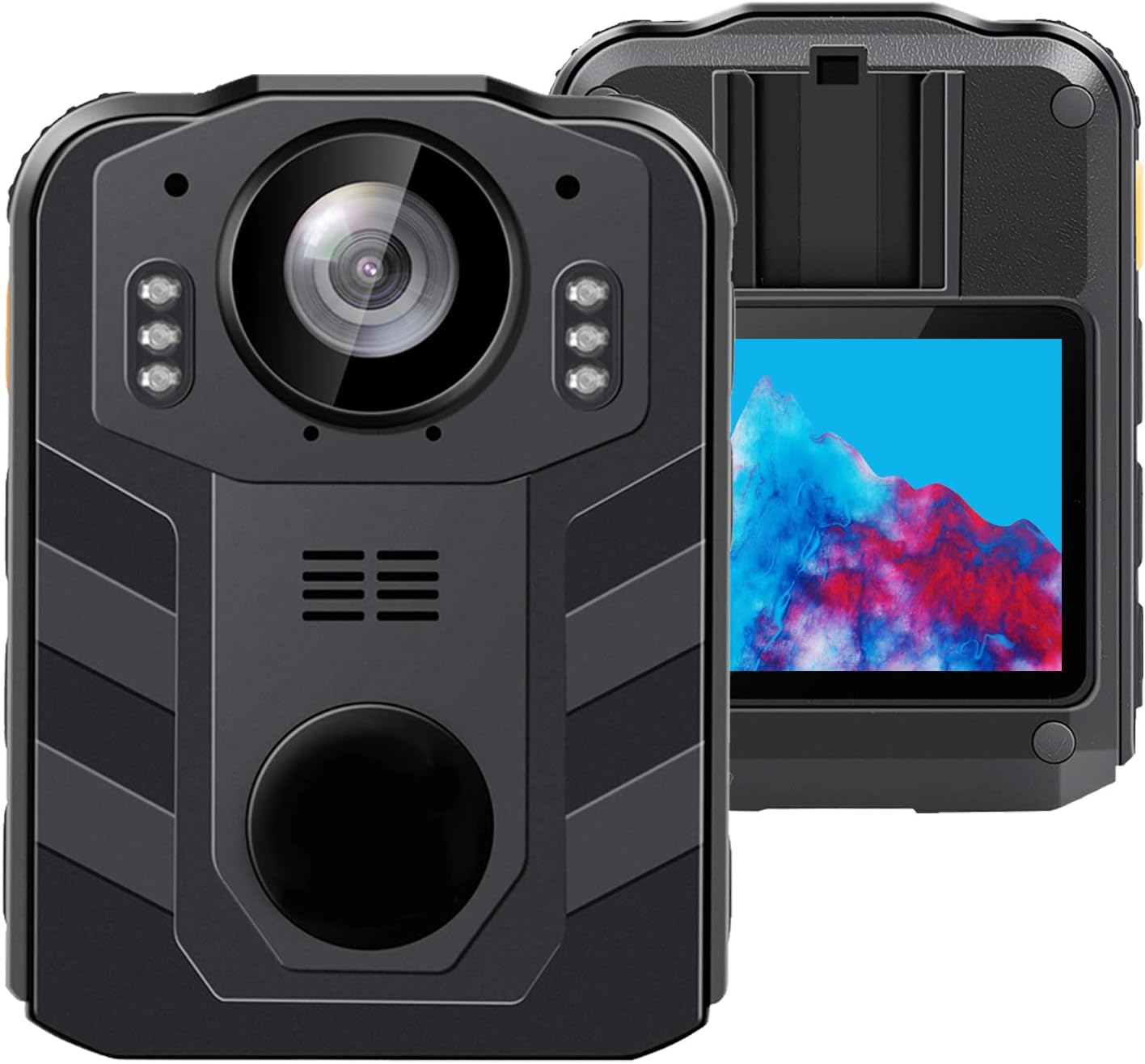
Gambar 1.1: Hareup jeung tukang view of the CAMMHD C9 Body Camera.
2. Eusi Paket
Pastikeun yén sadaya item aya dina pakét anjeun:
- CAMMHD C9 Body Camera
- Kabel USB
- Manual pangguna (dokumén ieu)
3. Produk Langkungview
Biasakeun diri sareng komponén sareng kadali kaméra.
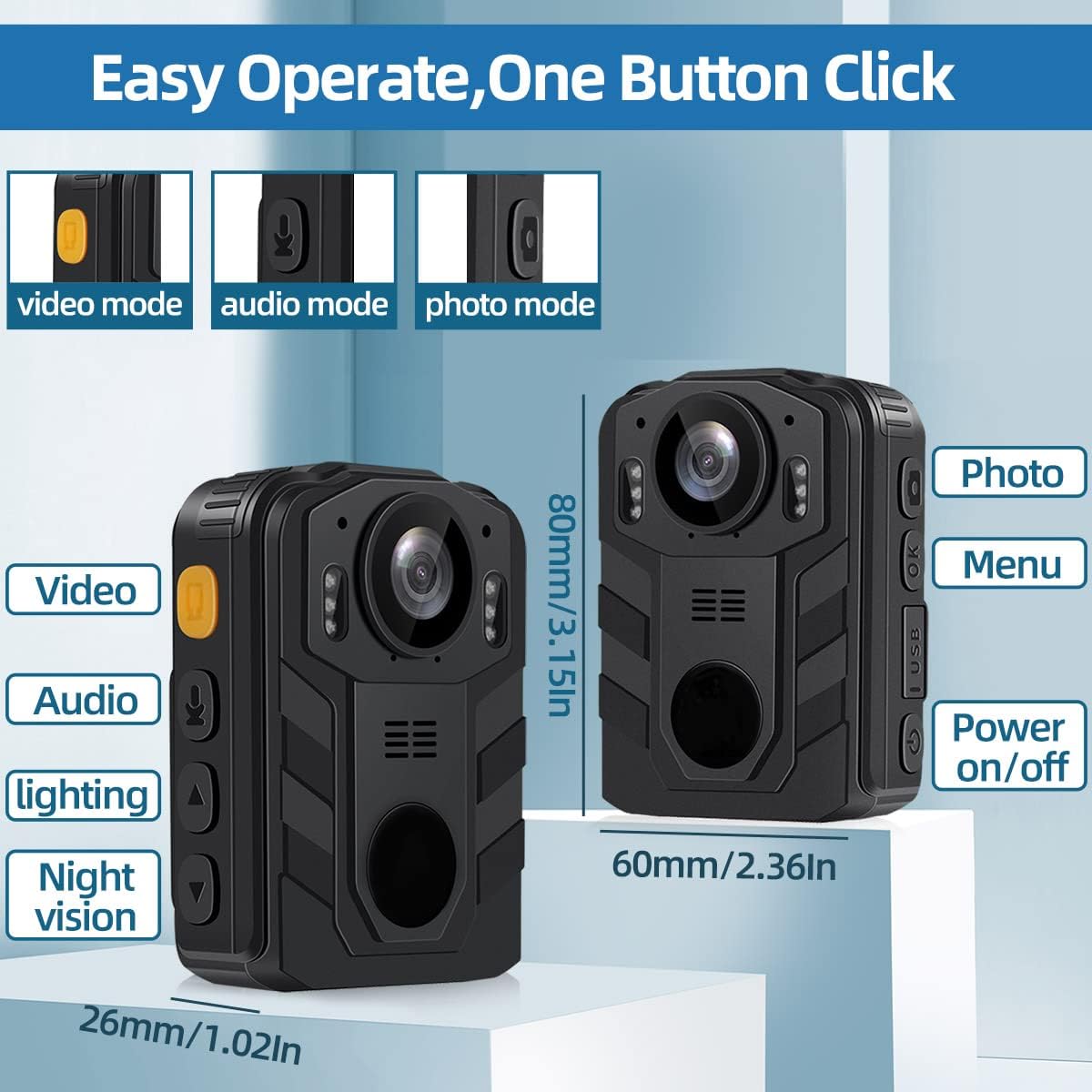
Image 3.1: CAMMHD C9 Body Camera with key features and dimensions highlighted.
3.1. Fungsi Tombol
- Tombol Daya / Pareuman: Pencét terus tahan pikeun ngahurungkeun atawa mareuman alat.
- Tombol Video: Pencét pikeun ngamimitian/ngeureunkeun ngarékam pidéo.
- Tombol Audio: Press to start/stop audio-only recording.
- Tombol Poto: Press to capture a still image.
- Tombol Menu/OK: Access the menu, confirm selections.
- Up/Down Navigation Buttons: Napigasi ngaliwatan pilihan ménu.
- Port USB: Pikeun ngecas sareng mindahkeun data.
4. Setélan
4.1. Ngecas Batré
Before first use, fully charge the camera's internal 3000mAh battery. Connect the camera to a USB power adapter (not included) or a computer's USB port using the provided USB cable. The charging indicator light will show the charging status. A full charge typically takes approximately 5 hours and provides up to 8 hours of recording time.
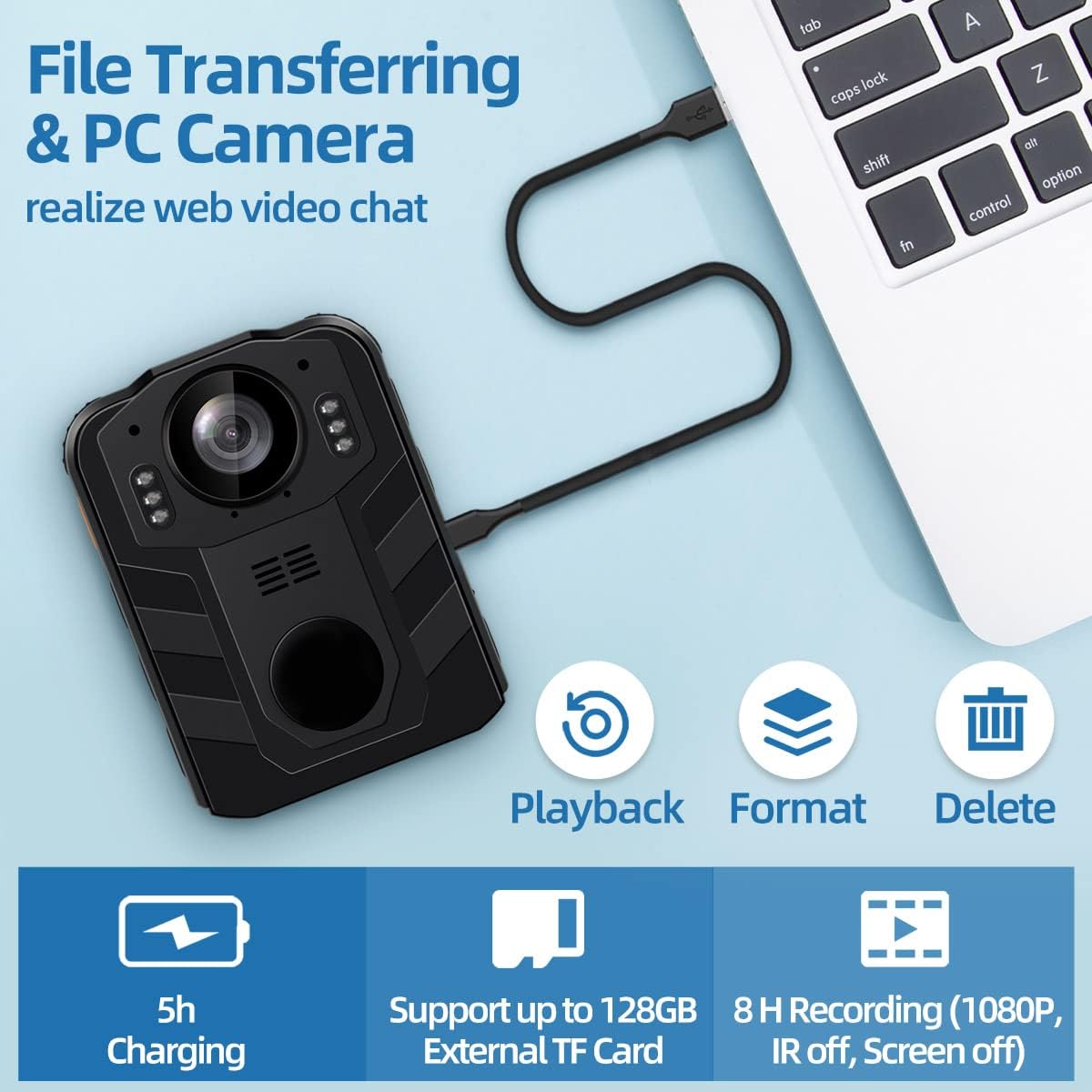
Image 4.1: Battery capacity and estimated usage/charging times.

Image 4.2: Methods for charging the camera and connecting to a computer.
4.2. Inserting hiji Kartu SD
The CAMMHD C9 Body Camera supports external SD cards up to 512GB. To insert an SD card:
- Pastikeun kaméra dipareuman.
- Locate the SD card slot, usually on the side or bottom of the device.
- Gently insert the SD card with the metal contacts facing the correct direction until it clicks into place.
- Pikeun nyabutna, pencét kartu sakedik ka jero dugi ka kaluar.
After inserting the SD card, you may need to select 'External card' in the camera's settings menu for storage. Refer to the video below for menu navigation examples.
Video 4.1: Demonstrates navigating the camera's menu, including selecting the SD card option for storage. This video shows the 'SD Card' option being highlighted and set to 'External card'.
5. Parentah Operasi
5.1. Daya Hurung / Pareum
- Pikeun Ngahurungkeun: Pencét terus tahan tombol Daya nepi ka layar hurung.
- Pikeun mareuman: Pencét terus tahan tombol Daya nepi ka alat pareum.
5.2. Ngarékam Pidéo
Tina layar utama, pencét éta Tombol Video once to start video recording. A recording indicator (e.g., a red dot or flashing icon) will appear on the screen. Press the Tombol Video again to stop recording. Videos are saved automatically.
5.3. Ngarékam Audio
Tina layar utama, pencét éta Tombol Audio once to start audio-only recording. An audio recording indicator will be visible. Press the Tombol Audio again to stop recording. Audio files disimpen sacara otomatis.
5.4. Motret Poto
Tina layar utama, pencét éta Tombol Poto once to capture a still image. The screen may flash briefly to indicate a photo has been taken.
5.5. Night Vision (IR)
The camera features infrared (IR) night vision for recording in low-light conditions. The IR function can be set to automatic or manual activation via the camera's menu. When active, the camera will record in black and white.
Image 5.1: Illustrates the difference between day and night vision recording modes.
5.6. Menu Napigasi
Pencét éta Menu / Tombol OK to access the camera's settings menu. Use the Up/Down Navigation Buttons to scroll through options. Press the Menu / Tombol OK to select an option or confirm a setting. Press the Tombol Daya pikeun kaluar menu.
6. Fitur canggih
6.1. Loop Rekaman
The CAMMHD C9 supports loop recording. When enabled, the camera will continuously record. Once the memory card is full, the oldest files will be overwritten by new recordings. This ensures continuous operation without manual deletion of old files. The duration of each loop segment can typically be adjusted in the settings menu.
6.2. PC Camera Mode
The camera can function as a PC camera (webcam) when connected to a computer. Connect the camera to your computer using the USB cable. Select the 'PC Camera' option on the camera's screen if prompted. Your computer should recognize the device as a webkaméra.

Image 6.1: The camera connected to a laptop, illustrating file transfer and PC camera functionality.
6.3. File Mindahkeun
To transfer recorded videos, audio, and photos to a computer:
- Sambungkeun kaméra ka komputer Anjeun nganggo kabel USB nu disadiakeun.
- The camera should appear as a removable disk drive on your computer.
- Buka drive pikeun ngaksés sareng nyalin anjeun files.
Alternatively, you can remove the SD card from the camera and insert it into a card reader connected to your computer for direct file aksés.

Image 6.2: Two methods for transferring files: direct USB connection or using an SD card reader.
7. Pangropéa
- beberesih: Anggo kaén anu garing sareng lemes pikeun ngabersihan awak kaméra. Pikeun lénsa, paké lawon beberesih lénsa khusus sareng solusi. Hindarkeun bahan kimia anu kasar.
- Panyimpenan: Simpen kaméra di tempat anu tiis sareng garing jauh tina sinar panonpoé langsung sareng suhu anu ekstrim.
- Perawatan batré: Pikeun umur batré anu optimal, ulah sering ngosongkeun batréna. Upami disimpen kanggo waktos anu lami, ngecas batréna dugi ka sakitar 50% unggal sababaraha bulan.
8. Cara ngungkulan
- Kaméra teu hurung: Pastikeun batréna geus dieusian. Sambungkeun ka sumber listrik teras cobian deui.
- Teu bisa ngarekam: Check if an SD card is inserted and properly formatted. Ensure there is sufficient storage space.
- Kualitas video goréng: Ensure the lens is clean. Check recording resolution settings in the menu.
- Computer not recognizing camera: Try a different USB port or cable. Ensure the camera is in the correct mode (e.g., Mass Storage or PC Camera) if prompted.
9. Spésifikasi
| Fitur | Spésifikasi |
|---|---|
| merek | CAMMHD |
| Nomer modél | C9 |
| Resolusi Capture Video | 1296 p |
| Format Capture Video | MPEG 4 |
| Ukuran layar | 2 inci |
| Fitur husus | Visi Peuting |
| Téhnologi konektipitas | Wireless (Note: Product description mentions wireless, but typically refers to data transfer, not live streaming) |
| Tipe Lénsa | Sudut lega |
| Tingkat Résistansi Cai | Tahan cai |
| Batré | 1 batré Lithium Ion (kaasup), 3000mAh |
| Item Beurat | 1.03 pon |
| Dimensi produk | 2.24 x 0.98 x 3.15 inci |
| Rojongan Panyimpenan Max | 512GB (External TF Card) |
10. Garansi jeung Rojongan
For warranty information or technical support, please refer to the product packaging or contact CAMMHD customer service through the retailer where the product was purchased. Keep your purchase receipt as proof of purchase.
Dokumén Patali - C9
 |
Manual Pamaké Kaméra Awak CAMMHD: Fitur, Operasi, sareng Setélan Manual pamaké komprehensif pikeun kaméra awak CAMMHD, ngajéntrékeun fitur-fiturna, pituduh pamakean gancang, setélan parameter, sareng pangiriman data. Diajar kumaha ngoperasikeun kaméra awak anjeun pikeun ngarékam pidéo, fotografi, sareng pungsi canggih. |
 |
Manual pamaké kaméra CAMMHD F6 Awak Manual pamaké ieu nyadiakeun parentah komprehensif pikeun CAMMHD F6 4K Body Camera. Diajar kumaha ngoperasikeun alat, ngonpigurasikeun setelan sapertos resolusi video, modeu rekaman, sareng visi wengi, sareng ngatur pangiriman data. Pituduh penting pikeun penegak hukum sareng profésional kaamanan. |
 |
CAMMHD Body Camera User Manual: Features, Settings, and Operation Guide Comprehensive user manual for the CAMMHD Body Camera, detailing its features, performance specifications, parameter settings, quick usage guide, and data transmission methods. Learn how to operate and configure your body-worn camera for optimal performance. |
 |
CAMMHD Body Camera User Manual - Features, Settings, and Operation Comprehensive user manual for the CAMMHD C8 series body camera. Covers product features, performance specifications, quick start guide, detailed parameter settings, and data transmission instructions for models like C8, C8-64GB, C8-128G, and C8-256G. Includes information on recording, photography, night vision, motion detection, and system configuration. |
 |
CAMMHD DSJ-V8 Awak dipaké kaméra Operasi Manual Ieu manual operasi resmi pikeun CAMMHD DSJ-V8 Body Worn Camera. Éta nyayogikeun pitunjuk lengkep ngeunaan setelan, fitur, pungsi, setélan parameter, transfer data, sareng ngungkulan pikeun penegak hukum sareng profésional kaamanan. Diajar kumaha ngamaksimalkeun kamampuan alat DSJ-V8 anjeun. |
 |
DSJ-T3 Kepala dipasang Awak kaméra pamaké Manual Manual pamaké pikeun DSJ-T3 Head Mounted Body Camera ku CAMMHD, ngawengku setelan, operasi, konektipitas aplikasi mobile, status indikator, pamasangan, jeung ngungkulan. |
Ask a question about this manual
Ask about setup, troubleshooting, compatibility, parts, safety, or missing instructions. Manuals+ will review the question and use this page’s manual context to help answer it.