1. Produk Langkungview
The Philips SRP5016/10 is a modern and elegant 6-in-1 universal remote control designed to simplify your home entertainment experience. It allows you to control up to six different devices, such as televisions, DTVs, DVRs, home theater systems, soundbars, and streaming devices. This remote features a learning function, enabling it to receive and store infrared codes from your original remote controls, providing comprehensive control over various brands and models.
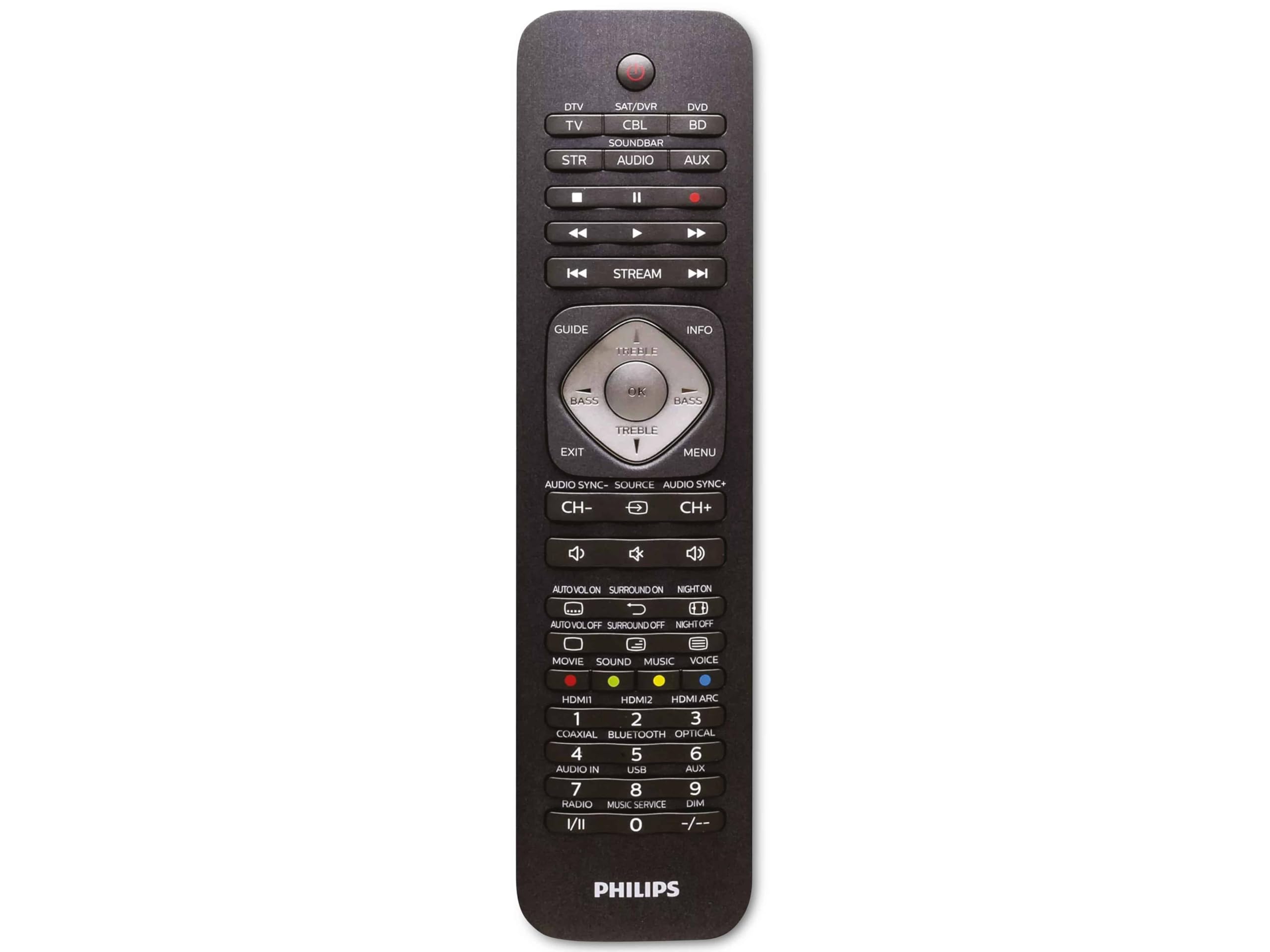
Image 1.1: Philips SRP5016/10 6-in-1 Universal Remote Control. This image displays the front view of the black universal remote control, highlighting its ergonomic design and button layout.
2. Setélan
2.1. Pamasangan batré
- Buka panutup kompartemen batré anu aya dina tonggong kadali jauh.
- Selapkeun dua batré AAA, mastikeun polaritasna bener (+ jeung -) sakumaha dituduhkeun di jero kompartemen.
- Tutup panutup kompartemen batré aman.
Catetan: Batré teu kaasup jeung kudu dibeuli misah.
2.2. Programming Devices
The Philips SRP5016/10 can be programmed using either direct code entry or the learning function.
2.2.1. Direct Code Entry (Recommended for common brands)
- Hurungkeun alat anu anjeun hoyong kontrol (contona, TV, pamuter DVD).
- Press and hold the desired device button on the universal remote (e.g., TV, DVD) for approximately 3 seconds until the device button lights up.
- Enter the 4-digit code for your device's brand (refer to the code list provided with your remote, if available, or search online for Philips universal remote codes).
- If the device turns off or responds, the code is correct. Press the device button again to save the code. If not, try the next code for your brand.
2.2.2. Learning Function (For devices not in the code list or advanced functions)
- Place the universal remote and your original remote control head-to-head, approximately 1-3 cm apart.
- Press and hold the desired device button on the universal remote (e.g., TV) for approximately 3 seconds until the device button lights up.
- Pencét jeung tahan tombol DIAJAR button on the universal remote until the device button starts blinking.
- On your original remote, press the button you wish to teach (e.g., POWER). The device button on the universal remote will blink rapidly and then stay solid, indicating successful learning.
- Repeat step 4 for all other buttons you wish to learn.
- Pencét éta DIAJAR button again to exit learning mode.
3. Parentah Operasi
3.1. Selecting a Device
To control a specific device, press the corresponding device button (e.g., TV, DVD, SAT, AUX, SOUNDBAR, ALIRAN) once. The selected device button will light up briefly to confirm your selection. You can then use the remote's buttons to control that device.
3.2. Fungsi Dasar
- kakuatan: Ngahurungkeun atawa mareuman alat nu dipilih.
- VOLUME +/-: Saluyukeun polumeu alat audio nu dipilih.
- CHANNEL +/-: Changes channels on the selected TV or DTV device.
- Bisu: Ngajempékeun audio.
- Jumlah tombol (0-9): Pikeun éntri saluran langsung atanapi input numerik anu sanés.
- NAVIGATION (Arrow buttons, OK): Pikeun menu navigasi jeung pilihan.
4. Pangropéa
4.1. Ngagantian batré
When the remote control's range decreases or buttons become unresponsive, it is time to replace the batteries. Follow the battery installation steps in Section 2.1. Always replace both AAA batteries simultaneously with new ones.
4.2. beberesih
Pikeun ngabersihkeun kadali jauh, paké kaén anu lemes sareng garing. Keur kokotor bandel, rada dampen the cloth with water or a mild cleaning solution. Avoid using abrasive cleaners, solvents, or alcohol, as these can damage the remote's surface or internal components.
5. Cara ngungkulan
- Jauh teu jalan:
- Pariksa naha batréna dipasang kalayan leres sareng henteu béak. Ganti upami diperyogikeun.
- Pastikeun teu aya halangan antara jauh sareng alat.
- Verify that the correct device button (e.g., TV, DVD) is selected.
- Alat teu ngabales paréntah:
- The device code may be incorrect. Try reprogramming the device using a different code from the code list or use the learning function.
- Ensure the remote's infrared emitter is pointed directly at the device's infrared receiver.
- Learning function not working:
- Pastikeun batré remot asli anyar sareng fungsina leres.
- Make sure the remotes are positioned correctly (head-to-head, 1-3 cm apart) during the learning process.
- Try learning the button again. Some original remotes have weaker IR signals that require multiple attempts.
6. Spésifikasi
| Fitur | Spésifikasi |
|---|---|
| merek | Philips |
| Ngaran modél | 6-di-1 |
| Nomer modél | SRP5016/10 |
| Alat nu cocog | Home Theater, DVD/Blu-ray Player, SoundBar, Television, Streaming Device |
| Fitur husus | Universal, Fungsi Diajar |
| Téhnologi konektipitas | Infrabeureum |
| Jumlah Maksimum Alat anu Dirojong | 6 |
| Tipe Controller | Tombol Control |
| Jumlah Kancing | Not specified (typical universal remote layout) |
| Rentang maksimum | 10 méter |
| Sumber Daya | 2 x Batré AAA (teu kalebet) |
| Jenis Bahan | palastik |
| Dimensi produk | 21.4 x 5.3 x 2.2 cm |
| Beurat produk | 130 g |
7. Garansi jeung Rojongan
For warranty information, please refer to the documentation provided at the time of purchase or contact your retailer. Philips offers customer support for their products. If you encounter issues that cannot be resolved using this manual, please visit the official Philips support websitus atanapi ngahubungan layanan palanggan maranéhna pikeun pitulung.
Punten tahan bukti pameseran anjeun pikeun klaim garansi.