
1. Bubuka
The Autopilot APCET2 is a versatile temperature controller designed for both cooling and heating applications. It features automatic day and night set points, detected by a built-in photocell, allowing for precise temperature management. Easy-to-use knobs facilitate setting adjustments, and a Memory-lock feature ensures consistent performance by preventing accidental changes to set points.
Fitur konci:
- Controls heating or cooling equipment with both day/night set points.
- Includes a 20-foot remote precision temperature sensor.
- Temperature control differential of +/- 3°F.
- Built-in photocell for automatic day/night detection.
- Temperature control range: 50°F–100°F (10°C–38°C).
- Electric power source.
2. Émbaran Kasalametan
Mangga baca sareng ngartos sadaya parentah kaamanan sateuacan ngoperasikeun alat ieu. Gagalna nuturkeun parentah ieu bisa ngakibatkeun shock listrik, seuneu, atawa tatu serius.
- Pamakéan jero rohangan wungkul: This device is intended for indoor use in dry locations. Do not expose to water or high humidity.
- Peunteun Listrik: Ensure the connected device's electrical rating does not exceed the thermostat's maximum load (1800 watts, 15 amps at 120V AC).
- Grounding anu leres: Always plug the thermostat into a properly grounded 3-prong outlet.
- Hindarkeun Overloading: Do not plug multiple high-power devices into the thermostat using a power strip or adapter.
- Panempatan sénsor: Position the temperature sensor away from direct heat sources, cold drafts, or direct sunlight to ensure accurate readings.
- beberesih: Disconnect power before cleaning. Use a dry cloth; do not use liquid cleaners.
- Barudak jeung Pets: Jauhkeun alat tina jangkauan barudak sareng piaraan.
3. Produk Langkungview
The Autopilot APCET2 thermostat features a user-friendly design with clearly labeled controls and indicators.
Hareupeun View:
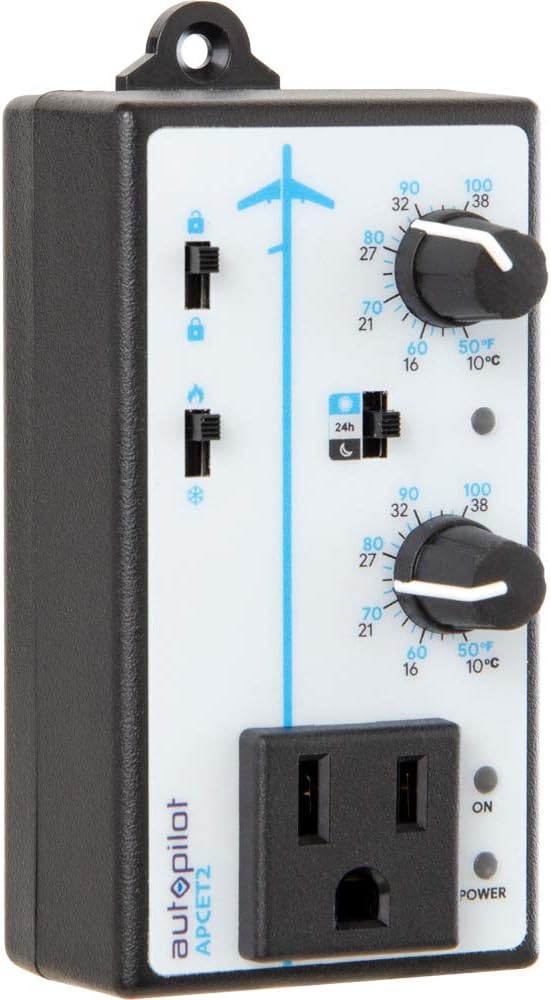
Gambar 3.1: Hareupeun view of the Autopilot APCET2 thermostat. This image displays the main control panel, including the two temperature setting knobs, the day/night mode switch, the heating/cooling mode switch, and the integrated power outlet for connecting your device. The "ON" and "POWER" indicator lights are also visible.
- Day/Night Temperature Knobs: Two separate knobs for setting desired temperatures for day and night cycles.
- Day/Night Mode Switch: Toggles between 24-hour operation or automatic day/night detection via photocell.
- Heating/Cooling Mode Switch: Selects whether the thermostat controls a heating or cooling device.
- Stopkontak Terpadu: Where the controlled device is plugged in.
- Lampu Indikator Kakuatan: Nyaangan nalika unit keur narima daya.
- Output Indicator Light: Illuminates when power is being supplied to the connected device.
Balik deui View:

Gambar 3.2: Balik deui view of the Autopilot APCET2 thermostat. This image shows the standard 3-prong power plug for connecting the thermostat to a wall outlet, along with the screws for potential wall mounting.
- Colokkeun kakuatan: Standard 3-prong plug for connecting to a 120V AC wall outlet.
- Liang ningkatna: For optional wall mounting.
ukuran:
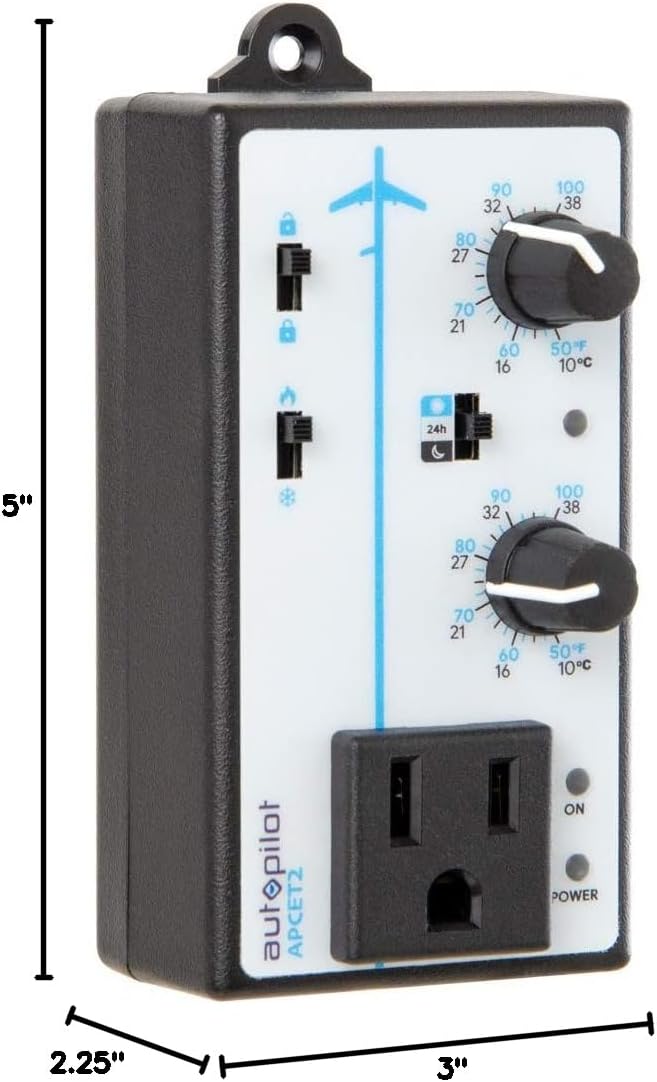
Gambar 3.3: Dimensions of the Autopilot APCET2 thermostat. The image indicates the device measures approximately 3 inches deep, 2.25 inches wide, and 5 inches high.
4. Parentah Setup
- Buka bungkus Alat: Carefully remove the Autopilot APCET2 thermostat and its components from the packaging.
- Sambungkeun Sensor Suhu: Plug the 20-foot remote precision temperature sensor into the designated port on the side of the thermostat. Ensure a secure connection.
- Posisi sénsor: Place the temperature sensor in the area where you want to monitor and control the temperature. Avoid placing it in direct sunlight, near heat sources, or in drafts, as this can affect accuracy.
- Colokkeun Termostat: Insert the 3-prong plug of the Autopilot APCET2 thermostat into a standard 120V AC grounded wall outlet. The Power indicator light should illuminate.
- Sambungkeun Alat Anjeun: Plug the heating or cooling device you wish to control into the integrated power outlet on the front of the thermostat.
- Cék awal: Ensure all connections are secure before proceeding to operation.
5. Parentah Operasi
The Autopilot APCET2 offers flexible temperature control with day and night settings and heating/cooling modes.
5.1 Selecting Operating Mode (Heating or Cooling)
- Panggihan lokasina Heating/Cooling Mode Switch on the front panel (typically marked with flame and snowflake icons).
- Geser saklar ka ikon seuneu pikeun Modeu pemanasan. In this mode, the connected device will turn ON when the temperature drops below the set point and turn OFF when it rises above the set point (considering the +/- 3°F differential).
- Geser saklar ka ikon snowflake pikeun Modeu tiis. In this mode, the connected device will turn ON when the temperature rises above the set point and turn OFF when it drops below the set point (considering the +/- 3°F differential).
5.2 Setting Day and Night Temperatures
The thermostat allows for distinct day and night temperature settings.
- Day Temperature Setting: Ngagunakeun éta upper knob (associated with the sun icon) to set your desired daytime temperature. Rotate the knob clockwise to increase the temperature and counter-clockwise to decrease it. The range is 50°F–100°F (10°C–38°C).
- Night Temperature Setting: Ngagunakeun éta lower knob (associated with the moon icon) to set your desired nighttime temperature. Rotate the knob clockwise to increase the temperature and counter-clockwise to decrease it. The range is 50°F–100°F (10°C–38°C).
5.3 Day/Night Detection Mode
The thermostat can automatically switch between day and night settings using its built-in photocell.
- Panggihan lokasina Day/Night Mode Switch (typically marked with a 24h icon and sun/moon icons).
- Geser saklar ka sun/moon icon pikeun Otomatis Poé / deteksi peuting. The built-in photocell will detect ambient light levels and automatically switch between your set day and night temperatures.
- Geser saklar ka 24h icon pikeun 24-Hour Operation. In this mode, the thermostat will continuously use the Day Temperature Setting, regardless of light conditions.
5.4 Memory-Lock Feature
The Memory-lock feature prevents accidental changes to your set points.
- Ka ngonci the settings, slide the small switch next to the padlock icon to the posisi dikonci. This will prevent the temperature knobs from being accidentally adjusted.
- Ka muka konci the settings, slide the switch to the posisi teu dikonci.
6. Pangropéa
Regular maintenance ensures optimal performance and longevity of your Autopilot APCET2 thermostat.
- beberesih: Disconnect the thermostat from the power outlet before cleaning. Use a soft, dry cloth to wipe the exterior. Do not use abrasive cleaners, solvents, or immerse the unit in water.
- Perawatan sénsor: Keep the temperature sensor clean and free from dust or debris. Ensure the sensor cable is not pinched or damaged.
- Panyimpenan: If storing the device for an extended period, disconnect it from power, clean it, and store it in a cool, dry place.
7. Cara ngungkulan
If you encounter issues with your Autopilot APCET2 thermostat, refer to the following common problems and solutions:
| Masalah | Mungkin Cukang lantaranana | Solusi |
|---|---|---|
| Device not turning ON/OFF at set temperature. | Incorrect mode selected (Heating/Cooling). Temperature differential not met. Thermostat not receiving power. Connected device is faulty or not powered. | Verify the Heating/Cooling switch is in the correct position. Allow for the +/- 3°F temperature differential. Check if the thermostat is securely plugged into a live outlet and the Power indicator is ON. Tés alat anu nyambung ku cara nyolokkeun langsung kana stop kontak témbok. |
| Temperature settings cannot be adjusted. | Memory-lock feature is engaged. | Slide the Memory-lock switch to the unlocked position. |
| Day/Night mode not switching automatically. | Photocell mode not selected. Photocell is obstructed or in constant light/darkness. | Ensure the Day/Night Mode switch is set to the sun/moon icon. Check that the photocell (small sensor on the front) is not covered and is exposed to natural light changes. |
| Bacaan suhu teu akurat. | Temperature sensor improperly placed or damaged. | Relocate the sensor away from direct heat, cold drafts, or sunlight. Inspect the sensor and cable for damage. |
Lamun masalah persists sanggeus nyobian solusi ieu, mangga ngahubungan rojongan customer.
8. Spésifikasi
| merek | Autopilot |
| Ngaran modél | Advanced Day & Night Cooling or Heating |
| Nomer modél | APCET2 |
| Dimensi produk | 3 "D x 2.25" W x 5" H |
| Tipe Controller | Knob & Push Button |
| Fitur husus | Lockable (Memory-lock) |
| Warna | Hideung |
| Mangpaat husus | Temperature Control in Grow Rooms, Controlling Heating and Cooling Equipment |
| Tipe Kontrol Suhu | Bisa diprogram |
| Komponén Kaasup | 20' remote precision temperature sensor |
| Sumber Daya | Listrik |
| Voltage | 120 volt |
| Wattage | 1800 watt |
| Item Beurat | 8.1 ons |
| Rentang Kontrol Suhu | 50°F–100°F (10°C–38°C) |
| Bédana Suhu | +/- 3 ° F |
| Tipe tampilan | LCD |
| Lampu tukang | Sumuhun |
| Tipe Pamasangan | Tembok Gunung |
9. Garansi sarta Rojongan Palanggan
For warranty information or technical assistance, please contact Autopilot customer support. Refer to the product packaging or the official Autopilot websitus pikeun detil kontak panganyarna.
When contacting support, please have your product model number (APCET2) and purchase information readily available.