1. Bubuka
The Sandberg USB Office Headset Pro Mono is designed for clear communication in office environments, online meetings, and calls. This manual provides essential instructions for setting up, operating, maintaining, and troubleshooting your headset to ensure optimal performance.
2. Eusi Paket
Punten parios yén sadaya barang aya dina pakét anjeun:
- Sandberg USB Office Headset Pro Mono (with integrated USB cable)

Image 1: The Sandberg USB Office Headset Pro Mono packaging, showing the headset and its features.
3. Setélan
Follow these steps to connect your headset to your computer:
- Milarian port USB-A anu sayogi dina komputer anjeun.
- Plug the USB-A connector of the headset into the USB-A port on your computer.
- Your operating system (Windows, macOS, etc.) should automatically detect and install the necessary drivers. This process typically takes a few moments.
- Once installed, the headset will be ready for use. You may need to select it as the default audio input and output device in your computer's sound settings or within your communication application (e.g., Zoom, Microsoft Teams, Skype).
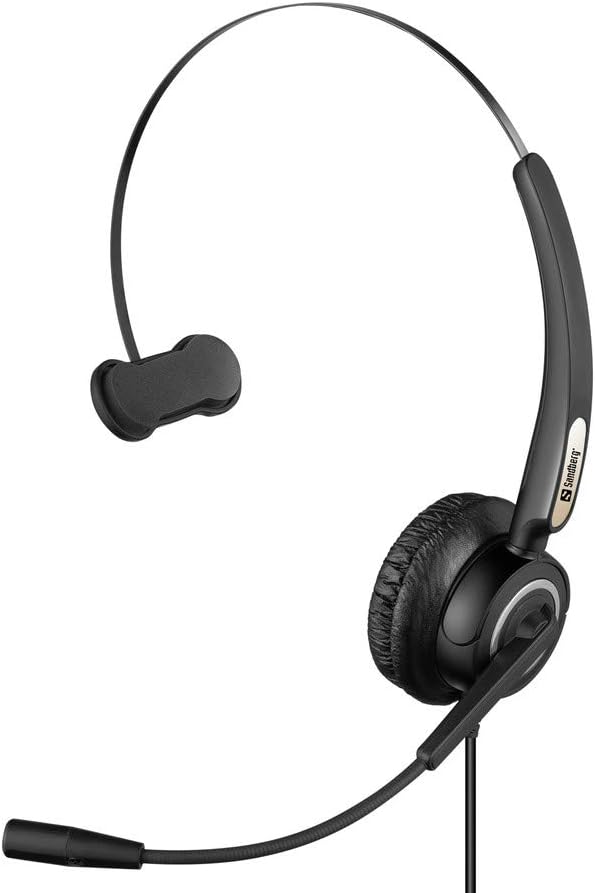
Image 2: The Sandberg USB Office Headset Pro Mono, illustrating its design for single-ear use with an adjustable microphone boom.
4. Parentah Operasi
4.1 Maké Headsét
- Place the earcup over one ear and adjust the headband for a comfortable fit.
- Position the microphone boom so that the microphone is approximately 1-2 inches (2.5-5 cm) from your mouth for optimal voice pickup.
4.2 Volume Control and Mute
The headset features an inline control unit on the USB cable for easy access to audio functions:
- Volume Up: Pencét tombol '+' pikeun ningkatkeun volume anu didangukeun.
- Volume Turun: Pencét tombol '-' pikeun ngirangan volume anu ngadangukeun.
- Mikropon bisu: Press the microphone button to mute or unmute your microphone. An indicator light on the control unit typically shows the mute status.
4.3 Making Calls and Using Applications
Once connected and selected as the default audio device, your headset will function with most communication applications. Ensure the headset is selected as the audio input (microphone) and output (speaker) device within the settings of your specific application (e.g., video conferencing software, softphone client).
5. Pangropéa
5.1 beberesih
- Lap headset lalaunan ku lawon anu lemes sareng garing.
- For ear cushions, use a slightly damp cloth with mild soap if necessary, then wipe dry immediately.
- Ulah nganggo bahan kimia, pangleyur, atanapi pembersih anu kasar.
- Avoid getting moisture into the earcup or microphone openings.
5.2 Panyimpenan
- Simpen headset di tempat anu bersih, garing, sareng jauh tina suhu anu ekstrim sareng sinar panonpoé langsung.
- Ulah nepi ka kabelna kusut supaya teu ruksak.
6. Cara ngungkulan
6.1 Teu Aya Sora tina Headset
- Ensure the USB connector is fully inserted into the computer's USB port.
- Check the volume level on the inline control unit and on your computer's operating system.
- Verify that the Sandberg USB Office Headset Pro Mono is selected as the default playback device in your computer's sound settings.
- Try connecting the headset to a different USB port on your computer.
6.2 Mikropon Teu Gawé
- Ensure the microphone is not muted via the inline control unit.
- Check that the Sandberg USB Office Headset Pro Mono is selected as the default recording device in your computer's sound settings.
- Adjust the microphone input level in your computer's sound settings.
- Confirm that the microphone boom is positioned correctly near your mouth.
6.3 Headset Not Detected by Computer
- Unplug the headset and plug it back into a different USB port.
- Balikan deui komputer anjeun.
- Check your computer's Device Manager (Windows) or System Information (macOS) to see if the USB device is listed.
7. Spésifikasi
| Fitur | Rincian |
|---|---|
| Ngaran modél | Pro Mono |
| Nomer modél | 126-14 |
| Panyambung | 1 x USB A Male Plug |
| Panjang kabel | 6.6 ft (2.0 m) |
| Tipe Kontrol | Volume Control (Inline) |
| Fitur husus | Mikropon Kaasup |
| Bahan | palastik |
| Item Beurat | 0.035 ons (kira-kira 1 gram) |
| Dimensi produk | 6.3 x 4.72 x 6.69 inci |
8. Garansi jeung Rojongan
For warranty information, please refer to the documentation provided with your purchase or visit the official Sandberg website. For technical support or further assistance, please contact Sandberg customer service or your retailer.
Anjeun tiasa mendakan langkung seueur inpormasi sareng sumber dukungan dina Sandberg websitus.