
Bubuka
The Motorola Solutions TLK 150 is a mobile two-way radio designed for rapid and reliable communication across a nationwide cellular network. This device offers ease of use and management, built for safe operation in vehicles with nationwide Push-to-Talk (PTT) capabilities. It allows teams to communicate instantly without the need for complex infrastructure setup or FCC licensing. The TLK 150 can integrate with compatible MOTOTRBO systems, LMR, and smartphones.
fitur konci ngawengku:
- Nationwide Push-to-Talk: Instant communication with team members across broad coverage areas.
- Safe In-Vehicle Operation: Designed for use while driving, featuring a one-button PTT microphone and support for hands-free accessories.
- Reliable 4G LTE Network Coverage: Minimizes dropped calls and ensures connectivity.
- Konstruksi awét: Built to withstand harsh working environments, resistant to rain, dust, and extreme temperatures.
- Desain kompak: A powerful, small device suitable for various mounting locations within a vehicle.
Parentah Setup
Follow these steps to set up your TLK 150 Mobile Two-Way Radio:
- Buka bungkus Alat: Carefully remove the TLK 150 radio and all accessories from the packaging. Ensure the microphone is present.
- Pilih Lokasi Pasang: Choose a secure and accessible location within your vehicle for mounting the radio. Consider visibility and ease of access to controls.
- Mount the Radio: Securely attach the TLK 150 to the chosen location using appropriate mounting hardware (not included unless specified).
- Sambungkeun Antenna: Connect the necessary antennas to the corresponding ports on the rear of the radio. The ports are typically labeled MAIN, DIV, and GNSS. Ensure connections are tight.
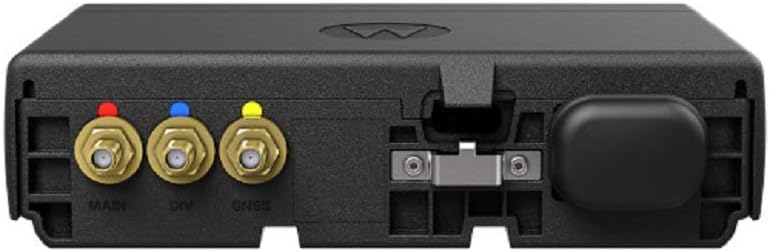
Gambar: Tukangeun view of the TLK 150 radio, highlighting the MAIN (red), DIV (blue), and GNSS (yellow) antenna ports.
- Sambungkeun Kakuatan: Connect the radio to your vehicle's power supply according to the installation guide provided with the mounting kit or power cable. Ensure proper voltage (3.7 Volt).
- Sambungkeun Mikropon: Plug the Push-to-Talk (PTT) microphone into its designated port on the radio.
- Daya mimiti Hurung: Once all connections are secure, power on the device. The radio will connect to the nationwide cellular network automatically.
- Subscription Activation: Your TLK 150 requires an active subscription for nationwide Push-to-Talk services. Contact your service provider for activation and talk group management.
Parentah Operasi
This section provides basic instructions for operating your TLK 150 radio.

Gambar: Hareupeun view of the Motorola TLK 150 Mobile Two-Way Radio with microphone.
- Hurungkeun/Pareuman: Press and hold the power button (usually located on the front panel) to turn the radio on or off.
- Saluyukeun Volume: Use the volume control knob or buttons to adjust the listening volume to a comfortable level.
- Select Talk Group/Channel: Use the channel selector knob or buttons to navigate through the available talk groups or channels. The display will show the current selection. The radio supports up to 96 channels.
- Initiate Push-to-Talk (PTT): To transmit, press and hold the PTT button on the microphone. Speak clearly into the microphone. Release the PTT button to listen.
- Operasi Hands-Free: If using hands-free accessories, ensure they are properly connected and configured. Refer to the accessory's manual for specific instructions.
- Narima Telepon: When a call is received, the radio will automatically play the audio. Ensure your volume is adjusted appropriately.
Pangropéa
Proper maintenance ensures the longevity and optimal performance of your TLK 150 radio.
- beberesih: Regularly clean the exterior of the radio with a soft, damp lawon. Ulah nganggo bahan kimia anu kasar atanapi pembersih anu abrasif. Pastikeun sadaya palabuhan bébas tina lebu sareng kokotor.
- Pamariksaan: Periodically inspect cables, connectors, and antennas for any signs of wear or damage. Replace damaged components immediately.
- Apdet parangkat lunak: Keep the radio's software updated as recommended by Motorola Solutions to ensure optimal performance and access to new features. Consult your service provider for update procedures.
- Perawatan batré: The radio contains a Lithium Ion battery. While designed for durability, avoid exposing the device to extreme temperatures for prolonged periods when not in use.
Pamérésan masalah
If you encounter issues with your TLK 150 radio, refer to the following common troubleshooting steps:
| Masalah | Mungkin Cukang lantaranana | Solusi |
|---|---|---|
| Radio teu hurung. | No power supply, loose power connection, or faulty power cable. | Check power connections. Ensure the vehicle's ignition is on if connected to an accessory power source. Verify power cable integrity. |
| Teu tiasa ngirim atanapi nampi. | No network signal, incorrect talk group selected, or subscription issue. | Move to an area with better cellular coverage. Verify the correct talk group is selected. Contact your service provider to confirm subscription status. |
| Kualitas audio goréng. | Low signal strength, microphone obstruction, or incorrect volume. | Adjust volume. Ensure microphone is clear and not obstructed. Check antenna connections. Move to an area with stronger signal. |
| Pintonan kosong atanapi beku. | glitch software atawa kasalahan samentara. | Perform a soft reset by powering the radio off and then on again. If the issue persists, contact support. |
If the problem persists after trying these steps, please contact Motorola Solutions customer support or your authorized dealer.
spésifikasi
Below are the technical specifications for the Motorola Solutions TLK 150 Mobile Two-Way Radio (Model HK2182A):
- merek: Motorola
- Jumlah modél: HK2182A
- warna: Hideung
- Jumlah Saluran: 96
- Fitur husus: Long Range, Rechargeable, Waterproof
- Rentang Frékuénsi: 450-470 MHz
- Jangkauan Ngobrol Maksimum: 35 mil
- Voltage: 3.7 volt
- Tingkat tahan cai: Tahan cai
- Jumlah Batré: 1 batré Litium Ion diperlukeun (internal)
- Beurat barang: 1.41 pon
- Noise kadenge: 50 desibel
- Alat anu cocog: Cellular Phones (for network connectivity)
- Jenis Tuner: UHF
- Protokol konektipitas: LTE
- Média Diwangun-Di: Mikropon
- Jumlah Unit: 1.0 Ngitung
- Pabrikan: Motorola Leyuran
Émbaran jaminan
Motorola Solutions products typically come with a standard manufacturer's warranty covering defects in materials and workmanship. The specific terms and duration of the warranty may vary by region and purchase agreement.
For detailed warranty information, please refer to the warranty card included with your product or visit the official Motorola Solutions websitus. Simpen bukti pameseran anjeun pikeun klaim garansi.
Rojongan jeung Kontak
If you require technical assistance, have questions about your TLK 150 radio, or need to report an issue, please contact Motorola Solutions customer support or your authorized dealer.
Motorola Solutions recommends only purchasing from an authorized dealer.
You can typically find contact information on the official Motorola Solutions websitus atanapi ngalangkungan dokumentasi produk anjeun.