1. Bubuka
The AOPUTTRIVER HP-770D is a professional high-precision digital multimeter designed for accurate measurement of various electrical parameters. It features a 40000-count display, auto/manual ranging, and a range of functions including NCV, True RMS, temperature measurement, and more. This manual provides essential information for the safe and effective operation of your HP-770D multimeter.

Figure 1: AOPUTTRIVER HP-770D Digital Multimeter and included accessories.
2. Eusi Paket
Punten parios eusi bungkusan nalika unboxing pikeun mastikeun yén sadaya barang aya:
- 1 x HP-770D Digital Multimeter
- 1 x Panerapan Suhu
- 1 x Operation Guide (this manual)
- 1 x Case Pelindung
- 2 x Test Leads (Red and Black)
- Batré 1 x 9V
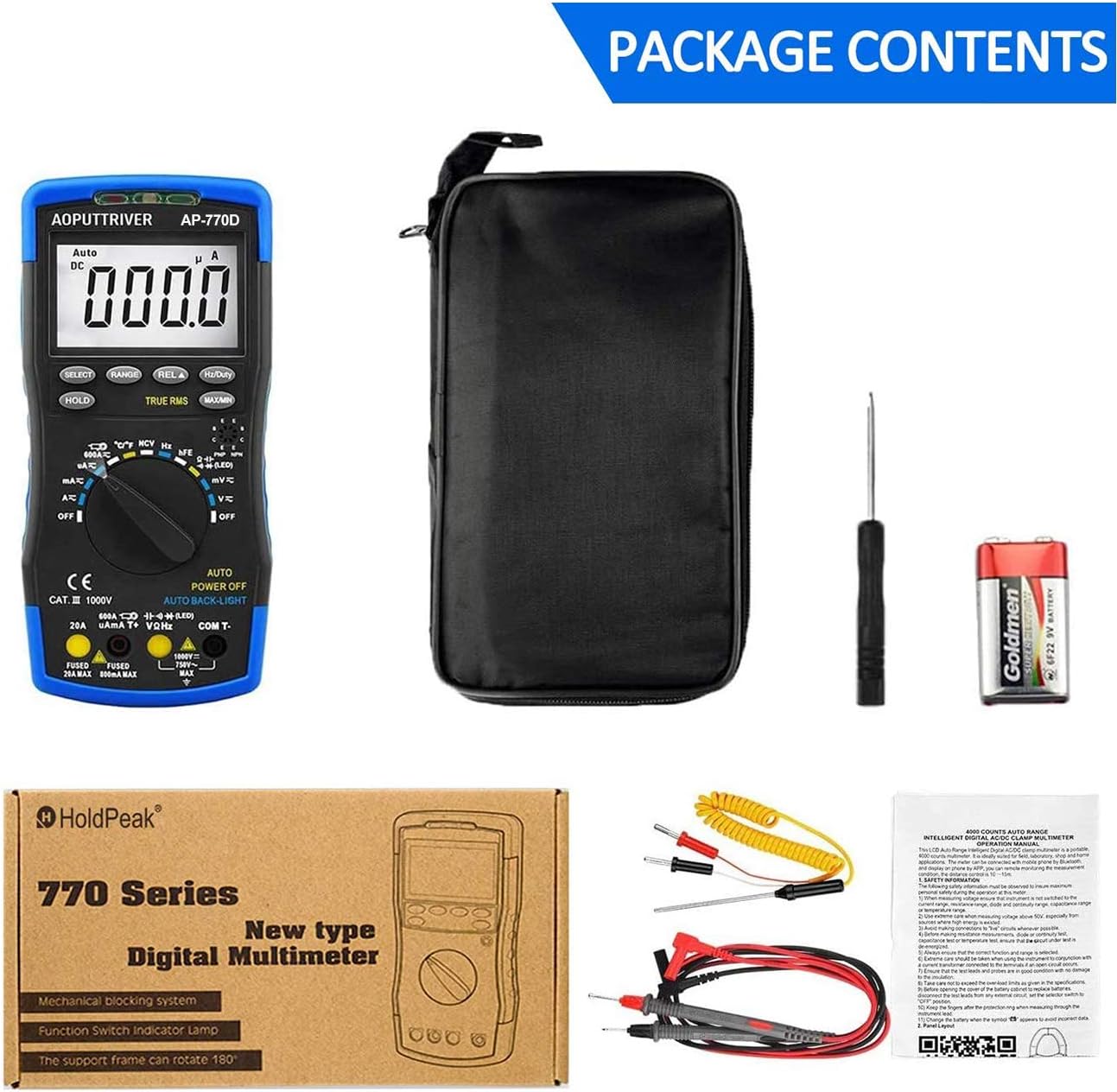
Figure 2: All items included in the HP-770D Multimeter package.
3. Produk Langkungview jeung Fungsi konci
The HP-770D multimeter is equipped with various features for comprehensive electrical testing.

Figure 3: Labeled diagram of the HP-770D Multimeter's key functions.
- NCV Red Light: Indicates non-contact voltage deteksi.
- Sénsor CDS: Light sensor for auto backlight function.
- NCV Green Light: Indicates non-contact voltage deteksi.
- Daérah Deteksi NCV: Area pikeun vol non-kontaktage deteksi.
- tampilan: 40000-count digital display with bar graph.
- Konci PILIH: Toggles between functions within a rotary switch position (e.g., AC/DC, Diode/Continuity).
- konci tahan: Ngabekukeun bacaan tampilan ayeuna.
- RANGE Key: Switches between auto and manual ranging.
- Konci REL: Ngaktipkeun modeu pangukuran relatif.
- Hz/Duty Key: Ngaganti antara pangukuran frékuénsi sareng siklus tugas.
- MAX/MIN Key: Némbongkeun nilai maksimum sareng minimum anu diukur.
- Transistor hFE Test Input Jack: Sockets for transistor testing.
- Saklar Rotary: Milih fungsi pangukuran anu dipikahoyong.
- VΩHz COM T- Input Jack: Common input for voltage, resistance, frequency, and temperature.
- COM T- Input Jack: Input umum pikeun sadaya pangukuran.
- 20A Input Jack: Input pikeun pangukuran arus anu luhur (dugi ka 20A).
- µAmA T+ Input Jack: Input for microampere and milliamppangukuran ayeuna.
4. Setélan
4.1 Pamasangan batré
The HP-770D multimeter requires one 9V battery for operation. The battery compartment is located on the back of the device.
- Pastikeun multimeter dina kaayaan OFF.
- Teangan tempat panutup kompartemen batré dina tonggong unit.
- Use a small Phillips head screwdriver to loosen the screw securing the battery cover.
- Cabut panutup batré.
- Connect the 9V battery to the battery clip, observing correct polarity (+ to + and - to -).
- Teundeun batré kana kompartemen.
- Ganti tutup batréna sareng kencengkeun sekrup.

Gambar 4: Tukangeun view of the HP-770D, showing the battery compartment and the 180° rotating kickstand.
4.2 Sambungan Kabel Uji
Always connect the test leads to the correct input jacks for the desired measurement. The HP-770D features a mechanical blocking system to prevent incorrect lead insertion.
- Pikeun Voltage, Resistance, Frequency, Capacitance, Diode, Continuity, and Temperature measurements, insert the black test lead into the COM T- jack jeung test beureum kalungguhan kana VΩHz jack.
- For Current measurements (µA/mA), insert the black test lead into the COM T- jack jeung test beureum kalungguhan kana µAmA T+ jack.
- For high current measurements (up to 20A), insert the black test lead into the COM T- jack jeung test beureum kalungguhan kana 20A jack.
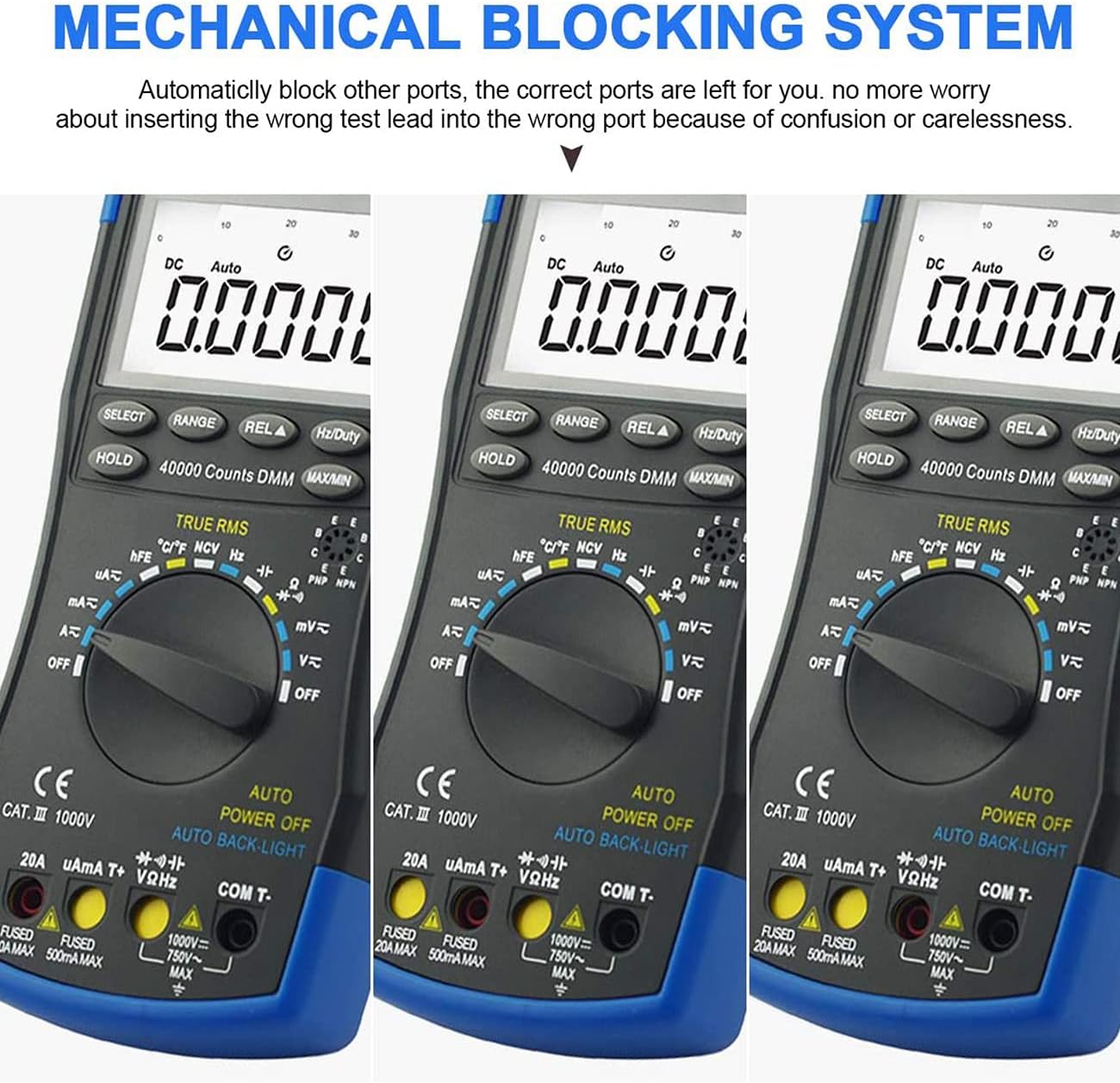
Figure 5: The mechanical blocking system automatically blocks incorrect input ports based on the selected function, enhancing safety.
5. Parentah Operasi
Before any measurement, ensure the multimeter is set to the correct function and range, and the test leads are properly connected.
5.1 DC / AC Voltage Pangukuran
- Hurungkeun saklar rotary ka V~ (Vol. ACtage) atawa V- (DC Voltage) posisi.
- Sambungkeun kabel uji kana sirkuit sacara paralel.
- Baca voltage value on the display. Use the PILIH button to toggle between AC and DC if in a combined mode.
5.2 DC/AC Current Measurement
- Hurungkeun saklar rotary ka µA~, mA~, atawa A~ position (for AC or DC current).
- Sambungkeun lead test dina runtuyan jeung sirkuit.
- Read the current value on the display. Use the PILIH button to toggle between AC and DC if in a combined mode.
5.3 Résistansi Ukur
- Hurungkeun saklar rotary ka Ω posisi.
- Pastikeun sirkuit geus dipareuman énergina sateuacan ngukur résistansi.
- Sambungkeun lead test kana komponén anu bakal diukur.
- Maca nilai résistansi dina tampilan.
5.4 Pangukuran Kamampuh
- Hurungkeun saklar rotary ka Kapasitansi posisi.
- Pastikeun kapasitor geus kosong sapinuhna sateuacan nyambungkeun kabel uji.
- Sambungkeun test lead sakuliah kapasitor nu.
- Maca nilai kapasitansi dina tampilan.
5.5 Pangukuran Frékuénsi sareng Siklus Tugas
- Hurungkeun saklar rotary ka Hz posisi.
- Sambungkeun kabel tés kana sumber sinyal.
- Pencét éta Hz / Kawajiban tombol pikeun ngaganti antara frékuénsi (Hz) sareng siklus tugas (%).
- Baca nilai dina tampilan.
5.6 Diode Test and Continuity Buzzer
- Hurungkeun saklar rotary ka Dioda / Kontinuitas posisi.
- Pencét éta PILIH button to toggle between Diode Test and Continuity.
- Tés Diode: Connect the red lead to the anode and black lead to the cathode. The display shows the forward voltage leupaskeun. Balikkeun kabelna pikeun mariksa sirkuit kabuka.
- Kontinuitas: Sambungkeun kabel tés ka sakuliah sirkuit atanapi komponén. Bunyi bip anu terus-terusan nunjukkeun kontinuitas (résistansi rendah).
5.7 Pangukuran Suhu
- Hurungkeun saklar rotary ka ° C / ° F posisi.
- Insert the temperature probe into the VΩHz jeung COM T- jacks.
- Place the probe tip on or in the object whose temperature is to be measured.
- Pencét éta PILIH tombol pikeun pindah antara Celsius (°C) jeung Fahrenheit (°F).
- Baca nilai suhu dina tampilan.

Figure 6: The HP-770D can measure temperature using the included probe, suitable for liquids or surfaces.
5.8 Non-Kontak Voltage (NCV) Deteksi
- Hurungkeun saklar rotary ka NCV posisi.
- Move the NCV detection area (top of the meter) close to the wire or power outlet.
- The red and green NCV lights will illuminate, and the buzzer will sound, indicating the presence of AC voltage.

Figure 7: NCV function allows detection of live wires without direct contact, enhancing safety.
5.9 hFE Test (Transistor Test)
- Hurungkeun saklar rotary ka hFE posisi.
- Tangtukeun naha transistorna NPN atanapi PNP.
- Insert the transistor leads (Emitter, Base, Collector) into the corresponding hFE test input jacks.
- The display will show the hFE (DC current gain) value.
5.10 Fungsi Husus
- Tahan Data (HOLD): Pencét éta TAHAN tombol pikeun ngabekukeun bacaan ayeuna dina tampilan. Pencét deui pikeun ngaleupaskeun.
- MAX / Mnt: Pencét éta MAX/MIN button to display the maximum or minimum value recorded during a measurement session.
- Relative Value (REL): Pencét éta REL button to set the current reading as a reference point, and subsequent measurements will be displayed as a deviation from this reference.
- Lampu tukang otomatis: The display backlight automatically adjusts based on ambient light conditions.
- Otomatis Pareum: The multimeter will automatically power off after a period of inactivity to conserve battery life.
- RMS leres: Provides accurate AC measurements for non-sinusoidal waveforms.
6. Pangropéa
6.1 beberesih
Pikeun ngabersihkeun multimeter, usap wadahna ku adamp cloth and a mild detergent. Do not use abrasives or solvents. Ensure the device is turned off and disconnected from any circuits before cleaning.
6.2 Ngagantian batré
When the battery low indicator appears on the display, replace the 9V battery as described in Section 4.1. Always use a fresh 9V battery.
6.3 Ngagantian sekering
If the current measurement function fails, the fuse may need replacement. Refer to the specifications for the correct fuse type. Fuse replacement should only be performed by qualified personnel.
- F1 Fuse: 500mA/250V (for µA/mA range)
- F2 Fuse: 20A/250V (for 20A range)
Warning: To avoid electric shock or damage to the meter, never attempt to replace the fuse with the test leads connected to a circuit.
7. Cara ngungkulan
| Masalah | Mungkin Cukang lantaranana | Solusi |
|---|---|---|
| Taya tampilan atawa taram tampilan | Low battery; Power off; Faulty display. | Replace battery; Turn on the meter; Contact support. |
| Bacaan anu salah | Wrong function selected; Incorrect lead connection; Out of range. | Select correct function; Connect leads properly; Select appropriate range or auto-range. |
| Pangukuran ayeuna teu jalan | Blown fuse; Incorrect lead connection. | Check and replace fuse (see 6.3); Ensure leads are in current input jacks. |
| Continuity buzzer not sounding | High resistance; Not in continuity mode. | Check resistance; Ensure rotary switch is on continuity and SELECT button is pressed. |
8. Spésifikasi
| Parameter | Range/Nilai |
|---|---|
| tampilan | 40000 cacah |
| Range Pilih | Otomatis / Manual Ranging |
| DC Voltage | 40mV/400mV/4V/40V/400V/1000V |
| AC Voltage | 40mV/400mV/4V/40V/400V/750V |
| DC Ayeuna | 400µA/4000µA/40mA/400mA/4A/20A |
| AC Ayeuna | 400µA/4000µA/40mA/400mA/4A/20A |
| Résistansi | 400Ω/4kΩ/40kΩ/400kΩ/4MΩ/40MΩ |
| Kapasitansi | 9.999nF/99.99nF/999.9nF/9.999µF/99.99µF/999.9µF/9.999mF/99.99mF |
| Frékuénsi | 9.999Hz/99.99Hz/999.9Hz/9.999KHz/99.99KHz/999.9KHz/9.999MHz |
| Suhu | -20 ℃ ~ 1000 ℃ (-4 ℉ ~ 1832 ℉) |
| Siklus tugas | 0.1%~99.9% |
| Diménsi | 195 x 88 x 40 mm (7.68 x 3.46 x 1.57 inci) |
| Beurat | 350g (0.77 pon) |
| Sumber Daya | Batré 9V |
| Standar Kasalametan | IEC-1010, Double Insulation, CAT III Overvoltage |
9. Garansi jeung Rojongan
The AOPUTTRIVER HP-770D Digital Multimeter is covered by a garansi dua taun ti tanggal beuli. Garansi ieu nyertakeun cacad dina bahan sareng pagawean dina panggunaan normal.
For technical support, warranty claims, or any inquiries regarding your product, please contact AOPUTTRIVER customer service. Refer to the contact information provided with your product packaging or visit the official AOPUTTRIVER websitus pikeun pitulung.
Punten nahan resi pameseran anjeun salaku bukti pameseran kanggo tujuan garansi.


