Bubuka
Hatur nuhun pikeun meuliasing the Altec Lansing AL-5003 Multimedia DJ Trolly Speaker. This speaker is designed to deliver powerful audio for various applications, including parties and surround sound systems. Featuring wireless connectivity, a built-in trolley for portability, and multiple input options, the AL-5003 offers a versatile audio experience. Please read this manual carefully to ensure proper setup, operation, and maintenance of your speaker.
Parentah Kasalametan penting
- Read these instructions thoroughly before operating the speaker.
- Simpen manual ieu kanggo rujukan ka hareup.
- Ulah ngalaan speaker ka hujan atawa beueus.
- Ulah meungpeuk sagala bukaan ventilasi.
- Entong dipasang di deukeut sumber panas sapertos radiator, register panas, kompor, atanapi aparat sanésna (kalebet ampLiifiers) anu ngahasilkeun panas.
- Nangtayungan kabel listrik tina leumpang atawa diciwit, utamana dina colokan, wadah merenah, jeung titik dimana aranjeunna kaluar tina aparat.
- Ngan anggo kantétan/aksésori anu ditunjuk ku produsén.
- Cabut colokan alat ieu nalika badai kilat atanapi nalika henteu dianggo kanggo waktos anu lami.
- Rujuk sadayana jasa ka tanaga jasa anu mumpuni.
Eusi pakét
Mangga parios pakét kanggo barang-barang ieu:
- Altec Lansing AL-5003 Multimedia DJ Trolly Speaker
- Kabel listrik
- Kadali jauh
- Manual pamaké
- Auxiliary Cable (may vary by region)
Produk Leuwihview
The AL-5003 speaker features a robust design with integrated wheels and a handle for easy transport. It includes a powerful 10-inch speaker and a 1-inch tweeter, providing clear and dynamic sound. The control panel is located on the top of the unit, offering easy access to various functions.
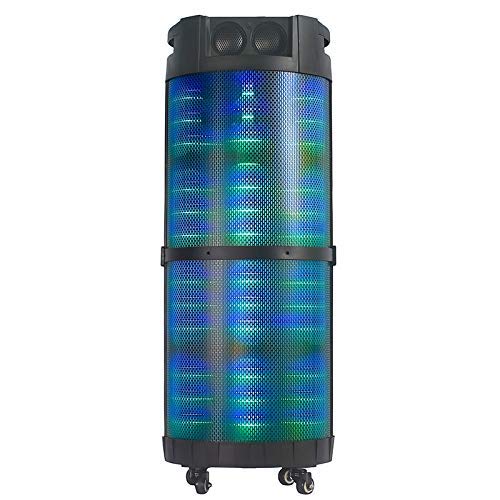
Gambar 1: Hareupeun view of the Altec Lansing AL-5003 speaker, showcasing its cylindrical design and illuminated grille. The speaker features a sturdy build with integrated wheels at the base for portability.
Panel Kontrol sareng Sambungan
The top panel of the speaker houses the main controls and input/output ports.
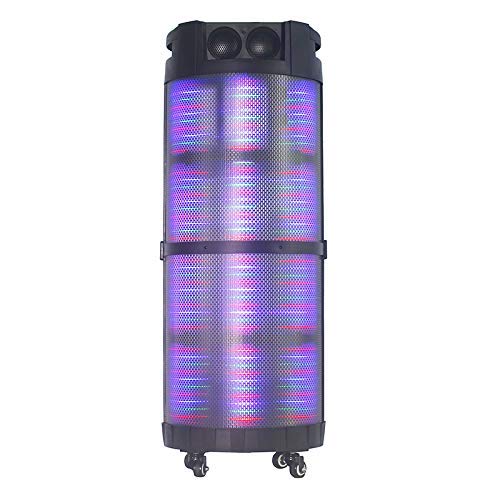
Gambar 2: Ti luhur ka handap view of the AL-5003 speaker, highlighting the control panel with various buttons and knobs, along with the top-mounted speakers. This view also shows the integrated handle for easy transport.
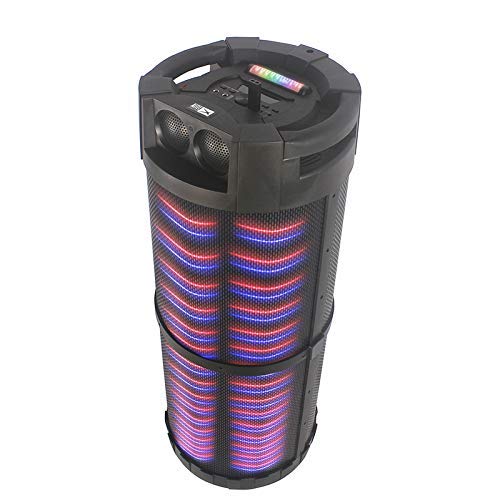
Gambar 3: Angled view of the AL-5003 speaker, providing a perspective of its overall structure, including the side grille and the top control area. The dynamic lighting effects are visible through the mesh.
Common controls include Power, Volume, Mode selection, Play/Pause, Track Skip, and inputs for USB, Auxiliary, and potentially Microphone (if available on the model).
Parentah Setup
- Ngabongkar bungkusan: Carefully remove the speaker and all accessories from the packaging. Retain the packaging for future transport or storage.
- panempatan: Place the speaker on a stable, flat surface. Ensure there is adequate ventilation around the unit. For optimal sound, position the speaker in a central location within the listening area.
- Sambungan Daya: Connect the provided power cord to the AC input on the speaker and then plug it into a standard wall outlet (AC 100-240V, 50/60Hz).
- Biaya Awal (upami aya): If the speaker has an internal battery (Lead Acid battery mentioned in specs), it is recommended to fully charge it before first use. The charging indicator light will typically show charging status.
- Daya Hurung: Press the Power button on the control panel or remote control to turn on the speaker.
Parentah Operasi
1. Mode Bluetooth
- Aktipkeun Bluetooth: Turn on the speaker. Press the "Mode" button on the control panel or remote until "Bluetooth" or "BT" is displayed (or indicated by a blue LED). The speaker will enter pairing mode, indicated by a flashing light or audible prompt.
- Masangkeun sareng Alat: On your mobile device (smartphone, tablet, laptop), go to Bluetooth settings and enable Bluetooth. Milarian pikeun available devices. You should see "AL-5003" or "Altec Lansing" in the list. Select it to pair.
- Konfirmasi sambungan: Once successfully paired, the speaker will emit a confirmation sound, and the Bluetooth indicator light will become solid.
- Playback: Start playing audio on your connected device. Use the speaker's volume controls or your device's volume controls to adjust the sound level. Use the Play/Pause, Next, and Previous buttons on the speaker or remote to control playback.
2. Auxiliary (AUX) Mode
- Sambungkeun kabel AUX: Insert one end of a 3.5mm auxiliary cable into the AUX input port on the speaker. Connect the other end to the headphone jack or audio output of your external audio device (e.g., MP3 player, laptop).
- Pilih Modeu AUX: Press the "Mode" button on the speaker or remote until "AUX" is displayed or indicated.
- Playback: Play audio from your connected device. Adjust volume using both the speaker's controls and your device's volume.
3. USB Playback Mode
- Lebetkeun Drive USB: Selapkeun USB flash drive nu ngandung audio MP3 files kana port USB dina spiker.
- Pilih USB Mode: The speaker may automatically switch to USB mode. If not, press the "Mode" button until "USB" is displayed or indicated.
- Playback: Speaker bakal otomatis mimiti muterkeun audio files from the USB drive. Use the Play/Pause, Next, and Previous buttons to control playback.
4. Karaoke Function (if applicable)
If your AL-5003 model includes a microphone input, you can use it for karaoke:
- Sambungkeun Mikropon: Plug a wired microphone into the designated microphone input jack.
- Saluyukeun Volume: Use the dedicated Microphone Volume knob (if present) to adjust the microphone's volume.
- Kontrol Gema: Some models may have an Echo knob to add an echo effect to the microphone audio.
5. Operasi Jauh Jauh
The included remote control provides convenient access to all major functions:
- kakuatan: Turn the speaker On/Off.
- Mode: Switch between Bluetooth, AUX, USB, and other available modes.
- Volume +/-: Saluyukeun volume master.
- Puter / Reureuh: Mimitian atanapi ngareureuhkeun playback.
- Saméméhna/Salajengna: Luncat ka lagu saméméhna atawa salajengna.
- EQ: Select different equalizer presets (if available).
- Jempé: Jempekeun atanapi aktipkeun deui audiona.
Pangropéa
- beberesih: Anggo kaén anu garing sareng lemes pikeun ngabersihan bagian luar spéker. Ulah make cleaners cair atawa bahan abrasive.
- Panyimpenan: Lamun teu dipaké pikeun période nambahan, nyimpen speaker dina tiis, tempat garing, jauh ti sinar panonpoé langsung jeung hawa ekstrim.
- Perawatan batré: If the speaker has a built-in rechargeable battery, avoid fully discharging it frequently. For long-term storage, charge the battery to approximately 50-70% every few months to prolong its lifespan.
- Ventilasi: Pastikeun yén bukaan ventilasi teu diblokir pikeun nyegah overheating.
Pamérésan masalah
| Masalah | Mungkin Cukang lantaranana | Solusi |
|---|---|---|
| Taya kakuatan | Power cord not connected; Power outlet not working; Speaker is off; Battery drained. | Ensure power cord is securely connected. Try a different outlet. Press the Power button. Charge the battery. |
| Taya sora | Volume too low; Incorrect mode selected; Device not connected properly; Mute function active. | Increase volume on speaker and source device. Select the correct input mode (Bluetooth, AUX, USB). Reconnect device. Check if mute is active on remote. |
| Gagalna papasangan Bluetooth | Speaker not in pairing mode; Device Bluetooth off; Speaker too far from device; Interference. | Ensure speaker is in Bluetooth pairing mode. Turn on Bluetooth on your device. Move device closer to speaker. Turn off other Bluetooth devices nearby. |
| playback USB teu jalan | Drive USB teu dipasang kalawan bener; Teu cocog file formatna; drive USB ruksak. | Reinsert USB drive. Ensure files aya dina format MP3. Coba drive USB anu béda. |
| Kadali jauh teu jalan | Batteries drained; Obstruction between remote and speaker; Remote not pointed at sensor. | Replace remote control batteries. Remove any obstructions. Point remote directly at the speaker's IR sensor. |
spésifikasi
| Fitur | Rincian |
|---|---|
| Ngaran modél | Altec Lansing AL-5003 Multimedia DJ Trolly Speaker |
| Tipe Speaker | Sakuliling Sora |
| Fitur husus | Nirkabel |
| Dianjurkeun Mangpaat | For Surround Sound Systems, Party |
| Alat nu cocog | Gaming Console, Karaoke Machine, Laptop, MP3 Player, Smartphone, Tablet |
| Konfigurasi Saluran Sakuliling Sora | 1.0 |
| Métode kontrol | Jauh |
| Téknologi Komunikasi Nirkabel | Bluetooth |
| Ukuran Speaker | 10 inci |
| Sumber Daya | Kabel Listrik |
| Diaméter Tweeter | 1 inci |
| Input Audio Cocog | Alat bantu, USB |
| Konektipitas Speaker | Wired (for power), Wireless (Bluetooth) |
| Audio Wattage | 100 Watt |
| Komposisi sél batré | Asam kalungguhan |
| Tipe Pamasangan | Stépar |
Garansi sareng Rojongan
Altec Lansing products are manufactured to the highest quality standards. For information regarding warranty coverage, technical support, or service inquiries, please refer to the warranty card included with your product or visit the official Altec Lansing website. Please have your model number (AL-5003) and purchase details ready when contacting support.
Websitus: www.alteclansing.com (This is a generic link, actual link might vary by region)


