
Bubuka
This user manual provides detailed instructions for the installation, operation, maintenance, and troubleshooting of the Aruba AP-555 Wireless Access Point. Please read this manual thoroughly before using the device to ensure proper setup and optimal performance.
Produk Leuwihview
The Aruba AP-555 is an advanced 802.11ax (Wi-Fi 6) wireless access point designed for high-density environments. It supports aggregate peak data rates of up to 5.95 Gbit/s across 2.4 GHz and 5 GHz bands, leveraging MIMO and Beamforming technologies for enhanced performance. This access point is ideal for accommodating a large number of mobile and IoT devices, ensuring robust and efficient wireless connectivity.
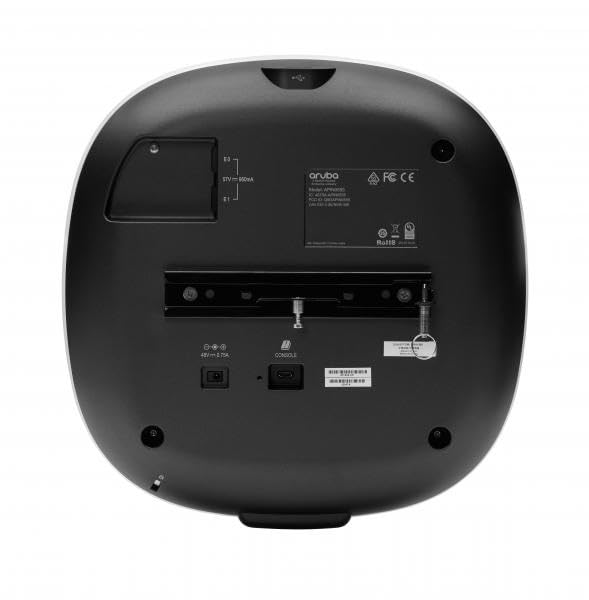
This image displays the rear panel of the Aruba AP-555 Wireless Access Point. Visible features include the mounting bracket, Ethernet ports (E0, E1), a USB port, a console port, and the power input (48V – 0.75A). Regulatory markings such as Aruba logo, FCC, CE, and RoHS are also present.
Disetél
1. Ngabongkar bungkusan
Sacara saksama miceun sadaya komponén tina bungkusan. Pastikeun yén sadaya barang anu didaptarkeun dina daptar bungkusan aya sareng henteu ruksak. Simpen bungkusan pikeun transportasi atanapi neundeun ka hareup.
2. Pamasangan
The Aruba AP-555 can be mounted on a wall or ceiling. Use the provided mounting bracket and hardware. Ensure the mounting surface is sturdy enough to support the access point's weight (approximately 3.46 pounds).
- Pamasangan témbok: Secure the bracket to the wall using appropriate screws and anchors.
- Pemasangan siling: Attach the bracket to a ceiling tile rail or a solid ceiling structure.
3. Connecting Power and Network
Connect the power adapter to the 48V – 0.75A power input port on the rear of the access point. Connect an Ethernet cable from your network switch or router to one of the RJ-45 network ports (E0 or E1) on the AP-555. Power over Ethernet (PoE) can also be used if supported by your network infrastructure.
4. Konfigurasi awal
Upon powering on, the access point will initiate its boot sequence. Access the device's management interface via a web browser or a dedicated management software (e.g., Aruba Central, AirWave) to perform initial configuration, including setting up SSIDs, security protocols, and network parameters.
Parentah Operasi
Indikator LED
AP-555 dilengkepan indikator LED anu nyayogikeun inpormasi status:
- LED kakuatan: Indicates power status (e.g., solid green for normal operation, blinking for boot-up).
- LEDs radio: Indicate activity on the 2.4 GHz and 5 GHz radios.
Nyambungkeun Alat
Once configured, wireless clients can connect to the SSIDs broadcast by the AP-555 using the specified security credentials.
Konfigurasi jaringan
Further network configurations, such as VLAN tagging, QoS settings, and guest access, can be managed through the access point's web interface or centralized management platform.
Pangropéa
Pembaruan firmware
Regularly check for and apply firmware updates from the Hewlett Packard Enterprise support websitus. Apdet firmware sering ngawengku paningkatan kinerja, patch kaamanan, sareng fitur anyar.
beberesih
Clean the exterior of the access point with a soft, dry cloth. Do not use liquid cleaners or aerosols. Ensure ventilation openings are free from dust and obstructions.
Pertimbangan Lingkungan
Ensure the access point is operated within its specified temperature and humidity ranges. Avoid placing it near heat sources or in direct sunlight.
Pamérésan masalah
Taya Daya
- Pastikeun adaptor daya parantos nyambung kalayan pageuh kana AP sareng stop kontak anu tiasa dianggo.
- Check if the power LED is illuminated.
Teu Aya Konéktivitas Jaringan
- Ensure the Ethernet cable is properly connected to a functional network port.
- Check the status of the network switch port.
- Verify network settings in the AP's configuration interface.
Performance Lalaunan
- Check for channel interference and adjust channel settings if necessary.
- Pastikeun firmware panganyarna dipasang.
- Review client density and network traffic.
Ngareset Alat
To perform a factory reset, locate the reset button (often recessed) and press it for a specified duration (refer to the device's quick start guide or online documentation for exact timing, typically 5-10 seconds) while the device is powered on.
spésifikasi
| Fitur | Rincian |
|---|---|
| Nomer modél | JZ366A |
| Dimensi produk | 10.2 x 10.2 x 2.3 inci |
| Item Beurat | 3.46 pon |
| Produsén | Hewlett Packard perusahaan |
| Tanpa kabel | 802.11ax (Wi-Fi 6) |
| Aggregate Data Rate | Nepi ka 5.95 Gbit/s |
| Pita frékuénsi | 2.40 GHz, 5 GHz |
| Konfigurasi MIMO | 8x8 MIMO (5GHz), 4x4 MIMO (2.4GHz) |
| Palabuhan | 2 x Network (RJ-45), 1 x USB, 1 x Console |
| Input kakuatan | 48V - 0.75A |
| Pilihan Pamasangan | Wall Mountable, Ceiling Mountable |
Garansi sareng Rojongan
For detailed warranty information, please refer to the warranty card included with your product or visit the official Hewlett Packard Enterprise support website. Technical support, drivers, and additional documentation can be found on the manufacturer's websitus.
Produsén Websitus: www.hpe.com/aruba