1. Bubuka
The ARENTI GO1 is a 100% wireless, battery-powered outdoor security camera designed to provide reliable surveillance for your home. Featuring 1080P Full HD video, night vision, two-way audio, and IP65 weather resistance, this camera offers comprehensive monitoring capabilities. Its AI motion detection ensures you receive relevant alerts, keeping you informed about activity around your property.
2. Naon dina Box
Taliti ngabongkar kotak sareng pastikeun sadaya barang aya. Lamun aya item nu leungit atawa ruksak, mangga ngahubungan rojongan customer.

Image: Contents of the ARENTI GO1 package, including the camera, mounting options, charging cable, power adapter, and quick start guide.
- ARENTI GO1 Camera (1X)
- Kabel USB (1X)
- Adaptor Daya (1X)
- Mounting Bracket (A) (1X)
- Mounting Bracket (B) (1X)
- Sekrup (3X)
- Reset Key (1X)
- Quick Guide (1X)
Video: An unboxing of the ARENTI GO1 camera, showing all included components and accessories.
3. Produk Langkungview
The ARENTI GO1 camera is designed for ease of use and robust performance. It features a compact, wireless design with dual mounting options for flexible placement.

Image: The ARENTI GO1 camera shown with both the traditional outdoor stand and a magnetic stand for versatile installation.
Fitur konci:
- Video HD lengkep 1080P: Provides clear and detailed video recordings.
- 145 ° Wide-Angle View: Captures a broad area for comprehensive surveillance.
- Visi Peuting: Equipped with infrared sensors for clear monitoring in low-light conditions.
- Audio Dua Arah: Allows for real-time communication with visitors or intruders.
- Deteksi Gerakan AI: Intelligently detects human motion to reduce false alarms.
- IP65 Tahan Cuaca: Durable design suitable for outdoor use in various weather conditions.
- Batré 6700mAh anu tiasa dicas deui: Offers long-lasting operation (30-180 days depending on usage).
- Lokal & Panyimpenan Awan: Supports SD card storage and optional cloud service.
Video: An introductory video highlighting the key features and benefits of the ARENTI GO1 camera.
4. Setélan
4.1. Ngecas kaméra
Before initial use, fully charge the ARENTI GO1 camera using the provided USB cable and power adapter. The battery is rechargeable and designed for long-term use.
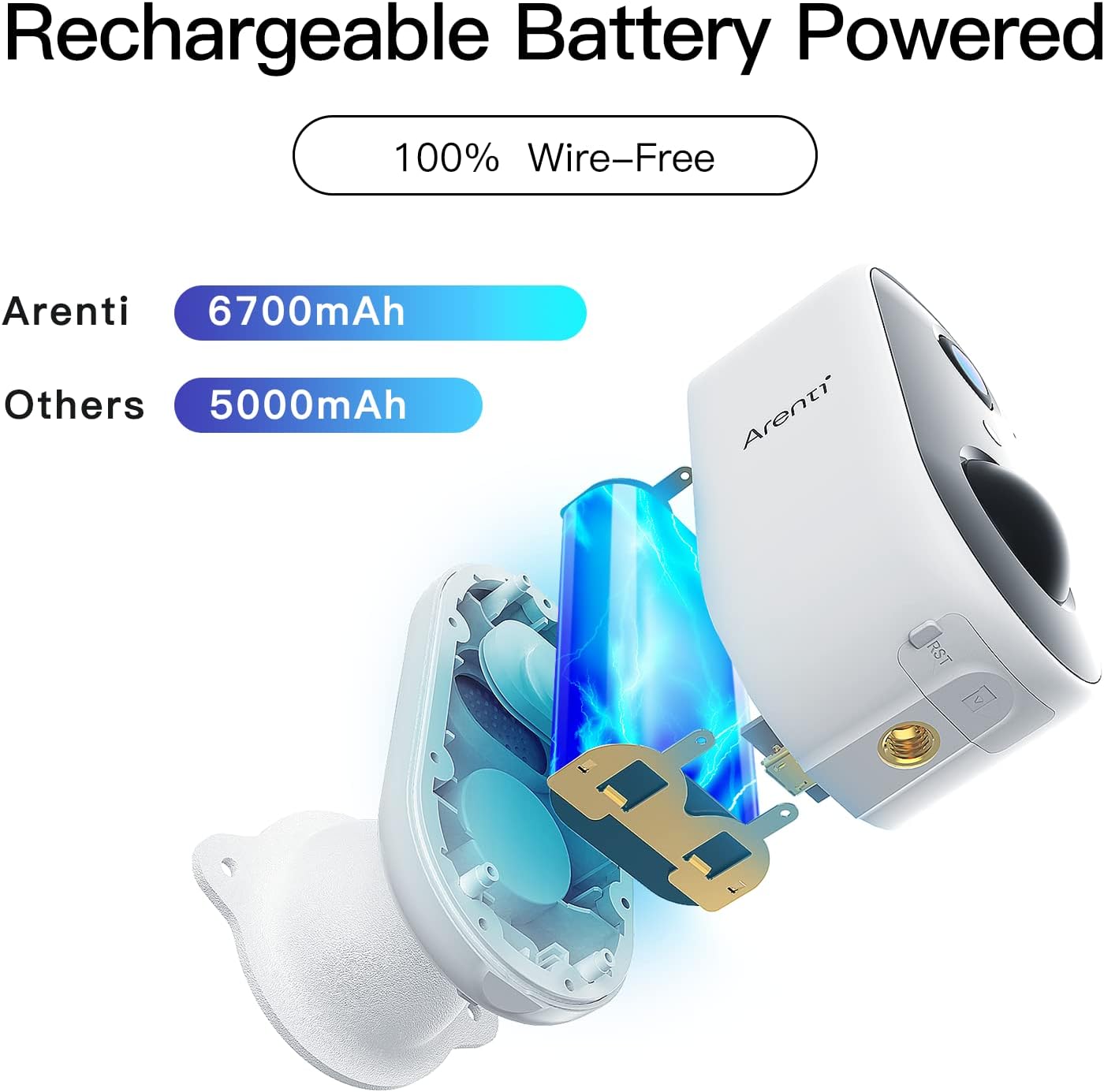
Gambar: Hiji internal view of the ARENTI GO1 camera, highlighting its 6700mAh rechargeable battery.
4.2. Pamasangan Aplikasi
Download the 'Arenti' app from your device's app store (Google Play Store for Android or Apple App Store for iOS). Ensure your smartphone is connected to a 2.4GHz Wi-Fi network, as the camera does not support 5GHz Wi-Fi.
4.3. Papasangan Parangkat
Follow these steps to pair your ARENTI GO1 camera with the app:
- Open the Arenti app and sign up or log in to your account.
- Ketok ikon '+' pikeun nambahkeun alat anyar.
- Pilih 'Kaméra Batré' tina daptar alat.
- Tahan tombol daya alat pikeun ngamimitian alat.
- Press the [battery camera] button to wake the device if it is asleep.
- Hold the RESET button on your device for 4-5 seconds (refer to the user manual for more details). Wait for a flashing RED indicator light.
- Pilih jaringan Wi-Fi 2.4GHz anjeun sareng lebetkeun kecap akses.
- Remove any protective film from the camera lens.
- Tap 'Next' to show a QR code on your phone.
- Hold your phone 5-8 inches (15-25cm) from the camera lens, allowing the camera to scan the QR code. A tone will be heard upon successful scan.
- The app will then connect and register the device.
Video: A step-by-step guide on how to connect the ARENTI GO1 camera to the Arenti app.
4.4. Pilihan Pamasangan
The ARENTI GO1 offers dual mounting options for versatile placement:
- Outdoor Stand: Use the metal bracket and screws for secure, permanent installation on walls or ceilings.
- Magnetic Stand: For temporary or easily adjustable placement, use the magnetic bracket. This allows for quick removal for charging.
5. Ngoperasikeun kaméra
5.1. Hirup View & Ngarékam
Once connected, access the live feed from your camera through the Arenti app. You can view real-time video and manually initiate recordings. The camera supports both event recording and 24-hour continuous recording to an SD card or cloud storage.

Image: The ARENTI GO1 camera illustrating its support for both cloud storage and local SD card storage.
5.2. Audio Dua Arah
The camera features a built-in microphone and speaker, enabling two-way communication. Use the app to speak through the camera and hear responses from the other end.

Image: A user communicating with a delivery person via the ARENTI GO1 camera's two-way audio feature.
5.3. Deteksi gerak & Siaga
The ARENTI GO1 utilizes AI motion detection to identify human activity. When motion is detected, you will receive instant push notifications on your smartphone, allowing you to monitor suspicious activity promptly.
Video: Demonstrates the night vision capabilities of the ARENTI GO1 camera, showing clear footage dina kaayaan cahaya remen.
5.4. Wawasan Peuting
Kamera otomatis pindah ka modeu visi wengi dina kondisi nu caang, nyadiakeun foo hideung-bodas jelastage nepi ka 32 kaki.
5.5. Pamaduan Smart Home
The ARENTI GO1 camera is compatible with Amazon Alexa and Google Assistant. You can use voice commands to view asupan kaméra dina tampilan pinter anu cocog.
Video: Instructions on how to connect and use the ARENTI GO1 camera with Amazon Alexa.
5.6. Babagi Alat
You can share access to your camera's live feed with family members through the Arenti app, allowing multiple users to monitor the property simultaneously.

Image: Illustration of multiple family members sharing and viewing the camera feed on various mobile devices.
6. Pangropéa
6.1. Manajemén batré
The 6700mAh rechargeable battery provides 30-180 days of operation depending on environmental factors and the number of wake-ups. Recharge the camera when the battery level is low. The app will notify you when charging is required.
6.2. Résistansi Cuaca
The ARENTI GO1 camera has an IP65 rating, making it resistant to dust and water. It is designed to withstand various weather conditions, ensuring year-round security.

Image: The ARENTI GO1 camera installed on an exterior wall, shown enduring rainfall, highlighting its IP65 weather resistance.
7. Cara ngungkulan
- Kaméra teu nyambung ka Wi-Fi: Ensure your Wi-Fi network is 2.4GHz. Move the camera closer to the router for a stronger signal. Reset the camera using the reset key and try pairing again.
- Poor night vision: Ensure the camera lens is clean. Check for any obstructions that might reflect infrared light back into the lens.
- hirup batré pondok: Reduce motion detection sensitivity or frequency of alerts. Ensure the camera is not placed in an area with constant motion (e.g., tree branches moving in the wind).
- Teu aya bewara anu ditampi: Check app notification settings on your smartphone and within the Arenti app. Ensure the camera is connected to Wi-Fi.
8. Spésifikasi
| Fitur | Rincian |
|---|---|
| Ngaran modél | GO1 |
| Resolusi Video | 1080P HD lengkep |
| Viewdina Angle | 145 darajat |
| Wengi Sawangan Sawangan | 32 suku |
| Kapasitas batré | 6700 mAh Litium Ion |
| Résistansi Cuaca | IP65 |
| Konektipitas | 2.4GHz Wi-Fi (not 5GHz) |
| Pilihan Panyimpenan | SD Card (up to 128GB), Cloud Storage |
| Audio | 2-Jalur Audio |
| Deteksi gerak | AI Motion Deteksi |
| Smart Home kasaluyuan | Amazon Alexa, Asisten Google |
| Diménsi | 2.05 x 1.97 x 3.74 inci |
| Beurat | 6.7 ons |
9. Jaminan & Dukungan
The ARENTI GO1 camera comes with a manufacturer's warranty. Please refer to the warranty card included in your package for specific terms and conditions. For technical support, troubleshooting, or any inquiries, please visit the official ARENTI websitus atanapi ngahubungan layanan palanggan maranéhanana langsung.


