1. Bubuka
The Renkforce RF-CAR-100 FM Transmitter allows you to wirelessly stream audio from your smartphone or Micro SD card to your car's FM radio. This device also features two USB charging ports, providing a combined output of 3.1 Amps to conveniently charge your mobile devices while on the go. Enjoy your personal music selection and hands-free calling through your car's audio system.
2. Émbaran Kasalametan
- Ensure the device is securely plugged into the car's 12V power socket.
- Ulah ngoperasikeun alat ieu ku cara anu ngaganggu anjeun nalika nyetir.
- Ulah ngalaan alat ka suhu ekstrim, sinar panonpoé langsung, atawa Uap.
- Ulah nyobian ngabongkar atawa ngaropéa alat. Ieu bakal ngabatalkeun jaminan.
- Jauhkeun tina jangkauan barudak.
3. Eusi Paket
- Renkforce RF-CAR-100 FM Transmitter (1 unit)
4. Produk Langkungview
Familiarize yourself with the components of your Renkforce RF-CAR-100 FM Transmitter:
- 12V Car Power Plug: Connects to your car's cigarette lighter socket.
- USB Charging Ports (x2): For charging smartphones and other USB-powered devices. One port may be designated for music playback from a USB drive (if supported) or for faster charging.
- Slot Kartu SD Mikro: Selapkeun kartu Micro SD pikeun muterkeun musik langsung.
- Multi-function Knob/Button: Used for adjusting FM frequency, controlling music playback (play/pause, skip tracks), and managing calls (answer/end).
- Témbong LED: Némbongkeun frékuénsi FM ayeuna.
- Mikropon: Pikeun nelepon handsfree.

Gambar 1: Hareupeun view of the Renkforce RF-CAR-100 FM Transmitter, showing the two USB charging ports and the blue LED indicator light when powered on.
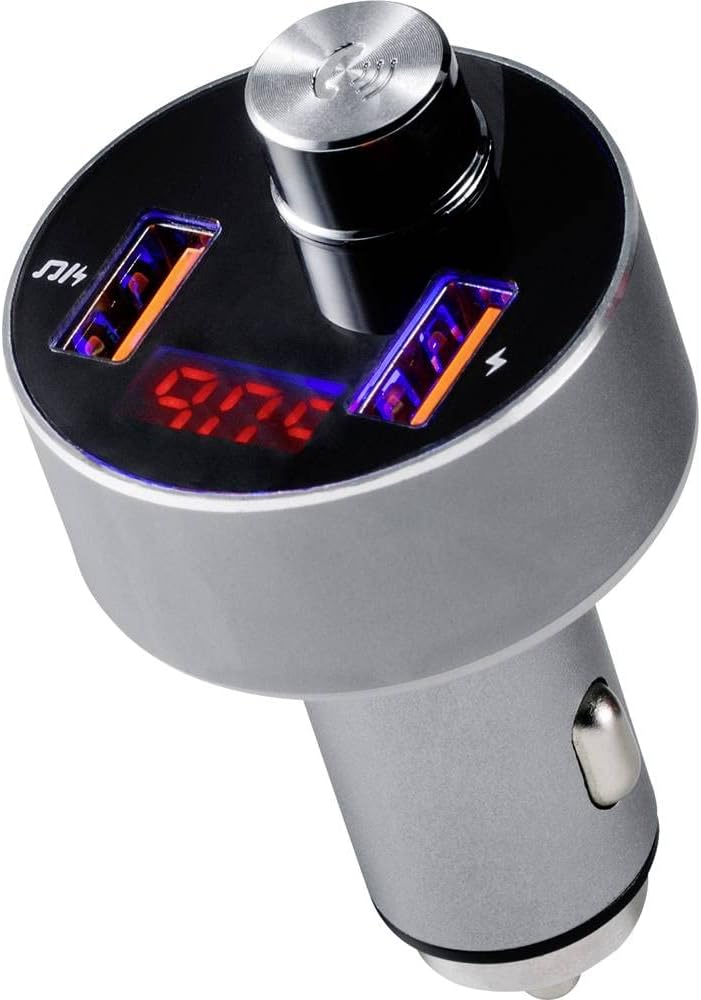
Gambar 2: Puncak view of the transmitter, highlighting the digital display showing the FM frequency (e.g., 97.0 MHz) and the central multi-function control knob.

Gambar 3: The FM Transmitter positioned beside a smartphone, illustrating its capability for hands-free calling. The phone screen shows an incoming call from 'Tom'.
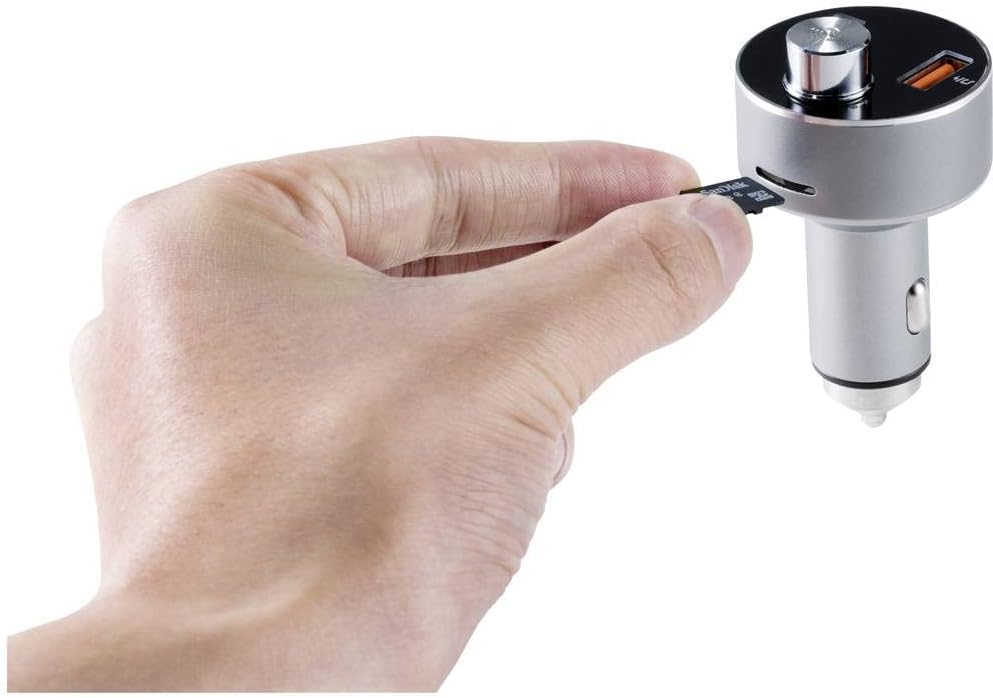
Gambar 4: A hand demonstrating the insertion of a Micro SD card into the dedicated slot on the side of the FM Transmitter for direct audio playback.
5. Setélan
- Daya Hurung: Insert the Renkforce RF-CAR-100 into your car's 12V cigarette lighter socket. The device will power on automatically, and the LED display will show the current FM frequency.
- Atur Frékuénsi FM:
- Tune your car's FM radio to an unused frequency (one with no strong broadcast signal, typically static).
- On the RF-CAR-100, press and hold the multi-function knob until the frequency display starts flashing.
- Rotate the knob left or right to adjust the transmitter's frequency to match the one on your car radio.
- Press the knob once to confirm the frequency setting.
- Masangkeun Bluetooth:
- Dina smartphone anjeun, aktipkeun Bluetooth sareng milarian alat anu sayogi.
- Select 'RF-CAR-100' (or similar name) from the list to pair.
- Once paired, a voice prompt may confirm the connection, and audio from your phone will be transmitted to your car radio.
6. Parentah Operasi
6.1 Puterkeun Musik
- From Bluetooth Device: Once paired, open your music player on your smartphone. Audio will automatically stream through the FM Transmitter to your car radio. Use the multi-function knob to play/pause (short press) or skip tracks (rotate and press).
- From Micro SD Card: Insert a Micro SD card (formatted with MP3/WMA files) into the designated slot. The device will automatically detect the card and begin playing music. Use the multi-function knob for playback control.
6.2 Telepon bebas leungeun
- Ngajawab Telepon: When an incoming call is received, the device will announce the number. Short press the multi-function knob to answer the call.
- Nutup Telepon: During a call, short press the multi-function knob to end the conversation.
- Nolak Telepon: Press and hold the multi-function knob to reject an incoming call.
- Telepon deui: Double-press the multi-function knob to redial the last number.
6.3 Ngecas USB
Connect your USB charging cable to one of the two USB ports on the transmitter and to your mobile device. The ports provide a combined output of 3.1 Amps pikeun ngecas efisien.
7. Pangropéa
- Bersihkeun alatna nganggo lawon anu lemes sareng garing. Entong nganggo pembersih cair atanapi pelarut.
- Ensure the USB ports and Micro SD slot are free from dust and debris.
- Lamun teu dipaké pikeun période nambahan, nyimpen alat dina tiis, tempat garing.
8. Cara ngungkulan
- Henteu aya kakuatan:
- Check if the car's 12V socket is functioning correctly.
- Ensure the transmitter is fully inserted into the socket.
- Poor Audio Quality / Static:
- Atur frékuénsi FM dina pemancar sareng radio mobil anjeun ka saluran anu teu dianggo.
- Ensure the volume on your smartphone and car radio is set appropriately.
- Move away from areas with strong radio interference.
- Masalah Sambungan Bluetooth:
- Pastikeun Bluetooth diaktipkeun dina smartphone Anjeun.
- Delete 'RF-CAR-100' from your phone's paired devices list and attempt to re-pair.
- Restart both your phone and the FM Transmitter.
- Ngecas Teu Gawé:
- Verify that the USB cable is not damaged and is properly connected.
- Ensure the device being charged is compatible with USB charging.
9. Spésifikasi
| merek: | Renkforce |
| model: | RF-CAR-100 (TWNT-V811R) |
| Ukuran produk: | 7.2 x 4.2 x 7.2 cm |
| Beurat barang: | 40 g |
| Antarmuka Hardware: | Bluetooth, USB |
| Alat anu cocog: | MP3 Player, Car Stereo |
| Fitur tambahan: | FM, MP3, Wireless |
| Mode Kaluaran Audio: | Pangiriman FM |
| Jenis Kaluaran Audio: | Radio FM, Bluetooth |
| Voltage: | 12 Volt (DC) |
| Tipe Sumber Daya: | Manual Operation (car 12V socket) |
| Jenis Wireless: | Bluetooth |
| Tipe Panyambung: | USB |
| Jenis Média: | Micro SD Card (MP3/WMA) |
| USB Ngaluarkeun Kaluaran: | 3.1 A (combined) |
10. Garansi jeung Rojongan
Renkforce products are designed for reliability and performance. For warranty information or technical support, please refer to the documentation provided at the time of purchase or contact your retailer. Keep your proof of purchase for warranty claims.


