Produk Leuwihview
The AOPUTTRIVER AP-770HC is a versatile auto/manual ranging digital multimeter designed for accurate measurements in various electrical applications. It features a 6000 count display and can measure AC/DC voltage, AC/DC current, resistance, temperature, capacitance, frequency, diode, hFE, continuity, and duty cycle. Key functionalities include True RMS, Data Hold, Relative Value, Max/Min value, automatic shutdown, and Non-Contact Voltagdeteksi e (NCV).
Fitur konci:
- High Precision Multimeter: Accurately measures AC Voltage (400mV ~ 750V), DC Voltage (400mV ~ 1000V), AC/DC Current (400µA ~ 20A), Resistance (400Ω ~ 40MΩ), Temperature (-20℃ ~ 1000℃), Frequency, Continuity, Diode Test, hFE Test, Relative Value, and MAX/MIN.
- Non-Kontak VoltagTés e (NCV): Ngadeteksi voltage greater than 90V (RMS) without direct contact. The instrument's sensor will light up and buzz.
- Fungsi Praktis: Data Hold, automatic backlight, automatic power-off, function switch indicator, ℃/°F selection, MAX/MIN, True RMS. Includes 600A AC/DC clamp.
- Mechanical Blocking System: Prevents short circuits by requiring the dial to be rotated before inserting test leads and allowing rotation only after leads are removed.
- Perlindungan Overload: Mastikeun kaamanan nalika operasi.
- Indikasi batré lemah: Alerts the user when the battery needs replacement.
Eusi pakét
Saatos muka bungkusan, mangga pariksa yén sadaya barang anu didaptarkeun di handap aya sareng dina kaayaan anu saé:
- 1 x AP-770HC Multimeter
- 2 x Test Leads (red and black)
- 1 x Mawa Kantong
- 1 x Batré 9V (6F22)
- 1 x Obeng Leutik
- 1 x Sénsor Suhu
- 1 x Buku Panduan (Basa Inggris)

Image: The AP-770HC multimeter, test leads, carrying bag, and 9V battery included in the package.
Disetél
1. Pamasangan batré:
- Tangtukeun lokasi kompartemen batré dina tonggong multimeter nu.
- Use the provided small screwdriver to open the battery compartment cover.
- Insert the 9V (6F22) battery, ensuring correct polarity (+ and -).
- Tutup panutup kompartemen batré jeung amankeun ku screw nu.
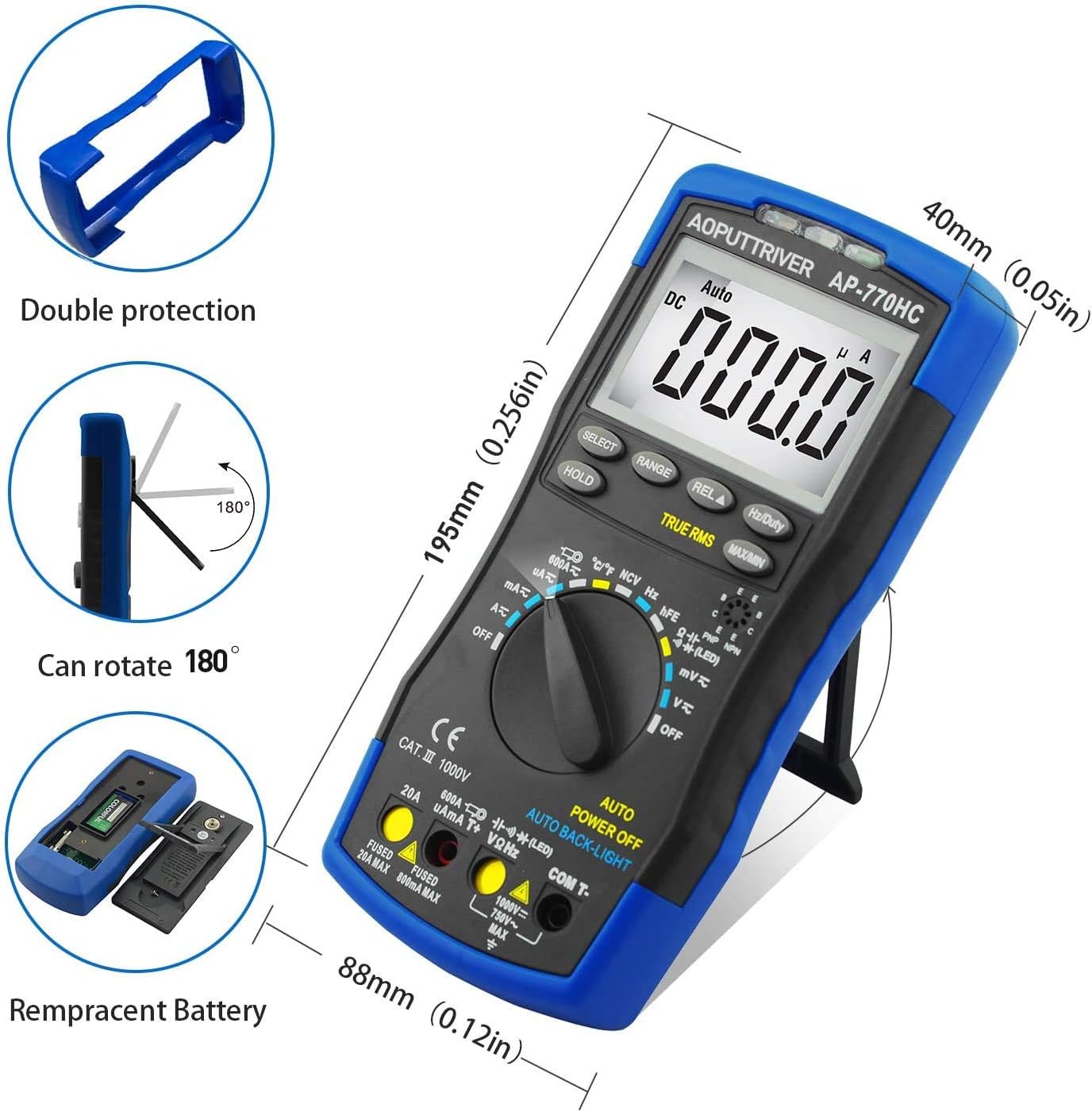
Gambar: Tukangeun view of the multimeter illustrating the battery compartment and its cover. The image also shows the kickstand and double protection casing.
2. Inspeksi Awal:
Before first use, inspect the multimeter and test leads for any signs of damage. Ensure the test leads are securely connected to the appropriate input jacks for the desired measurement.
Parentah Operasi
Panel Layout and Function Keys:

Image: Detailed diagram of the AP-770HC multimeter's front panel, labeling key components and buttons.
- Daérah Deteksi NCV: Area pikeun vol non-kontaktage deteksi.
- NCV Red Light: Illuminates when NCV detects voltage.
- Sénsor CDS: Light sensor for automatic backlight control.
- NCV Green Light: Illuminates when NCV detects voltage.
- Layar LCD: Némbongkeun bacaan sareng indikator pangukuran.
- RANGE Key: Switches between auto-ranging and manual ranging.
- Konci PILIH: Toggles between different measurement modes within a single rotary switch position (e.g., AC/DC, Diode/Continuity).
- REL▲ Key: Ngaktipkeun modeu pangukuran relatif.
- Hz/Duty Key: Milih pangukuran frékuénsi atanapi siklus tugas.
- konci tahan: Ngabekukeun bacaan tampilan ayeuna.
- MAX/MIN Key: Displays the maximum or minimum measured value.
- Saklar Rotary: Selects the primary measurement function (e.g., Voltage, Current, Resistance).
- 20A Input Jack: Input pikeun pangukuran arus anu luhur (dugi ka 20A).
- µAmA600AT+ Input Jack: Input for microampere and milliamppangukuran ayeuna.
- COM and Temperature "-" Input Jack: Common (negative) input for all measurements and negative input for temperature.
- VΩHz Input Jack: Input pikeun voltage, resistance, frequency, capacitance, diode, and hFE measurements.
General Measurement Procedures:
- Daya Hurung: Rotate the Rotary Switch (12) from "OFF" to the desired measurement function. The meter will power on.
- Sambungkeun Test Leads: Insert the black test lead into the COM jack (15). Insert the red test lead into the appropriate input jack based on the measurement:
- Pikeun Voltage, Resistance, Frequency, Capacitance, Diode, hFE: VΩHz (16)
- For µA/mA Current: µAmA600AT+ (14)
- For 20A Current: 20A (13)
- Select Range (if manual): If the meter is in auto-ranging mode, it will automatically select the appropriate range. To switch to manual ranging, press the RANGE key (6).
- Laksanakeun pangukuran: Connect the test leads to the circuit or component to be measured. Read the value on the LCD Display (5).
- Tahan Data: Press the HOLD key (10) to freeze the current reading on the display. Press again to release.
- MAX / Mnt: Press the MAX/MIN key (11) to cycle through maximum, minimum, and current readings.
- Pareum listrik: Rotate the Rotary Switch (12) back to "OFF" when finished. The meter also features automatic power-off after a period of inactivity.
Fungsi Pangukuran Husus:
Non-Kontak Voltage (NCV) Measurement:
To use the NCV function, rotate the rotary switch to the NCV position. Hold the NCV detection area (1) near the conductor. If AC voltage above 90V (RMS) is detected, the NCV red (2) and green (4) lights will illuminate, and the buzzer will sound.

Image: The multimeter demonstrating its Non-Contact Voltage (NCV) function by detecting live and null wires near an electrical outlet without direct contact.
Pangukuran Suhu:
Connect the temperature sensor to the COM (15) and VΩHz (16) input jacks. Rotate the rotary switch to the temperature position (℃/°F). Place the sensor tip on or in the object whose temperature you wish to measure. The temperature range is -20℃ to 1000℃ (-4°F to 1832°F). Press the SELECT key (7) to switch between Celsius and Fahrenheit.
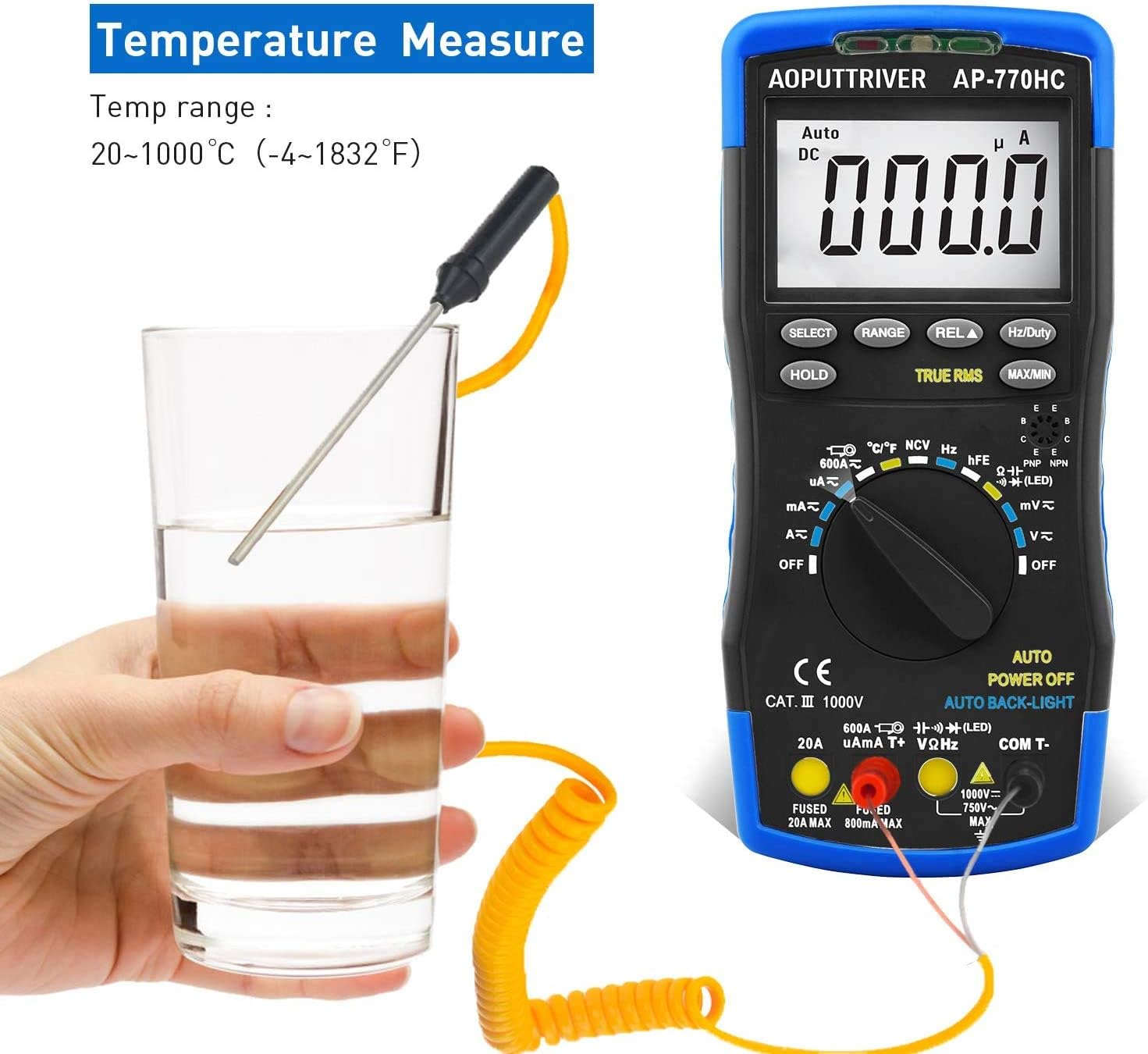
Image: The multimeter connected to a temperature probe, measuring the temperature of a liquid in a glass.
Pangukuran Arus (AC/DC):
For current measurements, ensure the test leads are connected to the correct current input jacks (13 or 14) and the rotary switch is set to the appropriate current range (µA, mA, or A). Always connect the meter in series with the circuit. The maximum current is 20A.

Image: An electrician using the AP-770HC multimeter to measure current within an electrical panel, demonstrating a typical application.
Pangropéa
beberesih:
Wipe the multimeter's casing jeung iklanamp cloth and mild detergent. Do not use abrasive cleaners or solvents. Ensure the device is powered off and test leads are disconnected before cleaning.
Ngagantian batré:
When the low battery indicator appears on the display, replace the 9V battery as described in the "Setup" section. Prompt battery replacement ensures accurate readings and proper device operation.
Panyimpenan:
When not in use for extended periods, remove the battery to prevent leakage. Store the multimeter in its carrying bag in a cool, dry place, away from direct sunlight and extreme temperatures.
Pamérésan masalah
| Masalah | Mungkin Cukang lantaranana | Solusi |
|---|---|---|
| Meter does not power on or powers on and off repeatedly. | batré lemah atawa maot. | Replace the 9V battery. Ensure correct polarity. |
| Teu aya bacaan atanapi "OL" (Overload) ditampilkeun. | Incorrect range selected (in manual mode), open circuit, or measurement exceeds meter's maximum capacity. | Switch to auto-ranging or a higher manual range. Check circuit continuity. Ensure measurement is within specifications. |
| Bacaan teu akurat. | Low battery, incorrect test lead connection, or environmental interference. | Replace battery. Verify test lead connections. Perform measurement in a stable environment. |
| NCV function not working. | Voltage too low, or not in NCV mode. | Pastikeun voltage is above 90V RMS. Confirm rotary switch is set to NCV. |
spésifikasi
| Parameter | Nilai |
|---|---|
| Pilihan Range | Rentang otomatis |
| tampilan maksimum | 6000 cacah |
| Siklus tugas | 0.1% ~ 99.9% |
| Kapasitansi | 9.999nF ~ 99.99mF |
| Frékuénsi | 5.12Hz ~ 5.12MHz (0.1% + 5dgt) |
| Suhu | -20℃ ~ 1000℃ (-4°F ~ 1832°F) |
| DC Voltage | 60mV / 600mV / 60V / 600V ± (0.5% + 2dgt) / 1000V ± (0.8% + 2dgt) |
| AC Voltage | 60mV / 600mV / 60V / 600V ± (1.0% + 10dgt) / 750V ± (1.5% + 3dgt) |
| DC Ayeuna | 600µA / 6000µA / 60mA / 600mA ± (1.5% + 2dgt); 6A/20A (± 2.5% + 5dgt); 600A (± 3.0% + 5dgt) |
| AC Ayeuna | 600µA / 6000µA / 60mA / 600mA ± (1.5% + 3dgt); 6A/20A (± 2.5% + 5dgt); 600A (± 3.0% + 5dgt) |
| Résistansi | 600Ω ~ 60MΩ |
| Diménsi | 23.4 x 13.4 x 6.4 cm |
| Beurat | 580 gram |
| Sumber Daya | Batré (9V) |
Garansi sareng Rojongan
Inpormasi Garansi:
AOPUTTRIVER provides a garansi 2 taun for the AP-770HC Digital Multimeter from the date of purchase. This warranty covers manufacturing defects and ensures the product functions as described under normal use.
Bantosan Téknis:
AOPUTTRIVER offers rojongan teknis hirupna for this product. If you encounter any issues or have questions regarding the operation, maintenance, or troubleshooting of your AP-770HC multimeter, please do not hesitate to contact AOPUTTRIVER customer service. They are committed to resolving issues within 24 hours.
For support, please refer to the contact information provided on the product packaging or the official AOPUTTRIVER websitus.


