1. Bubuka
This user manual provides comprehensive instructions for the setup, operation, maintenance, and troubleshooting of your JTECH IQ Base Paging System with 10 Coaster Pagers. Please read this manual thoroughly before operating the system to ensure proper functionality and longevity of the product.
The JTECH IQ Base Paging System is designed to enhance communication and efficiency in various environments, such as restaurants, medical offices, and retail stores, by allowing staff to discreetly page guests or customers.
2. Komponén Sistem
Your JTECH IQ Base Paging System package includes the following main components:
- IQ Base Transmitter: The central unit for sending pages.
- Coaster Pagers (10 units): Individual pagers for guests or customers.
- Dasar ngecas: Used to stack and charge the coaster pagers.
- adaptor kakuatan: For connecting the IQ Base Transmitter and Charging Base to power.

Gambar 2.1: The JTECH IQ Base Paging System, showing the IQ Base Transmitter on the left and a stack of 10 Coaster Pagers on their charging base on the right. The pagers display red numbers indicating their ID.

Gambar 2.2: A nutup-up view of the JTECH IQ Base Transmitter's keypad and display. A hand is shown pressing the '7' button, demonstrating user interaction with the numeric keypad and function buttons like SETUP, CANCEL, ENTER, MENU, and SEND.

Gambar 2.3: A single JTECH GuestCall Coaster Pager, viewed from the top. The pager is black and circular, featuring the JTECH logo and "GuestCall Coaster Guest Paging" text, along with the website "WWW.JTECH.com".
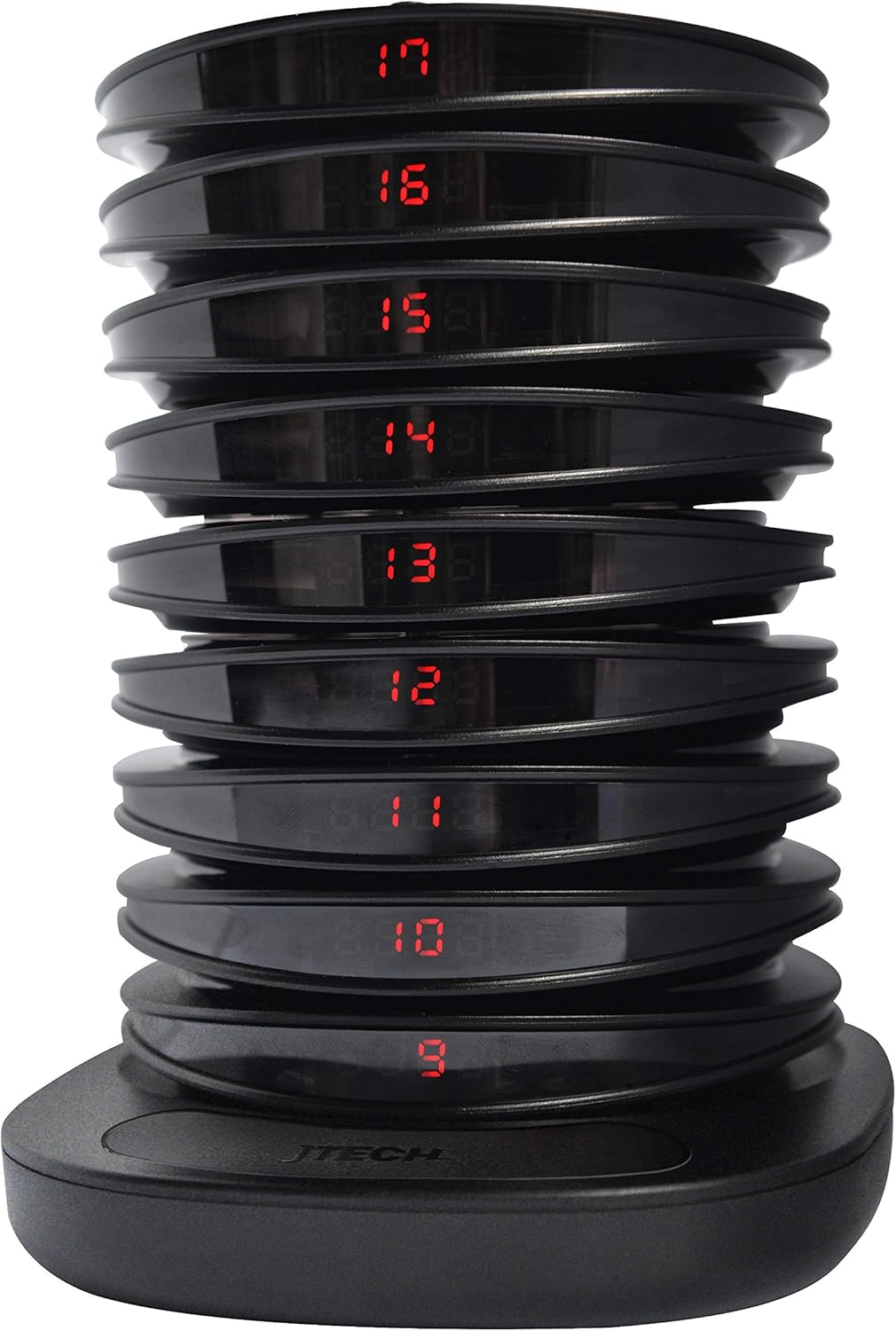
Gambar 2.4: A stack of JTECH Coaster Pagers resting on their charging base. Each pager displays a red numerical ID, ranging from 9 to 17, indicating their charging status and readiness for use.
3. Parentah Setup
Follow these steps to set up your JTECH IQ Base Paging System:
- Ngabongkar komponén: Cabut sadaya komponén tina bungkusna kalayan ati-ati. Pastikeun sadaya barang anu didaptarkeun dina Bagian 2 aya.
- Connect Power to IQ Base Transmitter:
- Locate the power input port on the back of the IQ Base Transmitter.
- Connect the provided power adapter to the transmitter and then plug it into a standard electrical outlet.
- The transmitter display should illuminate, indicating it is powered on.
- Connect Power to Charging Base:
- Connect the power adapter to the charging base and plug it into a standard electrical outlet.
- Pastikeun dasar pangisi daya disimpen dina permukaan anu stabil sareng rata.
- Place Pagers on Charging Base:
- Stack the 10 Coaster Pagers onto the charging base. Ensure each pager makes proper contact with the charging pins.
- The pagers should show a charging indicator (e.g., a flashing light or specific number display) when correctly placed. Allow pagers to fully charge before first use (approximately 4-6 hours).
- Antenna Installation (if applicable):
- If your IQ Base Transmitter came with an external antenna, screw it firmly into the antenna port on the back or top of the unit.
- Position the antenna vertically for optimal signal transmission.
4. Parentah Operasi
The JTECH IQ Base Paging System is designed for straightforward operation. Here are the basic steps for sending pages:
- Daya Hurung: Ensure both the IQ Base Transmitter and the Charging Base are powered on and connected.
- Paging a Single Pager:
- On the IQ Base Transmitter's keypad, enter the pager number you wish to page (e.g., "01" for pager 1, "10" for pager 10).
- Pencét éta Ngirimkeun kancing.
- The selected pager will vibrate, flash, and/or beep according to its programmed settings.
- Paging Multiple Pagers (Group Page):
- Some systems allow group paging. Consult your system's specific programming for group codes.
- Lebetkeun kode grup (if applicable) on the keypad.
- Pencét éta Ngirimkeun kancing.
- All pagers assigned to that group will activate.
- Canceling a Page:
- If a pager is actively paging and you wish to stop it from the base, press the NGABATALkeun button on the IQ Base Transmitter. This typically stops all active pages.
- Alternatively, returning a pager to the charging base will usually stop its alert.
- Ngartos tampilan:
- The IQ Base Transmitter's display provides information such as the current time, pager numbers being entered, and system status messages.
- Refer to the specific display icons and messages in your system's detailed programming guide for advanced features.
5. Pangropéa
Proper maintenance ensures the longevity and reliable performance of your JTECH IQ Base Paging System.
- beberesih:
- Wipe the IQ Base Transmitter, Coaster Pagers, and Charging Base with a soft, damp lawon.
- Use a mild, non-abrasive cleaning solution if necessary.
- Entong immerse any part of the system in water or use harsh chemicals, as this can damage the electronics.
- Ensure all components are dry before reconnecting power.
- Battery Care (Coaster Pagers):
- Always return pagers to the charging base when not in use to ensure they are fully charged and ready for the next use.
- Avoid completely draining the pager batteries frequently, as this can reduce their overall lifespan.
- Kaayaan Lingkungan:
- Operate the system in a dry environment, away from excessive heat, cold, or direct sunlight.
- Avoid placing the system near strong electromagnetic fields, which could interfere with signal transmission.
6. Cara ngungkulan
If you encounter issues with your JTECH IQ Base Paging System, refer to the following common problems and solutions:
| Masalah | Mungkin Cukang lantaranana | Solusi |
|---|---|---|
| IQ Base Transmitter not powering on. | Adaptor daya pegat atanapi stop kontakna rusak. | Check power adapter connection. Try a different electrical outlet. Ensure the adapter is the correct one supplied with the system. |
| Pager not responding to page. | Pager out of range, battery low/dead, or incorrect pager number entered. | Ensure pager is within operating range. Place pager on charging base to charge. Verify the correct pager number was entered on the transmitter. |
| Pagers not charging. | Charging base not powered, pagers not making contact, or dirty charging pins. | Check power connection to charging base. Ensure pagers are correctly seated. Clean charging pins on both pagers and base with a dry cloth. |
| Reduced paging range. | Obstructions, interference, or antenna not properly positioned. | Ensure the IQ Base Transmitter is placed in a central location with minimal obstructions. Check antenna connection and position. Avoid placing near large metal objects or other wireless devices. |
If the problem persists after attempting these solutions, please contact JTECH customer support for further assistance.
7. Spésifikasi
Key specifications for the JTECH IQ Base Paging System:
- Pabrikan: JTECH
- model: IQ Base Paging System
- ASIN: B085L7C2GW
- Titimangsa munggaran sadia: 6 Maret 2020
- Kapasitas Pager: Supports up to 10 Coaster Pagers (expandable with additional pagers, sold separately).
- Input kakuatan: Adaptor AC (volume khusustage/current details typically on adapter label).
- Frékuénsi operasi: (Specific frequency not provided, typically in the UHF band for paging systems)
- rentang: (Varies based on environment and obstructions)
Catetan: Specific technical details may vary. Refer to the product packaging or contact JTECH for precise specifications.
8. Garansi jeung Rojongan
JTECH products are designed for reliability and performance. For information regarding product warranty, technical support, or service, please refer to the warranty card included with your purchase or visit the official JTECH websitus.
For direct assistance, you may contact JTECH customer support:
- Websitus: www.jtech.com
- Inpormasi kontak: Rujuk kana websitus pikeun nomer telepon atawa rojongan email.
Mangga gaduh modél produk sareng ASIN (B085L7C2GW) ready when contacting support.


