
1. Bubuka
Welcome to the user manual for your Nokia 216 Dual SIM mobile phone. This guide provides essential information to help you set up, operate, and maintain your device. The Nokia 216 (RM-1187) is a classic feature phone designed for reliable communication, featuring dual SIM capability, a 2.4-inch display, and a VGA camera.
Please read this manual carefully to ensure proper use and to get the most out of your phone.
2. Eusi Paket
Pastikeun sadaya item aya dina pakét produk anjeun:
- Nokia 216 Dual SIM Mobile Phone (RM-1187)
- Batré
- Adaptor kakuatan
- Kabel USB
3. Alat Leuwihview
Familiarize yourself with the key components of your Nokia 216 phone.
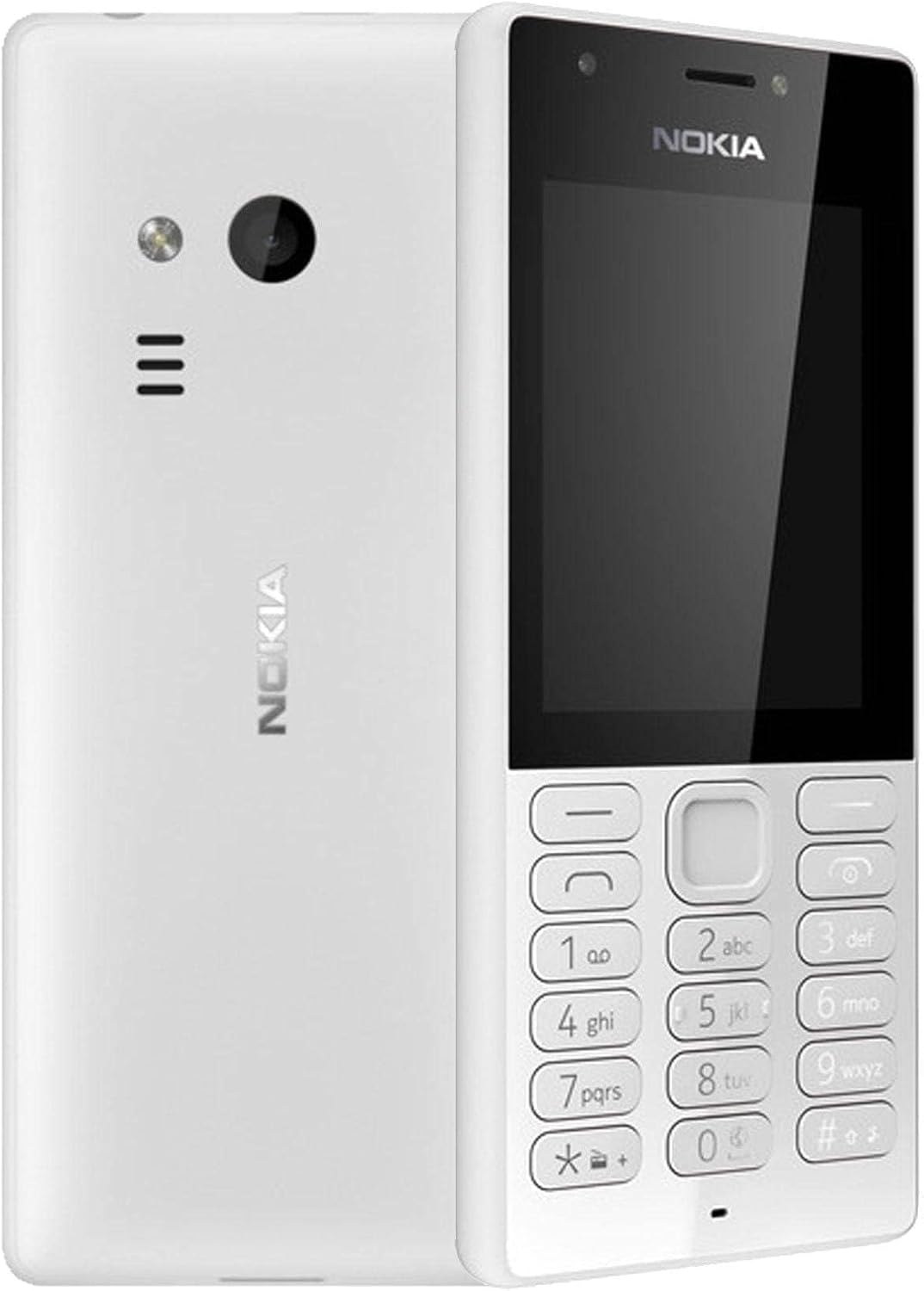
Gambar 3.1: Hareup jeung tukang view of the Nokia 216 Dual SIM mobile phone. The front shows the display, earpiece, and numeric keypad. The back features the rear camera, LED flash, and loudspeaker grille.

Gambar 3.2: Hareupeun view of the Nokia 216 Dual SIM mobile phone. This image highlights the 2.4-inch display, the navigation keys, and the alphanumeric keypad for dialing and text input.

Gambar 3.3: Balik deui view of the Nokia 216 Dual SIM mobile phone. This view shows the rear VGA camera lens, the LED flash, and the Nokia branding.
Komponén konci:
- tampilan: 2.4-inch QVGA screen.
- Papan tombol: Alphanumeric keypad for dialing and text entry, with navigation keys.
- Kaméra tukang: VGA camera with LED flash.
- Loudspeaker: For audio playback and hands-free calls.
- Mikropon: Kanggo input sora nalika nelepon sareng ngarékam.
- 3.5mm Audio Jack: Pikeun headphone atanapi speaker éksternal.
- Port ngecas: Port Micro-USB pikeun ngecas sareng mindahkeun data.
4. Setélan
4.1. Insert SIM Card(s)
- Pareuman telepon sareng cabut carjer naon waé.
- Carefully remove the back cover by prying it open from the notch.
- Upami batréna asup, angkat kaluar.
- Insert the SIM card(s) into the designated slot(s) with the gold contacts facing down. For dual SIM models, ensure both SIMs are correctly seated.
- If applicable, insert a microSD card into its slot for additional storage.
- Ganti batréna.
- Sejajarkeun panutup tukang teras pencét pageuh dugi ka ngaklik kana tempatna.
4.2. Ngeusi Batre
- Sambungkeun adaptor kakuatan ka stop kontak témbok.
- Plug the micro-USB end of the cable into the phone's charging port.
- Indikator batré dina layar bakal némbongkeun status ngecas.
- Saatos dicas pinuh, pegatkeun carjer tina telepon teras tina stop kontak.
5. Parentah Operasi
5.1. Daya Hurung / Pareum
- Pikeun Ngahurungkeun: Press and hold the power key (usually the red 'End Call' key) until the phone vibrates and the Nokia logo appears.
- Pikeun mareuman: Press and hold the power key until the 'Power off' option appears on the screen, then select it.
5.2. Nelepon
- From the home screen, enter the phone number using the numeric keypad.
- Press the green 'Call' key to initiate the call.
- To end a call, press the red 'End Call' key.
5.3. Sending Text Messages (SMS)
- Pindah ka ménu > Talatah > Jieun pesen.
- Ketik pesen anjeun nganggo keypad.
- Asupkeun nomer telepon panarima atawa pilih tina kontak.
- Pilih Ngirimkeun.
5.4. Ngagunakeun kaméra
- Pindah ka ménu > Kaméra.
- Pigura shot anjeun ngagunakeun tampilan.
- Pencét tombol navigasi tengah pikeun nyandak poto.
6. Pangropéa sarta perawatan
To ensure the longevity and optimal performance of your Nokia 216, follow these care guidelines:
- Jaga alat tetep garing: Uap cai tiasa ngaruksak sirkuit éléktronik.
- Use original accessories: Only use batteries, chargers, and accessories approved by Nokia.
- Rapihkan: Use a soft, clean, dry cloth to clean the surface of the device.
- Hindarkeun suhu anu ekstrim: Do not expose your device to very high or low temperatures.
- Nanganan kalayan ati-ati: Hindarkeun ragrag atanapi ngagentoskeun alat kana tabrakan anu kuat.
7. Cara ngungkulan
If you encounter issues with your Nokia 216, try these common troubleshooting steps:
| Masalah | Solusi |
|---|---|
| Telepon teu hurung | Pastikeun batréna tos dicas. Sambungkeun carjer teras cobian deui. Pariksa naha batréna parantos dipasang kalayan leres. |
| Taya sinyal jaringan | Check if the SIM card is correctly inserted. Move to an area with better network coverage. Restart the phone. |
| Batré teu ngecas | Ensure the charger is properly connected to both the phone and the power outlet. Try a different power outlet or charger. Check for any damage to the charging port. |
| Teu tiasa nelepon atanapi nampi telepon | Check network signal. Ensure your SIM card is active and has sufficient credit/plan. Verify that call barring is not enabled. |
8. Spésifikasi
| Fitur | Rincian |
|---|---|
| merek | Nokia |
| Ngaran modél | RM-1187 |
| Sistem operasi | Symbian 9.1 (Series 30) |
| Ukuran layar | 2.4 inci |
| Resolusi layar | 240 x 320 piksel |
| Refresh Laju | 90 Hz |
| Ukuran RAM anu dipasang | 256 MB |
| Kapasitas Panyimpenan Mémori | 3.9 GB (Internal, likely for system/apps, expandable via microSD) |
| Modél CPU | A10 |
| Téhnologi sélular | 2G |
| Téknologi Komunikasi Nirkabel | sélular |
| Téhnologi konektipitas | USB, Bluetooth, Wi-Fi |
| GPS | A-GPS |
| Primary Device User Interface | Buttons, Numeric Keypad, Microphone |
| Fitur kaméra séjén | Rear Camera (VGA) |
| Audio Jack | 3.5 mm |
| Faktor Bentuk | Klasik |
| Warna | kulawu |
| Waktu Ngobrol | Nepi ka 18 jam |
| Item Beurat | 339 gram |
| Ukuran Paket | 13.4 x 12.6 x 3.6 cm |
| Naon dina Box | Adaptor kakuatan, kabel USB |
9. Garansi jeung Rojongan
For warranty information, please refer to the warranty card included in your product package or visit the official Nokia website. If you require further assistance or technical support, please contact Nokia customer service through their official channels.
Simpen resi pameseran anjeun salaku bukti pameseran pikeun klaim garansi.