
Bubuka
The EVOLVEO EASYPHONE FM is a user-friendly mobile phone designed for straightforward communication. It features large, separated keys, a clear display, and essential functions to ensure ease of use. This manual provides instructions for setting up, operating, and maintaining your device.
1. Eusi Paket
Mangga parios pakét kanggo barang-barang ieu:
- EVOLVEO EASYPHONE FM Mobile Phone
- Ngecas Dock
- Adaptor AC
- Li-ion 1000 mAh Battery
- Manual pamaké
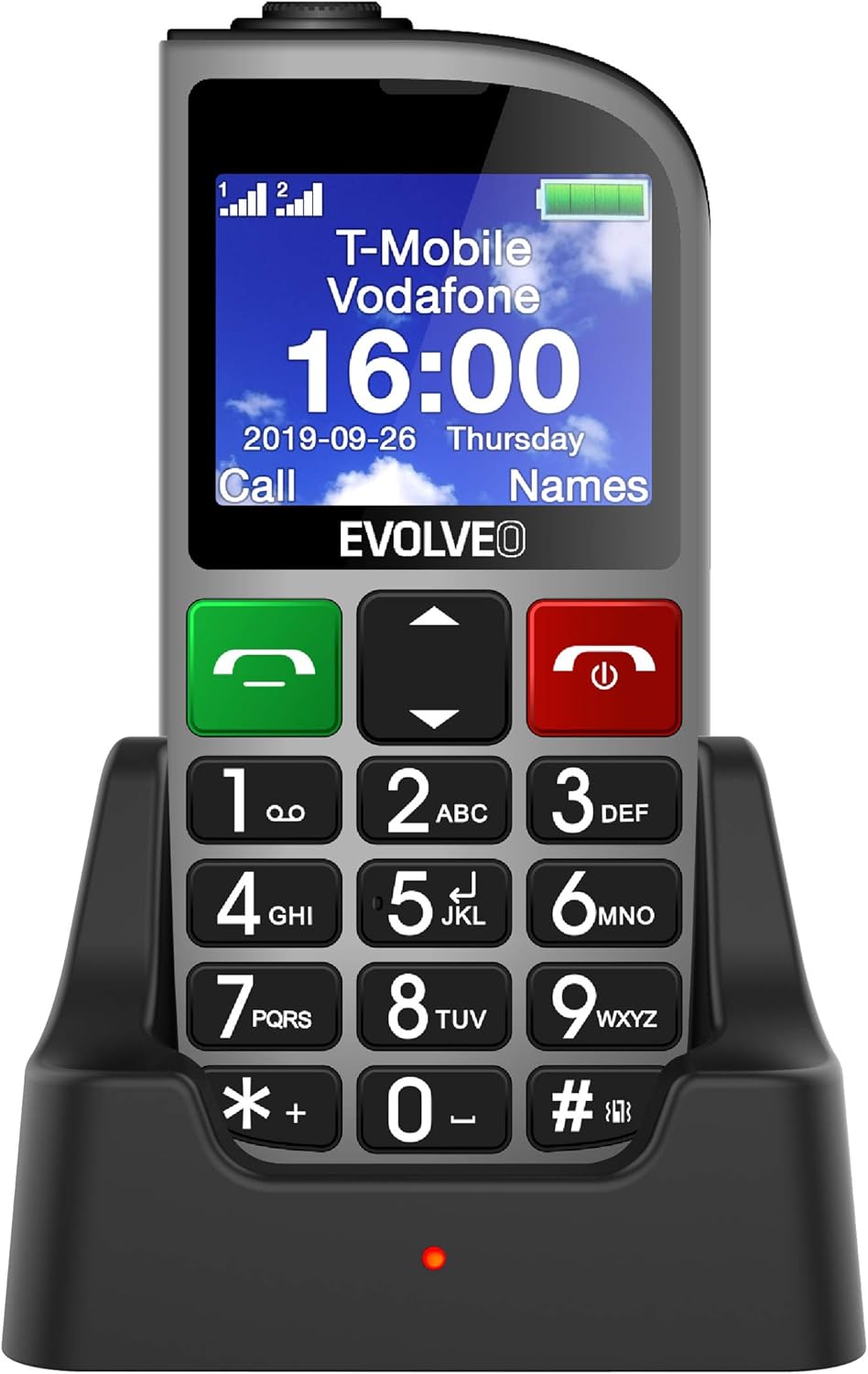
Gambar 1.1: EVOLVEO EASYPHONE FM placed in its charging dock. The phone features a large display showing time and network information, with prominent green call and red end call buttons, and a numeric keypad below.
2. Setélan
2.1. Pamasangan Batré sareng Ngecas
- Cabut panutup tukang telepon.
- Insert the Li-ion 1000 mAh battery, ensuring the contacts align correctly.
- Ganti tutup tukangna.
- Connect the AC adapter to the charging dock.
- Place the phone into the charging dock. The charging indicator light will illuminate.
- Ngidinan télépon ngecas sapinuhna sateuacan dianggo heula.
2.2. Nyelapkeun Kartu SIM
The phone supports two SIM cards (Dual SIM) for GSM/GPRS 850/900/1800/1900 MHz networks.
- Pastikeun telepon dipareuman.
- Cabut panutup tukang sareng batre.
- Locate the SIM card slots.
- Insert your SIM card(s) into the designated slots, ensuring correct orientation.
- Selapkeun deui batré sareng panutup tukang.
2.3. Inserting a MicroSDHC Card
You can expand the phone's storage for music, photos, and other files by inserting a MicroSDHC card.
- Pastikeun telepon dipareuman.
- Cabut panutup tukang sareng batre.
- Locate the MicroSDHC card slot.
- Gently insert the MicroSDHC card until it clicks into place.
- Selapkeun deui batré sareng panutup tukang.
3. Parentah Operasi
3.1. Daya Hurung / Pareum
- Pikeun ngahurungkeun: Pencét jeung tahan kenop Red End Call/Power tombol nepi ka layar hurung.
- Pikeun mareuman: Pencét jeung tahan tombol Red End Call/Power tombol nepi ka pilihan pareum nembongan, teras konfirmasi.

Gambar 3.1: Hareupeun view of the EVOLVEO EASYPHONE FM, highlighting the large display, call buttons, and numeric keypad for easy dialing.
3.2. Nyieun jeung Nampa Telepon
- Nelepon: Dial the number using the numeric keypad and press the Telepon Héjo kancing.
- Dial gancang: The phone supports quick access to 8 popular contacts. Assign numbers to keys 2-9 for speed dialing. Press and hold the assigned key to dial.
- Narima Telepon: Pencét éta Telepon Héjo tombol pikeun ngajawab telepon asup.
- Nutup Telepon: Pencét éta Red End Call/Power button to end an active call.
3.3. Ngirim sareng Nampi Pesen SMS
The separated keyboard keys facilitate easy writing of SMS messages.
- Arahkeun ka menu Pesen.
- Pilih "Tulis Pesen" pikeun nyieun SMS anyar.
- Asupkeun nomer panarima atawa pilih ti kontak.
- Ketik pesen anjeun nganggo keypad.
- Pencét "Kirim" pikeun ngirim pesen.
3.4. Volume Control
Adjust the call and ringtone volume using the dedicated volume control button located on the left side of the phone.

Gambar 3.2: Left side of the phone, showing the volume control buttons and the FM radio activation button.
3.5. Tombol Darurat SOS
The SOS button, located on the back of the device, allows for quick emergency calls and messages.
- Before use, configure up to five emergency contact numbers in the phone settings.
- Dina kaayaan darurat, pencét jeung tahan tombol SOS kancing.
- The phone will automatically dial the predefined emergency numbers sequentially and send an emergency message to these contacts.

Gambar 3.3: Tukangeun view of the EVOLVEO EASYPHONE FM, showing the prominent red SOS emergency button and the camera lens.
3.6. Radio FM
The phone includes an FM radio with a dedicated activation button.
- To turn on the FM radio, press the independent FM button on the side of the device.
- The radio can play in the background, allowing you to use other phone functions.
- During an incoming or outgoing call, the radio will automatically mute and resume playback after the call ends.
3.7. Senter
A powerful flashlight is integrated into the phone, activated by a dedicated button.
- Press the dedicated flashlight button on the side of the phone to turn the flashlight on or off.

Gambar 3.4: Right side of the phone, showing the dedicated flashlight button.
3.8. Fitur séjén
- Kaméra: The phone includes a VGA camera for basic photo capture.
- Pamuter Musik: Puter musik files stored on your MicroSDHC card.
- Digital Recorder (Dictaphone): Ngarékam catetan sora.
- Kalénder: Lacak tanggal sareng acara penting.
- Jam alarem: Setel alarm pikeun panginget.
- Kalkulator: Ngalakukeun itungan dasar.
- Kaca pembesar: Utilize the screen as a magnifying glass.
4. Pangropéa
4.1. Ngabersihan Alat
- Use a soft, dry cloth to clean the phone's surface and screen.
- Avoid using liquid cleaners or abrasive materials, as they may damage the device.
- Ensure no moisture enters the charging port or other openings.
4.2. Kaperawatan batré
- Pikeun manjangkeun umur batré, ulah ngantep telepon kakeunaan suhu anu ekstrim.
- Charge the battery regularly, but avoid overcharging or letting it completely drain for extended periods.
- If the phone will not be used for a long time, charge the battery to about 50% before storing it.
5. Cara ngungkulan
If you encounter issues with your EVOLVEO EASYPHONE FM, refer to the following common problems and solutions:
5.1. Telepon Teu Hurung
- Pastikeun batréna leres dipasang sareng dicas.
- Connect the phone to the charger and wait a few minutes before attempting to power it on again.
- Pariksa lamun kontak batréna beresih.
5.2. Cannot Make or Receive Calls
- Check if the SIM card(s) are correctly inserted and activated.
- Pastikeun anjeun gaduh jangkauan jaringan.
- Verify that the phone is not in airplane mode (if applicable).
- Check your account balance or subscription status with your service provider.
5.3. FM Radio Not Working
- Ensure you are in an area with good FM signal reception.
- Check if the FM radio is properly activated using its dedicated button.
5.4. Isu tampilan
- If the display is dim, check the brightness settings.
- If the screen is unresponsive, try restarting the phone.
6. Spésifikasi
| merek | Évolusi |
| Modél | EASYPHONE FM |
| Ukuran tampilan | 1.8 inci |
| Resolusi tampilan | 320 x 240 px |
| Téhnologi sélular | 2G (GSM/GPRS 850/900/1800/1900 MHz) |
| Rojongan SIM | Dual SIM |
| Konektipitas | Bluetooth, 3.5 mm Jack |
| Batré | Li-ion 1000 mAh |
| Diménsi | 130 × 61 × 16.5 mm |
| Beurat | 105 g (kalayan batré) |
| Kaméra | VGA |
| Ékspansi gudang | slot kartu MicroSDHC |
Catetan: Spésifikasi tiasa robih tanpa aya bewara sateuacana.
7. Garansi jeung Rojongan
For warranty information and technical support, please refer to the warranty card included in your package or visit the official Evolveo websitus. Simpen bukti pameseran anjeun pikeun klaim garansi.