1. Bubuka jeung Leuwihview
The Garmin tactix Delta is a premium GPS smartwatch engineered to meet military standards, offering specialized tactical features alongside advanced outdoor and training functionalities. This manual provides essential information for setting up, operating, and maintaining your device.
Fitur konci:
- Premium design built to military standards.
- Tactical-specific features including night vision compatibility, stealth mode, kill switch, Jumpmaster mode, and dual-position format.
- Multi-GNSS support and outdoor sensors for navigation.
- Advanced training features and performance metrics for running and cycling.
- Always-on 1.4-inch display, easy to read in direct sunlight.
- Scratch-resistant sapphire lens and DLC-coated bezel.
2. Setélan
Before using your Garmin tactix Delta, ensure it is fully charged and properly configured. Refer to the quick start guide included in your package for initial setup instructions.

Image: The Garmin tactix Delta smartwatch, showcasing its robust design and clear display.
3. Ngoperasikeun Alat
3.1 Display and Visibility
The tactix Delta features an always-on 1.4-inch display, providing clear readability even in direct sunlight. The scratch-resistant sapphire lens and DLC-coated bezel ensure durability. The display is also compatible with night vision goggles, allowing for seamless transition between daytime and nighttime views.
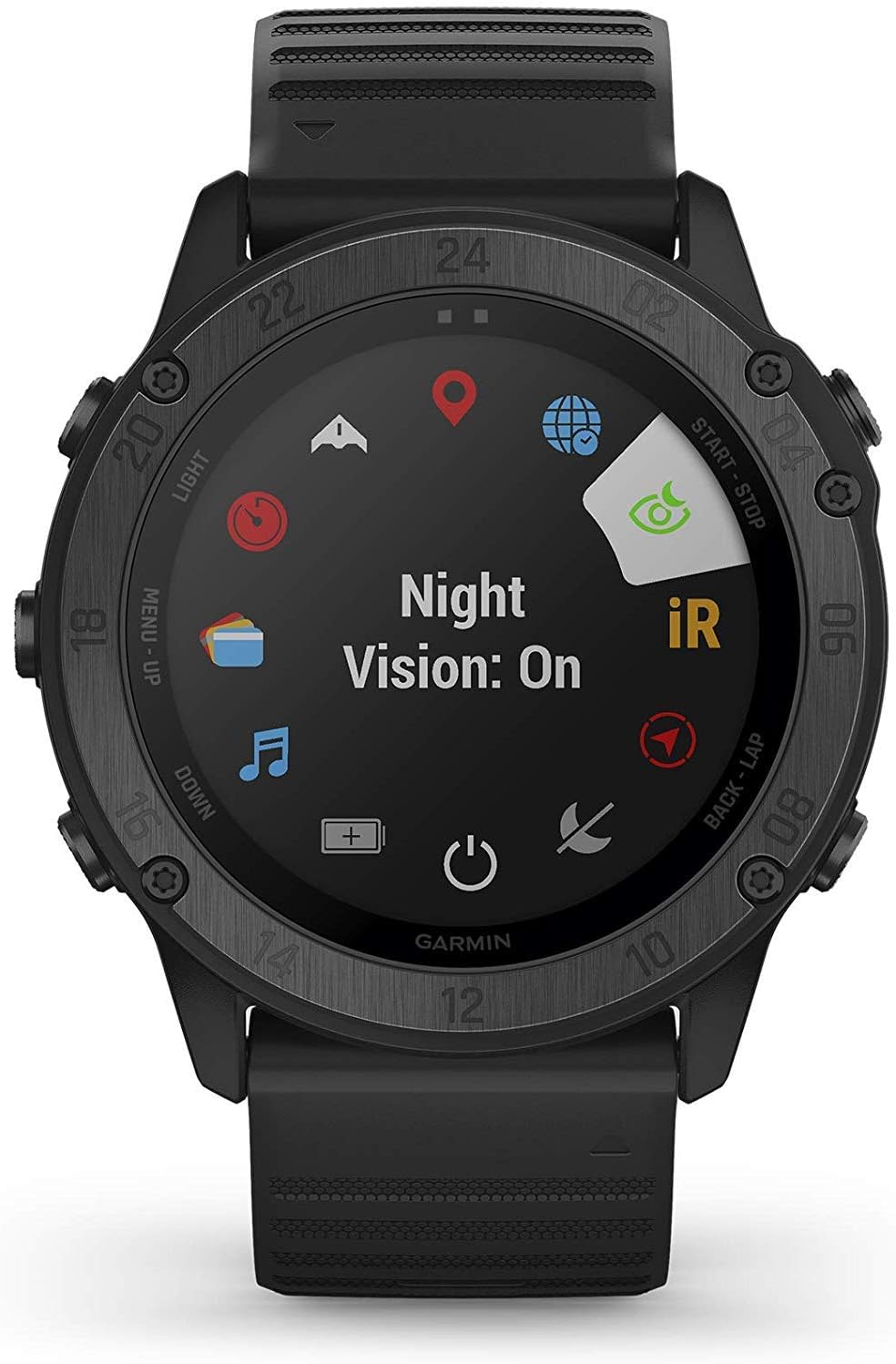
Image: The Garmin tactix Delta display showing 'Night Vision: On', indicating compatibility with night vision devices.
3.2 Tactical Features
3.2.1 Stealth Mode
Stealth Mode disables all wireless communications and stops storing or sharing your GPS position, ensuring your location remains uncompromised during sensitive operations.
Video: Demonstration of activating Stealth Mode on the Garmin tactix Delta, showing how it disables wireless communications and hides GPS data.
3.2.2 Maéhan Pindah
In situations where security is paramount, the onboard kill switch allows you to wipe all user memory from the device, protecting sensitive information.
Video: A user activating the Kill Switch feature on the Garmin tactix Delta, illustrating the countdown before data wipe.

Image: The Garmin tactix Delta display showing 'KILL SWITCH ACTIVATED' with a countdown, indicating the device is about to wipe user memory.
3.2.3 Jumpmaster Mode
For airborne operations, Jumpmaster Mode calculates high-altitude release points according to military guidelines and assists in navigating to your objective after a jump.
Video: A user selecting 'Jumpmaster' mode on the Garmin tactix Delta, showing options like HAHO and HALO Static for parachute jumps.

Image: The Garmin tactix Delta display showing 'Jumpmaster' mode with options for HAHO and HALO Static, used for calculating high-altitude release points.
3.2.4 Dual Position Format
The dual position format allows you to view both Universal Transverse Mercator (UTM) and Military Grid Reference System (MGRS) coordinates simultaneously, facilitating easy synchronization of your location with others.
Video: The Garmin tactix Delta displaying location in both standard coordinates and MGRS format, demonstrating the dual position feature.

Image: The Garmin tactix Delta display showing location coordinates in both standard latitude/longitude and MGRS format, enabling precise position sharing.
3.3 Manajemén kakuatan
The tactix Delta offers customizable battery modes to extend battery life. With normal usage, the device can last up to 21 days. Utilize power manager settings to optimize battery performance for various activities.

Image: The Garmin tactix Delta display showing 'Max Battery' mode with an estimated 60 hours of battery life, indicating power-saving options.
4. Pangropéa
To ensure the longevity and optimal performance of your Garmin tactix Delta, follow these maintenance guidelines:
- Rutin ngabersihkeun arloji sareng tali kalayan lemes, damp lawon.
- Avoid exposing the device to extreme temperatures or harsh chemicals.
- Bilas jam tangan ku cai bersih saatos kakeunaan cai asin atanapi cai anu ngandung klorin.
- Simpen alat dina tempat anu tiis sareng garing upami henteu dianggo.
5. Cara ngungkulan
If you encounter issues with your Garmin tactix Delta, refer to the following common troubleshooting tips:
- Alat teu hurung: Ensure the device is fully charged. Connect it to a power source using the provided charging cable.
- Masalah sinyal GPS: Pastikeun anjeun aya di daérah anu kabuka kalayan jelas view of the sky. Allow the device sufficient time to acquire a signal.
- Connectivity problems (Bluetooth/Wi-Fi): Check that wireless features are enabled and not in Stealth Mode. Ensure the device is within range of your connected smartphone or Wi-Fi network.
- Data teu akurat: Perform a soft reset by holding down the power button until the device restarts. Ensure the device firmware is up to date.
- Layar teu responsif: If the screen is frozen, try a hard reset by holding down the LIGHT button for 15 seconds until the device powers off.
6. Spésifikasi
| Fitur | Nilai |
|---|---|
| Item Beurat | 12 ons |
| Dimensi produk | 2.01 x 0.59 x 2.01 inci |
| Batré | 1 batré Litium Polimér diperlukeun (kaasup) |
| Ukuran tampilan | 1.4 inci |
| Ngarojong Bluetooth | Bluetooth |
| Kahirupan batré | 21 dinten |
| Paréntah sora | Kancing |
| Ngaran modél | tactix Delta |
| Fitur husus | Measure running and cycling performance |
| Téhnologi konektipitas | Bluetooth, ANT+, Wi-Fi |
| Tipe Peta | Sadunya |
| Mode Kaluaran Audio | Stereo |
| Tipe Pamasangan | Gunung pigeulang |
7. Naon dina Box
Your Garmin tactix Delta package includes the following components:
- 1x Garmin tactix Delta Premium Tactical GPS Watch
- 1x Wearable4U Ultimate Power Pack (includes Wearable4U Power Bank 2200 mAh, Wearable4U Wall and Car USB Charging adapters)

Image: The Wearable4U Ultimate Power Pack bundle, including a power bank, wall adapter, and car adapter, accompanying the smartwatch.
8. Garansi jeung Rojongan
For warranty information, product registration, and technical support, please visit the official Garmin support websitus atanapi ngahubungan layanan palanggan maranéhna. Simpen bukti pameseran anjeun pikeun klaim garansi.


