
1. Bubuka
This manual provides instructions for the installation, operation, and maintenance of the HPE Aruba 6300M 24G CL4 PoE 4SFP56 Switch (Model JL662A). This device is a high-performance Layer 3 switch designed for enterprise network environments, offering 24 Gigabit Ethernet ports with Class 4 Power over Ethernet (PoE) and 4 SFP56 ports for high-speed uplinks.
Please read this manual thoroughly before attempting to install or operate the switch to ensure proper functionality and safety.
2. Émbaran Kasalametan
Perhatikeun pancegahan kaamanan di handap ieu pikeun nyegah tatu sareng karusakan alat:
- Kasalametan listrik: Ensure the power source matches the switch's voltage requirements. Use only the provided power cord. Do not operate the switch with a damaged power cord or plug.
- Grounding: The switch must be properly grounded to prevent electrical shock.
- Ventilasi: Ensure adequate airflow around the switch. Do not block ventilation openings. Maintain proper clearance for heat dissipation.
- Lingkungan: Install the switch in a clean, dry environment, away from direct sunlight, heat sources, and excessive dust or moisture.
- Angkat: The switch may be heavy. Use proper lifting techniques or assistance when moving the unit.
- Palayanan: Refer all servicing to qualified service personnel. Do not attempt to open or repair the switch yourself.
3. Eusi Paket
Pariksa heula yén pakét anjeun ngandung barang-barang ieu. Upami aya barang anu leungit atanapi ruksak, hubungi vendor anjeun.
- HPE Aruba 6300M 24G CL4 PoE 4SFP56 Switch (Model JL662A)
- Kabel Daya
- Rak Gunung Kit
- Kabel Konsol (RJ-45 ka DB-9)
- Dokuméntasi (Pituduh Mimitian Gancang, Inpormasi Kasalametan sareng Peraturan)
4. Produk Langkungview
4.1 Panel payun
The front panel of the HPE Aruba 6300M switch features 24 Gigabit Ethernet ports with Class 4 Power over Ethernet (PoE) capabilities, along with 4 SFP56 ports for high-speed fiber optic connections. It also includes status LEDs for power, system health, and port activity.

Gambar 1: Hareupeun view of the HPE Aruba 6300M 24G CL4 PoE 4SFP56 Switch. This image displays the front of the network switch, featuring 24 standard RJ45 Ethernet ports arranged in two rows of twelve, each supporting Class 4 Power over Ethernet (PoE). To the right of these ports are four SFP56 ports, designed for high-speed fiber optic connections. Various status indicator LEDs are visible above the ports, providing information on power, system status, and individual port activity. A console port is also present for direct management access.
- 24 x 1GbE Class 4 PoE Ports: RJ-45 connectors for connecting network devices, providing both data and power.
- 4 x SFP56 Ports: For high-speed uplinks or stacking, supporting speeds up to 50 Gbps.
- LED Status: Indicate power status, system health, and port link/activity.
- Port konsol: RJ-45 port for local management access via a serial connection.
4.2 Panel tukang
The rear panel houses the modular power supply bays and fan modules, allowing for redundancy and easy maintenance.
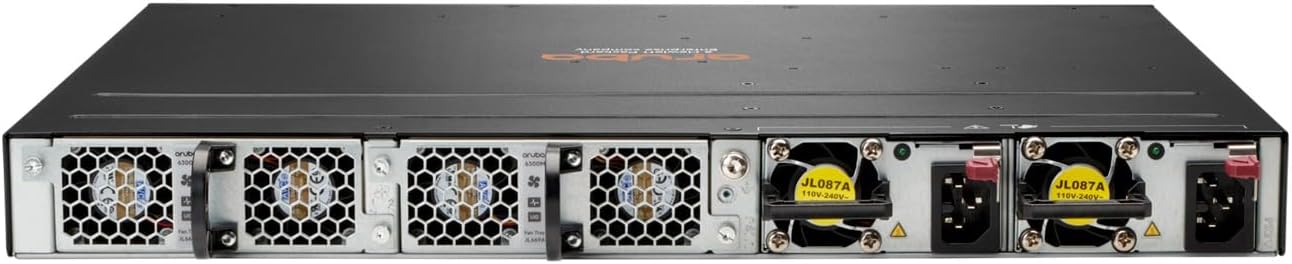
Gambar 2: Tukangeun view of the HPE Aruba 6300M 24G CL4 PoE 4SFP56 Switch. This image displays the back of the network switch, featuring multiple modular bays designed for power supplies and fan modules. Each bay is equipped with a handle for easy removal and installation. The power supply modules are visible with their respective power inlets and retention clips, indicating support for redundant power configurations. Fan modules are also present, ensuring proper cooling of the device.
- Modular Power Supply Bays: Supports redundant power supplies for increased reliability.
- Modul kipas: Hot-swappable fan modules for cooling and easy replacement.
5. Pamasangan
5.1 Rak Pamasangan
The HPE Aruba 6300M switch is designed for standard 19-inch rack mounting. Use the provided rack mount kit and follow these steps:
- Attach the rack mount brackets to the sides of the switch using the screws provided.
- Pasangkeun saklar kana rak nganggo sekrup rak anu pas. Pastikeun saklarna rata sareng dipasang pageuh.
- Allow adequate space for airflow around the front and rear panels.
5.2 Sambungan Daya
Connect the power cord(s) to the power supply module(s) on the rear panel of the switch and then to a grounded AC power outlet. For redundant power, connect both power supplies to separate power sources if available.
5.3 Sambungan Jaringan
- Port Ethernet: Connect network devices (computers, access points, IP phones) to the 1GbE RJ-45 ports using standard Ethernet cables. These ports support PoE for compatible devices.
- Palabuhan SFP56: Insert compatible SFP56 transceivers into the SFP56 slots and connect fiber optic cables for high-speed uplinks to other switches or network devices.
6. Parentah Operasi
6.1 Aksés Awal jeung Konfigurasi
Upon initial power-up, the switch will perform a self-test. You can access the switch for configuration via:
- Port konsol: Connect a computer to the console port using the provided console cable and a terminal emulation program (e.g., PuTTY, Tera Term) with settings: 9600 baud, 8 data bits, no parity, 1 stop bit, no flow control.
- Web Interface (GUI): Once the switch has an IP address, you can access its webpanganteur manajemén basis via a web browser. Refer to the Quick Start Guide for default IP address information.
- Command Line Interface (CLI) via SSH/Telnet: After initial configuration, you can manage the switch remotely using SSH (recommended for security) or Telnet.
6.2 Basic Configuration Steps
- Set IP Address: Configure a static IP address, subnet mask, and default gateway for the management interface.
- Robah Kapercayaan Default: For security, immediately change the default administrator username and password.
- Configure VLANs: Create and assign VLANs to segment your network traffic.
- Enable PoE: Ensure PoE is enabled on ports where PoE-powered devices are connected.
- Simpen Konfigurasi: Always save your configuration changes to non-volatile memory to ensure they persist after a reboot.
7. Pangropéa
7.1 Pertimbangan Lingkungan
Maintain the operating environment within specified temperature and humidity ranges to ensure optimal performance and longevity of the switch. Regularly check for proper ventilation and clear any obstructions around the air vents.
7.2 beberesih
Periodically clean the exterior of the switch with a soft, dry cloth. Do not use liquid or aerosol cleaners. Ensure the power is disconnected before cleaning.
7.3 Apdet firmware
Pariksa dukungan HPE Aruba sacara rutin website for the latest firmware updates. Applying firmware updates can provide new features, performance improvements, and security patches. Follow the instructions provided with the firmware package carefully.
8. Cara ngungkulan
This section provides solutions to common issues. For more complex problems, refer to the comprehensive documentation on the HPE Aruba support websitus atanapi ngahubungan rojongan teknis.
- Henteu aya kakuatan:
- Pastikeun kabel listrik disambungkeun sacara aman ka saklar sareng stopkontak.
- Pariksa pungsionalitas stop kontak.
- Ensure the power supply modules are correctly seated in their bays.
- Henteu aya tautan dina Port:
- Check the Ethernet or fiber cable connection at both ends.
- Verify the cable type and length are appropriate for the connection.
- Pastikeun alat nu disambungkeun dihurungkeun tur fungsina bener.
- Check the port status LEDs on the switch.
- Masalah Konektipitas Jaringan:
- Verify IP address, subnet mask, and gateway settings.
- Pariksa konfigurasi VLAN upami tiasa.
- Ensure there are no IP address conflicts on the network.
- Test connectivity using ping or traceroute commands from the switch CLI.
- Alat PoE Henteu Diaktipkeun:
- Ensure the device is PoE compatible (802.3af/at).
- Check if PoE is enabled on the specific port.
- Verify the PoE budget of the switch is not exceeded.
- Test with a different PoE device or cable.
9. Spésifikasi
| Fitur | Katerangan |
|---|---|
| merek | HEWLETT PACKARD |
| Nomer modél | JL662A |
| Jumlah Palabuhan | 24 (1GbE Class 4 PoE) + 4 (SFP56) |
| Pindah Tipe | Lapisan 3 |
| Laju Mindahkeun Data | 50 Gigabits Per Second (SFP56) |
| Panganteur | PoE, SFP56 |
| Alat nu cocog | Desktop (jeung alat jaringan séjén) |
| Item Beurat | 5000 gram |
| Case Material Type | Plastik, Logam |
| Warna | Hideung |
| UPC | 190017339467 |
10. Garansi jeung Rojongan
The HPE Aruba 6300M 24G CL4 PoE 4SFP56 Switch is covered by a manufacturer's warranty. For detailed warranty information, including terms and conditions, please refer to the warranty card included with your product or visit the official HPE Aruba websitus.
For technical support, product documentation, software downloads, and additional resources, please visit the HPE Aruba support portal. You will need your product model number (JL662A) and serial number when contacting support.