1. Bubuka
This manual provides essential information for setting up, operating, maintaining, and troubleshooting your Sony X800H 65-inch 4K Ultra HD Smart LED TV. Please read this manual thoroughly before using your television to ensure proper and safe operation.

Gambar 1.1: Hareupeun view of the Sony X800H 65-inch 4K Ultra HD Smart LED TV.
2. Naon dina Box
Upon unpacking your Sony X800H TV, ensure all the following items are present:
- Sony X800H 65-inch 4K Ultra HD Smart LED TV
- Kadali jauh
- Kabel listrik
- Table-Top Stand (if not wall-mounting)
- Parentah Operasi / Guide Setup Gancang
- Batré pikeun Remote Control
3. Setélan
3.1 Attaching the Table-Top Stand
- Teundeun layar TV sacara saksama dina tempat anu lemes sareng datar pikeun nyegah karuksakan.
- Sejajarkeun braket penyangga sareng liang sekrup di handapeun TV.
- Ngamankeun stand ngagunakeun screws disadiakeun. Pastikeun sadaya screws tightened pageuh.
3.2 Pamasangan Tembok (Pilihan)
If you choose to wall-mount your TV, please refer to the instructions provided with your wall-mount bracket. Ensure the bracket is compatible with VESA mounting standards for your TV size and weight. Professional installation is recommended.

Gambar 3.1: Example of a Sony TV mounted on a wall.
3.3 Nyambungkeun Alat éksternal
Connect your external devices (e.g., cable box, Blu-ray player, gaming console) to the HDMI ports on the back of the TV. The Sony X800H features multiple HDMI inputs for your convenience.

Gambar 3.2: Tukangeun view showing various input ports including HDMI, USB, and Ethernet.
3.4 Sambungan Daya jeung Setup Awal
- Colokkeun kabel listrik kana TV teras kana stop kontak témbok.
- Pencét tombol Daya dina kadali jauh atanapi dina TV.
- Follow the on-screen instructions to complete the initial setup, including network connection, language selection, and channel scanning.
4. Ngoperasikeun TV
4.1 Fungsi Dasar Kontrol Jarak Jauh
Remot kontrol anu kalebet ngamungkinkeun anjeun pikeun navigasi ménu, ngarobih saluran, nyaluyukeun volume, sareng ngaksés fitur pinter. Biasakeun diri anjeun sareng tata letak tombol pikeun panggunaan anu optimal.
4.2 Smart Android TV Features
Your Sony X800H is an Android TV, providing access to a wide range of apps, streaming services, and smart home integration. Use the Google Assistant for voice control and content search.
- Asisten Google: Press the Google Assistant button on your remote and speak your commands to search for movies, shows, control smart home devices, or get answers.
- Aksés Aplikasi: Navigate to the 'Apps' section to download and manage your favorite streaming applications like Netflix, Hulu, Disney+, and more.
- Alexa kasaluyuan: Connect your TV with an Alexa-enabled device to control your TV with voice commands, stream smart camera feeds, play music, and launch video apps.
- Apple AirPlay 2 & HomeKit: Seamlessly integrate your iPhone and Siri devices for content streaming and smart home management.
Video 4.1: Resmi réngséview of the Sony X800H 4K HDR LED Android Smart TV features, including smart functionality and picture quality enhancements.
5. Fitur konci
The Sony X800H TV is equipped with advanced technologies to enhance your viewpangalaman:
- Prosesor 4K HDR X1: Experience premium 4K pictures with rich detail and texture. Content is upscaled to near-4K resolution using 4K X-Reality PRO.
- Témbongkeun TRILUMINOS: Enjoy expanded, vivid colors for a more true-to-life picture, as intended by the creator.
- Modeu Kaulinan: Optimized settings for a smoother, more responsive gaming experience, ideal for PlayStation.
- HDR and Dolby Vision: Brings scenes to life with striking highlights, deeper darks, and vibrant colors.
- Aliran gerak XR: Reduces blur in fast-moving scenes, making content appear with lifelike motion.
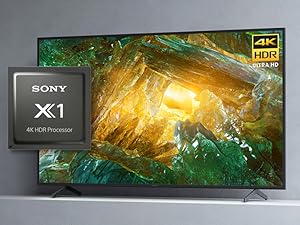
Image 5.1: The Sony X1 4K HDR Processor, central to enhanced picture quality.
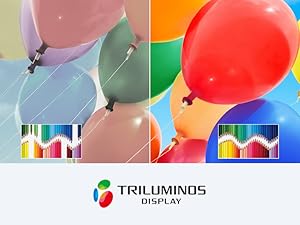
Image 5.2: Visual representation of the wide color gamut provided by the TRILUMINOS Display.
6. Pangropéa
6.1 Ngabersihan TV
- layar: Lembut usap layar nganggo kaen microfiber anu lemes sareng garing. Pikeun smudges nekad, enteng dampen kaen nganggo cai atanapi solusi beberesih khusus layar (henteu pernah disemprot langsung kana layar).
- Pigura jeung Stand: Anggo kaén anu lembut sareng garing pikeun ngusap lebu tina pigura TV sareng nangtung.
- penting: Always unplug the TV before cleaning. Avoid using harsh chemicals, abrasive cleaners, or solvents.
6.2 Apdet parangkat lunak
TV Anjeun bisa nampa apdet software otomatis pikeun ngaronjatkeun kinerja jeung nambahkeun fitur anyar. Pastikeun TV Anjeun disambungkeun ka internét pikeun nampa apdet ieu. Anjeun oge tiasa sacara manual mariksa apdet dina menu setelan TV.
7. Cara ngungkulan
Upami anjeun ngalaman masalah sareng TV anjeun, cobian léngkah-léngkah ngungkulan dasar ieu:
- Henteu aya kakuatan: Ensure the power cord is securely plugged into both the TV and the wall outlet. Try a different outlet.
- Taya Gambar/Sora: Check that the correct input source is selected. Verify all cable connections to external devices are secure.
- Jauh Teu Gawé: Ganti batré dina kadali jauh. Pastikeun teu aya halangan antara jauh sareng sénsor IR TV.
- Masalah Sambungan Jaringan: Balikan deui router sareng modem anjeun. Pariksa setélan jaringan TV pikeun mastikeun éta nyambung ka jaringan Wi-Fi atanapi kabel Ethernet anu leres.
- Masalah Kualitas Gambar: Saluyukeun setelan gambar (kacaangan, kontras, warna) dina menu TV. Pastikeun yén sumber eusi téh kualitas luhur.
For more detailed troubleshooting, refer to the comprehensive help guide accessible through your TV's settings menu or visit the Sony support websitus.
8. Spésifikasi
| Fitur | Spésifikasi |
|---|---|
| merek | Sony |
| Nomer modél | XBR65X800H |
| Ukuran layar | 64.5 Inci (Diagonal) |
| Téknologi tampilan | LED |
| Resolusi | 4K Ultra HD (3840 x 2160) |
| Refresh Laju | 60 Hz |
| Prosesor | Prosesor 4K HDR X1 |
| Sistem operasi | Android TV sareng Asisten Google |
| Konektipitas | HDMI, USB, Wi-Fi, Ethernet, Bluetooth |
| Ukuran (W x D x H) | 57.63 x 13.5 x 35.38 inci (kalayan nangtung) |
| Item Beurat | 49.81 Pounds (with stand) |
9. Garansi jeung Rojongan
Your Sony X800H TV comes with a manufacturer's warranty. For specific warranty details, please refer to the warranty card included with your product or visit the official Sony support websitus. Kanggo bantosan téknis, pendaptaran produk, atanapi kanggo milarian pusat layanan, mangga buka www.sony.com/electronics/support.


