1. Bubuka
This manual provides detailed instructions for the installation, operation, and maintenance of your GIGABYTE B660I AORUS PRO DDR4 Mini-ITX Gaming Motherboard. Designed for 12th Gen Intel Core Series Processors, this motherboard offers robust performance and advanced features for gaming and productivity. Please read this manual thoroughly before proceeding with installation to ensure proper setup and functionality.
2. Fitur konci
- Socket Intel LGA 1700: Ngarojong Prosesor Séri Intel Core Generasi ka-12.
- DDR4 cocog: Dual Channel Non-ECC Unbuffered DDR4, 2 DIMMs.
- Desain kakuatan paréntah: 8+1+1 Phases Digital VRM Solution with 90A SPS for stable power delivery.
- Desain Termal Motong: Extended Heatsinks and Multi-Layered PCH/M.2 Heatsink, Shielded Memory Routing, Thermal Backplate for efficient heat dissipation.
- Konektipitas Gen salajengna: PCI 4.0, NVMe PCIe 4.0 x4 M.2, USB 3.2 Gen 2x2 Type-C for high-speed data transfer.
- Jaringan gancang: Intel 2.5GbE LAN, WIFI 6 802.11ax, BT5 for reliable and high-speed network connections.
- Fitur Fine Tuning: RGB FUSION 2.0, Supports Addressable LED & RGB LED Strips, Smart Fan 6, Q-Flash Plus for BIOS updates without CPU, Memory, or GPU installation.
3. Produk Langkungview
Familiarize yourself with the layout and components of your motherboard.
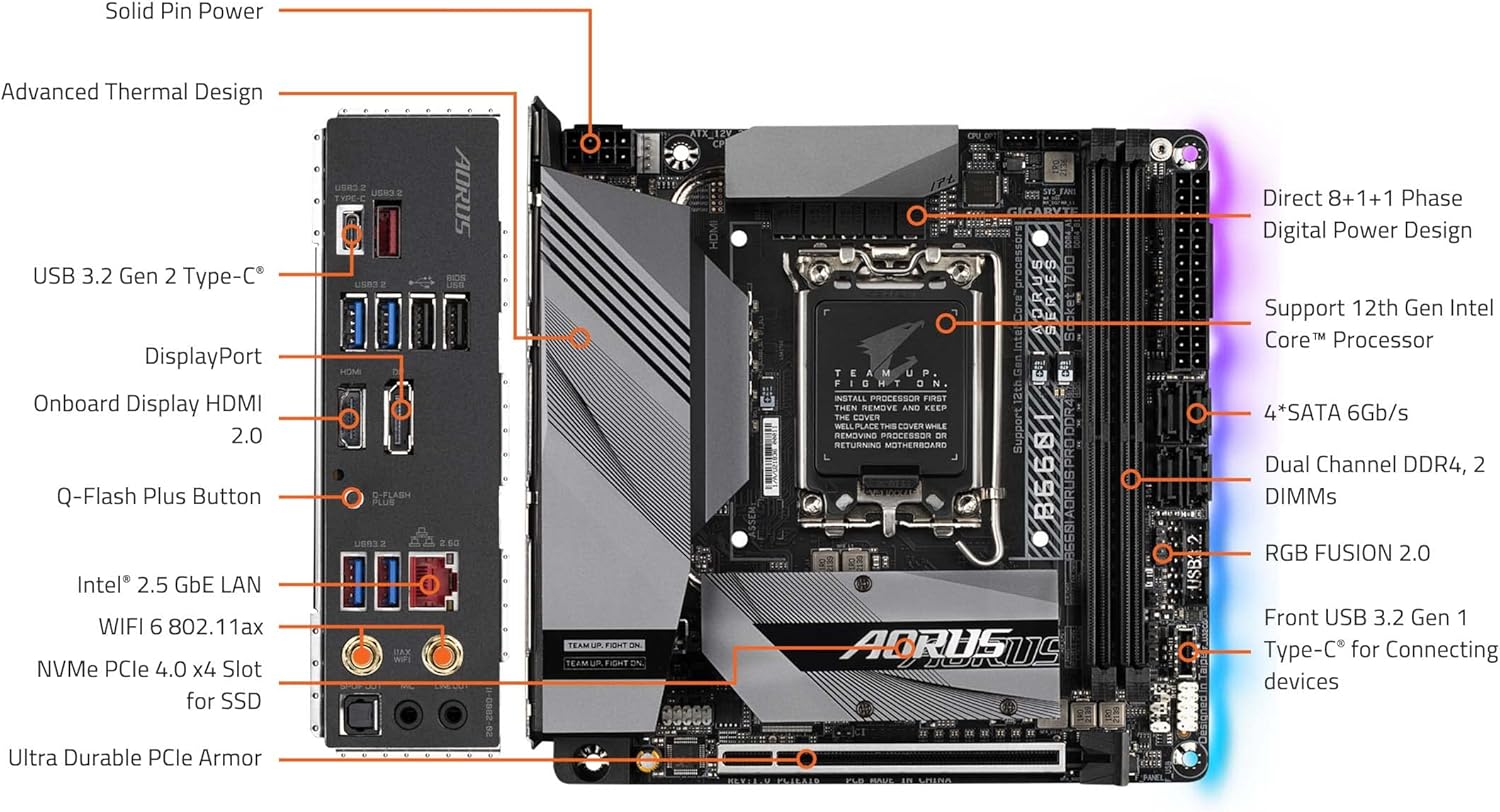
Figure 3.1: GIGABYTE B660I AORUS PRO DDR4 Motherboard with labeled components. This diagram shows the CPU socket, DDR4 DIMM slots, PCIe 4.0 slot, NVMe PCIe 4.0 x4 M.2 slot, USB 3.2 Gen 2 Type-C, DisplayPort, HDMI 2.0, Q-Flash Plus Button, Intel 2.5GbE LAN, WIFI 6 802.11ax, Ultra Durable PCIe Armor, and RGB FUSION 2.0 headers.

Figure 3.2: Rear I/O Panel. This image displays the USB 3.2 ports (Type-C and Type-A), USB 2.0 ports, HDMI, DisplayPort, Intel 2.5GbE LAN port, WiFi antenna connectors, and audio jacks.
4. Setup jeung Instalasi
4.1. Pamasangan CPU
The motherboard features an LGA 1700 socket. Ensure your CPU cooler has an LGA 1700 bracket for proper installation.
- Buka uas stop kontak CPU.
- Taliti align CPU jeung stop kontak, mastikeun tanda triangular on CPU cocog jeung tanda dina stop kontak nu.
- Gently nempatkeun CPU kana stop kontak nu. Ulah maksakeun.
- Tutup uas stop kontak pikeun ngamankeun CPU.
- Install your CPU cooler, ensuring it is compatible with the LGA 1700 socket and properly mounted.

Figure 4.1: CPU Socket and Cooler Bracket. This image shows the LGA 1700 socket on the motherboard and a separate LGA 1700 cooler bracket, emphasizing the need for compatible cooling solutions.
4.2. Pamasangan mémori (RAM).
This motherboard supports Dual Channel Non-ECC Unbuffered DDR4 memory across 2 DIMM slots.
- Buka klip dina kadua tungtung slot DIMM.
- Align kiyeu dina modul memori DDR4 jeung kiyeu dina slot DIMM.
- Selapkeun modul memori pageuh kana slot nepi ka jepitan snap kana tempat.
4.3. gudang (M.2 SSD) pamasangan
The motherboard includes an NVMe PCIe 4.0 x4 M.2 slot for high-speed storage.
- Locate the M.2 slot, often covered by a heatsink. Remove the heatsink if present.
- Selapkeun M.2 SSD kana slot dina hiji sudut.
- Gently push down the SSD and secure it with the provided screw or retention mechanism.
- Reattach the M.2 heatsink if applicable.
4.4. Pamasangan Kartu PCIe
The motherboard features a PCIe 4.0 slot for graphics cards or other expansion cards.
- Align your PCIe card with the PCIe slot.
- Pencét pageuh nepi ka kartu dipasang kalawan bener sareng klip penahan ngonci.
- Ngamankeun kartu kana chassis anjeun kalawan screw a.
5. Parentah Operasi
5.1. Boot awal sareng Setup BIOS
Upon first boot, access the BIOS/UEFI setup by pressing the designated key (usually DEL or F2) during startup. Here you can configure boot order, system time, and other advanced settings. Refer to the GIGABYTE website for detailed BIOS guides.
5.2. Pamasangan supir
After installing your operating system, install the latest drivers for your motherboard's chipset, audio, LAN, and Wi-Fi components. These can be found on the official GIGABYTE support websitus pikeun model husus Anjeun.
5.3. Q-Flash Ditambah
The Q-Flash Plus feature allows you to update the BIOS without installing the CPU, memory, or graphics card. Simply download the latest BIOS file ti GIGABYTE website, rename it as instructed, and place it on a USB flash drive. Insert the USB drive into the designated Q-Flash Plus port on the rear I/O panel and press the Q-Flash Plus button.
6. Pangropéa
6.1. beberesih
Regularly clean your PC components to prevent dust buildup, which can lead to overheating. Use compressed air to remove dust from heatsinks, fans, and other components. Ensure the system is powered off and unplugged before cleaning.
6.2. BIOS Apdet
Keep your BIOS updated to ensure optimal performance, compatibility, and security. Always download BIOS updates directly from the official GIGABYTE website and follow the instructions carefully. Incorrect BIOS updates can damage your motherboard.
6.3. Apdet parangkat lunak
Ensure all system drivers and utility software (e.g., RGB FUSION 2.0, Smart Fan 6) are kept up-to-date for the best user experience and system stability.
7. Cara ngungkulan
7.1. No Display/Boot Failure
- Check all power connections to the motherboard (24-pin ATX and 8-pin CPU power).
- Ensure RAM modules are correctly seated in their slots. Try reseating them or testing with one module at a time.
- Verify that the graphics card is properly installed and connected to the monitor.
- Clear CMOS (Complementary Metal-Oxide-Semiconductor) by removing the CMOS battery for a few minutes or using the designated jumper.
7.2. Masalah Konektipitas Jaringan
- For wired connections, ensure the Ethernet cable is securely plugged into the Intel 2.5GbE LAN port and your router/modem.
- For wireless connections, ensure the Wi-Fi antennas are properly attached to the rear I/O panel.
- Install or update the latest LAN and Wi-Fi drivers from the GIGABYTE websitus.
7.3. USB Port Malfunction
- Ensure all USB headers on the motherboard are correctly connected to your case's front panel USB ports.
- Update chipset drivers.
- Test the USB device on a different port or another computer to rule out device issues.
8. Spésifikasi
| Fitur | Spésifikasi |
|---|---|
| merek | GIGABYTE |
| Ngaran modél | B660I AORUS PRO DDR4 |
| CPU Socket | LGA 1700 |
| Prosesor cocog | 12th Gen Intel Core Series Processors |
| Tipe Chipset | Intel B660 |
| Téhnologi Mémori RAM | DDR4 |
| Laju mémori | 4400 MHz |
| Kapasitas Panyimpenan Mémori | 128 GB (Max) |
| Tipe Wireless | 802.11ax (WiFi 6) |
| LAN | Intel 2.5GbE LAN |
| palabuhan USB | USB 3.2 Gen 2x2 Tipe-C, USB 3.2 Gen 2, USB 3.2 Gen 1, USB 2.0 |
| Dimensi produk | 9.25 x 8.94 x 3.74 inci |
| Item Beurat | 2.62 pon |
9. Product Demonstration
Video 9.1: A brief product demonstration of the GIGABYTE B660I AORUS PRO DDR4 motherboard, showcasing its physical aspects and features. This video provides a visual overview of the motherboard's design and connectivity options.
10. Garansi jeung Rojongan
GIGABYTE products come with a limited warranty. For detailed warranty information, technical support, driver downloads, and BIOS updates, please visit the official GIGABYTE website. You can also find FAQs and contact customer service through their support portal.
Rojongan GIGABYTE Websitus: www.gigabyte.com/support


