1. Bubuka
This manual provides detailed instructions for the installation, operation, and maintenance of your Onforu 65W LED Motion Sensor Flood Light, Model BDB65G-3. This outdoor security light is designed to provide bright, efficient illumination with motion detection capabilities for various outdoor applications.

Figure 1: Onforu 65W LED Motion Sensor Flood Light, Model BDB65G-3.
2. Émbaran Kasalametan
Mangga baca sadaya pitunjuk kaamanan kalayan saksama sateuacan dipasang sareng dioperasikeun. Upami henteu nuturkeun pitunjuk ieu tiasa nyababkeun sengatan listrik, kahuruan, atanapi bahaya sanésna.
- Kasalametan listrik: Always turn off power at the circuit breaker before installing, servicing, or cleaning the fixture. Ensure proper grounding to avoid electrical shock.
- Tukang listrik anu mumpuni: If you are unsure about wiring or installation procedures, consult a qualified electrician.
- Voltage: Pastikeun catu daya voltage cocog sarat fixture urang (120 Volts).
- Pamasangan: Mount the fixture securely to a stable surface. Do not install near flammable materials.
- Panas: LED lights generate heat. Do not touch the fixture immediately after operation.
- Rating waterproof: This fixture is IP65 waterproof, suitable for outdoor use. However, ensure all connections are sealed properly during installation.
3. Eusi Paket
Pariksa yén sadaya komponén aya sateuacan ngamimitian pamasangan:
- Onforu 65W LED Motion Sensor Flood Light (1 unit)
- Pemasangan Hardware (sekrup, mur kawat)
- Instruksi Manual
4. Fitur Produk
The Onforu 65W LED Motion Sensor Flood Light offers several key features:
- Caang luhur: 65W power with 112 LED beads, producing 6500 lumens at 6500K daylight white.
- Deteksi gerak: 180° wide sensing angle, detecting motion up to 72 feet away.
- Lampu adjustable: Three adjustable heads provide a 270-degree detection zone and customizable light direction.
- Desain awét: IP65 waterproof rating for reliable performance in various weather conditions. Efficient fin-type heat sink design and aluminum housing ensure a long lifespan.
- Énergi Éfisién: Equivalent to a 450W traditional bulb, saving up to 85% on electricity costs.

Figure 2: Key features of the Onforu flood light.

Figure 3: Motion detection range illustration.
5. Parentah instalasi
Installation should be performed by a qualified individual. Always ensure power is OFF at the circuit breaker before starting.
5.1 Pilihan pamasangan
The flood light supports both wall mount and soffit mount installations.

Figure 4: Soffit Mounted vs. Wall Mounted installation.
5.2 Kabel
The fixture requires hardwired installation. Follow these steps for safe wiring:
- Nyiapkeun Plat Pemasangan: Secure the metal mounting ring to your electrical box. Ensure the center nipple faces the desired lighting area.
- Jalur Kawat: Pull the house's black (Live) and white (Neutral) wires through the top-left opening of the mounting ring. Pull the house's green (Ground) wire through the right side.
- Sambungan taneuh: Attach the house's green wire to the green screw on the fixture's base, wrapping it clockwise. Then, wrap the fixture's green wire clockwise around the same screw. Tighten the green screw securely. This connection can temporarily support the fixture during further wiring.
- Live Connection: Twist the fixture's black wire and the house's black wire together clockwise. Insert both into a wire nut and twist the nut clockwise until snug. Ensure no bare wire is exposed.
- Sambungan Nétral: Repeat the process for the white (Neutral) wires, twisting them together and securing with a wire nut.
- Kawat Tuck: Carefully push all wired connections and wire nuts into the electrical box, ensuring no wires are pinched.
- Perlengkapan Aman: Align the fixture's base with the mounting ring. Insert the long screw through the center of the fixture's base and thread it into the nipple on the mounting ring. Gently tighten the screw until the fixture is secure against the mounting surface. Do not overtighten.
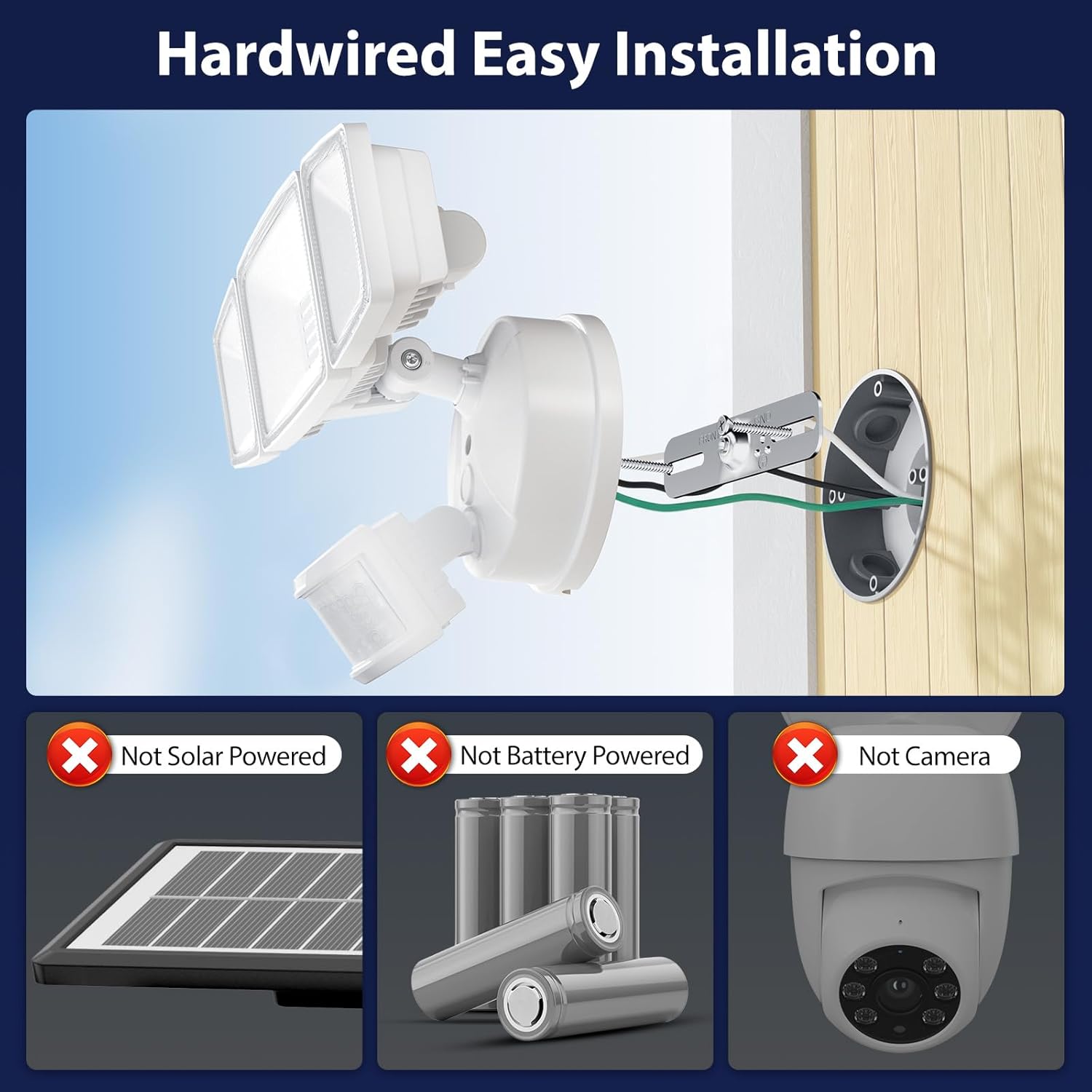
Figure 5: Hardwired installation overview.

Figure 6: Wiring connections and product dimensions.
5.3 Adjusting Light Heads
The three light heads are adjustable to direct illumination where needed. Loosen the screws on the side elbows of each arm to adjust the angle, then tighten securely once the desired position is achieved. The motion sensor itself can also be angled.

Figure 7: Adjustable light head positions.
6. Parentah Operasi
The motion sensor has three adjustable dials to customize its operation:
- LUX (Sensitivitas Cahaya): Controls the ambient light level at which the sensor activates.
- "+" setting: Lights will be triggered at both day and night.
- "-" setting: Lights will only be triggered at night (when it's dark enough).
- TIME (Duration): Adjusts how long the light stays on after motion is detected, ranging from 10 seconds to 7 minutes.
- SENS (Motion Sensitivity/Distance): Controls the detection range of the motion sensor, from approximately 16.4 feet to 72.2 feet.
To adjust these settings, rotate the corresponding dials on the bottom of the motion sensor. Start with all dials in the middle position and adjust incrementally to achieve desired performance. Small adjustments can lead to significant changes.

Figure 8: Motion sensor adjustment dials.
7. Pangropéa
Regular maintenance ensures optimal performance and longevity of your flood light.
- beberesih: Ngabersihan fixture jeung lénsa sensor gerak périodik ku lemes, damp lawon. Ulah make cleaners abrasive atawa pangleyur.
- Pamariksaan: Periodically check for any loose wiring connections or damage to the fixture. Address any issues promptly.
- Faktor Lingkungan: While IP65 rated, extreme weather conditions may affect performance. Ensure the fixture is clear of debris, snow, or ice that could obstruct the sensor or light output.
8. Cara ngungkulan
If you encounter issues with your flood light, refer to the following common problems and solutions:
| Masalah | Mungkin Cukang lantaranana | Solusi |
|---|---|---|
| Lampu henteu hurung. |
|
|
| Lampu terus hurung. |
|
|
| Lampu kilat atanapi kedip-kedip. |
|
|
| Sénsor gerak henteu ngadeteksi. |
|
|
9. Spésifikasi
| Atribut | Spésifikasi |
|---|---|
| merek | Onforu |
| Nomer modél | BDB65G-3 |
| Wattage | 65 Watt |
| Caang | 6500 Lumén |
| Suhu Warna | 6500 Kelvin (Daylight Bodas) |
| Voltage | 120 volt |
| Bahan | Aluminium Alloy |
| Tingkat Résistansi Cai | IP65 Waterproof |
| Sudut Sénsor gerak | 180° |
| Jarak Sénsor gerak | Nepi ka 72 suku |
| Jangkauan Timer | 10 detik nepi ka 7 menit |
| Dimensi produk | 10.7 "L x 5.8" W x 4.7" H |
| Item Beurat | 2 pon |
| Tipe Pamasangan | Wall Mount & Soffit Mount |
| UPC | 742089196426 |
10. Garansi jeung Rojongan
This Onforu flood light comes with a 2-taun jaminan kawates ti tanggal beuli. Garansi ieu nyertakeun cacad dina bahan sareng pagawean dina panggunaan normal.
For warranty claims, technical assistance, or any questions regarding your product, please contact Onforu customer support. Keep your purchase receipt as proof of purchase.
Onforu Customer Support: Please refer to the contact information provided on the product packaging or the official Onforu websitus pikeun detil rojongan panganyarna.


