
Bubuka
The Skytech 1420-A remote control system is designed to provide a safe, reliable, and user-friendly remote control solution for gas heating appliances. This system operates on 110-120 VAC and functions as a dry contact switch, meaning it does not output power directly.
Eusi pakét
The Skytech 1420-A system includes the following components:
- 2-Button On/Off handheld transmitter remote control (replaces model SKY-1410-A)
- All battery operated R.F. with 1,048,576 security codes
- 110V AC receiver box with learn function and On/Remote/Off slider switch
- Receiver box is designed for millivolt gas valves only and acts as a dry contact switch (the receiver will not output any voltage)
- témbok-jepitan
- parentah instalasi
- Batré (2 batré AAA diperyogikeun, kalebet)

Image: Skytech 1420 On/Off Remote Control Transmitter. This image shows the sleek black remote control with clearly labeled ON and OFF buttons.
Setup sareng Instalasi
Proper installation is crucial for the safe and effective operation of your Skytech 1420 remote control system. If you are unsure about any steps, it is recommended to consult a qualified professional.
1. Determine Fireplace Compatibility
Before installing the remote system, verify that your gas fireplace is remote-ready. This typically involves checking for existing control mechanisms or specific terminals on the gas valve.
- Check for a Wall Switch: Look for a wall-mounted switch that controls your fireplace.
- Check for a Fireplace Switch: Inspect inside the fireplace, often behind a louver or on a decorative trim, for an existing switch.
If a switch is present, your fireplace is likely compatible with a Skytech remote system.
2. Identify Gas Valve Terminals
If no switch is found, locate the gas valve within your fireplace. Examine the gas valve for terminals labeled TH, TP, or THTP. The presence of these terminals indicates that your fireplace is remote-ready and can connect to a Skytech receiver box.

Gambar: Deukeut view of a gas valve showing terminals labeled 'TP' and 'TH'. These terminals are essential for connecting the remote receiver.
3. Diagram Kabel
The Skytech 1420-A receiver box is specifically designed for millivolt gas valves. Below are general wiring diagrams for common fireplace types. Always refer to the detailed installation instructions included with your product for specific wiring steps and safety precautions. Professional installation is recommended for all gas appliance connections.
Wiring for Millivolt Valves
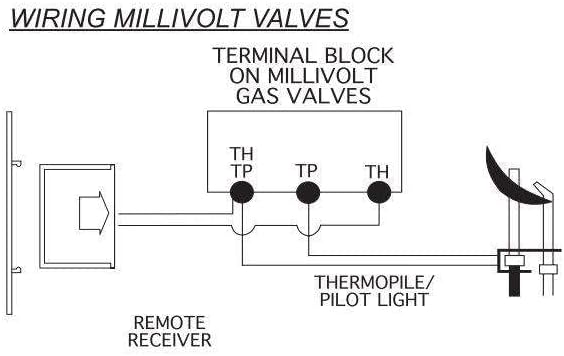
Image: Diagram illustrating the wiring of a remote receiver to a millivolt gas valve. It shows connections to the TH, TP, and THTP terminals, along with the thermopile/pilot light.
For millivolt gas valves, connect the receiver to the appropriate terminals (TH, TP, THTP) as indicated in the diagram. The receiver acts as a dry contact switch and does not supply voltage to the valve.
Wiring for Electronic Spark Ignitions (IPI Systems)

Image: Diagram showing the wiring for an electronic spark ignition system. It details connections from the remote receiver to an electronic module and a 110/24VAC transformer.
If your fireplace uses an electronic spark ignition (IPI) system, the wiring will involve an electronic module and a transformer. Follow the diagram carefully to ensure correct connections. Note that the Skytech 1420-A receiver is primarily for millivolt systems; for IPI, ensure compatibility or consider specific IPI-compatible Skytech models.
Parentah Operasi
The Skytech 1420-A remote control provides simple on/off functionality for your gas fireplace.
- Ngahurungkeun: Pencét éta ON button on the handheld transmitter. The fireplace will ignite.
- Pareuman: Pencét éta Pareum button on the handheld transmitter. The main burner will turn off, leaving only the pilot light (if applicable).
- Adjusting Flame (if supported by fireplace valve): Some fireplace systems allow for flame height adjustment. If your fireplace valve supports this, the remote may offer additional control. Refer to your fireplace's manual for details on flame adjustment capabilities.
Ensure the receiver box's slider switch is in the "Remote" position for remote operation.
spésifikasi
| Fitur | Rincian |
|---|---|
| Dimensi produk | 6 x 3 x 9 inci |
| Item Beurat | 11.7 ons |
| ASIN | B0839NCJPM |
| Nomer Modél Item | SKY-1420-A |
| Batré | 2 batré AAA diperlukeun (kaasup) |
| Produsén | Skytech |
| Negara asal | Cina |
| Fitur husus | Érgonomis |
| Warna | Hideung |
| Jumlah Max Alat Dirojong | 1 |
| Alat nu cocog | Gas fireplaces with millivolt gas valves |

Image: Compatibility chart for Skytech 1400 Series models, showing which models support ON/OFF, Thermostat, Timer, and Programmable features. The SKY-1410-A is listed with ON/OFF capability.
Pamérésan masalah
If you encounter issues with your Skytech 1420 remote control system, consider the following general troubleshooting steps:
- Pariksa batré: Ensure the batteries in the remote transmitter are fresh and correctly installed.
- Receiver Switch Position: Verify that the slider switch on the receiver box is set to the "Remote" position.
- Lampu Pilot: Confirm that the pilot light on your fireplace is lit. The remote system controls the main burner, not the pilot light.
- rentang: Ensure you are within the effective range of the receiver and there are no significant obstructions.
- Papasangan deui: If the remote is not responding, you may need to re-pair the transmitter with the receiver. Refer to the detailed installation instructions for the pairing procedure.
Bantosan Téknis
Should you require further assistance or encounter any problems with your Skytech product, please contact our technical support team:
Dukungan Téknis: 855-498-8324
Available Monday through Friday, 8 AM to 5 PM Eastern Standard Time.