Bubuka
This manual provides instructions for the ALLIMITY Replacement Infrared Remote Control, designed for use with various SKYWORTH LCD/LED TV models. Please read this guide thoroughly before using the remote control to ensure proper operation and longevity.
Compatible SKYWORTH TV Models:
- 24E66A
- 24E58A
- 32E66A
- 42E66A
- 50E58
- 32E57
- 32E36
- 42E38
- 39E36
If your specific TV model is not listed, please verify compatibility before use. This remote control operates via infrared (IR) technology.
Eusi pakét
- 1 x ALLIMITY Replacement Remote Control (Model: IND-SKYWORTH4-W)
Catetan: Batré henteu kalebet sareng kedah dipésér nyalira.
Disetél
1. Masang Batré
Remot kontrolna peryogi dua batré alkali AAA (teu kalebet).
- Panggihan kompartemen batré dina tonggong kadali jauh.
- Press down on the latch and slide the battery cover off.
- Insert two new AAA alkaline batteries, ensuring the positive (+) and negative (-) terminals match the diagrams inside the compartment.
- Geser panutup batré deui kana tempatna nepi ka ngaklik aman.
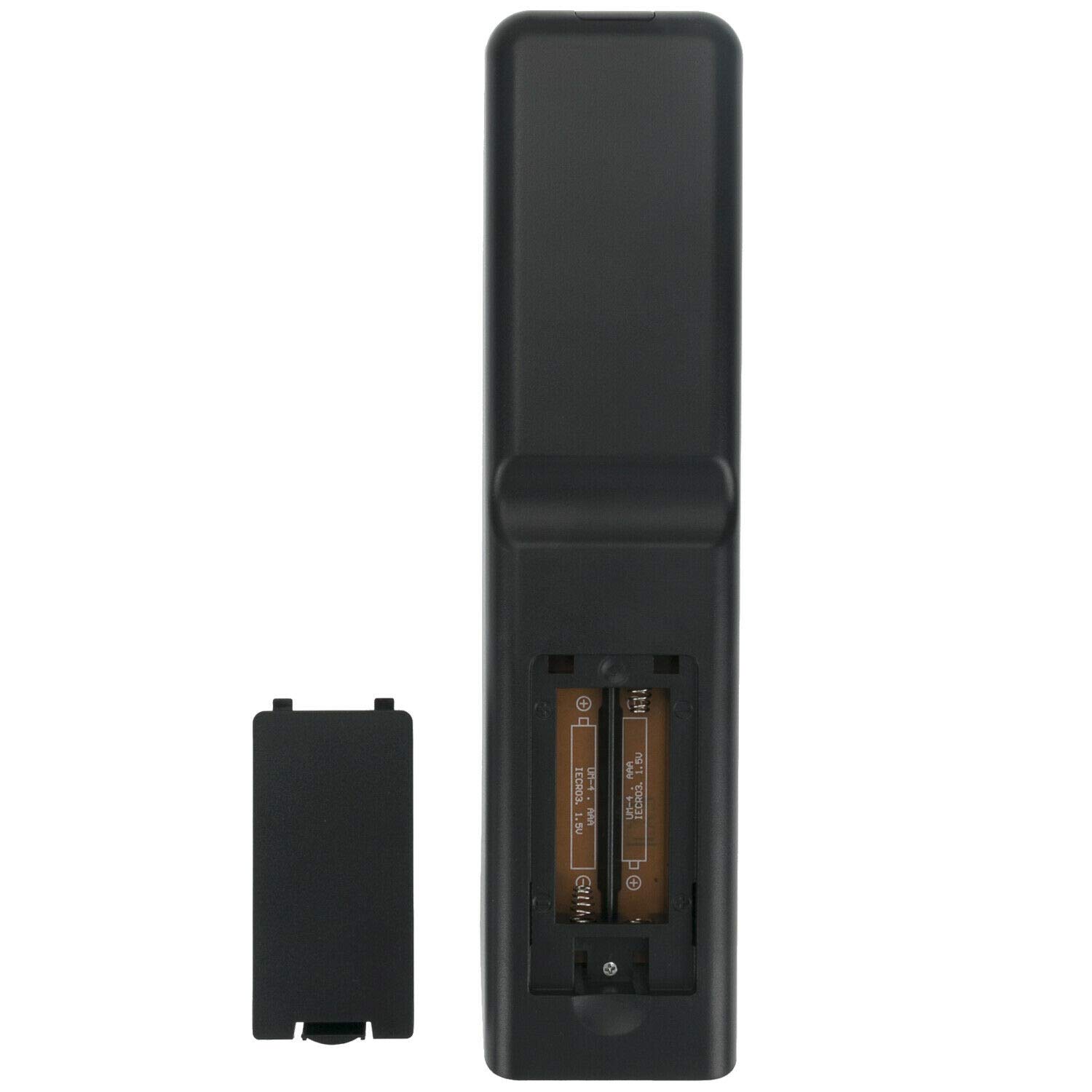
Gambar: Back of the remote control with the battery cover removed, illustrating the correct orientation for inserting AAA batteries.
2. Paké munggaran
No programming is required for this replacement remote control. Once batteries are installed, it is ready for use with compatible SKYWORTH LCD/LED TV models.
Parentah Operasi
To operate your TV using the remote control:
- Ensure the TV is powered on or in standby mode.
- Point the remote control directly towards the infrared sensor on your SKYWORTH TV. Avoid any obstacles between the remote and the TV sensor.
- Pencét tombol fungsi anu dipikahoyong.

Gambar: Leuwihview of the ALLIMITY remote control buttons.
Fungsi konci:
| Tombol | Fungsi |
|---|---|
| POWER | Ngahurungkeun atanapi mareuman TV (mode sayaga). |
| SM | Pilihan Modeu Sora. |
| ZOOM | Adjusts the screen zoom level. |
| 0-9 | Tombol numerik pikeun pilihan saluran langsung. |
| PULIH | Mulih kana ménu atanapi saluran sateuacanna. |
| MENU | Muka ménu utama TV. |
| QUICK CH/LIST | Accesses quick channel list. |
| SUMBER | Milih sumber input (HDMI, AV, jsb.). |
| Panah Navigasi (Luhur, Handap, Kénca, Katuhu) | Navigates ngaliwatan ménu jeung pilihan. |
| OK | Konfirmasi pilihan. |
| REC.DAFTAR | Accesses recorded content list. |
| KALUAR | Kaluar tina menu atanapi fungsi ayeuna. |
| INFO | Nampilkeun inpormasi ngeunaan program atanapi input ayeuna. |
| VOL +/- | Nyetél polumeu kaluhur atanapi kahandap. |
| PR +/- | Robah saluran kaluhur atanapi kahandap. |
| BISA | Ngajempékeun atanapi nganonaktipkeun sora TV. |
| SARE | Nyetél waktos bobo. |
| FAV | Ngaksés saluran paporit. |
| EPG | Pitunjuk Program Éléktronik. |
| TAHAN | Holds the current screen. |
| TEKS | Activates/deactivates Teletext. |
| INDEKS | Accesses Teletext index. |
| NGABATALkeun | Cancels current action. |
| SUBPAGE | Navigates Teletext subpages. |
| REC | Starts recording (if supported by TV). |
| UKURAN | Adjusts screen size/aspect ratio. |
| NYANGKEUN | Reveals hidden Teletext information. |
| MIX | Mixes TV picture with Teletext. |
| Kancing Berwarna (Beureum, Héjo, Konéng, Biru) | Functionality varies by TV model and current menu/application. Refer to your TV's manual. |
| Playback Controls (Rewind, Play/Pause, Fast Forward, Previous, Stop, Next) | Controls media playback (if supported by TV/connected device). |
Pangropéa
- beberesih: Wipe the remote control with a soft, dry cloth. Do not use liquid or aerosol cleaners.
- Ngagantian batré: Replace batteries when the remote control's response becomes sluggish or stops working. Always replace with new alkaline batteries.
- Panyimpenan: Upami remot kontrol moal dianggo dina waktos anu lami, cabut batréna pikeun nyegah bocor sareng karusakan.
- Ngahindarkeun Karusakan: Do not drop the remote control, expose it to moisture, or place it in direct sunlight or near heat sources.
Pamérésan masalah
| Masalah | Mungkin Cukang lantaranana | Solusi |
|---|---|---|
| Kadali jauh teu jalan. | Batré paéh atanapi teu leres diselapkeun. | Replace with new AAA alkaline batteries, ensuring correct polarity (+/-). |
| Rentang kadali jauh goréng. | Weak batteries; Obstruction between remote and TV sensor. | Replace batteries. Ensure a clear line of sight to the TV's IR sensor. |
| Sababaraha tombol teu jalan. | Remote control not compatible with specific TV function; Button malfunction. | Verify your TV model is listed as compatible. Some advanced functions may require the original remote. If multiple buttons fail, consider replacing the remote. |
| TV does not respond to any remote commands. | TV's IR sensor is blocked or faulty; TV is off or unplugged. | Check TV power. Clear any obstructions from the TV's IR sensor. Test with another remote if available to rule out TV sensor issue. |
spésifikasi
- merek: KAKATAAN
- model: IND-SKYWORTH4-W
- Alat anu cocog: SKYWORTH LCD/LED TVs (models: 24E66A, 24E58A, 32E66A, 42E66A, 50E58, 32E57, 32E36, 42E38, 39E36)
- Téknologi konektipitas: Infrabeureum (IR)
- Sumber Daya: Batré Powered
- Jenis Batré: 2 x Batré Alkali AAA (teu kalebet)
- Ukuran produk: 17 x 1.5 x 5 cm (kira-kira)
- Beurat barang: 70 g (sakitar)
- Bahan: ABS
- Negara asal: Cina
Garansi sareng Rojongan
This product is a replacement remote control. For specific warranty information, please refer to the seller's policy or contact ALLIMITY customer support directly. For technical assistance, refer to the troubleshooting section or contact your product vendor.
Note: This remote control is designed to function as a direct replacement for the original remote for the listed SKYWORTH TV models. Some advanced features specific to certain smart TV platforms or unique original remote buttons may not be fully supported.


