
Andoer HDV-201LM
Andoer HDV-201LM 1080p Digital Video Camera User Manual
Model: HDV-201LM
1. Bubuka
This manual provides detailed instructions for the safe and effective use of your Andoer HDV-201LM Digital Video Camera. Please read this manual thoroughly before operating the device and retain it for future reference.
The Andoer HDV-201LM is a 1080p Full HD digital video camera featuring a 5-megapixel CMOS sensor, capable of capturing video at 1920x1080p at 30 frames per second and still images up to 24 megapixels (interpolated). It includes a 16X digital zoom, a 3.0-inch TFT-LCD screen with 270-degree rotation, and supports external accessories via a hot shoe mount.
2. Eusi Paket
Pastikeun yén sadaya item anu didaptarkeun di handap kalebet kana pakét anjeun. Lamun aya item nu leungit atawa ruksak, mangga ngahubungan pangecér Anjeun.
- 1 x Andoer HDV-201LM Digital Video Camera
- 1 x Kantong Kaméra
- 2 x Rechargeable 3.7V 800mAh Batteries (one pre-installed)
- 1 x Kabel USB
- 1 Cable x AV
- 1 x Kadali Jauh
- 1 x Camera User Manual (English)
- 1 x 0.39X Wide-Angle Lens
- 1 x Mikropon Éksternal
- 1 x Microphone Connection Cable
- 1 x Microphone User Manual (Chinese)
Note: A memory card is not included. A Class 10 or higher SD card (up to 32GB) is strongly recommended for optimal performance.
3. Bagian Idéntifikasi
Familiarize yourself with the various components of your digital video camera.

Gambar 3.1: Hareupeun view of the Andoer HDV-201LM camera with attached wide-angle lens and external microphone.

Gambar 3.2: Detil views highlighting the hot shoe mount, control buttons, battery compartment, and 1/4-inch tripod thread.
- Lensa: Main optical component for capturing images and videos.
- Layar LCD: 3.0-inch TFT-LCD display for viewing and menu navigation. Rotates 270 degrees.
- Tombol Daya: Ngahurungkeun atanapi mareuman kaméra.
- Record/Stop Button: Initiates or stops video recording.
- Tombol Poto: Ngarekam gambar teu obah.
- Lever zum (W/T): Adjusts digital zoom (Wide/Telephoto).
- Tombol Menu: Ngaksés setélan kaméra.
- Tombol Napigasi: Dipaké pikeun navigasi menu jeung pilihan.
- Dudukan Sepatu Panas: For attaching external accessories like microphones or LED lights.
- Thread tripod: 1/4-inch thread for mounting the camera on a tripod.
- Kompartemen batré: Imah batré rechargeable.
- Slot Kartu SD: For inserting a memory card.
- Port USB: For connecting to a computer or charging.
- Kaluaran AV: Pikeun nyambungkeun ka televisi.
- Lampu Eusian LED: Provides additional illumination in low-light conditions.
4. Setélan
4.1. Ngecas Batré
- Buka panutup kompartemen batré.
- Insert the provided 3.7V 800mAh battery, ensuring correct polarity. If an insulator tab is present, remove it before insertion.
- Tutup panutup kompartemen batré.
- Connect the camera to a power source using the USB cable. The charging indicator will illuminate.
- Sakali dicas pinuh, lampu indikator bakal robah atanapi pareum.
4.2. Nyelapkeun Kartu Mémori
- Pastikeun kaméra dipareuman.
- Manggihan slot kartu SD.
- Lebetkeun kartu SD Kelas 10 atanapi anu langkung luhur (dugi ka 32GB) kana slotna dugi ka ngaklik kana tempatna.
- Pikeun nyabutna, pencét kartu lalaunan dugi ka kaluar.
4.3. Attaching the Wide-Angle Lens
- Remove the protective cap from the camera lens.
- Carefully screw the 0.39X wide-angle lens onto the camera's main lens thread until secure.

Figure 4.1: The camera with the 0.39X super wide-angle lens attached, demonstrating its expanded field of view.
4.4. Attaching the External Microphone
- Slide the external microphone into the hot shoe mount on top of the camera.
- Connect the microphone cable to the camera's external microphone input port.
5. Ngoperasikeun kaméra
5.1. Powering on / Pareum
- Pikeun ngahurungkeun, buka layar LCD atanapi pencét tombol Kakuatan kancing.
- Pikeun mareuman, tutup layar LCD atanapi pencét terus tahan tombol Kakuatan kancing.
5.2. Ngarékam Pidéo
- Ensure the camera is in video mode (indicated on the LCD screen). If not, press the Modus tombol pikeun pindah.
- Pencét éta Rékam / eureun button to start recording. A red indicator will typically flash.
- Pencét éta Rékam / eureun tombol deui pikeun ngeureunkeun ngarékam.
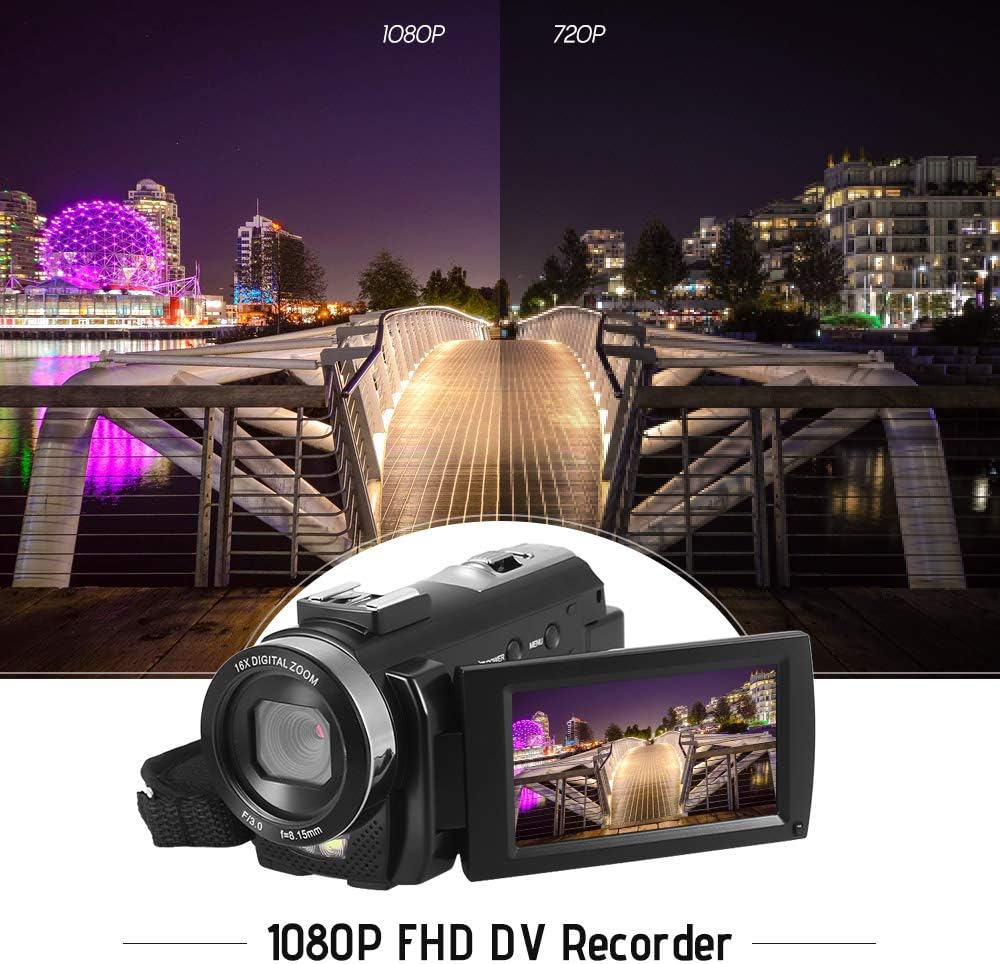
Figure 5.1: The camera is capable of recording in 1080p Full HD and 720p HD resolutions.
5.3. Nyokot Poto
- Ensure the camera is in photo mode. If not, press the Modus tombol pikeun pindah.
- Pigura shot anjeun ngagunakeun layar LCD.
- Pencét éta Poto button to capture an image.
5.4. Ngagunakeun Digital Zoom
- Ngagunakeun éta L (Lega) jeung T (Telefoto) lever to adjust the 16X digital zoom.

Figure 5.2: The camera's 16X digital zoom allows for closer views of subjects.
5.5. Setélan Menu
- Pencét éta ménu tombol pikeun ngakses setélan.
- Use the navigation buttons to scroll through options such as:
- Kasaimbangan bodas: Auto, Daylight, Cloudy, Fluorescent, Tungsten.
- Modeu Adegan: Auto, Night, Portrait, Landscape, Backlight, Sport, Party, Beach, High Sensitivity.
- Modeu shooting: Single, Continuous.
- Kakeunaan: Adjust ±3.0EV.
- Timer otomatis: Off, 2s, 5s, 10s.
- Otomatis Pareum: Off, 1min, 3min, 5min.
- Basa: English, German, French, Spanish, Italian, Turkish, Russian, Portuguese, Dutch, Simplified Chinese, Traditional Chinese, Japanese, Polish.
- Fungsi séjén: Face Detection, Smile Capture, Beauty Face, Anti-Shake.
- Pencét éta OK or Rékam / eureun tombol pikeun mastikeun selections.
- Pencét éta ménu tombol deui kaluar.
5.6. Nyambungkeun ka TV
- Use the provided AV cable to connect the camera's AV output to your television's AV input.
- Select the correct AV input channel on your TV to view camera content.
6. Pangropéa
6.1. Ngabersihan Kaméra
- Anggo kaén anu garing sareng lemes pikeun ngabersihan awak kaméra.
- Pikeun lénsa sareng layar LCD, paké lawon beberesih lénsa khusus sareng solusi. Hindarkeun bahan kimia anu kasar.
6.2. Panyimpenan
- Simpen kaméra di tempat anu tiis sareng garing jauh tina sinar panonpoé langsung sareng suhu anu ekstrim.
- Cabut batré upami kaméra moal dianggo kanggo waktos anu panjang.
7. Cara ngungkulan
| Masalah | Mungkin Cukang lantaranana | Solusi |
|---|---|---|
| Kaméra teu hurung. | Batré béak atanapi henteu leres diselapkeun. | Charge the battery fully. Ensure the battery is inserted with correct polarity and the insulator tab is removed. |
| Teu tiasa ngarékam pidéo atanapi nyandak poto. | Kartu mémori pinuh, teu diselapkeun, atawa ruksak. | Lebetkeun kartu memori. Hapus anu teu perlu files or format the card (this will erase all data). Replace the card if corrupted. |
| Kualitas pidéo/gambarna goréng. | Cahaya anu teu cekap, lénsa anu kotor, atanapi setélan anu salah. | Ensure adequate lighting. Use the LED fill light if necessary. Clean the lens. Adjust white balance and scene mode settings. |
| Kaméra freezes atawa jadi unresponsive. | Software glitch atanapi batré low. | Remove and reinsert the battery to reset the camera. Ensure the battery is charged. |
8. Spésifikasi
| Fitur | Spésifikasi |
|---|---|
| merek | Andoer |
| Modél | HDV-201LM |
| Sénsor Gambar | 5 Sensor CMOS Megapiksel |
| Resolusi Video | 1920x1080P (FHD 30fps), 1280x720 (HD 30fps), 640x480 (VGA 30fps), 320x240 (VGA 30fps) |
| Format pidéo | AVI |
| Resolusi gambar | 24MP (Interpolated), 20MP (Interpolated), 16MP (Interpolated), 12MP (Interpolated), 10MP (Interpolated), 7M Wide (Interpolated), 5MP, 3MP, 2M Wide, VGA |
| Format Gambar | JPG |
| Zum Digital | 16X |
| Lensa | ff (F/3.0 f=8.15mm) |
| Max aperture | 8.15 F |
| Layar LCD | 3.0-inch TFT-LCD (16:9), 270-degree rotation |
| Panyimpenan | SD Card (up to 32GB, Class 10 recommended) |
| Konektipitas | USB 2.0, AV Output (NTSC/PAL) |
| Sasayogian tanaga | 1 x 3.7V 800mAh Batré Isi Ulang |
| Batré Kadali Jauh | 1 x 3V CR2025 Battery |
| Rojongan System Operasi | Windows XP/Vista/7/8/10 |
| Fitur husus | Anti-shake, Face Detection, Smile Capture, Beauty Face, Self-Timer, LED Fill Light, Hot Shoe Mount |
| Diménsi | 13.5 x 5.5 x 6.5 cm (5.3 x 2.2 x 2.6 in) |
| Beurat | 273g (9.6oz) with battery |
| Warna | Hideung |
9. Garansi jeung Rojongan
Kanggo inpormasi garansi sareng dukungan téknis, mangga tingal dokuméntasi anu disayogikeun sareng pameseran anjeun atanapi ngahubungi pangecér anjeun. Simpen bukti pameseran anjeun pikeun klaim garansi.
Ask a question about this manual
Ask about setup, troubleshooting, compatibility, parts, safety, or missing instructions. Manuals+ will review the question and use this page’s manual context to help answer it.