1. Bubuka
This manual provides essential instructions for the proper installation, operation, and maintenance of your Sartorius Entris II Basic Essential Toploading Balance. This precision instrument is designed for accurate weighing in various laboratory and industrial applications. Please read this manual thoroughly before using the balance to ensure safe and correct operation.
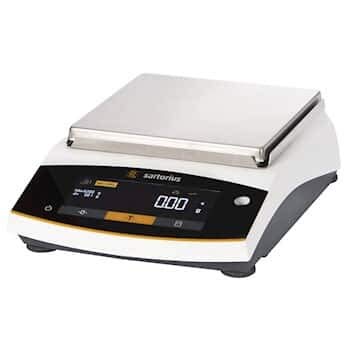
Image 1.1: The Sartorius Entris II Basic Essential Toploading Balance. This image displays the compact design of the balance, featuring its weighing pan and the integrated display panel.
2. Émbaran Kasalametan
Salawasna merhatikeun pancegahan kaamanan di handap ieu pikeun nyegah tatu sareng karusakan alat:
- Kasalametan listrik: Connect the balance only to a grounded power outlet with the specified voltage (100 to 240 VAC, 50/60 Hz). Do not use damaged power cords.
- panempatan: Place the balance on a stable, level surface away from vibrations, drafts, direct sunlight, and extreme temperature fluctuations.
- Résistansi kimiawi: The balance is constructed with chemical-resistant polybutylene terephthalate, stainless steel, and glass. However, avoid prolonged exposure to harsh chemicals and clean spills immediately.
- Perlindungan Overload: Do not exceed the maximum weighing capacity of 3200 g.
- beberesih: Cabut listrik sateuacan beberesih. Anggo lap anu lemes sarengamp cloth and mild detergent. Do not use abrasive cleaners or immerse the balance in water.
3. Setélan
3.1 Ngabongkar bungkusan
Carefully remove the balance and all accessories from the packaging. Retain the original packaging for future transport or storage.
3.2 Nempatkeun
Select a location that is free from drafts, vibrations, and rapid temperature changes. Ensure the surface is firm and level. The balance dimensions are approximately 7 inches (pan length) by 7 inches (pan width).
3.3 Sambungan Daya
Connect the provided power adapter to the balance and then to a suitable electrical outlet (100 to 240 VAC, 50/60 Hz).
3.4 Naratas
Adjust the leveling feet located at the base of the balance until the air bubble in the spirit level (usually located near the display) is centered. This ensures accurate weighing results.
3.5 Initial Calibration (isoCAL)
The Entris II features isoCAL internal calibration. Upon initial setup or after relocation, it is recommended to perform an internal calibration. Refer to the on-screen prompts or the balance's menu for initiating this process. This ensures optimal accuracy.
4. Parentah Operasi
4.1 Hurungkeun / Pareum
- Pikeun Ngahurungkeun: Pencét éta [ON/OFF] button. The balance will perform a self-test.
- Pareuman: Pencét jeung tahan tombol [ON/OFF] tombol nepi ka tampilan pareum.
4.2 Timbangan Dasar
- Nol: With an empty pan, press the [NOL] tombol pikeun nyetel tampilan ka nol.
- Taring: Simpen wadah kosong dina loyang timbangan. Pencét [Taré] button. The display will show zero, allowing you to weigh the net content.
- Timbangan: Place the item to be weighed on the pan. Wait for the stabilization indicator to appear (typically 0.9 seconds), then read the value.
4.3 Advanced Applications
The Entris II Basic Essential balance includes 12 built-in applications accessible via the hybrid screen and LED touch technology. These applications include:
- Dosing
- Ngitung
- Persentage Timbangan
- Pergaulan
- Totalizing
- Sato Timbangan
- Free Factor
- Penentuan Kapadetan
- Statistik
- Peakhold
- Timbangan
- Mass Unit Conversion
- Underfloor Weighing
Consult the on-screen menu or the detailed application guide (if provided separately) for specific instructions on using each function.
4.4 Mindahkeun Data
The balance features a USB Type-C interface for connecting to a PC and an RS232 output. It is "PC-direct," meaning no additional software is required for basic data transfer. You can download weighing data directly to applications like Microsoft Word or Excel.
5. Pangropéa
5.1 beberesih
Regular cleaning is crucial for maintaining accuracy and prolonging the life of your balance. Disconnect the power cord before cleaning.
- Make lawon anu lemes, teu aya serat dampened with a mild cleaning agent (e.g., isopropyl alcohol or a mild soap solution).
- Wipe down the weighing pan, housing, and display.
- Avoid allowing liquids to enter the balance housing.
- Do not use abrasive materials, strong solvents, or harsh chemicals.
5.2 Calibration Checks
Sedengkeun nu isoCAL function provides internal calibration, periodic checks with external calibration weights are recommended, especially for applications requiring high precision or to comply with quality standards. Refer to your laboratory's standard operating procedures for calibration frequency.
6. Cara ngungkulan
Bagian ieu ngabahas masalah umum anu anjeun tingali. Pikeun masalah teu didaptarkeun di dieu, kontak rojongan customer.
| Masalah | Mungkin Cukang lantaranana | Solusi |
|---|---|---|
| Bacaan teu stabil | Drafts, vibrations, unstable surface, temperature fluctuations. | Relocate balance, ensure stable surface, close doors/windows, allow balance to acclimatize. |
| Kasaimbangan teu hurung | Henteu aya kakuatan, kabel listrik / adaptor lepat. | Check power connection, try a different outlet, inspect power cord for damage. |
| Bacaan teu akurat | Not leveled, needs calibration, pan not clean. | Level the balance, perform internal or external calibration, clean the weighing pan. |
| Masalah transfer data | Incorrect cable, software settings. | Ensure correct USB-C cable, check PC settings for device recognition. |
7. Spésifikasi
| Fitur | Spésifikasi |
|---|---|
| Modél | Entris II Basic Essential Toploading Balance |
| Kapasitas | 3200 g |
| Kabacaan | 10 mg |
| Paguneman | 20 mg |
| Repeatability | 10 mg |
| Waktos Stabilisasi | 0.9 detik |
| Pan Dimensions (L x W) | 7 x 7 cm |
| Sarat kakuatan | 100 ka 240 VAC, 50/60 Hz |
| Interfaces kaluaran | RS232, USB-C |
| Unit Timbangan | gram, kilogram, carat, pound, ounce, troy ounce, Hong Kong tael, Singapore tael, Taiwan tael, grain, pennyweights, milligram, parts per pound, China tael, mommes, Austrian carat, tola, baht, mesghal, Newton |
| Bahan Pangwangunan | Polybutylene terephthalate, Stainless Steel, Glass |
| Item Beurat | 12 pon |
8. Garansi jeung Rojongan
8.1 Émbaran jaminan
Sartorius products are manufactured to high-quality standards. For specific warranty terms and conditions, please refer to the warranty card included with your product or visit the official Sartorius websitus. Simpen bukti pameseran anjeun pikeun klaim garansi.
8.2 Rojongan Palanggan
Should you require technical assistance, service, or have questions regarding your Sartorius Entris II Basic Essential Toploading Balance, please contact Sartorius customer support or your authorized dealer. Contact information can typically be found on the manufacturer's websitus atanapi dina bungkusan produk.


