Bubuka
This instruction manual provides detailed information on the installation, operation, and maintenance of your Blaupunkt DENVER 212 DAB BT car radio. Please read this manual thoroughly before using the device to ensure proper functionality and to prevent damage. Keep this manual for future reference.

Image: Blaupunkt DENVER 212 DAB BT product banner.
Émbaran Kasalametan
- Ensure proper installation by a qualified professional to avoid electrical hazards or damage to your vehicle.
- Ulah ngajalankeun alat dina cara nu ngaganggu anjeun tina nyetir. Salawasna prioritas kaamanan jalan.
- Ulah ngalaan unit ka suhu ekstrim, sinar panonpoé langsung, atawa Uap.
- Use only approved accessories and parts.
- Disconnect the vehicle's battery before installation to prevent short circuits.
Eusi pakét
Pastikeun yén sadaya item aya dina bungkusan:
- Blaupunkt DENVER 212 DAB BT Car Radio Unit
- Pamasangan Bingkai
- Wiring Harness (ISO connector)
- DAB+ Antenna (if included with specific models)
- Mikropon éksternal
- Disassembly Keys
- Manual pangguna (dokumén ieu)
Produk Leuwihview
The Blaupunkt DENVER 212 DAB BT is a 1-DIN car radio featuring DAB+ digital radio, Bluetooth hands-free calling, and media streaming. It offers a robust design and short installation depth for versatile vehicle compatibility.

Image: Front panel of the Blaupunkt DENVER 212 DAB BT, showing display, control knobs, and buttons.
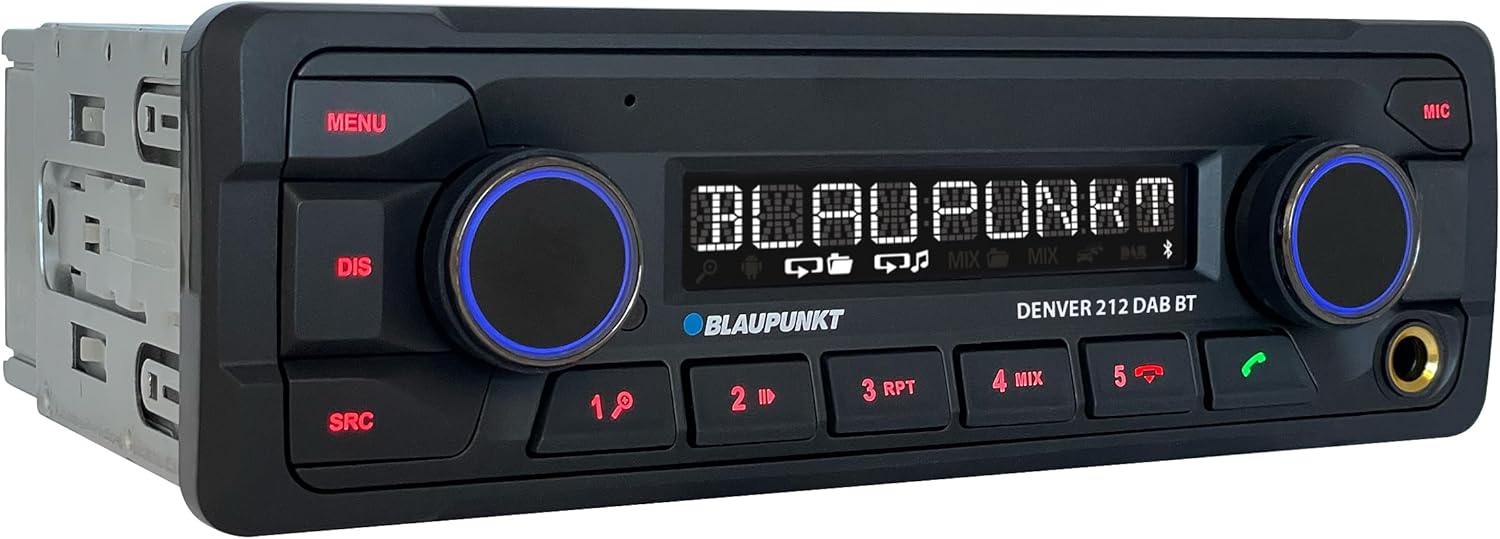
Gambar: Angled view of the Blaupunkt DENVER 212 DAB BT, highlighting its compact design.
Kontrol Panel hareup:
- Tombol MENU: Ngaksés setélan sareng pilihan sistem.
- DIS Button: Parobahan nembongkeun informasi.
- Tombol SRC: Selects audio source (Radio, DAB, Bluetooth, USB, AUX).
- Kenop Volume (Kénca): Adjusts audio volume. Press to mute/unmute.
- Selection Knob (Right): Navigates ménu tur pilih pilihan.
- Tombol prasetél (1-6): Store and recall radio stations, control media playback.
- Call Buttons (Green/Red): Answer/end Bluetooth calls.
- Port USB: Sambungkeun alat panyimpenan USB pikeun playback media.
- Input AUX (Jack 3.5mm): Sambungkeun sumber audio éksternal.
Setup sareng Instalasi
Léngkah-léngkah pamasangan:
- Persiapan: Pegatkeun sambungan terminal négatip batré kendaraan anjeun.
- Pamasangan: Insert the supplied mounting frame into the vehicle's 1-DIN opening. Bend the tabs to secure it.
- Wiring: Connect the wiring harness according to the diagram below. Ensure all connections are secure.
- Sambungan Antenna: Connect the FM antenna and the DAB+ antenna (if applicable) to the corresponding inputs on the rear of the radio.
- Sambungan Mikropon: Connect the external microphone to the designated input for optimal hands-free call quality.
- Unit Lebetkeun: Slide the radio unit into the mounting frame until it clicks into place.
- Cék ahir: Reconnect the vehicle's battery and test the unit.
Diagram Wiring (Umum):
| Warna Kawat | Fungsi |
|---|---|
| Konéng | Konstan 12V (Batre) |
| Beureum | Switched 12V (Ignition) |
| Hideung | taneuh |
| Biru | Anteneu Kakuatan / Amplifier Jauh |
| Oranyeu / Bodas | Paneangan |
| Speaker Wires (e.g., White, Grey, Green, Purple pairs) | Connect to vehicle speakers (Front Left, Front Right, Rear Left, Rear Right) |
| Setir Control Input | Connect to vehicle's steering wheel control interface (if applicable) |
Note: Specific wire colors may vary. Always refer to your vehicle's wiring diagram and the radio's included diagram for precise connections.

Image: The Blaupunkt DENVER 212 DAB BT car radio seamlessly integrated into a vehicle's dashboard.
Parentah Operasi
1. Fungsi Dasar:
- Hurungkeun/Pareuman: Press the volume knob (left) briefly to turn the unit on. Press and hold to turn off.
- Kontrol volume: Rotate the volume knob (left) to adjust the sound level.
- Pilihan Sumber: Pencét éta SRC button repeatedly to cycle through available audio sources (FM, DAB, Bluetooth Audio, USB, AUX).
- Napigasi Menu: Pencét éta MENU button to enter the main menu. Use the right knob to navigate and select options.
2. Radio (FM/DAB+):
- Milih Modeu Radio: Pencét SRC until FM or DAB is selected.
- Tuning otomatis: In FM/DAB mode, press and hold the right knob or seek buttons (if available) to automatically search for stations.
- Tuning Manual: Briefly press the right knob or seek buttons to fine-tune frequencies.
- Nyimpen Presét: Tune to a desired station, then press and hold one of the numeric preset buttons (1-6) until you hear a confirmation beep.
- Nginget-nginget Préparasi: Pencét sakeudeung tombol prasetél numerik (1-6) pikeun ngelingan stasiun nu disimpen.
3. Operasi Bluetooth:
- Masangkeun Alat:
- Pastikeun Bluetooth diaktipkeun dina alat sélulér Anjeun.
- Select "Bluetooth" as the source on the car radio. The display will show "PAIRING".
- On your mobile device, search for Bluetooth devices and select "BLAUPUNKT DENVER".
- Pastikeun pasangan dina kadua alat upami dipenta.
- Telepon Hand-Free:
- Ngajawab Telepon: Pencét tombol panggero héjo.
- Nutup Telepon: Press the red call button.
- Nelepon: Dial from your phone; audio will transfer to the car radio.
- Streaming Audio Bluetooth: Once paired, select "Bluetooth Audio" as the source. Play music from your mobile device, and it will stream through the car radio. Use the preset buttons (e.g., 4 for MIX, 5 for RPT) for playback control (play/pause, skip tracks).
4. USB and AUX Input:
- Puterkeun USB: Insert a USB storage device into the front USB port. The unit will automatically switch to USB mode and begin playback.
- Input AUX: Connect an external audio device (e.g., MP3 player) to the 3.5mm AUX input jack using an audio cable. Select "AUX" as the source.
5. Sound Settings (Equalizer):
- Pencét éta MENU button, then navigate to "AUDIO" or "EQ" settings.
- Adjust bass, treble, balance, and fader settings to your preference.
- Pre-set equalizer modes (e.g., Pop, Rock, Classic) may be available.
Video: Hiji leuwihview of the Blaupunkt DENVER 212 DAB BT car radio's features and basic operation.
Pangropéa
- beberesih: Anggo lawon anu garing sareng lemes pikeun ngabersihan panel hareup unit. Ulah make cleaners abrasive atawa pangleyur.
- Port USB: Jaga port USB tina lebu sareng lebu.
- Pembaruan firmware: Check the official Blaupunkt website periodically for any available firmware updates for your model.
Pamérésan masalah
| Masalah | Mungkin Cukang lantaranana | Solusi |
|---|---|---|
| Taya kakuatan | Blown fuse; incorrect wiring (constant/switched 12V); loose connection. | Check vehicle fuses and the radio's fuse. Verify wiring connections, especially constant and ignition power. Ensure the unit is properly seated. |
| Taya sora | Volume low teuing; bisu diaktipkeun; kabel spiker salah; ampmasalah liifier. | Ningkatkeun volume. Pariksa lamun bisu aktip. Pariksa sambungan speaker. Lamun hiji éksternal amplifier dipaké, pariksa kakuatan sarta sambungan na. |
| Poor radio reception (FM/DAB) | anteneu teu disambungkeun; anteneu ruksak; wewengkon sinyal lemah. | Ensure antenna is securely connected. Check antenna for damage. Consider a stronger antenna or signal booster if in a weak signal area. For DAB+, ensure the DAB antenna is correctly installed and positioned. |
| Masalah sambungan Bluetooth | Device not in pairing mode; incorrect wiring (ignition+ and constant+); interference. | Ensure both devices are in pairing mode. Delete previous pairings and try again. Verify that the constant 12V and switched 12V wires are correctly connected to the radio, as improper wiring can affect Bluetooth stability. Move away from other Bluetooth devices. |
| USB teu dipikawanoh | Teu dirojong file format; USB drive not formatted correctly; damaged USB drive. | Pastikeun audio files are in supported formats (e.g., MP3, WMA). Format the USB drive to FAT32. Try a different USB drive. |
spésifikasi
| Fitur | Rincian |
|---|---|
| merek | BLAUPUNKT |
| Nomer modél | Denver 212 DAB BT |
| Warna | Hideung |
| Téhnologi konektipitas | Bluetooth, USB |
| Tipe Panyambung | Soket 3.5 mm, USB |
| Fitur husus | DAB, RDS, Equalizer, Bluetooth Hands-free |
| Alat nu cocog | Smartphone |
| Total palabuhan USB | 1 |
| Mode Kaluaran Audio | Stereo |
| Konfigurasi Saluran Sakuliling Sora | 4.0 |
| Dimensi produk | 12D x 17.8W x 5.2H séntiméter |
| Produsén | Blaupunkt |
| Kasadiaan suku cadang | 1 Taun |
Garansi sareng Rojongan
This Blaupunkt product comes with a manufacturer's warranty. For specific warranty terms and conditions, please refer to the warranty card included with your product or visit the official Blaupunkt website. For technical support, troubleshooting assistance, or spare parts inquiries, please contact Blaupunkt customer service through their official channels.
Spare parts are generally available for 1 year from the date of purchase.
Blaupunkt resmi Websitus: www.blaupunkt.com


