1. Bubuka
This manual provides essential information for setting up, operating, maintaining, and troubleshooting your OPPO A17 smartphone. Please read this guide thoroughly to ensure proper use and to maximize the device's performance and longevity. Keep this manual for future reference.
2. Produk Langkungview
Familiarize yourself with the physical components of your OPPO A17 smartphone.
Gambar 2.1: Hareupeun View
This image displays the front of the OPPO A17, featuring the display screen and the front camera notch at the top center.

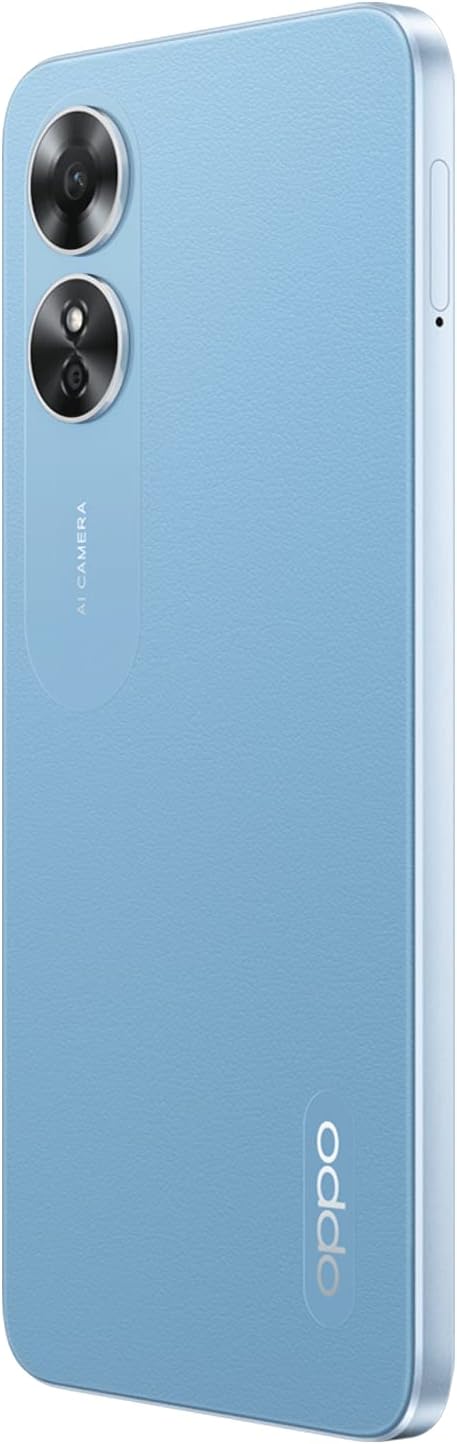
Gambar 2.2: Balik View
This image shows the rear of the OPPO A17, highlighting the dual camera module and the OPPO branding at the bottom right.

Gambar 2.3: Sisi View
Gambar ieu ngagambarkeun sisi profile of the OPPO A17, showing the power button (which may include a fingerprint sensor) and volume rocker.
3. Setélan
3.1. Nyelapkeun Kartu SIM sareng Kartu SD
- Tangtukeun lokasi baki kartu SIM di sisi telepon Anjeun.
- Pake alat ejector SIM (upami disadiakeun) pikeun muka baki.
- Lebetkeun kartu Nano-SIM anjeun kana slot anu parantos ditangtukeun. Pastikeun kontak emasna nyanghareup ka handap.
- If you wish to expand storage, insert a microSD card into the dedicated slot on the same tray.
- Taliti dorong baki deui kana telepon nepi ka siram jeung awak alat.
3.2. Daya Awal Hurung sareng Setup
- Pencét terus tahan tombol Daya (biasana di sisi katuhu) dugi ka logo OPPO muncul.
- Turutan parentah dina layar pikeun milih basa anjeun, wewengkon, nyambung ka Wi-Fi, tur nyetel akun Google Anjeun.
- You will be prompted to set up security features such as a PIN, pattern, password, or fingerprint.
3.3. Ngecas Alat
Before first use, it is recommended to fully charge your OPPO A17.
- Sambungkeun kabel USB ka adaptor kakuatan.
- Colokkeun adaptor kakuatan kana stop kontak témbok.
- Sambungkeun tungtung kabel USB anu sanésna kana port ngecas dina telepon anjeun.
- Indikator ngecas bakal nembongan dina layar.
4. Parentah Operasi
4.1. Napigasi Dasar
- Layar cabak: Interact with the device by tapping, swiping, pinching, and spreading on the display.
- Layar Utama: Akses aplikasi, widget, sareng bewara anjeun.
- Panel Bewara: Gesek ka handap ti luhur layar pikeun view bewara sareng setelan gancang.
4.2. Nelepon jeung Ngirim Talatah
- Telepon: Buka aplikasi Telepon, tuliskeun nomerna, teras ketok ikon telepon.
- Pesen: Buka aplikasi Talatah, ketok ikon talatah anyar, lebetkeun panarima sareng talatah anjeun.
4.3. Pamakéan kaméra
Your OPPO A17 is equipped with front and rear cameras for photography and video recording.
- Buka aplikasi kaméra.
- Select between photo, video, and other modes.
- Ketok tombol jepret pikeun moto gambar atawa ngamimitian/eureun ngarekam video.
- Ketok ikon switch kaméra pikeun pindah antara kaméra hareup jeung pungkur.
4.4. Konektipitas
- Wifi: Buka Setélan > Wi-Fi pikeun nyambung ka jaringan nu sadia.
- Bluetooth: Buka Setélan > Bluetooth pikeun masangkeun sareng alat Bluetooth anu sanés.
- Data Seluler (LTE): Ensure your SIM card is active and mobile data is enabled in Settings > Mobile Network.
5. Pangropéa
5.1. Ngabersihan Alat Anjeun
- Anggo lawon anu lemes sareng henteu lint pikeun ngusap lembut layar sareng awak telepon.
- Ulah make bahan kimia kasar, bahan abrasive, atawa sprays aerosol.
- Ulah ngantep telepon kakeunaan kalembaban anu kaleuleuwihi.
5.2. Kaperawatan batré
- Hindarkeun suhu anu ekstrim, sabab tiasa ngirangan kinerja batré.
- Paké ngan asesoris ngecas aslina atawa Certified.
- Ulah ninggalkeun telepon ngecas pikeun période nambahan sanggeus éta ngahontal 100%.
5.3. Apdet parangkat lunak
Pariksa sareng pasang apdet parangkat lunak sacara rutin pikeun mastikeun alat anjeun ngagaduhan fitur, patch kaamanan, sareng paningkatan kinerja pangénggalna. Buka Setélan > Ngeunaan alat > Apdet pikeun mariksa apdet.
6. Cara ngungkulan
This section addresses common issues you might encounter with your OPPO A17.
6.1. Telepon Teu Bisa Dihurungkeun
- Pastikeun batréna geus dieusian. Sambungkeun telepon ka carjer sareng antosan sababaraha menit sateuacan nyobian ngahurungkeun deui.
- Pencét jeung tahan tombol Daya sahenteuna 10-15 detik pikeun ngalakukeun balikan deui paksa.
6.2. Alat katirisan atanapi Unresponsive
- Maksakeun balikan deui alat ku mencét sareng nahan tombol Daya salami 10-15 detik.
- If the issue persists, try clearing the cache of problematic apps or performing a factory reset (Catetan: A factory reset will erase all data on your phone. Back up important data before proceeding).
6.3. Connectivity Issues (Wi-Fi/Bluetooth/Mobile Data)
- Toggle the respective connectivity option (Wi-Fi, Bluetooth, Mobile Data) off and on again.
- Balikan deui telepon anjeun.
- For Wi-Fi, try forgetting the network and reconnecting. For mobile data, ensure your SIM card is properly inserted and active.
6.4. Poor Camera Performance
- Ensure the camera lenses are clean and free from smudges.
- Check if there are any software updates available for your device.
- Hapus cache sareng data aplikasi Kamera dina Setélan> Aplikasi.
7. Spésifikasi
Detailed technical specifications for the OPPO A17 (Model CPH2477).
| Fitur | Spésifikasi |
|---|---|
| Sistem operasi | Android 12.0 |
| Ram | 4GB |
| Panyimpenan | 64GB |
| Dimensi produk | 16.42 x 7.56 x 0.83 cm |
| Item Beurat | 187 gram |
| Batré | 1 Lithium Ion (included), 5000 mAh |
| Nomer modél | CPH2477 |
| Téknologi nirkabel | 4G LTE |
| Téhnologi konektipitas | Bluetooth, WiFi |
| GPS | GLONASS |
| Fitur husus | Expandable memory, Dual SIM |
| Tampilan Interface | Layar cabak |
| Resolusi tampilan | 720 x 1600 piksel |
| Fitur kaméra | Hareupeun, Tukangeun |
| Audio Jack | 3.5 mm |
| Faktor Bentuk | Bar |
| Warna | Biru |
| Komponén Kaasup | Phone case, USB cable, Power adapter |
8. Garansi jeung Rojongan
For warranty information, please refer to the warranty card included with your product or visit the official OPPO website. For further assistance, technical support, or service inquiries, please contact OPPO customer service through their official channels.
You can find more information and support resources on the official OPPO websitus: www.oppo.com


