1. Bubuka
The DiamondBoxx PA15 is a versatile, large portable Bluetooth speaker designed for various audio applications, including use as a guitar amplifier, DJ speaker, PA system, or karaoke machine. This manual provides detailed instructions for setting up, operating, and maintaining your PA15 speaker to ensure optimal performance and longevity.
2. Fitur Produk
- High-fidelity audio output suitable for large venues.
- Integrated Bluetooth connectivity for wireless audio streaming.
- Multiple input options: USB, XLR, Auxiliary.
- Includes two wireless microphones for vocal performances and karaoke.
- kadali jauh pikeun operasi merenah.
- Built-in wheels and retractable handle for enhanced portability.
- Adjustable audio controls including Volume, Treble, Bass, Echo, Repeat, and Delay.
- Microphone priority function for clear announcements.
3. Naon dina Box
Upon unpacking your DiamondBoxx PA15, please verify that all the following items are included:
- DiamondBoxx PA15 Portable Bluetooth Speaker
- 2 Mikropon Nirkabel
- Kadali jauh
- Kabel Daya
- Manual pangguna (dokumén ieu)
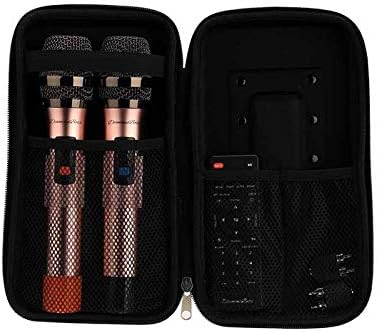
Gambar 3.1: Included wireless microphones and remote control in their storage case.
4. Setélan
4.1 Ngabongkar sareng Nempatkeun
- Taliti miceun spiker sareng sadaya asesoris tina bungkusan.
- Simpen speaker dina permukaan anu rata sareng stabil. Pastikeun ventilasi anu cekap di sakitar unit.
- For portability, extend the retractable handle and utilize the built-in wheels.
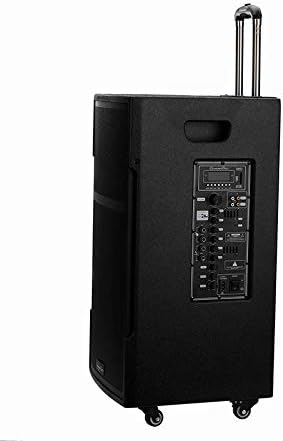
Gambar 4.1: DiamondBoxx PA15 speaker with extended handle for transport.
4.2 Sambungan Daya
- Connect the provided power cable to the AC INPUT port on the rear control panel of the speaker.
- Plug the other end of the power cable into a standard 110V/60Hz AC power outlet.
- Ensure the POWER switch on the control panel is in the OFF position before connecting to power.
- The speaker can operate on internal battery power or directly from AC power. For initial use, it is recommended to fully charge the battery.
5. Parentah Operasi
5.1 Control Panel Leuwihview
Familiarize yourself with the control panel located on the rear of the speaker. This panel provides access to all input connections and audio adjustments.
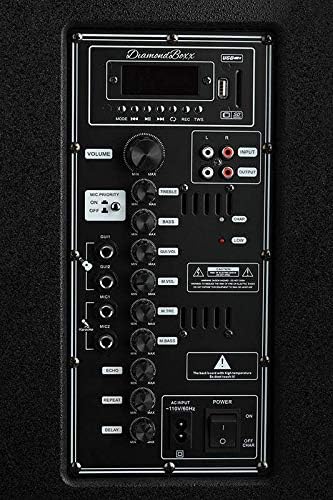
Gambar 5.1: DiamondBoxx PA15 Control Panel.
- JILID: Kontrol volume master pikeun sadaya kaluaran audio.
- TREBLE / BASS: Adjusts the high and low frequencies of the main audio output.
- PRIORITAS MIC: When activated, lowers music volume when microphone is in use.
- INPUT GITAR: 1/4-inch input for connecting a guitar.
- MIC1 / MIC2 INPUTS: 1/4-inch inputs for wired microphones.
- MIC VOL / MIC BASS: Volume and bass controls for connected microphones.
- ECHO / REPEAT / DELAY: Effects controls for microphone inputs.
- USB / SD Card Slot: Pikeun muter audio filetina drive USB atanapi kartu SD.
- RCA INPUT / OUTPUT: Stereo RCA jacks for connecting external audio sources or outputting audio to another device.
- XLR input: Professional audio input for microphones or other audio equipment.
- Input AC: sambungan kabel kakuatan.
- Saklar Daya: Ngahurungkeun atanapi mareuman speaker.
5.2 Powering on / Pareum
- Pikeun ngahurungkeun, balikkeun POWER switch to the ON position. The display screen will illuminate.
- Pikeun mareuman, balikkeun POWER pindah ka posisi OFF.
5.3 Nyapasangkeun Bluetooth
- Pastikeun spiker diaktipkeun.
- Pencét éta MODÉ button on the control panel or remote control until "Bluetooth" mode is selected. The display will show "BLUE" and a blinking Bluetooth icon, indicating it's ready for pairing.
- Dina alat sélulér anjeun (smartphone, tablet, komputer), aktipkeun Bluetooth teras milarian alat anu sayogi.
- Select "DiamondBoxx PA15" from the list of devices.
- Once paired, the speaker will emit a confirmation sound, and the Bluetooth icon on the display will stop blinking.
- Anjeun ayeuna tiasa ngalirkeun data audio sacara nirkabel tina alat anjeun ka spiker.
5.4 Using Wireless Microphones
- Selapkeun dua batré AA kana unggal mikropon nirkabel (batréna teu kaasup).
- Hurungkeun mikropon nganggo saklar kakuatan masing-masing.
- The microphones will automatically connect to the PA15 speaker.
- Saluyukeun volume mikropon nganggo tombol MIC VOL knob and microphone bass using the MIC BASS knob on the control panel.
- Apply echo effects using the ECHO, ULANGAN, jeung TUNDA knobs as desired.
- Aktipkeun KAMUNG MIK switch if you want the music volume to automatically lower when speaking into the microphone.
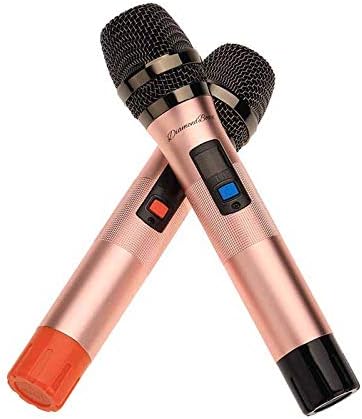
Gambar 5.2: Included wireless microphones.
5.5 Input Audio Séjénna
- USB/Kartu SD: Insert a USB drive or SD card into the respective slot. The speaker will automatically switch to USB/SD mode and begin playing compatible audio files. Use the playback controls on the panel or remote.
- Input XLR: Connect professional audio equipment (e.g., mixers, wired microphones) using an XLR cable.
- Input RCA: Connect devices with RCA audio output (e.g., CD players, older media players) using RCA cables.
- Input Gitar: Plug your guitar directly into the GITAR 1/4-inch input. Adjust the main VOLUME, TREBLE, jeung bass for your desired sound.
6. Pangropéa
- beberesih: Anggo kaén anu garing sareng lemes pikeun ngabersihan bagian luar spéker. Ulah make cleaners abrasive atawa pangleyur.
- Panyimpenan: Upami teu dianggo salami lami, simpen speaker di tempat anu tiis sareng garing.
- Perawatan batré: For optimal battery life, avoid fully discharging the battery frequently. Recharge the battery regularly, even if the speaker is not in active use.
- Ventilasi: Ensure the speaker's vents are not obstructed to prevent overheating.
7. Cara ngungkulan
| Masalah | Mungkin Cukang lantaranana | Solusi |
|---|---|---|
| Taya kakuatan | Power cable not connected; Power switch off; Battery depleted | Ensure power cable is securely connected and plugged in. Flip POWER switch to ON. Charge the battery. |
| Taya kaluaran sora | Volume too low; Incorrect input mode; Device not connected properly | Naékkeun VOLUME knob. Press MODÉ to select correct input (Bluetooth, USB, AUX). Reconnect audio source. |
| Bluetooth teu dipasangkeun | Spiker teu dina modeu pairing; Bluetooth alat pareum; Jauh teuing ti spiker | Ensure speaker is in Bluetooth mode (blinking BLUE). Turn on Bluetooth on your device. Move device closer to speaker (within 30 feet). |
| Mikropon nirkabel henteu jalan | Microphone off; Batteries depleted; MIC VOL too low | Turn on microphone. Replace batteries. Increase MIC VOL kenop. |
| Distorsi sora | Volume too high; Input signal too strong | Lower the master VOLUME or the volume from the input source. Adjust TREBLE/bass setélan. |
8. Spésifikasi
| Fitur | Rincian |
|---|---|
| merek | IntenBoxx |
| Nomer modél | 686091727578 (PA15) |
| Sumber Daya | Hybrid Powered (AC/Battery) |
| Téhnologi konektipitas | Bluetooth, USB |
| Tipe Panyambung | USB, XLR, 1/4-inch (Guitar/Mic), RCA |
| Input Audio | Wireless Microphone, Auxiliary/USB, XLR, Guitar |
| Jumlah Saluran | 2 |
| Bahan | Logam, Plastik |
| Item Beurat | 60 pon |
| Ukuran Paket | 33 x 22 x 19 inci |
| Warna | Hideung |
| Tipe Pamasangan | Tabletop |
| Dianjurkeun Mangpaat | Concerts, Conferences, Places of Worship, Outdoor Events, Schools, Music Performances, Karaoke, General Sound Amplifikasi |
9. Émbaran Kasalametan
PERHATOSAN: Produk ieu tiasa ngalaan anjeun ka bahan kimia kalebet timah, anu dipikanyaho ku Nagara California nyababkeun kanker sareng cacad kalahiran atanapi cilaka réproduktif sanés. Kanggo inpo nu leuwih lengkep buka www.P65Warnings.ca.gov.
Always follow basic safety precautions when using electrical products to reduce the risk of fire, electric shock, and injury to persons, including the following:
- Baca sadaya parentah sateuacan nganggo produk.
- Ulah make deukeut cai.
- Ngabersihan ngan ku kaén garing.
- Ulah meungpeuk sagala bukaan ventilasi.
- Entong dipasang di deukeut sumber panas sapertos radiator, register panas, kompor, atanapi aparat sanésna (kalebet ampLiifiers) anu ngahasilkeun panas.
- Nangtayungan kabel kakuatan tina keur leumpang dina atawa pinched.
- Ngan anggo kantétan/aksésori anu ditunjuk ku produsén.
- Cabut colokan alat ieu nalika badai kilat atanapi nalika henteu dianggo kanggo waktos anu lami.
10. Garansi jeung Rojongan
For warranty information, technical support, or service inquiries, please contact DiamondBoxx customer service directly. Refer to the official DiamondBoxx websitus wéb atanapi dokuméntasi pameseran anjeun kanggo detil kontak khusus sareng syarat garansi.


