1. Bubuka
This manual provides essential instructions for the safe and effective use of your Unitech MS652 800mAh rechargeable battery. Please read this manual thoroughly before using the battery to ensure proper operation and to prevent damage or injury.
2. Produk Langkungview
The Unitech MS652 800mAh battery is a genuine replacement or spare battery designed specifically for the Unitech MS652 ring scanner. It provides reliable power to ensure continuous operation of your device.
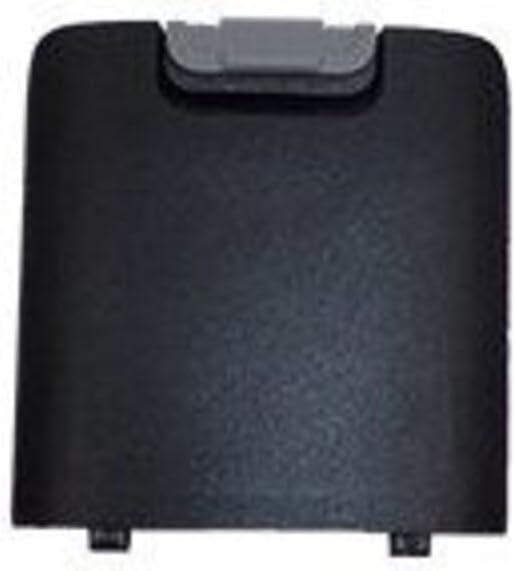
Gambar 1: Unitech MS652 800mAh Battery. This image shows the black rectangular battery pack with a grey latch mechanism at the top, designed to fit into the Unitech MS652 ring scanner.
3. Setup jeung Instalasi
Follow these steps to install the battery into your Unitech MS652 ring scanner:
- Pareum Alat: Ensure your Unitech MS652 ring scanner is completely powered off before attempting battery installation or removal.
- Panggihan Kompartemen Batré: Identify the battery compartment on your MS652 scanner. Refer to your scanner's user manual for exact location if unsure.
- Kompartemen Buka: Carefully open the battery compartment cover. This may involve sliding a latch or unscrewing a small screw, depending on the scanner model.
- Selapkeun Batré: Align the battery with the contacts inside the compartment. Gently push the battery into place until it clicks or sits securely. Ensure the grey latch mechanism on the battery aligns with the scanner's locking mechanism.
- Tutup Kompartemen: Ganti panutup kompartemen batré sareng amankeun.
- Muatan Awal: Pikeun kinerja anu optimal, eusian batréna pinuh sateuacan dianggo pikeun anu munggaran.
4. Parentah Operasi
The Unitech MS652 800mAh battery is designed for seamless integration with your MS652 ring scanner.
- Ngecas: Use only the charger supplied or approved by Unitech for the MS652 scanner. Connect the scanner with the installed battery to the charger. The charging indicator on the scanner will typically show the charging status.
- Pamakéan munggaran: It is recommended to fully charge the battery before its initial use to calibrate the battery meter and ensure maximum capacity.
- Pamakéan normal: The battery will power your MS652 scanner during operation. Monitor the battery level indicator on your scanner to determine when recharging is necessary.
- Kahirupan batré: Battery life varies depending on usage patterns, scanner settings, and environmental conditions.
5. Pangropéa
Pangropéa anu leres tiasa manjangkeun umur batré anjeun:
- Ngecas Biasa: Avoid completely draining the battery frequently. Recharge it when the device indicates low power.
- Panyimpenan: If storing the battery for an extended period, charge it to approximately 50% and store it in a cool, dry place (between 0°C and 25°C or 32°F and 77°F). Avoid extreme temperatures.
- beberesih: Keep battery contacts clean. Use a dry, soft cloth to wipe away any dust or debris.
- Hindarkeun Karusakan Fisik: Ulah teundeun, tusukan, atawa ngabongkar batréna.
6. Cara ngungkulan
Upami anjeun ngalaman masalah sareng batré anjeun, pertimbangkeun hal-hal ieu:
- Batré Teu Ngecas:
- Ensure the charger is properly connected to both the power source and the scanner.
- Verify that the charger is the correct one for your Unitech MS652 scanner.
- Pariksa heula bisi aya karusakan anu katingali dina batré atanapi carjer.
- Clean the battery contacts on both the battery and the scanner.
- Kahirupan batré pondok:
- Pastikeun batre tos dicas pinuh sateuacan dianggo.
- Reduce screen brightness or disable unnecessary features on the scanner to conserve power.
- Upami batréna parantos lami, kapasitasna tiasa turun laun-laun. Pertimbangkeun pikeun ngagentosna.
- Alat Teu Dihurungkeun:
- Confirm the battery is correctly installed and fully charged.
- Try a different, known-good battery if available.
If problems persist, contact Unitech customer support for assistance.
7. Spésifikasi
| Fitur | Rincian |
|---|---|
| merek | Unitech |
| Model kasaluyuan | Unitech MS652 Ring Scanner |
| Jenis Batré | Bisa dicas deui |
| Kapasitas | 800 mAh (Milliamp Jam) |
| Nomer Bagian | 1400-900050G |
| Item Beurat | Kira-kira 3.92 ons |
| Jumlah Unit | 1 Ngitung |
8. Émbaran Kasalametan
Perhatikeun pancegahan kaamanan di handap ieu pikeun nyegah tatu atanapi karusakan:
- Anggo Charger anu Disatujuan: Only use chargers specifically designed and approved for the Unitech MS652 scanner and its battery. Using incompatible chargers can cause fire, explosion, or other hazards.
- Hindarkeun Suhu Ekstrim: Do not expose the battery to extreme heat (e.g., direct sunlight, near heaters) or cold. High temperatures can cause the battery to overheat, swell, or explode. Low temperatures can significantly reduce battery performance.
- Ulah ngabongkar: Never attempt to disassemble, puncture, or modify the battery. This can lead to short circuits, fire, or exposure to hazardous materials.
- Pembuangan anu leres: Do not dispose of batteries in household waste. Follow local regulations for proper disposal of rechargeable batteries. Many retailers and recycling centers offer battery recycling programs.
- Jauhkeun tina cai: Ulah ngalelepkeun batréna kana cai atanapi ngantepkeun kalembaban anu kaleuleuwihi.
- Jauhkeun ti Barudak: Nyimpen batré jauh tina jangkauan sahiji barudak.
- Nanganan kalayan ati-ati: Ulah nepi ka batréna murag atawa kakeunaan dampak anu kuat.
9. Garansi jeung Rojongan
For warranty information or technical support regarding your Unitech MS652 800mAh battery or compatible device, please refer to the documentation provided with your Unitech MS652 ring scanner or visit the official Unitech website. You may also contact Unitech customer service directly for assistance.
Unitech Official Websitus: www.unitech.com


