Bubuka
The Power Dynamics PDM25 is a compact and versatile 100V amplifier designed for small installations such as shops, restaurants, and offices. It offers easy operation, reliable performance, and a range of features including Bluetooth connectivity, an integrated MP3 player, USB input, AUX input, and a wireless remote control. This manual provides essential information for the safe and efficient use of your PDM25 amppangagung.
Parentah Kasalametan
- Maca manual ieu sacara tuntas sateuacan nganggo produk.
- Simpen manual ieu kanggo rujukan ka hareup.
- Titénan sagala warnings tur turutan sagala parentah.
- Entong nganggo alat ieu caket cai.
- Ngabersihan ngan ku kaén garing.
- Ulah meungpeuk sagala bukaan ventilasi. Pasang saluyu sareng parentah produsén.
- Entong dipasang di deukeut sumber panas sapertos radiator, register panas, kompor, atanapi aparat sanésna (kalebet ampLiifiers) anu ngahasilkeun panas.
- Ulah eleh tujuan kaamanan colokan polarized atawa grounding-tipe. A colokan polarized boga dua wilah jeung hiji leuwih lega ti lianna. A colokan tipe grounding boga dua wilah jeung prong grounding katilu. Agul lega atawa prong katilu disadiakeun pikeun kaamanan Anjeun. Upami colokan anu disayogikeun henteu pas kana stop kontak anjeun, konsultasi ka tukang listrik pikeun ngagantian stop kontak anu tos lami.
- Nangtayungan kabel listrik tina leumpang atawa diciwit, utamana dina colokan, wadah merenah, jeung titik dimana aranjeunna kaluar tina aparat.
- Ngan anggo kantétan/aksésori anu ditunjuk ku produsén.
- Cabut colokan alat ieu nalika badai kilat atanapi nalika henteu dianggo kanggo waktos anu lami.
- Rujuk sadayana jasa ka tanaga jasa anu mumpuni. Diperlukeun ngalayanan nalika aparatur ruksak ku cara naon waé, sapertos kabel catu daya atanapi colokan rusak, cairan tumpah atanapi barang murag kana aparatur, aparatur parantos kakeunaan hujan atanapi lembab, henteu beroperasi normal. , atawa geus turun.
- PERHATOSAN: Pikeun ngirangan résiko seuneu atanapi kejutan listrik, ulah ngalaan alat ieu ka hujan atanapi lembab.
- PERHATOSAN: Do not open the cover. No user-serviceable parts inside. Refer servicing to qualified personnel only.
Produk Leuwihview
The PDM25 amplifier features a user-friendly front panel with controls for various audio sources and volume adjustments, along with a clear digital display. The rear panel provides all necessary connections for speakers, external audio sources, and power.

Gambar 1: Panel hareup Leuwihview of the PDM25 Amppangagung.

Figure 2: Rear Panel Connections of the PDM25 Amppangagung.
Disetél
1. Ngabongkar bungkusan
Ati-ati ngaleupaskeun amplifier from its packaging. Inspect the unit for any signs of damage during transit. Retain the original packaging for future transport or storage.
2. Panempatan
Tempatna amplifier on a stable, flat surface. Ensure adequate ventilation around the unit to prevent overheating. Avoid placing it near heat sources or in direct sunlight.
3. Sambungan Speaker
The PDM25 supports both 100V line speakers and low impedance (4-16 Ohm) speakers.
- For 100V Line Speakers: Connect the positive (+) terminal of your 100V speaker system to the "100V" terminal on the amplifier's rear panel. Connect the negative (-) terminal to the "COM" terminal.
- For Low Impedance Speakers (4-16 Ohm): Connect the positive (+) terminal of your speaker to the "4-16 Ohm" terminal on the amplifier's rear panel. Connect the negative (-) terminal to the "COM" terminal.
Ensure correct polarity (+ to + and - to -) for optimal sound quality. Do not connect both 100V and low impedance speakers simultaneously to the same output.
4. Sambungan Sumber Audio
- Input AUX: Connect external audio devices (e.g., CD player, mixer) to the RCA "AUX" input jacks on the rear panel using an RCA cable.
- Input mikropon: Connect a microphone to the 6.3mm jack on the front panel.
- Input USB: Selapkeun USB flash drive nu ngandung MP3 files kana port USB dina panel hareup.
5. Sambungan Daya
Sambungkeun kabel daya anu disayogikeun ka asupan AC dina panel tukang amplifier and then to a suitable mains power outlet (230 Vac/50 Hz).
Parentah Operasi
1. Daya Hurung / Pareum
Press the "ON/OFF" switch on the front panel to power on or off the amppangagung.
2. Pilihan Sumber
Use the "MODE" button on the front panel or the remote control to cycle through available input sources: Bluetooth, USB/MP3, AUX, and Radio. The selected mode will be displayed on the digital screen.

Figure 3: Front Panel Controls and USB Input.
3. Volume Control
- Jilid Master: Adjust the main output volume using the large "VOLUME" knob on the front panel.
- Individual Source Volume: Adjust the volume for MP3, AUX, and MIC inputs using their respective smaller "VOLUME" knobs.
4. Kontrol nada
Use the "TREBLE" and "BASS" knobs on the front panel to adjust the high and low frequencies of the audio output.
5. Operasi Bluetooth
- Select "Bluetooth" mode using the "MODE" button. The display will show "BLUE".
- On your Bluetooth-enabled device (smartphone, tablet, etc.), search for available devices and select "PDM25".
- Sakali dipasangkeun, anjeun tiasa ngalirkeun data audio sacara nirkabel ka amppangagung.
6. USB/MP3 Player Operation
- Insert a USB flash drive into the USB port. The amplifier will automatically switch to USB mode and begin playing MP3 files.
- Use the play/pause, next, and previous track buttons on the front panel or remote control to manage playback.
7. Operasi Radio
In Radio mode, use the control buttons to scan for and select radio stations.
8. Kadali jauh
The included remote control provides convenient access to power, mode selection, volume, track control, and equalizer presets.
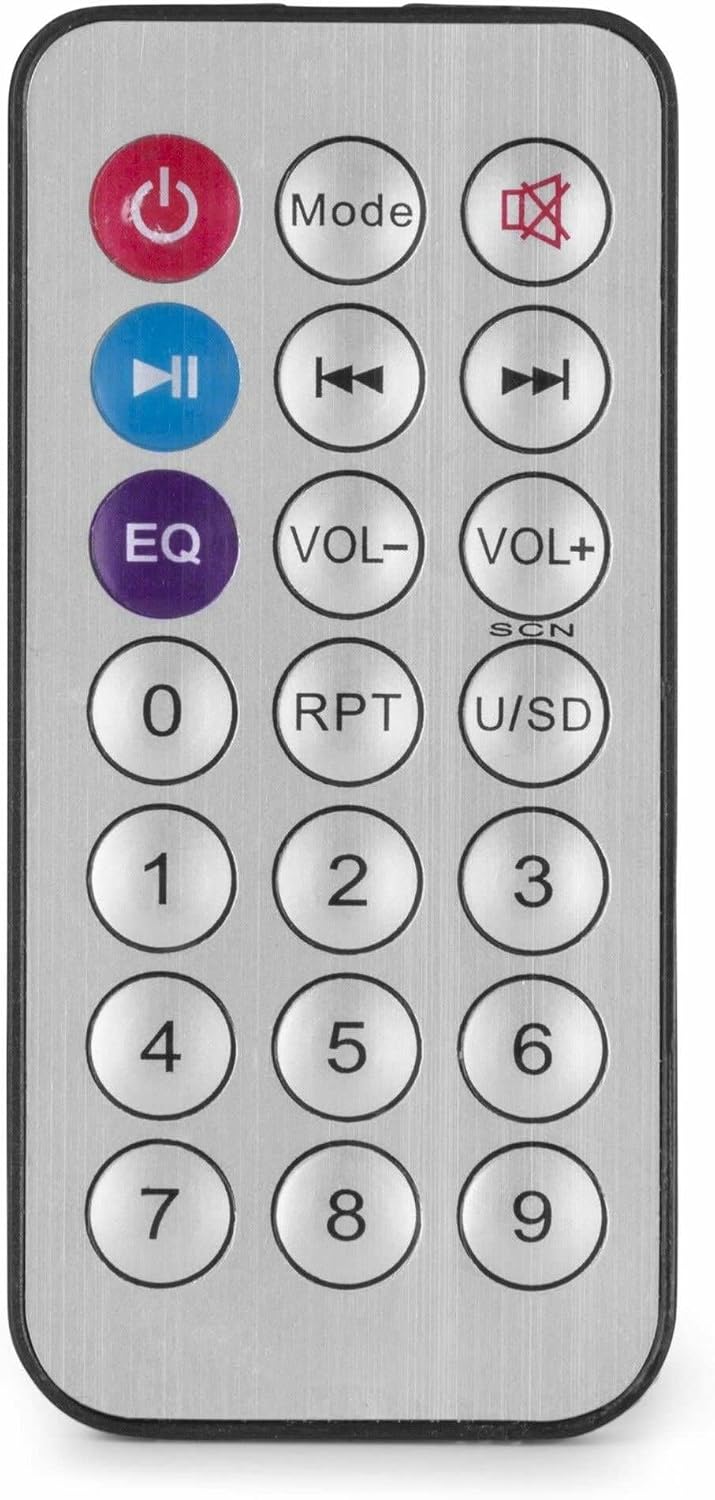
Gambar 4: Remote Control Nirkabel.
Pangropéa
- beberesih: Disconnect the power before cleaning. Use a soft, dry cloth to wipe the exterior of the amppangbersih. Ulah nganggo pembersih cair atanapi aerosol.
- Ventilasi: Pastikeun liang ventilasi bersih tina lebu sareng kokotor supados aliran hawa tetep lancar.
- Panyimpenan: Upami nyimpen unit kanggo waktos anu lami, pegatkeun tina listrik teras simpen di tempat anu tiis sareng garing, langkung saé dina bungkus aslina.
Pamérésan masalah
| Masalah | Mungkin Cukang lantaranana | Solusi |
|---|---|---|
| Taya kakuatan | Kabel listrik teu nyambung; Stop kontak rusak; Ampswitch pareum. | Check power cable connection; Test power outlet; Ensure amplifier switch is ON. |
| Taya kaluaran sora | Incorrect source selected; Volume too low; Speaker connections faulty; Mute activated. | Select correct input source; Increase master and source volume; Check speaker wiring; Deactivate mute function on remote. |
| Bluetooth teu nyambung | AmpLampu teu dina modeu Bluetooth; Alat jauh teuing; Alat parantos dipasangkeun sareng unit anu sanés. | Mastikeun amplifier is in Bluetooth mode ("BLUE" displayed); Move device closer; Disconnect from other devices and try again. |
| Masalah playback USB | Drive USB teu diformat kalayan leres; Teu cocog file format; drive USB rusak. | Pastikeun USB drive diformat FAT32; Anggo MP3 files; Cobi nganggo USB drive anu béda. |
| Sora distort | Volume too high; Incorrect impedance matching for speakers; Faulty audio source. | Leutikan volume; Pariksa cocogna impedansi spiker amplifier output; Test with a different audio source. |
spésifikasi
- Daya kaluaran: 25 W
- Kaluaran Speaker: 100V and 4-16 Ohm
- Rentang Frékuénsi: 50 Hz - 18 kHz
- Rasio Signal-to-Noise: > 75 dB
- Sambungan Voltage: 230 Vac/50 Hz
- Ukuran (L x W x H): 205 x 285 x 65 mm
- beurat: 1.5 kg
- Fitur: Bluetooth, USB MP3 Player, Radio, AUX Input, Microphone Input, Bass/Treble Control, Integrated Equalizer, Remote Control
- Jumlah modél: PDM25
- Pabrikan: Tronios BV
Garansi sareng Rojongan
For warranty information and technical support, please refer to the documentation provided with your purchase or visit the official Power Dynamics websitus. Simpen bukti pameseran anjeun pikeun klaim garansi.
Pabrikan: Tronios BV
Websitus: www.power-dynamics.eu


