Bubuka
This manual provides comprehensive instructions for the setup, operation, and maintenance of your Geemarc CL595 Amplified Corded Telephone. Designed for ease of use, particularly for seniors and individuals with moderate to severe hearing loss, the CL595 features amplified sound, large buttons, and specialized functions like photo memory keys and an SOS emergency call system. Please read this manual thoroughly to ensure proper use and to maximize the benefits of your telephone.
1. Setélan
Follow these steps to set up your Geemarc CL595 telephone:
- Ngabongkar bungkusan: Carefully remove all components from the packaging. Ensure you have the telephone base, handset, coiled handset cord, telephone line cord, and power adapter.
- Pamasangan batré: The telephone requires 3 AAA batteries (not included) for certain functions like memory retention during power outages. Open the battery compartment on the underside of the base and insert the batteries, observing polarity.
- Sambungkeun Handset: Plug one end of the coiled handset cord into the handset and the other end into the designated port on the left side of the telephone base.
- Sambungkeun Jalur Telepon: Plug one end of the telephone line cord into the "LINE" port on the back of the telephone base and the other end into your wall telephone jack.
- Sambungkeun Adaptor Daya: Plug the power adapter into the "DC IN" port on the back of the telephone base, then plug the adapter into a standard electrical outlet.
- Daya mimiti Hurung: The telephone display should light up. Follow any on-screen prompts to set the date, time, and language.

Gambar 1: Hareupeun view of the Geemarc CL595 telephone, showing the handset, large keypad, display, and photo memory buttons. This illustrates the overall design and key user interface elements.
2. Parentah Operasi
This section details the various functions and how to operate your CL595 telephone.
2.1 Fungsi Telepon Dasar
- Nelepon: Lift the handset, wait for a dial tone, then dial the desired number using the large keypad.
- Narima Telepon: Sawaktos telepon hurung, angkat handset pikeun ngajawab.
- Nutup Telepon: Teundeun handset deui dina dasarna.
- Speakerphone: Pencét éta SPEAKER button to activate the speakerphone function. Press it again to deactivate.
2.2 Amplified Volume and Hearing Aid Compatibility
- Reception Volume: The telephone offers 6 levels of reception amplification. Adjust the volume during a call using the dedicated volume buttons.
- Fungsi Boost: Pencét éta SOS/AMPHIRUP button during a call to instantly amplify the reception volume by up to 50dB. Press again to return to normal volume.
- Volume ringer: The powerful ringer can reach up to 80dB. Adjust the ringer volume using the settings menu.
- Kasaluyuan Alat Dédéngéan: If you use hearing aids, switch them to the "T" position for optimal sound quality during calls.
2.3 Photo Memory Keys
The CL595 features three customizable photo memory keys (M1, M2, M3) for quick dialing of frequently called numbers.
- Pemrograman:
- Angkat héndsét.
- Pencét éta TOKO button (if available, or refer to specific menu instructions).
- Pencét nomer telepon anu anjeun hoyong simpen.
- Press the desired photo memory key (M1, M2, or M3).
- Ganti héndsét.
- Nempatkeun Telepon: Simply lift the handset and press the desired photo memory key (M1, M2, or M3) to dial the stored number.
- Customizing Photos: Lift the transparent cover on each photo key, insert a small photo of the contact, and replace the cover.
2.4 Mesin Ngajawab
The integrated answering machine can record up to 30 minutes of messages.
- Ngaksés Pesen: Press the dedicated answering machine button on the base to play back messages.
- Putereun Lambat: If a message is spoken too quickly, activate the "slow playback" function (refer to the menu for specific steps) to listen at a reduced speed.
2.5 Fungsi Darurat SOS
Beureum SOS button on the base activates an emergency call sequence.
- Ngaprogram Angka SOS:
- Access the SOS settings in the telephone menu.
- Program up to four emergency contact numbers in the desired calling order.
- Aktipkeun SOS: Pencét beureum SOS button on the base. The telephone will automatically dial the pre-programmed numbers one after another until a connection is made.
2.6 VIP Directory and Call Blocking
- VIP Directory: You can store up to 50 trusted numbers in a special "VIP" directory. The telephone can be configured to only accept incoming calls from numbers listed in this directory.
- Panghalang telepon: The CL595 allows you to block up to 100 unwanted numbers. Access the call blocking settings in the menu to add numbers to the block list.
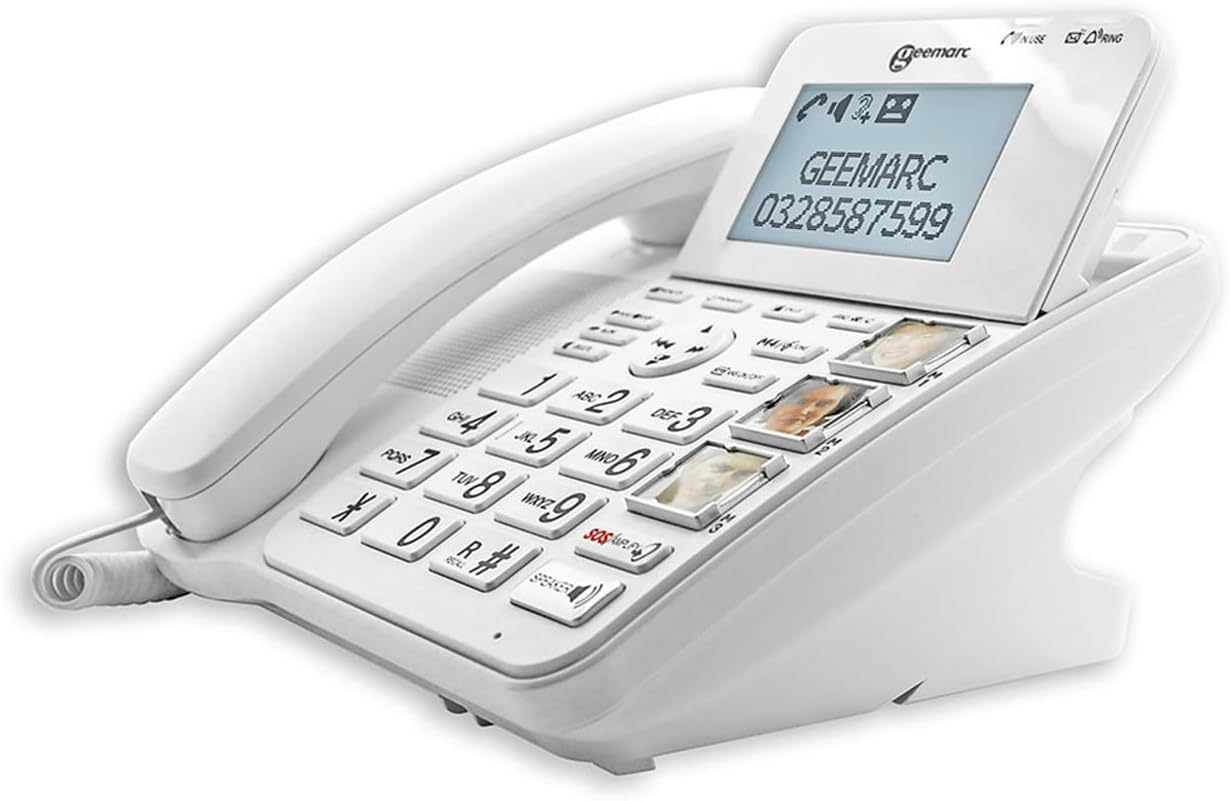
Gambar 2: Angled view of the Geemarc CL595, highlighting the large, well-spaced buttons, the digital display, and the three photo memory keys. This image demonstrates the user-friendly interface for dialing and accessing features.
3. Pangropéa
Proper maintenance ensures the longevity and optimal performance of your telephone.
- beberesih: Ngagunakeun lemes, damp cloth to clean the telephone's exterior. Do not use abrasive cleaners or solvents. Ensure no liquid enters the telephone's openings.
- Ngagantian batré: If the telephone uses AAA batteries for backup, replace them periodically (e.g., annually) or if the low battery indicator appears.
- Panyimpenan: Store the telephone in a cool, dry place away from direct sunlight and extreme temperatures when not in use for extended periods.
4. Cara ngungkulan
If you encounter issues with your Geemarc CL595, refer to the following common problems and solutions:
| Masalah | Mungkin Cukang lantaranana | Solusi |
|---|---|---|
| Taya nada dial | Kabel telepon pegat atanapi rusak. | Ensure the telephone line cord is securely connected to both the phone and the wall jack. Test with another phone if possible. |
| Teu tiasa ngadangu nu nelepon / Nu nelepon teu tiasa ngadangu kuring | Volume settings are too low; handset or line cord issue. | Adjust reception volume using the dedicated buttons or activate the Boost function. Check handset cord connection. |
| Telepon teu hurung | Ringer volume is off or set too low. | Check ringer volume settings in the menu. Ensure "Do Not Disturb" or similar features are not active. |
| Paparanana kosong | Adaptor daya pegat atanapi dayana pareumtage. | Ensure the power adapter is securely connected to the phone and a working electrical outlet. Check household power. |
If the problem persists after trying these solutions, please contact Geemarc customer support for further assistance.
5. Spésifikasi
- model: CL595
- Tipe: Telepon kabel
- Ukuran (L x W x H): 19 x 20 x 27 cm (kira-kira)
- beurat: 1 Kilogram
- Sumber Daya: Kabel listrik
- Batré: 3 x AAA (for backup, not included)
- Ukuran layar: 5 inci (layar)
- Resepsi Amppangajén: Up to +50dB (with Boost function)
- Volume ringer: Nepi ka 80dB
- Kasaluyuan Alat Dédéngéan: Yes (T-position)
- Mesin Ngajawab: Digital, nepi ka 30 menit waktos rekaman
- Photo Memory Keys: 3 kenop mémori langsung
- VIP Directory Capacity: Dugi ka 50 nomer
- Kapasitas Panghalang Telepon: Dugi ka 100 nomer
- Alat anu cocog: PSTN (Public Switched Telephone Network)
- Pabrikan: Geemarc Telecom
- Negara asal: Cina
6. Garansi jeung Rojongan
Garansi: The Geemarc CL595 typically comes with a 1-year parts availability guarantee. For specific warranty terms and conditions, please refer to the documentation provided with your purchase or contact your retailer.
Rojongan Palanggan: For technical assistance, troubleshooting beyond this manual, or warranty inquiries, please contact Geemarc customer service. Contact details can usually be found on the manufacturer's websitus atanapi dina bungkusan produk Anjeun.


