1. Bubuka
This manual provides essential instructions for the installation, operation, and maintenance of your Cisco Aironet 2602I Standalone Wireless Access Point. The Cisco Aironet 2602i is an enterprise-grade wireless access point designed to provide secure and reliable Wi-Fi connectivity for various environments. Please read this manual thoroughly before using the device to ensure proper functionality and safety.
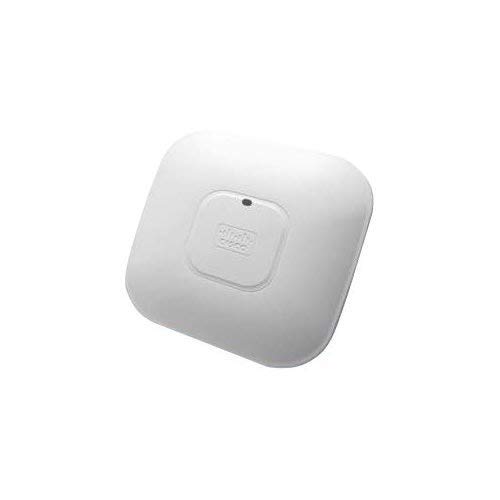
Image showing the front view of the Cisco Aironet 2602I Wireless Access Point.
2. Émbaran Kasalametan
Always observe the following safety precautions to reduce the risk of injury, electric shock, fire, or damage to the device:
- Pastikeun sumber kakuatan cocog voltage requirements specified for the device.
- Ulah ngalaan alat ka cai, beueus, atawa suhu ekstrim.
- Hindarkeun nempatkeun alat caket sumber panas atanapi dina sinar panonpoé langsung.
- Ulah nyobian muka atawa ngalereskeun alat sorangan. Rujuk sadayana jasa ka tanaga anu mumpuni.
- Use only accessories and power adapters approved by the manufacturer.
- Pastikeun ventilasi ditangtoskeun sabudeureun alat pikeun nyegah overheating.
3. Eusi Paket
Pariksa yén pakét anjeun ngandung barang-barang ieu:
- Cisco Aironet 2602I Wireless Access Point (1 unit)
- Bracket Pemasangan (upami aya)
- Power Adapter (if included, or PoE injector/switch required)
- Dokuméntasi (Panduan Mimitian Gancang, Inpormasi Kasalametan)
Note: Specific accessories may vary based on the product bundle or region.
4. Setélan
4.1 Instalasi fisik
- Pilih Lokasi: Select a central location for optimal Wi-Fi coverage, away from obstructions and sources of interference (e.g., microwave ovens, cordless phones).
- Pamasangan (Opsional): If mounting, use the provided bracket to secure the access point to a wall or ceiling. Ensure it is securely fastened.
- Sambungkeun kabel Ethernet: Connect an Ethernet cable from your network switch (preferably a Power over Ethernet (PoE) enabled switch) to the Ethernet port on the access point. If PoE is not available, use a compatible power adapter.
- Daya Hurung: Sakali nyambung, titik aksés bakal hurung. Perhatikeun indikator LED pikeun status.
4.2 Konfigurasi Awal
The Cisco Aironet 2602I is a standalone access point. Initial configuration typically involves connecting to the device's default Wi-Fi network or via a console cable for command-line interface (CLI) access.
- SSID standar: Look for a default Wi-Fi network broadcast by the access point (e.g., "CiscoAP" or similar).
- Alamat IP standar: The device may obtain an IP address via DHCP or have a default static IP (refer to Cisco documentation for specific default IP and credentials).
- Web panganteur: Aksés ka web-based management interface by entering the access point's IP address into a web browser.
- Konfigurasi Kaamanan: Change default passwords immediately. Configure your desired Wi-Fi network name (SSID), security type (WPA2/WPA3 recommended), and password.
For detailed configuration steps, refer to the comprehensive Cisco Aironet 2600 Series documentation available on the Cisco support websitus.
5. Operasi
5.1 Nyambungkeun Alat ka Wi-Fi
- On your wireless device (laptop, smartphone, tablet), open the Wi-Fi settings.
- Scan pikeun milarian jaringan anu sayogi.
- Select the SSID you configured for your Cisco Aironet 2602I.
- Lebetkeun kecap akses Wi-Fi nalika dipenta.
- Alat Anjeun ayeuna kudu disambungkeun ka jaringan nirkabel.
5.2 Indikator LED
The access point features LED indicators that provide status information:
- Héjo padet: Alat beroperasi normal.
- Héjo kedip-kedip: Alat nuju di-boot atanapi nuju ningkatkeun firmware.
- Amber padet: Device has encountered an error or is in a warning state.
- Pareum: Alat teu dihurungkeun.
Refer to the official Cisco documentation for a complete list of LED behaviors and their meanings.
6. Pangropéa
6.1 Apdet firmware
Rutin pariksa rojongan Cisco website for firmware updates. Firmware updates can improve performance, add new features, and address security vulnerabilities. Follow the instructions provided by Cisco for updating the firmware.
6.2 beberesih
To clean the device, power it off and disconnect it from the power source. Use a soft, dry cloth to wipe the exterior. Do not use liquid cleaners or aerosol sprays directly on the device.
6.3 Pertimbangan Lingkungan
Ensure the device is operated within its specified temperature and humidity ranges. Avoid placing it in areas with excessive dust or poor ventilation.
7. Cara ngungkulan
| Masalah | Mungkin Cukang lantaranana | Solusi |
|---|---|---|
| Teu aya daya / Alat teu hurung | Power cable disconnected, faulty power adapter, no PoE. | Check power connections. Ensure PoE is active on the switch port or use a functional power adapter. |
| Teu bisa nyambung ka jaringan Wi-Fi | Incorrect Wi-Fi password, SSID not broadcasting, device out of range, Wi-Fi disabled. | Verify password. Check AP configuration. Move closer to the AP. Ensure Wi-Fi is enabled on the AP. |
| Gancangna Wi-Fi laun atanapi sambungan anu pegat-pegat | Gangguan, seueur teuing alat, firmware anu tos lami, panempatan AP anu goréng. | Change Wi-Fi channel. Reduce number of connected devices. Update firmware. Relocate AP for better signal. |
| Teu bisa ngakses web panganteur manajemén | Alamat IP salah, masalah konektipitas jaringan, aksés blocking firewall. | Verify AP's IP address. Ensure your device is on the same network segment. Temporarily disable firewalls. |
If the problem persists after trying these solutions, contact technical support.
8. Spésifikasi
| Ngaran modél | AIR-SAP2602IBK9-WS |
| merek | CISCO DESIGNED |
| Jenis produk | Networking Device (Wireless Access Point) |
| Standar Komunikasi Nirkabel | 802.11a/b/g/n |
| Frékuénsi Band Kelas | Dual-Band |
| Protokol Kaamanan | WPS, WPA2, WPA |
| Fitur husus | WPS |
| Téhnologi konektipitas | Nirkabel |
| Alat nu cocog | Laptop, Smartphone, Tablet |
| Sistem operasi | Cisco ios |
| Métode kontrol | Toél (Note: This typically refers to configuration via a web interface or CLI, not a physical touch screen on the AP itself.) |
| Item Beurat | 4 pon |
| Ukuran Paket | 10 x 10 x 3 inci |
9. Garansi jeung Rojongan
9.1 Émbaran jaminan
This product is sold as "Amazon Renewed." Amazon Renewed products are backed by the Amazon Renewed Guarantee, which provides a replacement or refund within 90 days of receipt if the product does not work as expected. For specific warranty details from Cisco, please refer to the official Cisco website or contact Cisco support directly.
9.2 Rojongan Téknis
For technical assistance, troubleshooting, or further information regarding your Cisco Aironet 2602I, please visit the official Cisco support website or contact their customer service. For issues related to your Amazon Renewed purchase, please contact Amazon customer service.
- Rojongan Cisco: www.cisco.com/c/en/us/support/index.html
- Rojongan Amazon Anyarkeun: Refer to your Amazon order details for specific return and support options.


