1. Bubuka
The HUAWEI B311-221 4G LTE WiFi Router is designed to provide high-speed internet access. It supports 4G LTE CAT4 with download speeds up to 150Mbps and Wi-Fi speeds up to 300Mbps (802.11n). This router allows you to share a 3G/4G network connection with up to 32 Wi-Fi enabled devices, including tablets, mobile phones, and laptops. Its plug-and-play functionality makes it suitable for various environments where traditional broadband internet may not be available. The HUAWEI HiLink app offers convenient management of your network and connected devices.
2. Eusi Paket
Mangga parios eusi bungkusna kalawan saksama. Upami aya barang anu leungit atanapi ruksak, mangga ngahubungi padagang ritel anjeun.
- 1 x HUAWEI B311-221 4G LTE WiFi Router
- 1 x Ethernet Kabel
- 1 x adaptor kakuatan
- 1 x Gancang Mimitian Guide
3. Produk Langkungview
3.1 Hareup View

This image shows the front of the HUAWEI B311-221 router, featuring a clean white design with indicator lights for power, network status, Wi-Fi, and signal strength. The HUAWEI logo is visible at the bottom center.
3.2 Tukangeun View jeung Palabuhan
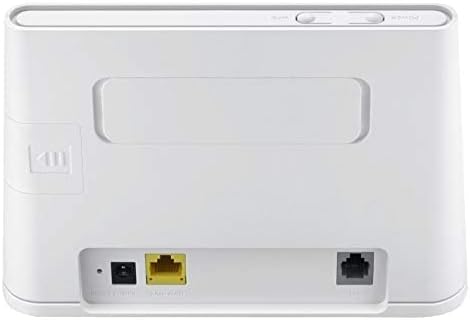
Tukangeun view of the router displays the various ports for connectivity. These include the power input, a Gigabit Ethernet LAN/WAN port (yellow), and an RJ11 port for voice services.
3.3 Slot Kartu SIM

This image highlights the integrated SIM card slot located on the side of the router, which is essential for 4G LTE connectivity. The slot is shown open, indicating where the SIM card should be inserted.
3.4 Lampu Indikator

A close-up of the router's top panel, showing the indicator lights for Power, Wi-Fi, Network Mode, and Signal Strength. These lights provide visual feedback on the router's operational status.
4. Parentah Setup
Follow these steps to set up your HUAWEI B311-221 router:
- Selapkeun Kartu SIM: Locate the SIM card slot on the side of the router. Carefully insert your standard-sized 3G/4G SIM card into the slot until it clicks into place. Ensure the SIM card is activated by your service provider.
- Sambungkeun Kakuatan: Connect the power adapter to the router's power input port and then plug it into a power outlet. The router will automatically power on.
- Daya Hurung: Press the Power button on the router. The Power indicator light should turn on.
- Sambungan jaringan: Wait for the Network Mode and Signal Strength indicator lights to stabilize. A solid blue or green light typically indicates a successful 4G LTE connection.
- Sambungkeun Alat:
- Wifi: On your device (laptop, phone, tablet), search for available Wi-Fi networks. Select the network name (SSID) printed on the label at the bottom of your router. Enter the Wi-Fi password (Key) also found on the label.
- Ethernet: For wired connections, connect an Ethernet cable from the router's LAN/WAN port to your computer or other network device.
- Antarmuka Manajemén Aksés: Buka a web browser on a connected device and enter the default IP address (usually 192.168.8.1) to access the router's web management page. Log in using the default username and password (found on the router label or in the Quick Start Guide).
- HUAWEI HiLink App: For easier management, download the HUAWEI HiLink app from your device's app store. Connect your phone to the router's Wi-Fi and use the app to monitor network status, manage connected devices, and configure settings.
5. Parentah Operasi
5.1 Nyambungkeun Alat
The router supports up to 32 Wi-Fi devices simultaneously. Ensure your devices are within the Wi-Fi coverage area for optimal performance.

This diagram illustrates the Wi-Fi coverage provided by the HUAWEI B311-221 router within a typical home environment, showing multiple devices connected wirelessly.
5.2 Aksés Internét
Once connected, devices can access the internet via the 4G LTE network. The router provides high-speed data for streaming, browsing, and online activities.

This image demonstrates the router's capability to deliver 4G internet at speeds up to 150Mbps to a connected laptop, facilitating fast downloads and online activities.
5.3 Using the HUAWEI HiLink App
The HUAWEI HiLink app allows you to:
- Check network strength and status.
- Read SMS messages received on the router's SIM card.
- Set data usage limits.
- View and manage all connected devices.
- Modify Wi-Fi settings (SSID, password).
Ensure your smartphone is connected to the router's Wi-Fi network to use the app.
6. Pangropéa
Pikeun mastikeun kinerja anu optimal sareng umur panjang router HUAWEI B311-221 anjeun, turutan pedoman pangropéa ieu:
- panempatan: Simpen router di tempat anu kabuka, jauh tina halangan, barang logam ageung, sareng alat éléktronik sanés anu tiasa nyababkeun gangguan.
- beberesih: Anggo lawon anu lemes sareng garing pikeun ngabersihkeun router. Entong nganggo pembersih cair atanapi aerosol.
- Ventilasi: Ensure the router's ventilation openings are not blocked to prevent overheating.
- Pembaruan firmware: Pariksa sacara périodik apdet firmware ngalangkungan router web management interface or the HUAWEI HiLink app. Keeping the firmware updated ensures the best performance and security.
- Siklus kakuatan: Upami anjeun ngalaman masalah leutik, cobian hurungkeun router ku cara nyabut tina stop kontak salami 10 detik teras colokkeun deui.
7. Cara ngungkulan
Upami anjeun ngalaman masalah sareng router anjeun, tingali masalah sareng solusi umum ieu:
| Masalah | Solusi anu mungkin |
|---|---|
| Taya sambungan internét |
|
| Laju Wi-Fi lalaunan |
|
| Cannot access router management page |
|
| Sinyal Wi-Fi sering turun |
|
8. Spésifikasi
| Fitur | Rincian |
|---|---|
| merek | HUAWEI |
| Ngaran modél | B311-221 |
| Nomer Modél Item | B311-221 |
| Dimensi produk | 18.1 x 12.6 x 3.6 cm |
| Item Beurat | 218 gram |
| Warna | Bodas |
| Téhnologi konektipitas | Wi-Fi, 4G LTE |
| Standar Komunikasi Nirkabel | 802.11n |
| Frékuénsi Band Kelas | Pita Tunggal (2.4GHz) |
| Max Wi-Fi Speed | Nepi ka 300 Mbps |
| Max 4G LTE Speed | Nepi ka 150 Mbps |
| palabuhan Ethernet | 1 x Gigabit Ethernet LAN/WAN port |
| Voice Port | 1 x RJ11 port |
| Slot Kartu SIM | Integrated (Standard SIM) |
| Fitur husus | WPS, HUAWEI HiLink App Management |
| Alat nu cocog | Smart TV, Tablet, Personal Computer, Laptops, Phones, Gaming Devices |
| Batré Kaasup | No |
| Operating System (Compatibility) | Windows (and other OS via Wi-Fi/Ethernet) |
9. Émbaran jaminan
This HUAWEI product is covered by a limited warranty. The specific terms and duration of the warranty may vary depending on your region and local regulations. Please refer to the warranty card included in your product package or visit the official HUAWEI websitus pikeun inpo jaminan lengkep. Simpen bukti pameseran anjeun pikeun klaim garansi.
10. Rojongan
For technical support, product inquiries, or service requests, please contact HUAWEI customer support through one of the following methods:
- Dukungan Online: Kunjungi dukungan resmi HUAWEI websitus pikeun FAQ, pituduh ngungkulan, sareng pilihan kontak.
- HUAWEI HiLink App: Use the support features available within the HiLink application.
- Hotél Service: Refer to your Quick Start Guide or HUAWEI's official website for regional service hotline numbers.
When contacting support, please have your product model (B311-221) and serial number ready.