1. Bubuka
Thank you for choosing the Maul MAULarc 8200490 LED Desk Lamp. manual ieu nyadiakeun informasi penting pikeun pamakéan aman tur efisien tina l anyar AnjeunampMangga baca parentah ieu kalawan saksama sateuacan dipasang sareng dioperasikeun, teras simpen kanggo rujukan ka hareup.

Image 1.1: The Maul MAULarc 8200490 LED Desk Lamp in a typical office environment.
2. Parentah Kasalametan
Pikeun mastikeun operasi aman, salawasna turutan pancegahan kaamanan dasar ieu:
- Produk ieu dirancang pikeun pamakéan indoor wungkul. Do not expose to rain or moisture.
- Pastikeun catu daya voltage cocog jeung lampsyarat 's (220 Volts).
- Do not attempt to open or modify the lamp. The LED light source is permanently installed and cannot be replaced.
- Tetep lamp jauh tina sumber panas sareng sinar panonpoé langsung.
- Cabut colokan lamp tina stop kontak sateuacan dibersihkeun atanapi upami moal dianggo salami lami.
- Entong beroperasi lamp kalawan kabel ruksak atawa colokan.
3. Eusi Paket
Carefully unpack the box and ensure all items are present and undamaged. The package should contain:
- 1 x Maul MAULarc 8200490 LED Desk Lamp (with integrated power cord)
4. Setélan
Follow these steps to set up your LED desk lamp:
- panempatan: Choose a stable, flat surface for the lamp, such as a desk or table. Ensure there is adequate space around the lamp for ventilation and adjustment.
- Sambungkeun Kakuatan: Insert the power plug into a standard 220V electrical outlet.
- Saluyukeun Posisi: Anu lamp features a flexible arm. Gently bend the arm to position the light head as desired for optimal illumination.
5. Parentah Operasi
The Maul MAULarc 8200490 LED Desk Lamp is simple to operate:
- Hurungkeun/Pareuman: Locate the switch on the lamp base. Press the switch to turn the lamp hurung atawa pareum.
- Penyesuaian cahaya: The flexible arm allows for easy adjustment of the light direction. Gently reposition the lamp sirah ka lampu langsung dimana diperlukeun.
6. Pangropéa
Perawatan anu leres bakal mastikeun umur panjang anjeunamp:
- beberesih: Sateuacan beberesih, sok cabut colokan lamp from the power outlet. Use a soft, dry cloth to wipe the lamppermukaanna. Ulah make cleaners abrasive, pangleyur, atawa bahan kimia kasar, sabab ieu bisa ngaruksak finish.
- Sumber Lampu LED: Sumber cahaya LED dina ieu lamp is permanently installed and does not require replacement. Do not attempt to remove or replace the LEDs.
7. Cara ngungkulan
Lamun sapatemon masalah naon jeung l Anjeunamp, tingal pituduh ngungkulan ieu di handap:
| Masalah | Mungkin Cukang lantaranana | Solusi |
|---|---|---|
| Lamp henteu hurung. | Taya catu daya. | Check if the power plug is securely inserted into the outlet. Ensure the outlet is functional by testing with another device. |
| Lamp kedip-kedip. | Catu daya teu stabil atanapi sambungan anu kendor. | Ensure the power plug is firmly connected. Try plugging the lamp into a different outlet. If flickering persists, discontinue use and contact support. |
| Lamp head is difficult to adjust. | Operasi normal. | The flexible arm is designed to hold its position. Apply gentle, steady pressure to adjust. Do not force it excessively. |
8. Spésifikasi
Detailed technical specifications for the Maul MAULarc 8200490 LED Desk Lamp:
| Fitur | Spésifikasi |
|---|---|
| merek | MAUL |
| Nomer modél | 8200490 |
| Dimensi produk | 29 x 13.5 x 38 cm (P x L x T) |
| Beurat | 660 gram |
| Warna | Hideung |
| Bahan | logam |
| Lamp Tipe | LED (fixed light source) |
| Wattage | 5 Watt |
| Fluks Luminous | 290 Lumén |
| Voltage | 220 volt |
| Rata Kahirupan | 20,000 Jam |
| Fitur husus | With cord |
| Kelas Énergi Énergi | D (A - G scale) |
| Tipe Pamasangan | Tabletop |
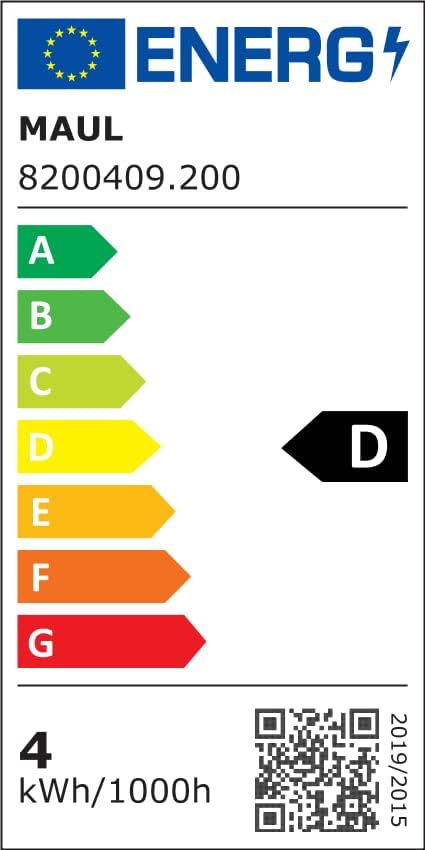
Image 8.1: Energy Efficiency Label. For more details, visit the official EPREL database: Pangkalan data EPREL
9. Garansi jeung Rojongan
Produk ieu hadir kalawan minimum garansi 2 taun ti tanggal dibeuli, ngawengku defects manufaktur sarta malfunctions dina pamakéan normal. Punten tahan bukti pameseran anjeun pikeun klaim garansi.
For technical support, warranty claims, or any questions regarding your Maul MAULarc 8200490 LED Desk Lamp, please contact your retailer or the manufacturer's customer service department. Contact details can typically be found on the product packaging or the manufacturer's official websitus.


