1. Bubuka
This manual provides detailed instructions for the installation, operation, and maintenance of your Anlapus 1080P Home CCTV Security Camera System. This system includes an 8-channel 2MP Surveillance DVR with a pre-installed 1TB hard drive and four weatherproof 1080P dome cameras, designed for both indoor and outdoor use. The system offers features such as night vision and motion alerts to enhance your security monitoring.

Figure 1.1: Anlapus 1080P Home CCTV Security Camera System components, including the DVR, four dome cameras, and a 1TB hard drive.
2. Eusi Paket
Mangga parios heula sadaya barang anu didaptarkeun di handap ieu kalebet kana pakét anjeun. Upami aya barang anu leungit atanapi ruksak, mangga ngahubungi layanan palanggan.
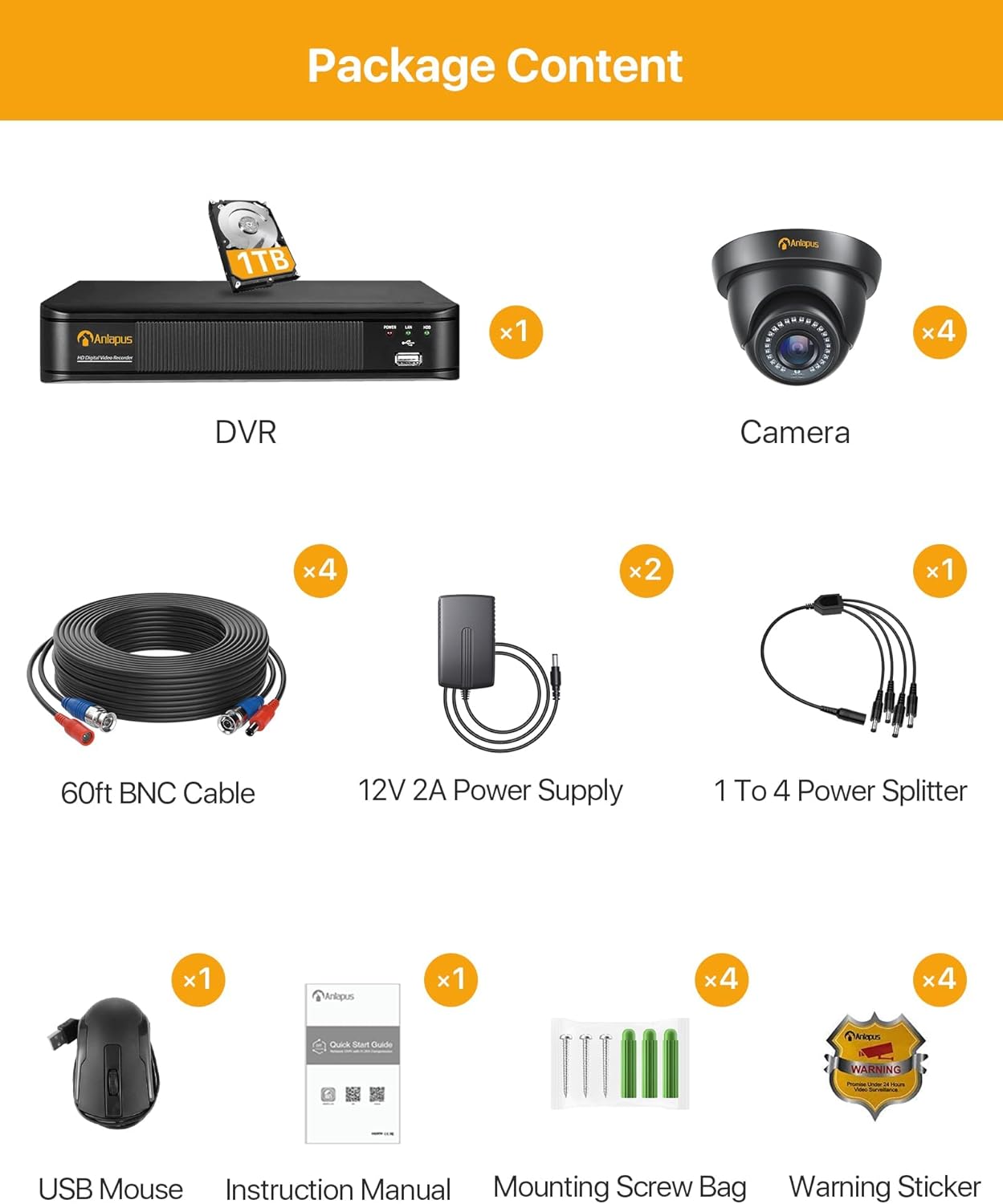
Gambar 2.1: Gambaran visual tina eusi bungkusan.
- 1 x Anlapus HD Digital Video Recorder (DVR) with 1TB Hard Drive pre-installed
- 4 x Anlapus 1080P Dome Cameras
- 4 x 60ft BNC Kabel
- 2 x 12V 2A Power Supplies
- 1 x 1 to 4 Power Splitter
- 1 x Mouse USB
- 1 x Manual Instruksi (Dokumén ieu)
- 4 x Kantong Sekrup Pemasangan
- 4 x Stiker Peringatan
3. Produk Langkungview
The Anlapus security system consists of a Digital Video Recorder (DVR) and 1080P dome cameras. Understanding the components and their connections is crucial for proper setup and operation.

Figure 3.1: Anlapus Dome Camera features and DVR rear panel connections.
3.1 Dome Camera Features
- IP66 Tahan Cuaca: Designed for both indoor and outdoor use, resistant to dust and water.
- 24pcs IR-LEDs: Provides up to 80ft (24 meters) of night vision.
- 3.6mm HD Lens: Offers a 90° wider viewsudut ing.
- Panutup kaca: Protects the lens from rain, dust, and fog.
- Palabuhan Daya: For connecting the camera to a power supply.
- Kaluaran Video: For connecting the camera to the DVR via BNC cable.
3.2 DVR Rear Panel Ports
- Video Input (BNC): Connects up to 8 cameras (4 included).
- Audio Input/Output (RCA): For connecting an external microphone (not included) and audio output.
- Monitor (VGA): Nyambung ka monitor VGA.
- Monitor (HDMI): Connects to an HDMI monitor or TV.
- Jaringan (RJ45): Connects to your router for remote access.
- USB 2.0: For connecting the USB mouse and for USB backup.
- Input Daya DC 12V: For connecting the DVR power supply.
4. Setup jeung Instalasi
The Anlapus system is designed for easy plug-and-play installation. Follow these steps to set up your security system.

Figure 4.1: Easy Installation and Mobile Access Steps.
4.1 Sambungan Hardware Awal
- Sambungkeun kaméra: Connect each camera to the DVR using the provided 60ft BNC cables. Ensure the connections are secure.
- Kaméra Daya: Use the 1 to 4 power splitter and 12V 2A power supplies to power the cameras. Connect the splitter to the power supply, then connect each camera's power port to the splitter.
- Sambungkeun DVR ka Monitor: Connect the DVR to a monitor or TV using either an HDMI or VGA cable. Ensure your display supports at least 1080p (1920x1080 pixels) resolution for optimal viewing.
- Sambungkeun Beurit USB: Colokkeun beurit USB kana salah sahiji port USB dina DVR.
- Power DVR: Connect the DVR to its dedicated 12V power supply and plug it into a power outlet. The DVR will power on automatically.
- Network Connection (Optional for Remote Access): Pikeun jauh viewing, connect the DVR's RJ45 network port to your router using an Ethernet cable.
4.2 Mobile App Setup for Remote Access
To access your security system remotely via smartphone or tablet, download the free SANNCE HOME APP.
- Unduh App: Milarian pikeun "SANNCE HOME" in the Google Play Store (for Android) or Apple App Store (for iOS) and install the application.
- Ngadaptar Akun: Buka aplikasi teras turutan pitunjuk dina layar pikeun ngadaptarkeun akun énggal.
- Tambahkeun Alat: In the app, select the option to add a new device. You will typically scan a QR code displayed on your DVR's monitor (found in the network settings) or manually enter the device ID.
- Konpigurasikeun Setélan: Once the device is added, you can configure various settings, including motion detection alerts and recording schedules, directly from the app.
5. Operasi Sistim nu
This section covers the primary operational features of your Anlapus security system.
5.1 Hirup View
Anjeun tiasa view hirup footage from your cameras on a connected monitor/TV or remotely via the mobile app or computer software.

Gambar 5.1: Hirup viewing options across various devices.
- Lokal View: Use the USB mouse to navigate the DVR's on-screen menu. You can switch between single-camera view jeung multi-kaméra grid view.
- Jauh View: Access the SANNCE HOME APP on your smartphone/tablet or use compatible client software on your PC/laptop to view live feeds from anywhere with an internet connection.
5.2 Ngarékam
The system supports continuous 24/7 recording and motion-triggered recording.

Figure 5.2: Motion detection capabilities.
- Ngarekam 24/7: The pre-installed 1TB hard drive is designed for continuous security recording. It provides approximately 10 days of loop recording for all 4 cameras in FHD 1080p before overwriting the oldest footage otomatis.
- Ngarekam Deteksi Gerak: Configure the DVR to record only when motion is detected. This saves hard drive space and focuses on important events. You can define specific motion detection areas (masks) to avoid false alarms from constant, non-changing movements.
- Tanda Gerak: Receive instant notifications on your smartphone when motion is detected, ensuring you are aware of any activity in real-time.
5.3 Playback
Review dirékam footage directly from the DVR or remotely via the mobile app.
- Playback Lokal: Access the playback menu on the DVR using the USB mouse. Select the date and time to review dirékam footage.
- Remote Playback: Use the SANNCE HOME APP to access and play back recorded videos stored on the DVR.
5.4 Visi Peuting
The cameras are equipped with EXIR LEDs for clear night vision.

Figure 5.3: Day and Night Vision capabilities.
The cameras automatically switch to night vision mode in low-light conditions, providing crisp black and white images up to 100 feet (30 meters).
5.5 Video Compression (H.265+)
The DVR utilizes advanced H.265+ video compression technology.

Figure 5.4: Benefits of H.265+ Video Compression.
H.265+ compression significantly reduces file sizes, allowing for up to 4 times longer recording times compared to H.264, while maintaining video quality. This also contributes to faster remote viewing due to reduced bandwidth requirements.
6. Pangropéa
Proper maintenance ensures the longevity and optimal performance of your security system.

Figure 6.1: Cameras are designed to work in various weather conditions.
- Beberesih Kaméra: Périodik ngabersihan lénsa kaméra ku lemes, damp lawon pikeun ngaleungitkeun lebu, kokotor, atanapi bintik cai anu tiasa ngahalangan view. Ngahindarkeun cleaners abrasive.
- Manajemén hard drive: The 1TB hard drive is designed for continuous loop recording. No manual intervention is typically required for overwriting old footage. However, if you experience recording issues, check the DVR's hard drive status in the system settings.
- Pembaruan firmware: Check the Anlapus official website periodically for any available firmware updates for your DVR. Updating firmware can improve system stability and add new features.
- Pertimbangan Lingkungan: While cameras are weatherproof (IP66), extreme temperatures (-10°C to 60°C) or direct exposure to harsh elements for prolonged periods should be avoided if possible to maximize lifespan. Ensure proper ventilation for the DVR.
7. Cara ngungkulan
Bagian ieu alamat masalah umum anjeun bisa sapatemon jeung nyadiakeun solusi.
- No Video Display on Monitor:
- Ensure the DVR is powered on and the power adapter is securely connected.
- Check the HDMI/VGA cable connection between the DVR and the monitor.
- Pastikeun sumber input monitor parantos dipilih kalayan leres (HDMI/VGA).
- Ensure your monitor supports 1080p resolution.
- Henteu aya gambar kaméra:
- Check if the camera is receiving power. The IR LEDs should glow faintly in the dark if powered.
- Ensure the BNC cable is securely connected at both the camera and DVR ends.
- Try connecting the camera to a different BNC input on the DVR to rule out a faulty DVR port.
- Test the camera with a known working power supply and cable if available.
- Taya Aksés Jauh:
- Ensure the DVR is connected to your router via an Ethernet cable and the network indicator lights on the DVR's RJ45 port are active.
- Pariksa yén router anjeun gaduh sambungan internét anu aktip.
- Check the network settings on the DVR to ensure it has obtained an IP address.
- Ensure the SANNCE HOME APP is updated to the latest version.
- Confirm the device ID or QR code was correctly added to the app.
- Motion Detection Not Working/Too Sensitive:
- Access the DVR's motion detection settings.
- Saluyukeun tingkat sensitipitas.
- Define or refine the motion detection area (mask) to exclude areas with constant, irrelevant movement (e.g., swaying trees, busy roads).
- Ensure motion recording is enabled for the specific channels.
- Henteu aya rékaman:
- Check the hard drive status in the DVR's system settings. Ensure it is detected and healthy.
- Verify that recording schedules are properly configured for continuous or motion-triggered recording.
- If the hard drive is full and not set to overwrite, enable the overwrite function.
8. Spésifikasi
Detailed technical specifications for the Anlapus 1080P Home CCTV Security Camera System.
| Fitur | Spésifikasi |
|---|---|
| Nomer modél | AM8M4B-4B41K-202S |
| Saluran DVR | 8 Channel (Supports Analog/AHD/TVI/CVI/IP Connection) |
| Input Video | 8CH BNC Input |
| Kaluaran Video | 1CH HDMI, 1CH VGA |
| Input / Kaluaran Audio | 1CH/1CH (RCA) |
| Panganteur Jaringan | RJ45 10M/100M self-adaption |
| Hard Drive | 1TB Professional Hard Drive Pre-installed (Supports up to 8TB) |
| Resolusi kaméra | 1080P (1920x1080 pixels) |
| Camera Image Sensor | 1/4 "Progressive Scan CMOS |
| Lensa kaméra | 3.6mm (82.2° Angle View) |
| Jarak Visi Peuting | Up to 100 ft (30 meters) with EXIR LED |
| Rating Kaméra Tahan Cuaca | IP66 (Indoor / outdoor) |
| Komprési Video | H.265 + |
| Aksés Jauh | SANNCE HOME APP (iPhone/iPad/Android/Android Pad), IE, Firefox, Chrome Browser |
| Rojongan System Operasi | Android, ios |
| Sumber Daya | Kabel Listrik |
| Dimensi produk | 40 x 18 x 33 cm |
| Item Beurat | 4.98 kg |
9. Garansi jeung Rojongan
Anlapus products are designed for reliability and performance. For specific warranty details, please refer to the warranty card included in your package or visit the official Anlapus websitus.
If you encounter any issues not covered in this manual or require further assistance, please contact Anlapus customer support through their official website or the contact information provided with your purchase. When contacting support, please have your product model number (AM8M4B-4B41K-202S) and purchase details ready.


