1. Bubuka
Thank you for choosing the Kaidi KD913 Wireless Stereo Headphone. This manual provides essential information for setting up, operating, and maintaining your new headphones. Please read it carefully before use to ensure optimal performance and longevity of the product.
2. Émbaran Kasalametan
- Kontrol volume: Hindarkeun dengekeun dina tingkat polumeu luhur pikeun période anu panjang pikeun nyegah karusakan dédéngéan.
- Paparan cai: Do not expose the headphones to water or moisture. This product is not waterproof.
- Paparan Panas: Keep the headphones away from extreme temperatures, direct sunlight, and heat sources.
- beberesih: Anggo kaén anu lemes sareng garing pikeun beberesih. Ulah make cleaners abrasive atawa pangleyur.
- Pembongkaran: Entong nyobian ngabongkar atanapi ngarobih headphone. Ieu bakal ngabatalkeun jaminan.
3. Eusi Paket
Mangga parios pakét kanggo barang-barang ieu:
- Kaidi KD913 Wireless Stereo Headphone
- Kabel Ngecas USB
- Manual pamaké
4. Produk Langkungview
Familiarize yourself with the components of your Kaidi KD913 headphones.
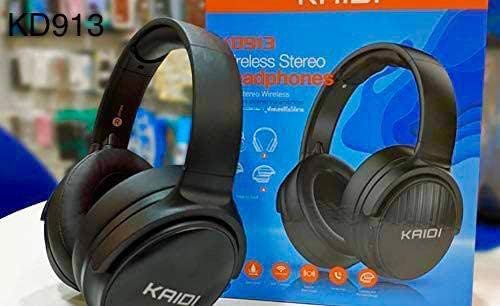
Image: Kaidi KD913 Headphone in a folded position, showcasing desain kompak na.
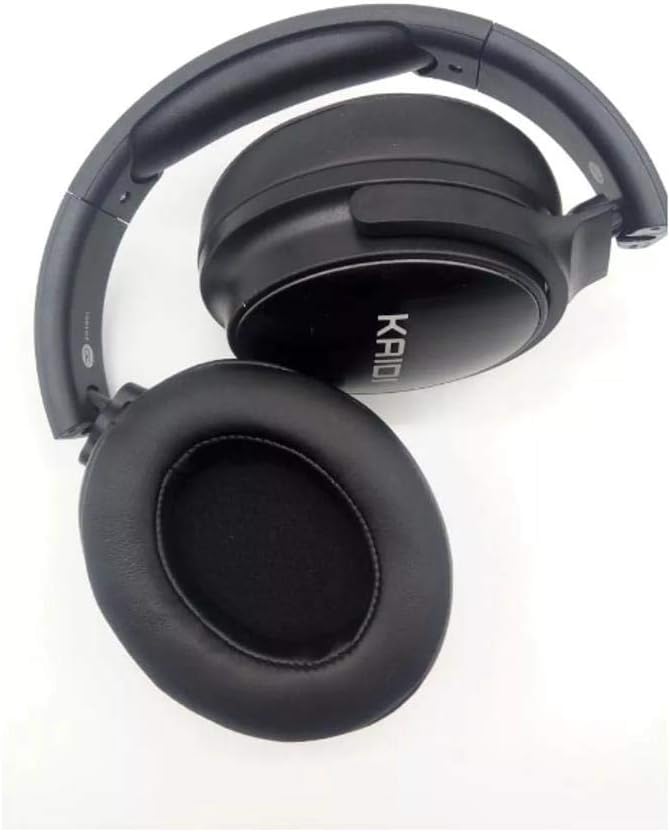
Gambar: Deukeut view of a Kaidi KD913 Headphone earcup, highlighting the cushioning and 'KAIDI' branding.
Komponén Headphone:
- Tombol Daya/Multi-fungsi: Used for power on/off, play/pause, answer/end calls.
- Volume Kaluhur/Tombol Lagu Salajengna: Increases volume, skips to the next track.
- Volume Turun/Tombol Lagu Saméméhna: Decreases volume, goes to the previous track.
- Indikator LED: Némbongkeun status daya, ngecas, sareng pasangan.
- Mikropon: Pikeun telepon handsfree.
- Palabuhan Ngecas USB: Pikeun nyambungkeun kabel ngecas.
- Port AUX-in: Pikeun sambungan audio kabel.
5. Setélan
5.1. Ngecas Headphone
- Connect the small end of the USB charging cable to the USB charging port on the headphone.
- Sambungkeun tungtung nu leuwih gede tina kabel ngecas USB ka adaptor kakuatan USB (teu kaasup) atawa port USB komputer.
- The LED indicator will illuminate (typically red) during charging.
- Once fully charged, the LED indicator will change color (typically blue) or turn off. Disconnect the charging cable.
Note: For first-time use, fully charge the headphones before use.
5.2. Ngapasangkeun sareng Alat (Bluetooth)
- Daya Hurung: Press and hold the Power/Multi-function button for approximately 3-5 seconds until the LED indicator flashes blue and red alternately. This indicates the headphones are in pairing mode.
- Aktipkeun Bluetooth: Dina alat anjeun (smartphone, tablet, laptop), aktipkeun Bluetooth.
- Milarian pikeun Paranti: Dina setélan Bluetooth alat anjeun, milarian alat anu sayogi.
- Select 'KD913': From the list of found devices, select 'KD913'.
- Konfirmasi pasangan: Once successfully paired, the LED indicator on the headphones will flash blue slowly, and you will hear an audible confirmation.
Note: If a password is required, enter '0000'. The headphones will automatically connect to the last paired device when powered on, if Bluetooth is enabled on the device.
6. Parentah Operasi
6.1. Daya Hurung / Pareum
- Daya Hurung: Press and hold the Power/Multi-function button for 3 seconds. The LED indicator will flash blue.
- Pareum listrik: Press and hold the Power/Multi-function button for 3 seconds. The LED indicator will turn off.
6.2. Kadali Playback Musik
- Puter / Reureuh: Pencét tombol Daya/Multi-fungsi sakali.
- Lagu salajengna: Pencét jeung tahan tombol Volume Up.
- Lagu Sateuacanna: Pencét jeung tahan tombol Jilid Turun.
6.3. Manajemén nelepon
- Ngajawab Telepon: Pencét tombol Daya/Multi-fungsi sakali.
- Tungtung Telepon: Pencét tombol Daya/Multi-fungsi sakali nalika nelepon.
- Nolak Telepon: Pencét terus tahan tombol Daya/Multi-fungsi salami 2 detik.
- Telepon deui Nomer Panungtungan: Pencét dua kali tombol Daya/Multi-fungsi.
6.4. Volume Control
- Ningkatkeun Jilid: Pencét pondok tombol Volume Up.
- Turunkeun Jilid: Pencét pondok tombol Volume Turun.
6.5. Wired Mode (AUX-in)
To use the headphones in wired mode, connect a 3.5mm audio cable (not included) from your audio source to the AUX-in port on the headphones. The Bluetooth function will automatically disable when an AUX cable is connected.
7. Pangropéa
7.1. beberesih
Wipe the headphones with a soft, dry, lint-free cloth. Do not use liquid cleaners, sprays, or harsh chemicals.
7.2. Panyimpenan
When not in use, store the headphones in a cool, dry place, away from direct sunlight and extreme temperatures. If storing for an extended period, ensure the headphones are partially charged to maintain battery health.
8. Cara ngungkulan
| Masalah | Mungkin Cukang lantaranana | Solusi |
|---|---|---|
| Headphone teu hurung. | batré lemah. | Ngecas headphone pinuh. |
| Teu tiasa dipasangkeun sareng alat. | Headphones not in pairing mode; Bluetooth not enabled on device; device too far. | Pastikeun headphone aya dina mode papasangan (kedip-kedip beureum/biru). Aktipkeun Bluetooth dina alat Anjeun. Pindahkeun alat ngadeukeutan headphone. |
| Taya sora. | Volume low teuing; headphone teu disambungkeun; kaluaran audio salah dipilih. | Naékkeun volume dina headphone sareng alatna. Pasangkeun deui headphone. Pariksa setélan kaluaran audio dina alat anjeun. |
| Kualitas sora henteu saé. | gangguan; alat jauh teuing; batré lemah. | Pindah ngadeukeutan ka alat nu disapasangkeun. Hindarkeun gangguan éléktromagnétik anu kuat. Ngecas headphone. |
9. Spésifikasi
- merek: Kaidi
- model: KD913
- Téknologi konektipitas: Nirkabel
- Téknologi Komunikasi Nirkabel: Bluetooth
- Faktor Bentuk Headphone: Over-ear (Circumaurais)
- Penempatan Ceuli: Over-ear (Circumaurais)
- warna: Hideung
- Alat anu cocog: Cell phones, Notebooks, Tablets, Televisions
- Fitur kabel: Wireless (No cable)
10. Garansi jeung Rojongan
Kaidi products are designed for reliability and performance. For warranty information or technical support, please refer to the warranty card included with your purchase or contact your local retailer or Kaidi customer service.


