
1. Produk Langkungview
The GalaxyElec STC-100A is a microcomputer temperature controller designed for precise temperature management. It supports both heating and refrigerating modes, allowing for accurate control based on user-defined temperature settings and differential values. The device includes delay protection for compressor startup and heating elements, a feature to limit the temperature setting range, and an alarm function for sensor errors.
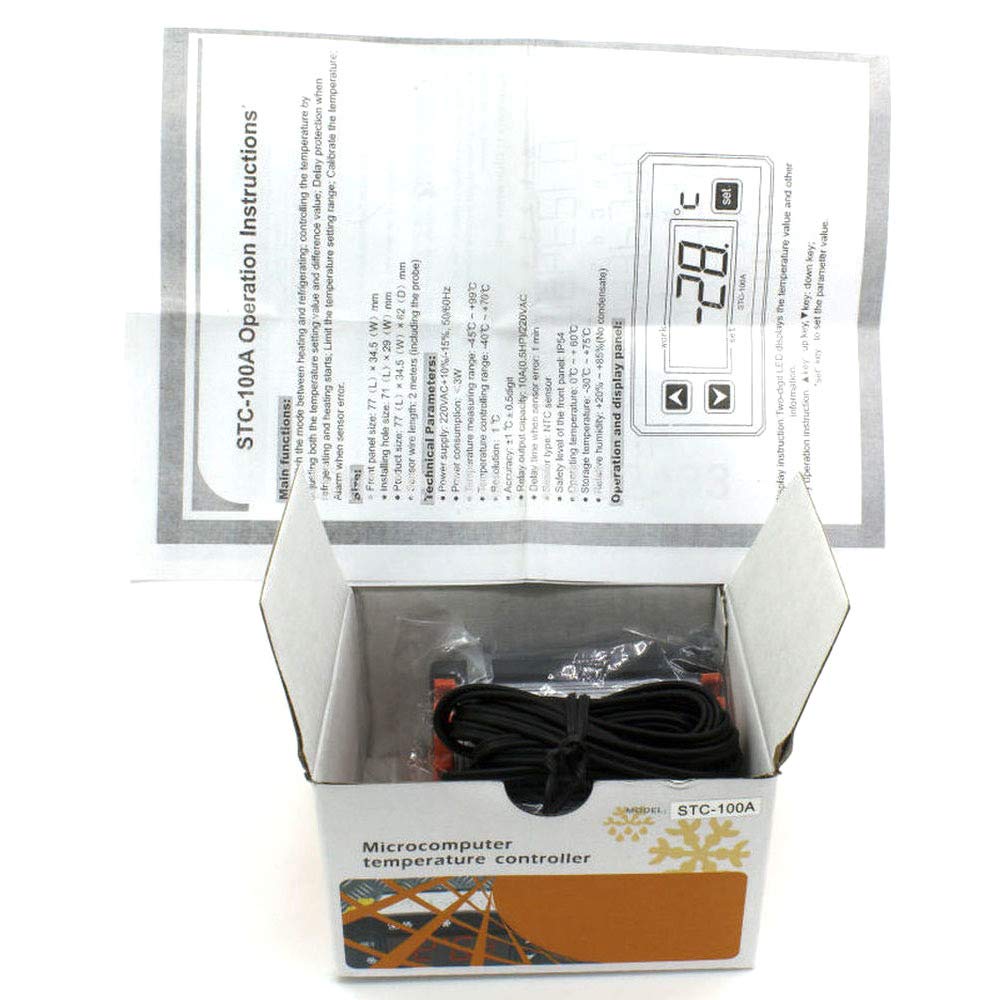
Gambar 1.1: The STC-100A Temperature Controller shown in its retail packaging, with the instruction manual partially visible. The device itself is a compact unit with a digital display and control buttons.
2. Spésifikasi Téknis
| Parameter | Nilai |
|---|---|
| Ukuran Panel hareup | 77 (L) x 34.5 (W) mm |
| Installing Hole Size | 71 (L) x 29 (W) mm |
| Ukuran produk | 77 (L) x 34.5 (W) x 62 (D) mm |
| Panjang Kawat Sensor | 2 meters (including the probe) |
| Sasayogian tanaga | 220VAC +10% -15%, 50/60Hz |
| Konsumsi Daya | <3W |
| Rentang Ukur Suhu | -45°C nepi ka +99°C |
| Temperature Controlling Range | -40°C nepi ka +70°C |
| Resolusi | 1°C |
| Akurasi | ± 1 ° C ± 0.5 digit |
| Relay Output Capacity | 10A (0.5HP) / 220VAC |
| Delay Time When Sensor Error | 1 menit |
| Tipe sénsor | sénsor NTC |
| Safety Level of Front Panel | IP54 |
| Suhu Operasi | 0°C nepi ka +60°C |
| Suhu Panyimpenan | -30°C nepi ka +75°C |
| Kalembaban rélatif | +20% to +85% (No condensate) |
3. Pedoman instalasi
Proper installation is crucial for the safe and effective operation of the STC-100A temperature controller. Ensure all electrical connections are made by a qualified professional if you are unsure.
3.1 Instalasi fisik
- Prepare an opening in your control panel or enclosure with dimensions matching the 'Installing Hole Size' (71mm L x 29mm W).
- Insert the STC-100A controller into the prepared opening.
- Secure the controller using the provided mounting clips or screws to ensure it is firmly in place.
- Connect the NTC temperature sensor probe to the designated terminals on the controller. Ensure the sensor is placed in the area where temperature measurement is required. The sensor wire length is 2 meters.
3.2 Kabel Listrik
Awas: Disconnect power before performing any wiring to prevent electric shock. All wiring should comply with local electrical codes.
- Connect the power supply (220VAC, 50/60Hz) to the designated power input terminals on the controller.
- Connect your heating or refrigerating load (e.g., compressor, heater) to the relay output terminals. The relay output capacity is 10A (0.5HP) at 220VAC.
- Pariksa deui sadaya sambungan pikeun pageuh sareng polaritasna anu leres sateuacan nganggo daya.
4. Operasi sareng Panel Témbongkeun
The STC-100A features a two-digit LED display that shows the current temperature value and other operational information. Control is managed via three buttons located below the display.
Gambar 4.1: The operational display panel of the STC-100A. It features a digital LED display for temperature readings and three tactile buttons for navigation and setting parameters: an 'up' arrow, a 'down' arrow, and a 'set' button.
4.1 Fungsi Tombol
- Up Key (▲): Dianggo pikeun ningkatkeun nilai atanapi napigasi ka luhur dina ménu.
- Down Key (▼): Dianggo pikeun nurunkeun nilai atanapi napigasi ka handap dina ménu.
- Set Key (SET): Used to enter parameter setting mode, confirm selections, or save changes.
5. Parentah Operasi
5.1 Daya Hurung/Pareuman
The controller powers on automatically when connected to a suitable power supply. There is no dedicated power button.
5.2 Setting the Temperature Value
- Pencét éta SET key once. The display will flash, indicating that the temperature setting value can be adjusted.
- Ngagunakeun éta Ka luhur (▲) or Turun (▼) keys to adjust the desired temperature set point.
- Pencét éta SET key again to confirm and save the new setting. The display will stop flashing and return to showing the current temperature.
5.3 Adjusting Advanced Parameters
To access and modify advanced parameters (e.g., difference value, delay protection, temperature calibration), refer to the detailed parameter list in the full manual. Typically, this involves pressing and holding the SET key for several seconds to enter the parameter menu, then using the Ka luhur (▲) jeung Turun (▼) keys to navigate and adjust values, and SET pikeun mastikeun.
6. Pangropéa
Regular maintenance ensures the longevity and accuracy of your temperature controller.
- beberesih: Lap layar sareng c sacara berkalaasing with a soft, dry cloth. Do not use abrasive cleaners or solvents. Ensure no liquids enter the device.
- Perawatan sénsor: Ensure the temperature sensor probe is clean and free from debris. Avoid bending or damaging the sensor wire. If the sensor appears damaged or provides inconsistent readings, it may need replacement.
- Kaayaan Lingkungan: Operate the controller within the specified operating temperature (0°C to +60°C) and relative humidity (+20% to +85%, non-condensing) to prevent damage.
7. Cara ngungkulan
This section addresses common issues you might encounter with the STC-100A controller.
7.1 Sensor Error Alarm
- Gejala: The display shows an error code (e.g., 'E1' or similar, as indicated by 'Alarm when sensor error' in main functions).
- Alesan anu mungkin: The NTC sensor is disconnected, damaged, or faulty.
- Solusi: Check the sensor's connection to the controller. Ensure the wire is not cut or shorted. If the connection is secure and the error persists, replace the sensor. The delay time when sensor error is 1 minute before an alarm is triggered.
7.2 Bacaan Suhu Lepat
- Alesan anu mungkin: Sensor misplacement, environmental interference, or calibration offset.
- Solusi: Ensure the sensor is correctly positioned to measure the desired temperature. Check for drafts or heat sources directly affecting the sensor. If necessary, use the temperature calibration function (refer to advanced parameters) to adjust the reading.
7.3 Controller Not Powering On
- Alesan anu mungkin: Teu aya catu daya, voltase salahtage, atawa wiring faulty.
- Solusi: Verify that the 220VAC power supply is connected and active. Check all wiring connections for security and correctness. Ensure the voltage is within the specified range (220VAC +10% -15%).
8. Émbaran Kasalametan
- Always disconnect power before installing, wiring, or performing maintenance on the controller.
- Ensure all wiring is done by a qualified person and complies with local electrical codes and regulations.
- Do not operate the device in environments exceeding its specified operating temperature or humidity ranges.
- The front panel has a safety level of IP54, providing protection against dust and splashing water, but it is not waterproof. Avoid direct exposure to water.
- Do not attempt to repair the device yourself. Refer to qualified service personnel.
9. Garansi jeung Rojongan
For warranty information, please refer to the documentation provided at the time of purchase or contact your retailer. For technical support or further assistance with your GalaxyElec STC-100A Temperature Controller, please contact the manufacturer, GalaxyElec, or your authorized distributor.