Bubuka
This manual provides essential information for setting up, operating, maintaining, and troubleshooting your Dell Inspiron 3593 laptop. Please read this guide thoroughly to ensure proper use and to maximize the performance and longevity of your device.

Gambar 1: Top-handap view of the Dell Inspiron 3593 laptop, displaying the keyboard, touchpad, and the Windows 10 operating system interface on the screen.
Disetél
1. Mimiti Power-On
- Sambungkeun Adaptor Daya: Plug the power adapter into a wall outlet and then into the power port on your laptop.
- Open the Display: Carefully lift the display panel.
- Daya Hurung: Press the power button located on the top-right of the keyboard. The laptop will begin the initial setup process.
2. Setelan Windows 10
Follow the on-screen instructions to complete the Windows 10 setup. This includes selecting your region, language, accepting the license agreement, and creating a user account. Your laptop comes with Windows 10 in S Mode, which is optimized for security and performance by exclusively using apps from the Microsoft Store. You have the option to switch out of S Mode to regular Windows 10 if you require applications not available in the Microsoft Store.
3. Sambungan jaringan
During the Windows setup, you will be prompted to connect to a Wi-Fi network. Select your network from the list and enter the password if required. The laptop supports 802.11ac wireless connectivity.
Ngoperasikeun Laptop Anjeun
1. Keyboard jeung Touchpad
The Dell Inspiron 3593 features a full-size keyboard and a precision touchpad for navigation. The keyboard is backlit, allowing for comfortable typing in low-light conditions. Use the function keys (F1-F12) for quick access to system controls such as volume, brightness, and keyboard backlight toggle.
2. Pintonan layar rampa
Your laptop is equipped with a 15.6-inch HD touchscreen display. You can interact directly with the screen using touch gestures, similar to a tablet or smartphone. This includes tapping, swiping, pinching to zoom, and scrolling.
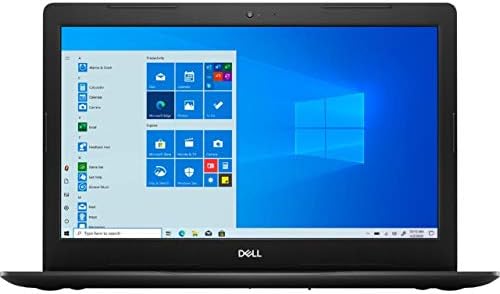
Gambar 2: Hareupeun view of the Dell Inspiron 3593 laptop with the screen active, showing the Windows 10 desktop environment.
3. Palabuhan sarta Panyambungna
Familiarize yourself with the various ports on your laptop:
- Port USB 3.0 (x2): For connecting high-speed USB devices such as external hard drives, flash drives, and peripherals.
- Port USB 2.0 (x1): Pikeun nyambungkeun alat USB standar.
- Port HDMI (x1): Pikeun nyambungkeun kana tampilan éksternal atanapi proyektor.
- Combination Audio Jack (x1): Pikeun nyambungkeun headphone atanapi headset sareng mikropon.
- 3-in-1 Media Card Reader (SD/SDHC/SDXC): For reading memory cards from cameras and other devices.

Figure 3: Left side of the laptop, typically featuring the power input, HDMI, and USB ports.

Figure 4: Right side of the laptop, typically featuring the SD card reader, USB ports, and audio jack.
4. Integrated Webkaméra
The laptop includes an integrated Widescreen HD 720P Webcam, suitable for video calls and online meetings.
Pangropéa
1. Ngabersihan Laptop Anjeun
- layar: Anggo kaén anu lemes sareng teu aya serat anu hampang dampdikumbah ku cai atawa pembersih layar. Hindarkeun bahan kimia anu kasar.
- Keyboard sareng Chassis: Use a soft cloth. For dust, a can of compressed air can be used to clean between keys.
- Palabuhan: Ensure ports are free of dust and debris to maintain proper connectivity.
2. Apdet parangkat lunak
Regularly check for and install Windows updates and Dell driver updates to ensure optimal performance, security, and compatibility. You can find Windows updates in the Settings app under "Update & Security." Dell updates can typically be found through the Dell SupportAssist application or Dell's official websitus.
3. Kaperawatan batré
To prolong battery life, avoid extreme temperatures and fully discharging the battery frequently. For long-term storage, ensure the battery is charged to about 50%.
Pamérésan masalah
This section addresses common issues you might encounter with your Dell Inspiron 3593.
- Laptop Does Not Power On:
- Pastikeun adaptor daya disambungkeun pageuh kana laptop sareng stop kontak anu tiasa dianggo.
- Pastikeun stop kontak listrik berpungsi ku cara nyolokkeun alat sejen.
- Coba tahan tombol daya pikeun 15-20 detik pikeun ngalakukeun reset teuas.
- Screen is Blank or Black:
- Connect an external monitor to the HDMI port to check if the display output is working.
- Saluyukeun kacaangan layar nganggo kenop pungsi.
- Laksanakeun hard reset sapertos anu dijelaskeun di luhur.
- Performance Lambat:
- Tutup aplikasi anu teu perlu jalan di latar tukang.
- Pariksa sareng pasang apdet Windows atanapi supir anu nuju ngantosan.
- Ensure your SSD has sufficient free space (at least 15-20% free).
- Jalankeun scan sistem pikeun malware atanapi virus.
- Masalah Konektipitas Wi-Fi:
- Ensure Wi-Fi is enabled (check function keys or Windows settings).
- Balikan deui router sareng modem anjeun.
- Apdet supir adaptor nirkabel anjeun.
- Poho jaringan sarta sambungkeun deui.
For more complex issues or if troubleshooting steps do not resolve the problem, please refer to the Dell Support section.
spésifikasi
| Fitur | Katerangan |
|---|---|
| Modél | Dell Inspiron 3593 |
| Prosesor | Generasi ka-10 Intel Core i7-1065G7 |
| Ram | 12 GB DDR4 (2666 MHz) |
| Panyimpenan | 512 GB SSD |
| tampilan | 15.6-inch HD (1366 x 768) IPS Touchscreen Truelife LED-Backlit Display |
| Grafika | Intel UHD Grafika 620 kalawan memori grafik dibagikeun |
| Sistem operasi | Windows 10 dina Modeu S |
| Konéktipitas Wireless | 802.11ac, Bluetooth 4.1 |
| Palabuhan | 2x USB 3.0, 1x USB 2.0, 1x HDMI, 1x Combination Audio Jack, 3-in-1 Media Card Reader |
| Webkaméra | Integrated Widescreen HD 720P Webkaméra |
| Audio | Stereo speakers + MaxxAudio |
| Ukuran (L x W x H) | 10.85 x 15.28 x 0.94 inci |
| Beurat | 6.16 pon |
Garansi sareng Rojongan
Your Dell Inspiron 3593 laptop is covered by Dell's standard warranty. For detailed information regarding warranty terms, service options, and technical support, please visit the official Dell support website. You will need your product's Service Tag, which is typically located on a sticker on the bottom of your laptop.
Rojongan Dell Websitus: www.dell.com/support
The Dell SupportAssist application pre-installed on your laptop can also help you with diagnostics, driver updates, and contacting support.


