1. Bubuka jeung Leuwihview
The hOmeLabs True HEPA Air Purifier is designed to significantly improve indoor air quality by filtering out airborne particles. Featuring a 3-stage filtration system, including a pre-filter, H13 True HEPA filter, and activated carbon filter, it effectively captures 99.97% of particles as small as 0.3 microns. Its compact and modern design makes it suitable for various small to medium-sized spaces such as kitchens, home offices, living rooms, and bedrooms.
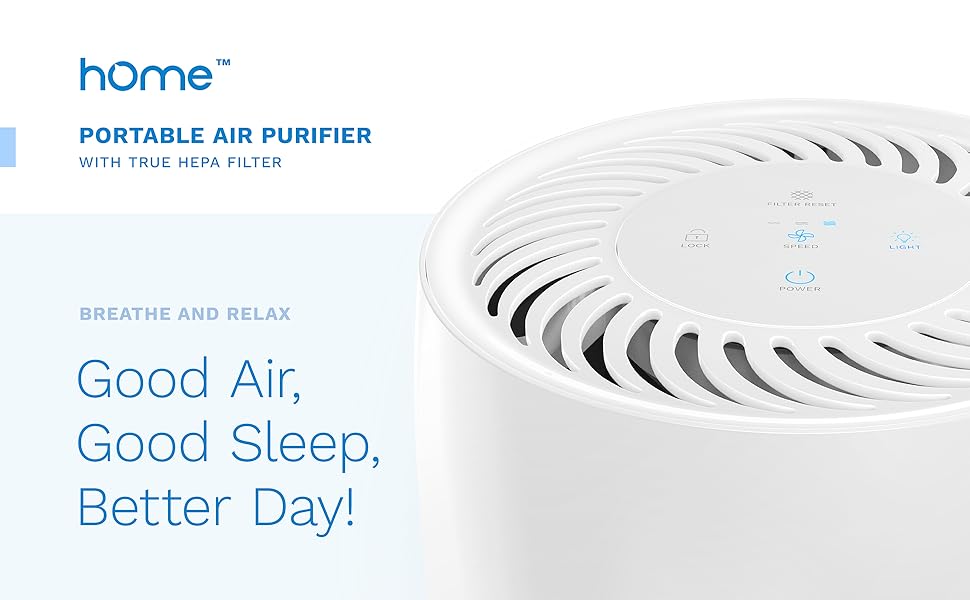
Image: hOmeLabs True HEPA Air Purifier in a living room setting, showcasing desainna kompak sareng modern.
2. Parentah Kasalametan
Please read all safety instructions carefully before operating the air purifier to ensure safe and efficient use.
- Always unplug the air purifier from the power outlet before cleaning, performing maintenance, or when not in use.
- Pastikeun unit disimpen dina permukaan datar anu stabil pikeun nyegah tipping.
- Keep the air purifier away from water or moist environments to prevent electrical hazards.
- Ulah meungpeuk inlets hawa atawa outlet. Ngajaga clearance nyukupan sabudeureun unit pikeun aliran hawa ditangtoskeun.
- penting: The included filter ships with a protective plastic sleeve. Please remove this plastic sleeve from the filter before initial use. Failure to do so will prevent the unit from functioning correctly.
- Ulah ngajalankeun unit ku kabel ruksak atawa colokan. Lamun ari atawa colokan ruksak, kontak rojongan customer.
- Alat ieu henteu dimaksudkeun pikeun dianggo ku jalma (kalebet murangkalih) anu ngirangan kamampuan fisik, indrawi atanapi mental, atanapi kirang pangalaman sareng pangaweruh, kecuali aranjeunna dipasihan pangawasan atanapi petunjuk ngeunaan panggunaan alat ku jalma anu tanggung jawab kana kasalametanana.
3. Komponén produk
Familiarize yourself with the main components of your hOmeLabs Air Purifier:
- Unit Utama: The primary housing of the air purifier.
- Panél kontrol: Located on the top of the unit, featuring touch controls for various functions.
- Inlet Udara: Located around the lower part of the unit, where air is drawn in for filtration.
- Outlet hawa: Located on the top of the unit, where purified air is released.
- Sistem Filtrasi 3-in-1: Consists of a pre-filter, H13 True HEPA filter, and activated carbon filter.

Gambar: Top view of the hOmeLabs Air Purifier control panel, showing touch-sensitive buttons for various functions.
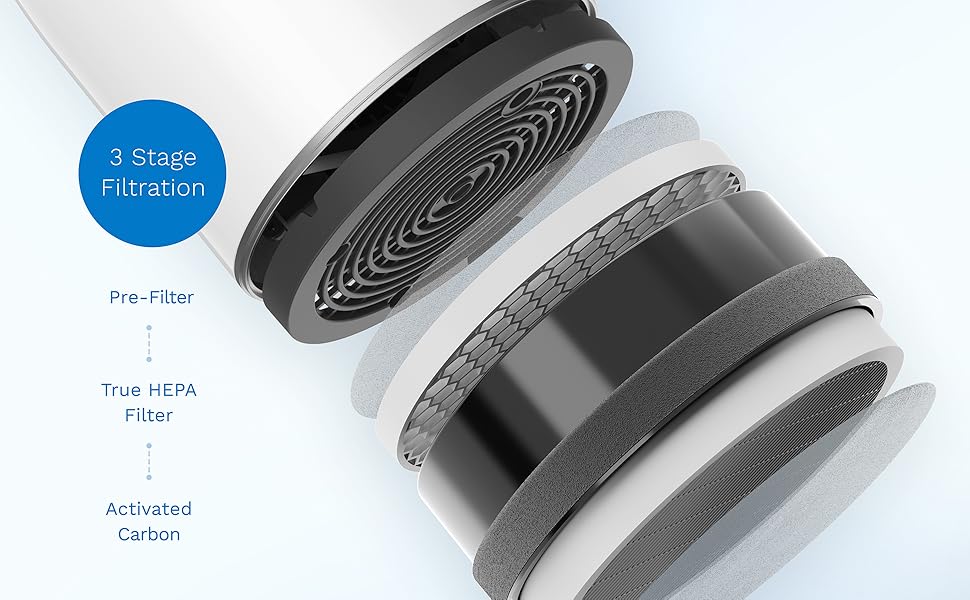
Image: Cross-section diagram illustrating the 3-stage filtration system, including the pre-filter, True HEPA filter, and activated carbon filter.
4. Setélan
Follow these steps to set up your air purifier for the first time:
- Ngabongkar: Sacara saksama cabut panyaring hawa sareng sadaya bahan bungkusan tina kotak.
- Leupaskeun saringan bungkusan: Turn the unit upside down. Rotate the base counter-clockwise to unlock and remove it. Take out the 3-in-1 filter and remove its protective plastic sleeve. Reinsert the filter into the unit, ensuring it is seated correctly. Secure the base by rotating it clockwise until it locks.
- panempatan: Place the air purifier on a firm, level surface. Ensure there is at least 6 inches (15 cm) of clearance from walls or furniture to allow for optimal airflow.
- Sambungan Daya: Colokkeun kabel listrik kana stop kontak listrik standar.
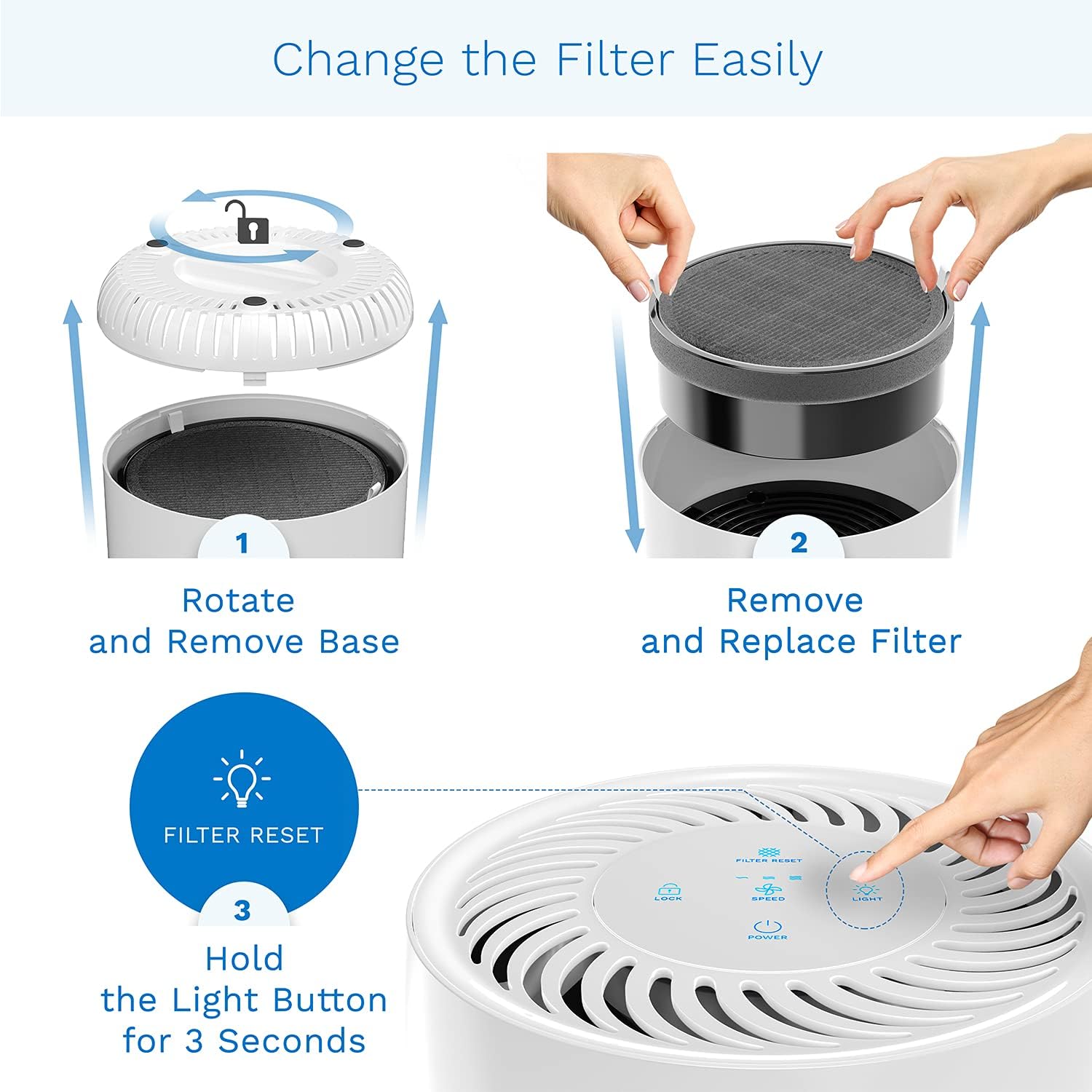
Image: Visual guide for filter replacement, detailing how to access and secure the filter compartment.
5. Parentah Operasi
Your hOmeLabs Air Purifier features an intuitive touch control panel:
- Hurungkeun/Pareuman: Toél ka Kakuatan tombol pikeun ngahurungkeun atawa mareuman unit.
- Laju kipas: Toél ka Laju button to cycle through three fan speed settings: Low, Medium, and High. The current speed is indicated by illuminated bars on the control panel.
- Lampu Peuting: Toél ka Caang button to turn the night light on or off. The night light has adjustable brightness options.
- Konci Budak: Pencét jeung tahan tombol Konci button for 3 seconds to activate or deactivate the child lock function. This prevents accidental changes to settings.
- Timer: Toél ka Timer button to set the operating time for 2, 4, 6, or 8 hours. The unit will automatically turn off after the set time.
- Filter Reset Indicator: A dedicated indicator light will illuminate when it's time to replace the filter.

Gambar: Detil view of the touch control panel, highlighting the various operational buttons.
6. Pangropéa
Pangropéa rutin ngajamin kinerja optimal sareng manjangkeun umur panyaring hawa anjeun.
Ngagantian Filter
The 3-in-1 filter should be replaced approximately every 2100 hours of use (about 3 months on low to medium fan mode). The Filter Reset Indicator light will illuminate to remind you.
- Pareum sareng Cabut colokan: Turn off the air purifier and unplug it from the power outlet.
- Hapus Dasar: Turn the unit upside down. Rotate the base counter-clockwise to unlock and remove it.
- Hapus Filter Old: Carefully pull out the used 3-in-1 filter. Dispose of it properly.
- Pasang Filter Anyar: Insert a new hOmeLabs 3-in-1 replacement filter into the unit, ensuring it is seated correctly.
- Pangkalan Aman: Replace the base and rotate it clockwise until it locks securely.
- Reset Indikator Filter: Plug the air purifier back in. With the unit powered on, press and hold the Caang button for 3 seconds until the Filter Reset Indicator light turns off. This resets the filter life counter.
Ngabersihan Luar
Wipe the exterior of the air purifier with a soft, dry cloth as needed. Do not use abrasive cleaners or solvents.
7. Cara ngungkulan
Upami anjeun ngalaman masalah sareng pembersih hawa anjeun, tingal masalah sareng solusi umum ieu:
| Masalah | Mungkin Cukang lantaranana | Solusi |
|---|---|---|
| Unit teu hurung. | Kabel listrik henteu dicolokkeun sacara aman. | Pastikeun kabel listrik dipasang pageuh kana stop kontak anu tiasa dianggo. |
| Teu aya listrik tina stop kontak. | Test the outlet with another device or check the circuit breaker. | |
| Aliran hawa lemah atanapi ribut. | Saringan kotor atanapi mampet. | Replace the filter as per maintenance instructions. |
| Inlet / outlet hawa diblokir. | Pastikeun aya rohangan anu cekap di sakitar unit. | |
| Filter Reset Indicator light remains on after filter replacement. | Filter life counter not reset. | Pencét jeung tahan tombol Caang tombol pikeun 3 detik pikeun ngareset indikator. |
| Child Lock aktip. | Child Lock function is engaged. | Pencét jeung tahan tombol Konci button for 3 seconds to deactivate. |
If the problem persists after trying these solutions, please contact hOmeLabs customer support.
8. Spésifikasi
| Fitur | Spésifikasi |
|---|---|
| Nomer modél | HME020248N |
| merek | hOmeLabs |
| Warna | Bodas |
| Dimensi produk | 7.87 "D x 7.87" W x 12.8" H |
| Item Beurat | 5.29 pon |
| Panutup Wewengkon Lantai | 215 suku pasagi |
| Tingkat Noise | 50 desibel |
| Tipe Controller | Toél Control |
| Kelas Filter | HEPA (H13), Activated Carbon |
| Sumber Daya | Kabel Listrik |
| UPC | 850000941397 |
9. Garansi jeung Rojongan
For warranty information or technical support, please refer to the contact details provided in your product packaging or visit the official hOmeLabs websitus. Simpen resi pameseran anjeun salaku bukti pameseran pikeun klaim garansi.


