1. Bubuka
Hatur nuhun pikeun meuliasing the PRUNUS J-288 Portable Radio. This device combines a powerful FM/AM(MW) radio with a versatile Bluetooth speaker, MP3 player, and AUX input, offering a comprehensive audio experience. Please read this manual carefully to ensure proper use and optimal performance of your new device.
2. Produk Langkungview
2.1 Eusi pakét
- 1 x PRUNUS J-288 Portable Radio
- 1 x Batré Litium Rechargeable
- 1 x Kabel Ngecas USB
- User Manuals (This document serves as your primary guide)
2.2 Tata Letak sareng Kontrol Alat
Familiarize yourself with the main components and controls of your PRUNUS J-288 radio.

Gambar 2.2.1: Hareupeun view of the PRUNUS J-288 Portable Radio, showing the LED display, dual speakers, numeric keypad, and function buttons (Power, Play/Pause, Next/Previous, Mode, Scan, Lock, Sleep Timer).
- Témbong LED: Némbongkeun frékuénsi, mode, sareng inpormasi anu sanésna.
- Tombol Daya (⏻): Pencét jeung tahan pikeun ngahurungkeun/pareum.
- Tombol Puter/Reureuh (⏸): Puter atanapi ngareureuhkeun playback audio.
- Previous/Next Buttons (⏪ / ⏩): Napigasi lagu atawa stasiun radio.
- Tombol Mode: Switch between FM, AM, Bluetooth, USB, TF, and AUX modes.
- Tombol SCAN: Nyeken otomatis sareng nyimpen stasiun radio.
- Tombol konci: Lock/unlock the keypad to prevent accidental presses.
- Tombol Pangatur Waktu Sare (⏰): Set a timer for the radio to automatically turn off.
- Papan tombol angka (0-9): Directly input frequencies or saved station numbers.
- Antena Teleskopik: Extend for improved radio reception.
- Port USB: Pikeun USB flash drive.
- Slot Kartu TF: For TF/Micro SD cards.
- Input AUX: 3.5mm jack pikeun alat audio éksternal.
- Jack headphone: 3.5mm jack pikeun déngékeun swasta.
- Port ngecas: Port mikro USB pikeun ngecas.
- Lampu Indikator muatan: Red when charging, green when fully charged.
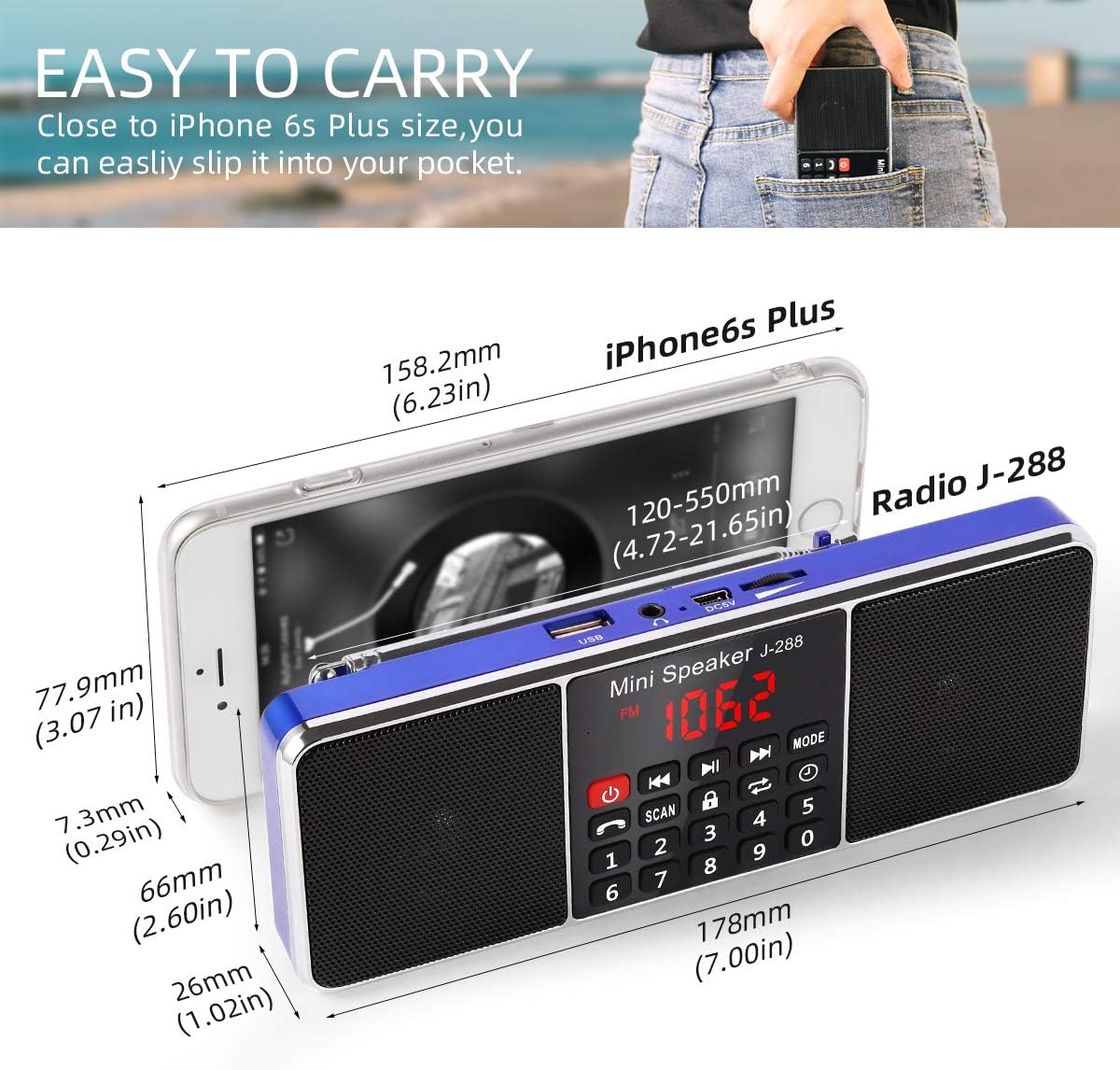
Gambar 2.2.2: The compact size of the PRUNUS J-288 radio, illustrating its portability and ease of carrying, similar in size to a large smartphone.
3. Setélan
3.1 Pamasangan batré
- Tangtukeun lokasi kompartemen batré dina tonggong radio.
- Buka panutup kompartemen.
- Insert the provided rechargeable Lithium battery, ensuring correct polarity.
- Tutup panutup kompartemen batré aman.
3.2 Ngecas Awal
Before first use, fully charge the radio.
- Connect the small end of the USB charging cable to the charging port on the radio.
- Connect the large end of the USB cable to a 5V/500-1000MA USB power adapter (not included) or a computer USB port.
- The charge indicator light will turn red, indicating charging is in progress.
- Charging typically takes about 2 hours. The light will turn green when fully charged.
Catetan: Avoid completely discharging the battery to prolong its lifespan.
4. Parentah Operasi
4.1 Daya Hurung/Pareuman
- Pencét jeung tahan tombol Daya (⏻) for a few seconds to turn the radio on or off.
4.2 Pamilihan Mode
- Pencét éta MODÉ button repeatedly to cycle through available modes: FM Radio, AM(MW) Radio, Bluetooth, USB, TF Card, and AUX.
4.3 Operasi Radio (FM/AM)

Gambar 4.3.1: The PRUNUS J-288 radio with its long telescopic antenna extended, highlighting its capability for clear and stereo sound reception from favorite stations.
- Pilih Modeu Radio: Pencét éta MODÉ button until "FM" or "AM" appears on the display.
- Manjangkeun Antenna: Panjangkeun anteneu teleskopik sapinuhna pikeun panarimaan anu optimal.
- Scan otomatis: Pencét jeung tahan tombol SCAN button for about 3 seconds. The radio will automatically scan for available stations and save them.
- Tuning Manual:
- Anggo Saméméhna (⏪) sareng salajengna (⏩) buttons to fine-tune the frequency or jump between saved stations.
- Alternatively, use the numeric keypad to directly enter a frequency (e.g., for 97.3 MHz, enter "973").
- Access Saved Stations: After scanning, you can directly input the saved station number using the numeric keypad (e.g., "1" for the first saved station).

Gambar 4.3.2: This image illustrates the user-friendly numeric keypad of the PRUNUS J-288, allowing for quick and direct input of radio frequencies or selection of saved stations, contrasting with less intuitive tuning methods found on other devices.
4.4 Operasi Bluetooth
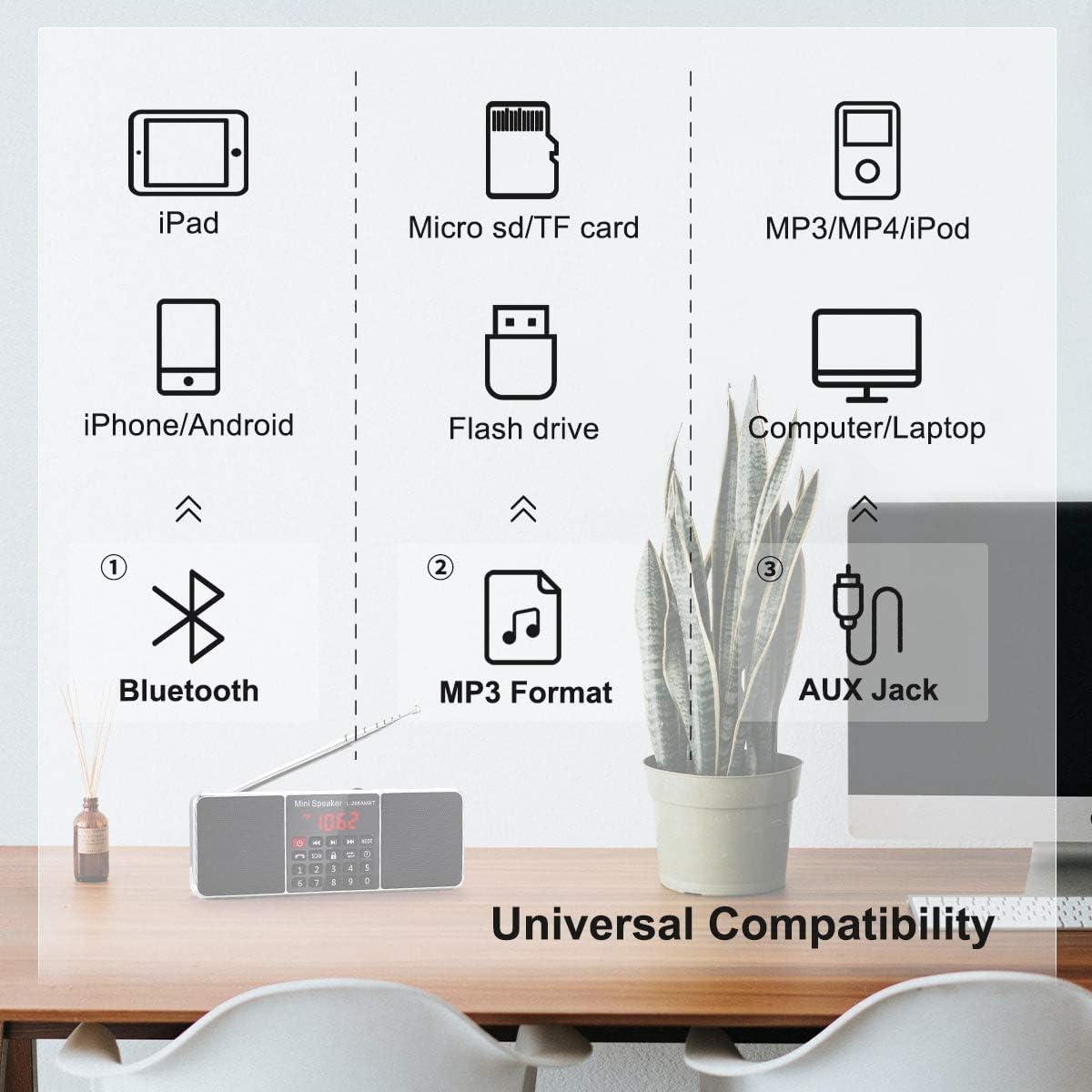
Gambar 4.4.1: This diagram highlights the universal compatibility of the PRUNUS J-288, showing its ability to connect via Bluetooth to smartphones and tablets, play MP3 files from USB drives and TF cards, and connect to various audio sources via AUX jack.
- Pilih Mode Bluetooth: Pencét éta MODÉ button until "BLUE" or "BT" appears on the display. The radio will enter pairing mode.
- papasangan: On your mobile device (smartphone, tablet, etc.), enable Bluetooth and search for "PRUNUS J-288" (or similar). Select it to pair.
- Playback: Once paired, you can play audio from your device through the radio. Use the Play/Pause (⏸), saméméhna (⏪), sareng salajengna (⏩) buttons to control playback.
- Telepon Hand-Free: The radio features a built-in microphone. When a call comes in during Bluetooth mode, you can answer it through the radio.
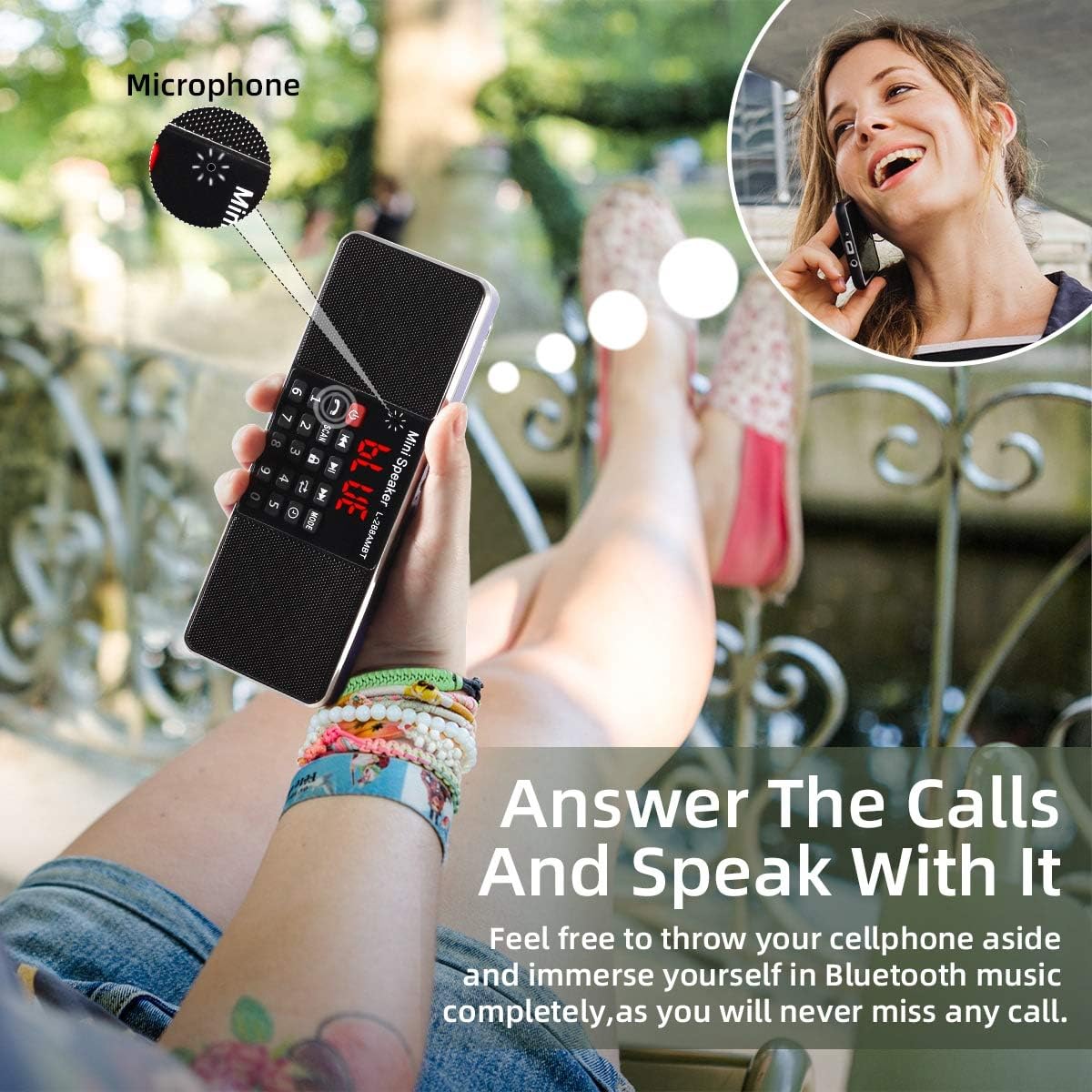
Gambar 4.4.2: This image demonstrates the hands-free calling capability of the PRUNUS J-288, allowing users to answer calls and speak directly through the radio's built-in microphone while connected via Bluetooth.
4.5 MP3 Playback (USB/TF Card)
- Insert a USB flash drive into the USB port or a TF (Micro SD) card into the TF card slot. Ensure the audio files dina format MP3.
- The radio will automatically switch to USB or TF card mode and begin playback. If not, press the MODÉ tombol pikeun milih sumber anu leres.
- Anggo Play/Pause (⏸), saméméhna (⏪), sareng salajengna (⏩) buttons to control playback.
- The radio supports breakpoint memory, meaning it will resume playback from where it left off when turned on again.
4.6 Input AUX
- Connect an external audio device (e.g., smartphone, MP3 player) to the radio's 3.5mm AUX input jack using a 3.5mm audio cable (not included).
- Pencét éta MODÉ tombol dugi "AUX" nembongan dina tampilan.
- Kadalikeun putereun tina alat audio éksternal anjeun.
4.7 Fungsi Timer Saré

Gambar 4.7.1: The PRUNUS J-288 features a convenient sleep timer function, allowing users to set a specific duration after which the radio will automatically power off, ideal for bedtime listening.
- Press the Sleep Timer button (⏰) repeatedly to cycle through preset sleep times (e.g., 15min, 30min, 60min, 90min, 120min, 240min). The radio will automatically turn off after the selected time.
4.8 Keypad Lock Function
- Pencét éta KUNCI button to lock the keypad, preventing accidental button presses. Press it again to unlock.
5. Ngecas Batré
When the battery is low, the radio may indicate this on the display or through reduced performance. Recharge the battery as follows:
- Connect the USB charging cable to the radio's charging port and to a 5V USB power source.
- The charge indicator light will illuminate red.
- Once fully charged (approximately 2 hours), the indicator light will turn green.
- Pegatkeun sambungan kabel anu dieusi.
6. Pangropéa
- Tetep alat tetep garing. Hindarkeun paparan ka cai atanapi kalembaban anu luhur.
- Bersihkeun radio nganggo kaén anu lemes sareng garing. Ulah make cleaners abrasive atawa pangleyur.
- Ulah ngabongkar alat. Perbaikan ngan kedah dilakukeun ku tanaga anu mumpuni.
- Simpen radio di tempat anu tiis sareng garing upami henteu dianggo salami lami.
7. Cara ngungkulan
| Masalah | Mungkin Cukang lantaranana | Solusi |
|---|---|---|
| Radio teu hurung. | Batré lemah atawa béak. | Ngeusi batre sapinuhna. |
| panarimaan radio goréng. | Antena teu manjang atanapi daérah sinyal lemah. | Fully extend the telescopic antenna. Try moving the radio to a different location. |
| Bluetooth teu nyambung. | Radio not in Bluetooth mode or device not discoverable. | Ensure radio is in Bluetooth mode. Make sure your device's Bluetooth is on and searching. Try restarting both devices. |
| No sound from USB/TF card. | Incorrect mode, unsupported file format, or corrupted media. | Ensure radio is in USB/TF mode. Verify files are in MP3 format. Try a different USB drive/TF card. |
| Tombol-tombol henteu ngaréspon. | Konci keypad diaktipkeun. | Pencét éta KUNCI tombol pikeun muka konci keypad. |
8. Spésifikasi
| Fitur | Rincian |
|---|---|
| Modél | J-288 (RADIO288CB) |
| merek | PRUNUS |
| Kaluaran kakuatan | 3W x 2 (max) |
| Rentang Frékuénsi FM | 87.5 - 108 MHz |
| Radio AM (MW) | Supported (Specific frequency range not provided) |
| Bandwidth | 150Hz - 20KHz |
| Rasio Signal-to-Noise | > 80 dB |
| Tipe Speaker | 16 cores of 40MM internal magnetic |
| Ngecas Voltage | DC 5V / 500-1000MA |
| Rojongan Media | TF Card / USB Flash Drive (MP3 format) |
| Jenis Batré | Litium anu tiasa diisi ulang |
| Waktu Ngecas | Kira-kira. 2 jam |
| Waktos Puterkeun Musik | Kira-kira. 3-4 jam |
| Ukuran (L x W x H) | Ukuran 20L x 10W x 3.5H cm |
| Konektipitas | Bluetooth, Auxiliary, USB |
9. Garansi jeung Rojongan
PRUNUS offers a 12-month quality guarantee for this product. For any questions, issues, or support needs, please contact PRUNUS customer service. They are reachable by email 24 hours a day on working days.
Please refer to your purchase documentation or the PRUNUS official websitus pikeun inpo kontak paling up-to-date.


