1. Produk Langkungview
The PRUNUS J-288 is a versatile portable radio offering AM/FM reception, Bluetooth speaker functionality, and an integrated MP3 player supporting USB disk and TF card inputs. Designed for convenience and high-quality audio, it features an ultra-long antenna for enhanced signal reception, a power-saving display, and a sleep timer function.

Gambar 1.1: Hareupeun view of the PRUNUS J-288 Portable Radio, showcasing its compact design, speaker grilles, digital display, and control buttons.
2. Fitur konci
- Resepsi anu saé: Equipped with a 56cm ultra-long antenna for enhanced signal stability, capable of auto-saving up to 99 AM (522-1620KHZ) and 98 FM (87-108MHZ) stations.
- 5-in-1 Stereo Radio Speaker: Supports TF card, Bluetooth, AUX input, USB flash drive, and radio modes. Features dual 3W magnetic speakers for clear bass and immersive stereo sound.
- Bluetooth & Hands-Free: Upgraded Bluetooth 4.0 technology for fast transmission and automatic re-connection. Functions as a hands-free telephone receiver (Note: Bluetooth headphones are not supported).
- Timer Saré: Allows setting a shutdown time in advance (15min, 30min, 60min, 90min, 120min, 240min) for convenient listening before sleep.
- Power-Saving Battery: Features a 1200mAh Li-ion rechargeable battery and an upgraded AOD (Always-On Display) screen unit that turns black when not in manual operation, providing up to 10 hours of playtime at 30% volume.
3. Eusi Paket
Punten parios eusi bungkusan nalika unboxing pikeun mastikeun yén sadaya barang aya:
- PRUNUS J-288 Radio Portabel
- Leungeun Strip
- USB Charging Cable (Inferred, typically included)
- Buku Panduan Pangguna (Dokumén ieu)
4. Émbaran Kasalametan
To ensure safe and proper operation of your PRUNUS J-288 radio, please observe the following safety precautions:
- Ulah ngalaan alat ka hujan, beueus, atawa suhu ekstrim.
- Hindarkeun ragrag atanapi ngagentoskeun alat kana tabrakan anu kuat.
- Ulah ngabongkar, ngalereskeun, atanapi ngarobih unitna nyalira. Serahkan sadaya perawatan ka tanaga anu mumpuni.
- Jauhkeun alat ieu tina sinar panonpoé langsung, sumber panas, sareng seuneu anu muka.
- Use only the specified charging cable and power adapter (if applicable) to charge the battery.
- Buang batré anu leres nurutkeun peraturan lokal.
5. Setélan
5.1 Ngecas Batré
The PRUNUS J-288 comes with a built-in 1200mAh Li-ion rechargeable battery. Before first use, it is recommended to fully charge the device.
- Connect the USB charging cable to the charging port on the radio.
- Connect the other end of the USB cable to a standard USB power adapter (e.g., 5V/1A) or a computer's USB port.
- The charging indicator light will illuminate. Once fully charged, the indicator will turn green.
5.2 Setup anteneu
Pikeun panarimaan radio anu optimal, panjangkeun anteneu teleskopik sapinuhna. Atur arahna pikeun kajelasan sinyal anu pangsaéna.

Figure 5.1: The PRUNUS J-288 with its ultra-long telescopic antenna extended, illustrating its role in enhancing radio signal reception.
5.3 Daya Awal Hurung
Pencét jeung tahan tombol Kakuatan tombol () to turn on the radio. The display will light up, indicating the current mode or frequency.
6. Parentah Operasi
6.1 Daya Hurung/Pareuman
- Pencét jeung tahan tombol Kakuatan tombol pikeun ngahurungkeun alat ON atawa OFF.
6.2 Pamilihan Mode
Pencét éta MODÉ button to cycle through available modes: FM Radio, AM Radio, Bluetooth, TF Card, USB Disk, and AUX Input.
6.3 Radio Mode (AM/FM)
- Switch to FM or AM mode using the MODÉ kancing.
- Scan Otomatis: Pencét éta SCAN button to automatically search and save available stations. The radio can save up to 99 AM and 98 FM stations.
- Tuning Manual: Use the numeric keypad to directly enter a frequency (e.g., 1062 for 106.2 MHz FM).
- Browse Saved Stations: Ngagunakeun éta saméméhna () jeung Teras () buttons to navigate through saved stations.

Figure 6.1: The numeric keypad on the PRUNUS J-288, allowing for direct frequency input and easy selection of saved stations.
6.4 Modeu Bluetooth
- Pindah ka modeu Bluetooth nganggo MODÉ button. The display will show "BT" and a Bluetooth icon.
- On your mobile device, enable Bluetooth and search for "PRUNUS J-288".
- Pilih alat nu rék disapasangkeun. Sora konfirmasi bakal nunjukkeun papasangan anu suksés.
- Anjeun ayeuna bisa muterkeun audio tina alat Anjeun disambungkeun ngaliwatan radio.
- To use the hands-free function, answer incoming calls directly from your phone; audio will be routed through the radio.

Figure 6.2: The PRUNUS J-288 functioning as a wireless Bluetooth speaker, connected to a smartphone playing music.
6.5 MP3 Player Mode (USB Disk / TF Card)
- Lebetkeun flash drive USB atanapi kartu TF (Micro SD) anu ngandung audio MP3 files into the respective slot on the radio.
- The radio will automatically switch to the corresponding mode (USB or TF) and begin playing the first compatible audio file. If not, press the MODÉ tombol pikeun milih.
- Ngagunakeun éta saméméhna () jeung Teras () buttons to skip tracks.
- Pencét éta Play / Reureuh tombol () to pause or resume playback.
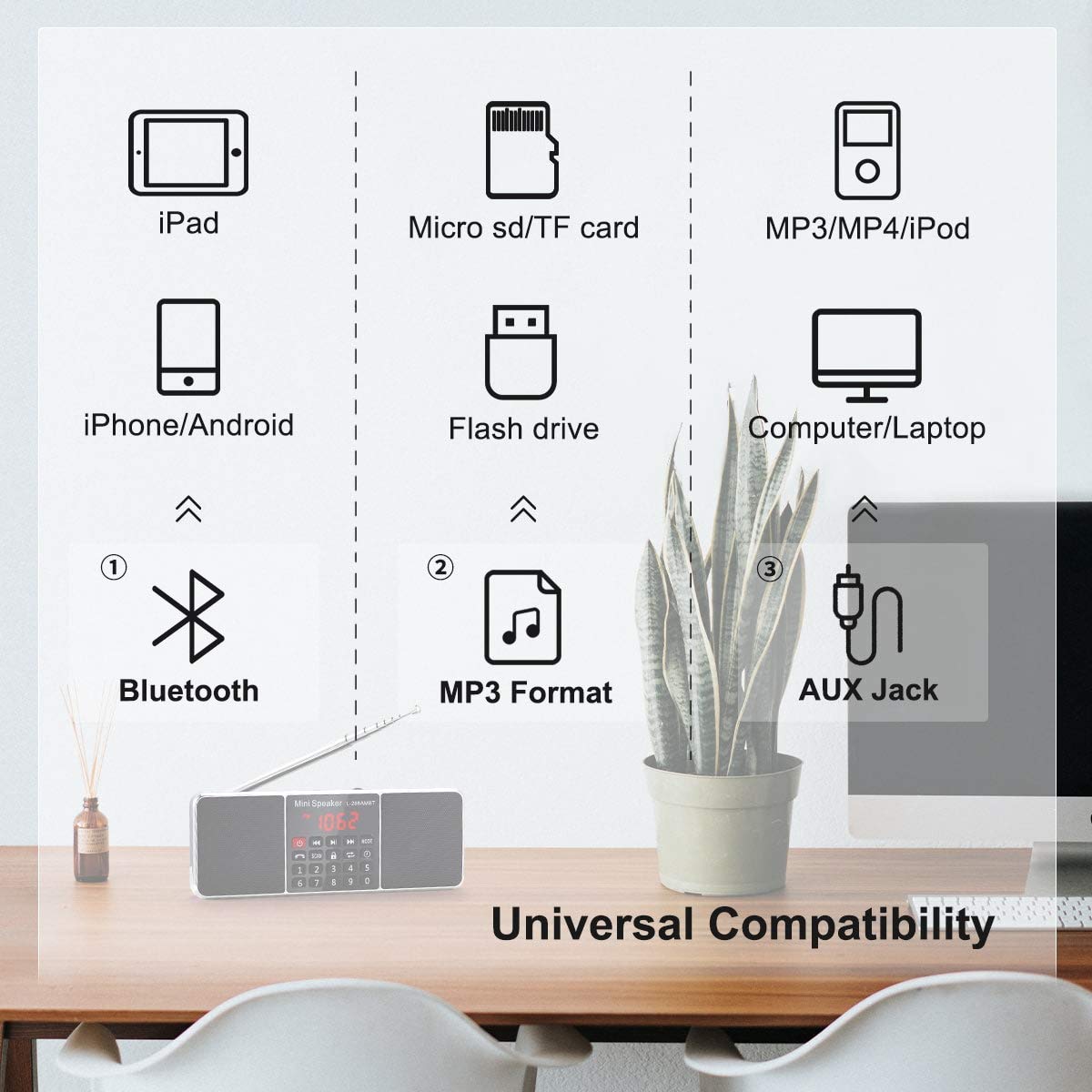
Figure 6.3: Diagram illustrating the universal compatibility of the PRUNUS J-288, showing support for Bluetooth, MP3 format via USB/TF card, and AUX input.
6.6 Modeu Input AUX
- Connect an external audio device (e.g., MP3 player, smartphone) to the AUX input port on the radio using a 3.5mm audio cable (not included).
- Pindah ka modeu AUX ngagunakeun MODÉ kancing.
- Audio from the connected device will now play through the radio's speakers. Control playback from your external device.
6.7 Fungsi Timer Saré
Timer sare ngamungkinkeun radio otomatis pareum saatos periode anu disetél.
- Pencét éta JAM button (often labeled with a clock icon or integrated with the sleep timer function).
- Repeatedly press the button to cycle through the available sleep timer options: 15min, 30min, 60min, 90min, 120min, 240min.
- The selected time will be displayed. The radio will automatically power off after the set duration.

Figure 6.4: The PRUNUS J-288 displaying the sleep timer function, allowing users to set automatic shutdown times.
7. Pangropéa
Proper care and maintenance will extend the life of your PRUNUS J-288 radio.
- beberesih: Anggo lawon anu lemes sareng garing pikeun ngabersihkeun bagian luar radio. Entong nganggo pembersih abrasif, lilin, atanapi pangleyur.
- Panyimpenan: Upami henteu dianggo salami lami, simpen radio di tempat anu tiis sareng garing, jauh tina sinar panonpoé langsung sareng suhu anu ekstrim.
- Perawatan batré: Pikeun ngajaga kasehatan batré, ulah sering ngosongkeun batréna. Upami disimpen lami, ngecas batréna dugi ka sakitar 50% unggal sababaraha bulan.
- anteneu: Handle the telescopic antenna gently to prevent bending or breaking. Retract it when not in use or when transporting the radio.
8. Cara ngungkulan
If you encounter issues with your PRUNUS J-288, please refer to the following common problems and solutions:
| Masalah | Mungkin Cukang lantaranana | Solusi |
|---|---|---|
| Radio teu hurung. | Batré béak. | Ngeusi batre sapinuhna. |
| panarimaan radio goréng. | Anteneu henteu dipanjangkeun atanapi diposisikan leres; wewengkon sinyal lemah. | Fully extend the antenna and adjust its direction. Try moving to an area with better signal. |
| Alat Bluetooth teu tiasa dipasangkeun. | Radio not in Bluetooth mode; device too far; Bluetooth not enabled on external device. | Ensure radio is in Bluetooth mode. Move devices closer. Enable Bluetooth on your external device and search again. |
| No sound from USB/TF card. | Lepat file format; card/drive not inserted properly; radio not in correct mode. | Mastikeun files are MP3 format. Reinsert the USB drive/TF card. Press MODE to select USB/TF mode. |
| Distorsi sora. | Volume too high; weak signal; interference. | Lower the volume. Adjust antenna or move radio to reduce interference. |
9. Spésifikasi
| merek | PRUNUS |
| Modél | J-288 |
| Dimensi produk | 18L x 2W x 6H Centimeters (approx. 2.03 x 17.78 x 5.84 cm) |
| Item Beurat | 308 g |
| Batré | 1200mAh Lithium Ion (included, rechargeable) |
| Sumber Daya | Batré Powered (5 Volts) |
| Téhnologi Tuner | FM, AM |
| Pita Radio Dirojong | AM (522-1620KHZ), FM (87-108MHZ) |
| Panganteur Hardware | Bluetooth 5 |
| Alat nu cocog | Headphone, Smartphone, MP3 Player, USB Storage Device |
| Speaker Daya Kaluaran Maksimum | 3 Watt |
| Tipe tampilan | LCD (LED Display Technology) |
| Bahan | Acrylonitrile Butadiene Styrene (ABS) |
| Ngawengku Jauh | No |
| Negara asal | AS |
10. Garansi jeung Rojongan
PRUNUS offers a manufacturer's warranty for the J-288 Portable Radio. Please refer to the warranty card included with your purchase or visit the official PRUNUS websitus pikeun istilah jeung kaayaan jaminan lengkep.
For technical support, troubleshooting assistance, or warranty claims, please contact PRUNUS customer service through their official channels. Contact information can typically be found on the product packaging or the brand's official websitus.
Catetan: Teu aya pidéo produk resmi anu sayogi ti nu ngajual pikeun disematkeun dina manual ieu.