1. Bubuka
Thank you for choosing the DiamondBoxx M3 Bluetooth Speaker. This manual provides essential information for the safe and efficient operation of your device. Please read it thoroughly before use and retain it for future reference.
2. Produk Langkungview
2.1 Fitur konci
- Bluetooth 5.0 with TWS aptX HD: For high-quality wireless audio streaming and True Wireless Stereo pairing.
- Kaluaran audio anu kuat: 200 Watts RMS, 400 Watts Max ampkakuatan Lifier.
- Supir Premium: Features 4-inch Aluminum Cone Woofers and 1-inch Titanium Dome Tweeters.
- Tanggapan Frékuénsi Lebar: 50Hz - 22kHz @+/-3dB for clear and balanced sound.
- Waktu Maén Panjang: Equipped with a 115Wh battery for extended use.
- Konstruksi awét: Enclosed in a wood cabinet.
2.2 Eusi pakét
- DiamondBoxx M3 Bluetooth Speaker
- Batré (tos dipasang sateuacanna atanapi kalebet misah)
- Power Adapter (not explicitly listed but implied for charging)
- Manual pangguna (dokumén ieu)
2.3 Idéntifikasi komponén
Refer to the images below for identification of the speaker's controls and ports.

Gambar 1: Hareupeun view of the DiamondBoxx M3 speaker, showing the main control panel with Treble, Volume, and Bass knobs (orange), Power and TWS buttons, AUX IN port, and speaker grilles.
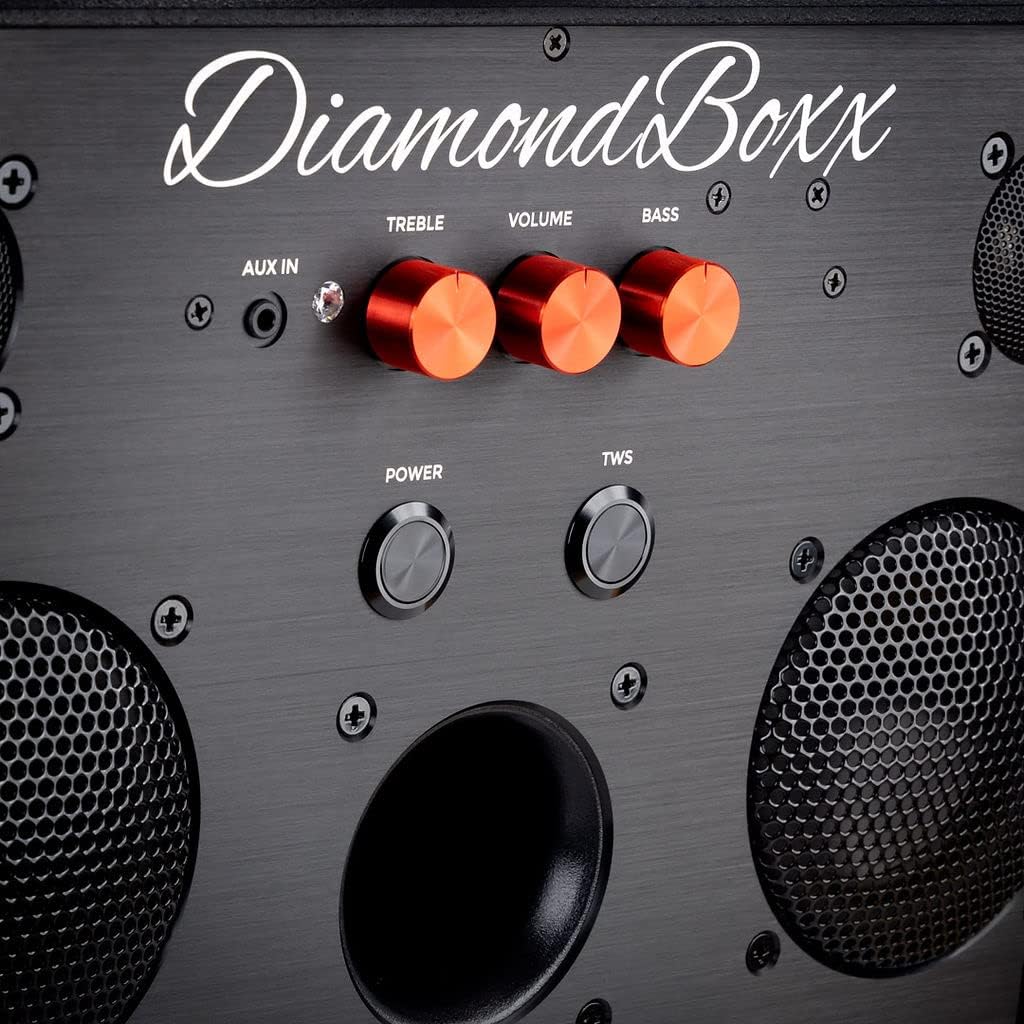
Gambar 2: Diwincik view of the control panel, highlighting the orange Treble, Volume, and Bass adjustment knobs, along with the Power and TWS buttons and AUX IN port.

Gambar 3: Angled close-up of the DiamondBoxx M3 control panel, showing the texture of the speaker's surface and the layout of the controls.
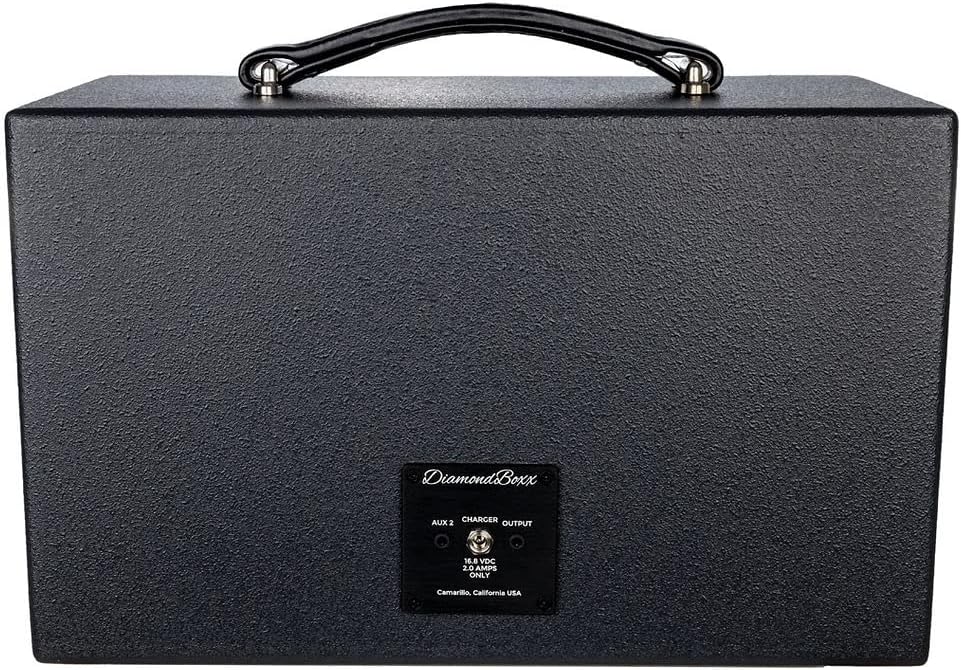
Gambar 4: Tukangeun view of the DiamondBoxx M3 speaker, displaying the AUX 2 input, Charger port, and Output port, along with the manufacturer's label.
3. Setélan
3.1 Ngecas Batré
- Connect the provided power adapter to the "Charger" port on the rear of the speaker (refer to Figure 4).
- Colokkeun adaptor kakuatan kana stop kontak listrik standar.
- The charging indicator (if available, not specified in data) will illuminate. A full charge takes approximately 3 hours.
- Disconnect the charger once fully charged or when not in use.
3.2 Powering on / Pareum
- Pikeun ngahurungkeun, pencét jeung tahan kenop POWER button located on the front panel (refer to Figure 2) until the indicator light illuminates.
- Pikeun pareum, pencét jeung tahan POWER pencet deui tombolna nepi ka lampu indikatorna pareum.
4. Parentah Operasi
4.1 Nyapasangkeun Bluetooth
- Ensure the DiamondBoxx M3 is powered on.
- The speaker will automatically enter Bluetooth pairing mode, indicated by a flashing Bluetooth LED (location not specified in data, assume near power button).
- On your compatible device (smartphone, tablet, laptop), enable Bluetooth and search for available devices.
- Select "DiamondBoxx M3" from the list.
- Once paired, the Bluetooth LED will become solid, and you will hear an audible confirmation.
4.2 Leres Wireless Stereo (TWS) papasangan
TWS allows you to connect two DiamondBoxx M3 speakers for a stereo sound experience.
- Ensure both DiamondBoxx M3 speakers are powered on and not connected to any Bluetooth device.
- Dina hiji spiker (ieu bakal janten spiker utama), pencét tombol TWS button (refer to Figure 2). The TWS indicator will flash.
- Dina spiker kadua, pencét tombol TWS button. Both speakers will attempt to connect to each other.
- Once successfully paired, the TWS indicator on both speakers will become solid, and you will hear an audible confirmation.
- Now, connect your Bluetooth device to the primary speaker as described in section 4.1. Audio will play in stereo across both speakers.
4.3 Kadali Audio
- Jilid Kenop: Puterkeun VOLUME knob (orange, center) clockwise to increase volume and counter-clockwise to decrease it.
- Treble kenop: Puterkeun TREBLE knob (orange, left) to adjust high-frequency sounds.
- Tombol Bass: Puterkeun bass knob (orange, right) to adjust low-frequency sounds.
4.4 Input Auxiliary (AUX IN)
The DiamondBoxx M3 features two auxiliary inputs for wired connections.
- AUX IN (Front): Connect an audio source using a 3.5mm audio cable to the NGARÉMÉ DI port on the front panel (refer to Figure 2).
- AUX 2 (Rear): Connect an audio source using a 3.5mm audio cable to the AUX 2 port on the rear panel (refer to Figure 4).
- When an audio cable is connected, the speaker will automatically switch to the auxiliary input. Disconnect the cable to return to Bluetooth mode.
4.5 Video Produk Resmi
Klip 1: An official video from DiamondBoxx showcasing the M3 speaker's design, features, and manufacturing process. This video provides a visual guide to the product's quality and capabilities.
5. Pangropéa
- beberesih: Anggo lawon anu lemes sareng garing pikeun ngabersihkeun bagian luar spiker. Entong nganggo pembersih cair atanapi aerosol.
- Panyimpenan: Simpen spéker dina tempat anu tiis sareng garing jauh tina sinar panonpoé langsung sareng suhu anu ekstrim.
- Perawatan batré: Pikeun umur batre optimal, ulah pinuh discharging batré remen. Ngeusi batre spéker rutin, sanajan teu dipaké pikeun période nambahan.
- Tahan cai: The DiamondBoxx M3 is TEU waterproof. Avoid exposure to water or moisture.
6. Cara ngungkulan
| Masalah | Mungkin Cukang lantaranana | Solusi |
|---|---|---|
| Speaker teu hurung. | Batré discharged. | Connect the speaker to the power adapter and charge for at least 30 minutes before attempting to power on. |
| Teu bisa masangkeun via Bluetooth. | Speaker is already paired to another device or device's Bluetooth is off. | Ensure the speaker is in pairing mode (flashing LED). Turn off Bluetooth on previously connected devices. Restart your device's Bluetooth. |
| Taya sora. | Volume is too low, audio source paused, or incorrect input selected. | Increase speaker and device volume. Check if audio is playing on your source device. Ensure no AUX cable is connected if using Bluetooth. |
| Papasangan TWS gagal. | Speakers are too far apart or already connected to a Bluetooth device. | Ensure both speakers are within close proximity (e.g., 1 meter). Disconnect any Bluetooth devices from both speakers before initiating TWS pairing. |
7. Spésifikasi
| Ngaran modél: | M3_115 |
| merek: | IntenBoxx |
| Amplifier Kakuatan: | 200 Watts RMS, 400 Watts Max |
| Woofers: | 4 inch Aluminum Cone (2x) |
| Tweeter: | 1 inch Titanium Dome (2x) |
| Tanggapan Frékuénsi: | 50Hz - 22kHz @+/-3dB |
| Vérsi Bluetooth: | 5.0 with TWS aptX HD |
| Kisaran Bluetooth: | Nepi ka 100 Méter (330 kaki) |
| Batré: | 1 Lithium Ion (115Wh) |
| Waktu Ngecas: | Kurang leuwih 3 Jam |
| Waktu maén: | Up to 20 hours (depending on volume and content) |
| Ukuran produk: | 8.25 "D x 14.75" W x 9.5" H |
| Beurat barang: | 12 pon |
| Bahan: | Kai |
| Tahan cai: | No |
| Métode kontrol: | App, Physical Knobs/Buttons |
| Konektipitas: | Wireless (Bluetooth), Wired (AUX IN) |
| Mode Kaluaran Audio: | Stereo |
8. Garansi jeung Rojongan
The DiamondBoxx M3 Bluetooth Speaker comes with a Limited Warranty. For specific warranty terms and conditions, please refer to the warranty card included with your product or visit the official DiamondBoxx website. For technical support, troubleshooting assistance, or service inquiries, please contact DiamondBoxx customer support.
Pabrikan: DiamondBoxx LLC
Websitus: DiamondBoxx Store on Amazon (kanggo inpormasi umum ngeunaan merek)


